

Introduction
First off, it’s a tiny and powerful library with a minified and gzipped size of 5.7kb. You can download the same.
The open-source code is located here.
The library supports over a hundred functions, most of them are very useful and can really simplify our day-to-day work involving the usage of JavaScript.
Here’s the complete definition of underscore.js from the official site.
“Underscore is a JavaScript library that provides a whole mess of useful functional programming helpers without extending any built-in objects. It’s the answer to the question: “If I sit down in front of a blank HTML page, and want to start being productive immediately, what do I need?” … and the tie to go along with jQuery's tux and Backbone's suspenders”.
The underscore.js functions can be used to perform or do something on the Collection, Array and Objects. Also it has other utility functions that we will see later.
Using Code
Note
The following demo code is based on the unit test code of underscore.js.
Now let us see the real use of underscore.js with some sample examples. Considering an example of applying underscore.js array functions, I will walk you through an example.
Below is the code snippet where we are performing various array operations such as finding index, unique elements, set operations like union, intersection, difference etc.
Here’s the code snippet for the same.
- <script type="text/javascript">
- var array = [1, 2, 3, 1, 2, 3];
- console.log('First Function');
- console.log('_.first(' + array + ', 2): ' + _.first(array, 2));
- var kittens = [
- {
- kitten: 'Celery',
- cuteness: 8
- },
- {
- kitten: 'Juniper',
- cuteness: 10
- },
- {
- kitten: 'Spottis',
- cuteness: 10
- }];
- console.log('Unique Function');
- varexpectedKittens = _.uniq(kittens, true, 'cuteness');
- console.log('Actual: ' + JSON.stringify(kittens));
- console.log('Result: ' + JSON.stringify(expectedKittens));
- //returns elements starting at the given index
- console.log('Rest Function');
- var numbers1 = [1, 2, 3, 4];
- var after = _.rest(numbers1, 2);
- console.log('_.rest(' + numbers2 + ', 2): ' + after);
- // returns all but the last n elements
- var numbers2 = [1, 2, 3, 4];
- var after = _.initial(numbers2, 2);
- console.log('Initial Function');
- console.log('_.initial(' + numbers2 + ', 2): ' + after);
- // fetch the last n elements
- var numbers3 = [1, 2, 3, 4];
- var after = _.last(numbers3, 2);
- console.log('Last Function');
- console.log('_.last(' + numbers3 + ', 2): ' + after);
- // range function
- console.log('Range Function');
- console.log('_.range(3, 10, 3): ' + _.range(3, 10, 3));
- console.log('_.range(12, 7, -2): ' + _.range(12, 7, -2));
- // last index of element
- console.log('LastIndexOf Function');
- console.log('_.lastIndexOf([-1, 1, 2], 1): ' + _.lastIndexOf([-1, 1, 2], 1));
- // index of element
- console.log('IndexOf Function');
- console.log('_.indexOf([1, 1, 2], 1): ' + _.indexOf([1, 1, 2], 1));
- // difference of two arrays
- console.log('Difference Function');
- var result = _.difference([1, 2, 3], [2, 30, 40]);
- console.log(' _.difference([1, 2, 3], [2, 30, 40]): ' + result);
- result = _.difference([1, 2, 3, 4], [2, 30, 40], [1, 11, 111]);
- console.log(' _.difference([1, 2, 3, 4], [2, 30, 40], [1, 11, 111]): ' + result);
- // union of two arrays
- console.log('Union Function');
- var result = _.union([1, 2, 3], [2, 30, 1], [1, 40]);
- console.log(' _.union([1, 2, 3], [2, 30, 1], [1, 40]): ' + result);
- result = _.union([1, 2, 3], [2, 30, 1], [1, 40, [1]]);
- console.log(' _.union([1, 2, 3], [2, 30, 1], [1, 40, [1]]): ' + result);
- // intersection of two arrays
- console.log('Intersection Function');
- var result = _.intersection([2, 4, 3, 1], [1, 2, 3]);
- console.log(' _.intersection([2, 4, 3, 1], [1, 2, 3]): ' + result);
- //without
- console.log('Without Function');
- var list = [1, 2, 1, 0, 3, 1, 4];
- console.log(' _.without([1, 2, 1, 0, 3, 1, 4], 0, 1): ' + _.without(list, 0, 1));
- </script>
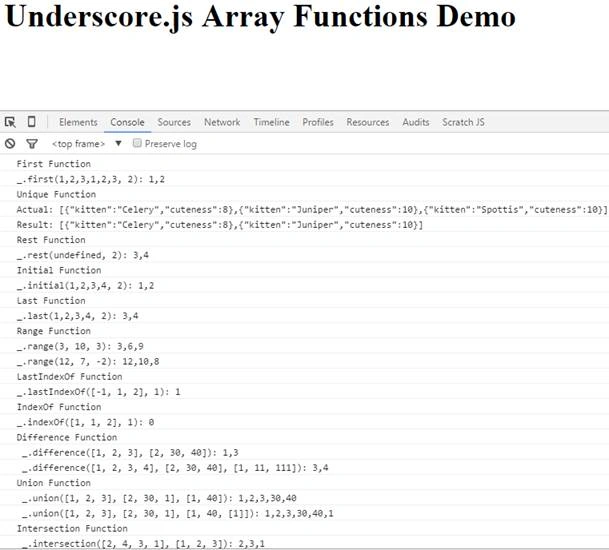
Now let us see the underscore collection related functions. In the following example, you will be seeing the usage of collection functions for iterating, finding, sorting, partitioning, and grouping elements.
- <script type="text/javascript">
- console.log('Simple Iterator')
- var array = [1, 2, 3, 4];
- console.log('Given Array:' + array)
- _.each([1, 2, 3], function(num, i)
- {
- console.log(i);
- });
- console.log('Find elements')
- var array = [1, 2, 3, 4];
- console.log('Given Array:' + array)
- _.find(array, function(n)
- {
- if (n > 2) console.log(n);
- });
- console.log('Filter even numbers');
- var array = [1, 2, 3, 4, 5, 6];
- varevenObject =
- {
- one: 1,
- two: 2,
- three: 3
- };
- varisEven = function(num)
- {
- return num % 2 === 0;
- };
- console.log('Given Array:' + array)
- console.log(_.filter(array, isEven));
- console.log('Reject even numbers');
- var array = [1, 2, 3, 4, 5, 6];
- var odds = _.reject([1, 2, 3, 4, 5, 6], function(num)
- {
- return num % 2 === 0;
- });
- console.log('Given Array:' + array)
- console.log(odds);
- console.log('Find where');
- var list = [
- {
- a: 1,
- b: 2
- },
- {
- a: 2,
- b: 2
- },
- {
- a: 1,
- b: 3
- },
- {
- a: 1,
- b: 4
- },
- {
- a: 2,
- b: 4
- }];
- var result = _.findWhere(list,
- {
- a: 1
- });
- console.log('Given Input:' + JSON.stringify(list));
- console.log(result);
- console.log('Max number');
- var array = [1, 2, 3, 4, 5, 6];
- var result = _.max(array);
- console.log('Given Array:' + array)
- console.log('Max:' + result);
- console.log('Min number');
- var array = [1, 2, 3, 4, 5, 6];
- var result = _.min(array);
- console.log('Given Array:' + array)
- console.log('Min:' + result);
- console.log('Sort By Age')
- var people = [{
- name: 'curly',
- age: 50
- }, {
- name: 'moe',
- age: 30
- }];
- console.log('Given Object:' + JSON.stringify(people))
- people = _.sortBy(people, function(person)
- {
- return person.age;
- });
- console.log('Result:' + JSON.stringify(people));
- console.log('Group items')
- var array = [1, 2, 3, 4, 5, 6];
- var result = _.groupBy([1, 2, 3, 4, 5, 6], function(num)
- {
- return num % 2;
- });
- console.log('Result:' + JSON.stringify(result));
- console.log('Group items by length')
- var list = ['one', 'two', 'three', 'four', 'five', 'six', 'seven', 'eight', 'nine', 'ten'];
- console.log('Given List:' + JSON.stringify(list));
- var grouped = _.groupBy(list, 'length');
- console.log(grouped['1']);
- console.log(grouped['2']);
- console.log(grouped['3']);
- console.log(grouped['4']);
- console.log(grouped['5']);
- console.log('Count items by length')
- var grouped = _.countBy(list, 'length');
- console.log('Given List:' + JSON.stringify(list));
- console.log(grouped['3'], 4);
- console.log(grouped['4'], 3);
- console.log(grouped['5'], 3);
- console.log('Partition items where element value < 4')
- var list = [0, 1, 2, 3, 4, 5];
- console.log('Given List:' + list);
- var result = _.partition(list, function(x)
- {
- return x < 4;
- });
- console.log('Result:' + JSON.stringify(result));
- </script>
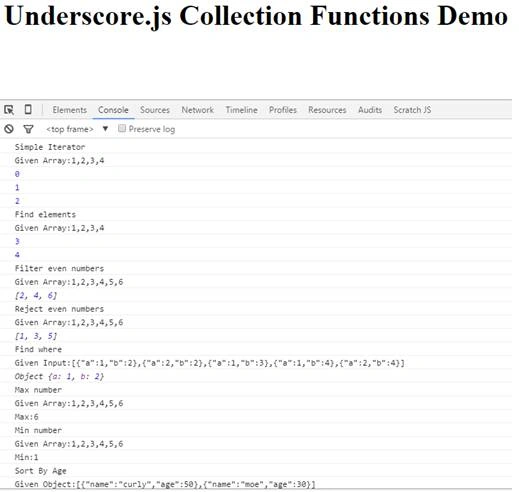
Let us take a look into the underscore.js object function usages.
- <script type="text/javascript">
- console.log('Keys function');
- varobj = {
- one: 1,
- two: 2
- };
- console.log('Given Object:' + JSON.stringify(obj))
- console.log('Result: ' + JSON.stringify(_.keys(obj)));
- console.log('Values function');
- varobj = {
- one: 1,
- two: 2
- };
- console.log('Given Object:' + JSON.stringify(obj))
- console.log('Result: ' + JSON.stringify(_.values(obj)));
- console.log('Pairs function');
- varobj = {
- one: 1,
- two: 2,
- three: 3
- };
- console.log('Given Object:' + JSON.stringify(obj))
- console.log('Result: ' + JSON.stringify(_.pairs(obj)));
- console.log('Invert function');
- varobj = {
- cat: 1,
- dog: 2,
- pig: 3
- };
- console.log('Given Object:' + JSON.stringify(obj))
- console.log('Result: ' + JSON.stringify(_.invert(obj)));
- console.log('Pick function');
- varobj = {
- cat: 1,
- dog: 2,
- pig: 3
- };
- console.log('Given Object:' + JSON.stringify(obj))
- console.log('Result: ' + JSON.stringify(_.pick(obj, 'cat')));
- console.log('Omit function');
- varobj = {
- cat: 1,
- dog: 2,
- pig: 3
- };
- console.log('Given Object:' + JSON.stringify(obj))
- console.log('Result: ' + JSON.stringify(_.omit(obj, 'cat')));
- console.log('Clone function');
- varobj = {
- cat: 1,
- dog: 2
- };
- var clone = _.clone(obj);
- console.log('Given Object:' + JSON.stringify(obj))
- console.log('Cloned Object:' + JSON.stringify(clone))
- console.log('Has function');
- varobj = {
- cat: 1,
- dog: 2
- };
- console.log('Given Object:' + JSON.stringify(obj))
- console.log('Result:' + _.has(obj, 'cat'))
- console.log('IsDate function');
- vardt = new Date();
- console.log('_.isDate(' + dt + '): ' + _.isDate(dt));
- console.log('IsFinite function');
- console.log('_.isFinite(NaN): ' + _.isFinite(NaN));
- console.log('_.isFinite(1): ' + _.isFinite(1));
- console.log('IsFunction function');
- console.log('_.isFunction([1, 2, 3]): ' + _.isFunction([1, 2, 3]));
- console.log('_.isFunction(function(){}): ' +
- _.isFunction(function() {}));
- console.log('IsBoolean function');
- console.log('_.isBoolean(1): ' + _.isFinite(1));
- console.log('_.isBoolean(test): ' + _.isFinite('test'));
- console.log('IsNumber function');
- console.log('_.isNumber(1): ' + _.isNumber(1));
- console.log('_.isNumber(NaN): ' + _.isNumber(NaN));
- console.log('IsString function');
- console.log('_.isString(1): ' + _.isString(1));
- console.log('_.isString(testing): ' + _.isString('testing'));
- console.log('IsArray function');
- console.log('_.isArray([1, 2, 3]): ' + _.isArray([1, 2, 3]));
- console.log('IsObject function');
- console.log('_.isObject(new String(string): ' + _.isObject(new String('string')));
- console.log('_.isObject(12): ' + _.isObject(12));
- console.log('IsEmpty function');
- varargs = function() {
- return arguments;
- };
- // empty arguments object is empty
- console.log('_.isEmpty(args()): ' + _.isEmpty(args()));
- console.log('_.isEmpty(""): ' + _.isEmpty(''));
- console.log('_.isEmpty(null): ' + _.isEmpty(null));
- console.log('IsEqual function');
- var a = [{
- abc: null
- }];
- var b = [{
- abc: null
- }];
- console.log('_.isEqual(a, b):' + _.isEqual(a, b));
- </script>
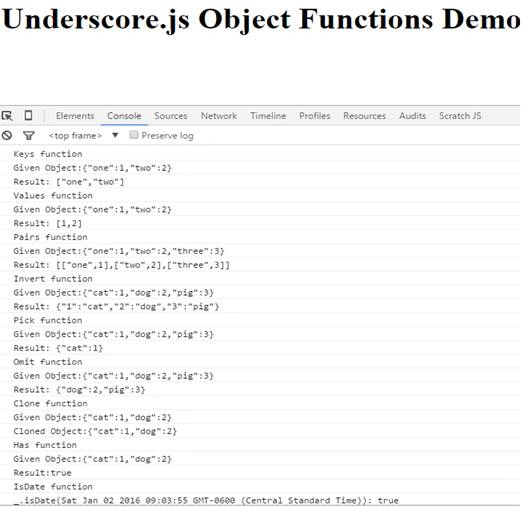
Let us define our HTML document to display a table with some data.
- <html>
- <head>
- <script type="text/javascript" src="http://underscorejs.org/underscore-min.js">
- </script>
- <script src="https://ajax.googleapis.com/ajax/libs/jquery/1.11.3/jquery.min.js">
- </script>
- </head>
- <body>
- <table class="outer">
- <thead>
- <tr>
- <th>Id</th>
- <th>Website</th>
- </tr>
- </thead>
- <tbody>
- </tbody>
- </table>
- </body>
- </html>
From the below code, we are iterating through the “items”, for each item, we will be creating a table row <tr> with two columns, one to show the “Id” and the other to display the website name.
- <script type="text/html" id='table-data'>
- <% _.each(items,function(item,key,list){ %>
- <tr>
- <td>
- <%= key %>
- </td>
- <td>
- <%= item.name %>
- </td>
- </tr>
- <% }) %>
- </script>
Let us code a script block to run the above template. Here’s the code snippet. You can see below, we have defined the items to display. The first thing we have to do is, get the table template to display. So we can run the template by making a call to _.template, passing in the template and items. The underscore.js runs the template with the data and returns HTML.
- <script type="text/javascript">
- var items = [
- {
- name: "CsharpCorner"
- },
- {
- name: "CodeProject"
- },
- {
- name: "StackOverFlow"
- }];
- vartableTemplate = $("#table-data").html();
- $("table.outertbody").html(_.template(tableTemplate,
- {
- items: items
- }));
- </script>
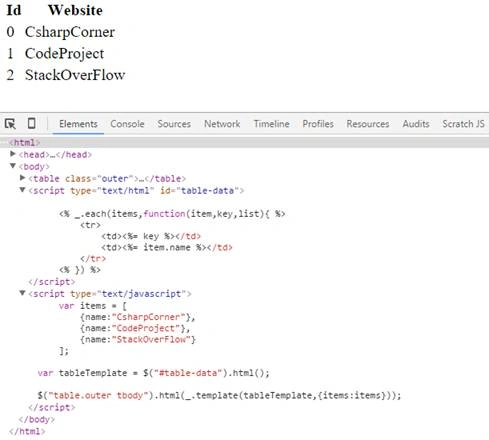
More information and explanation of underscore.js functions can be read.
Read more articles on JavaScript:
Pradeep SahooPosted Mar 18, 2016, 8:44 PM
why to go for _underscore over angular ,looking for this info .plz let me know
Ehsan SajjadPosted Feb 18, 2016, 1:18 PM
Informative
Santhakumar MunuswamyPosted Feb 16, 2016, 3:04 PM
Thanks for nice article. Keep it up
Amit Kumar SinghPosted Feb 16, 2016, 12:03 PM
Nice one
Anupam SinghPosted Feb 15, 2016, 4:09 AM
Very helpful.
Raja TPosted Feb 15, 2016, 3:04 AM
Nice,Thanks for sharing
Shubham KumarPosted Feb 15, 2016, 12:37 AM
nice
Sibeesh VenuPosted Feb 15, 2016, 12:35 AM
Nice Share
Debasis SahaPosted Feb 15, 2016, 12:03 AM
Nice One...
Mohammed IbrahimPosted Feb 14, 2016, 11:24 PM
nice
Gowtham KPosted Feb 14, 2016, 12:07 PM
Good Share
Kumaresh RajalingamPosted Feb 14, 2016, 12:00 PM
Nice share
Pramod ThakurPosted Feb 14, 2016, 11:38 AM
thanks for sharing...