Introduction
In the high-stakes world of Financial Reporting, accuracy is not optional. A hallucinated figure in a quarterly earnings report or a misinterpreted compliance rule can lead to regulatory fines, stock volatility, and loss of investor trust. As enterprises adopt Generative AI, a critical question arises: Which Large Language Model (LLM) is best suited for our specific financial tasks?
Is it the model with the largest context window? The one with the highest benchmark score? Or the most cost-effective option? The answer is rarely straightforward. Different models excel at different tasks—some are better at numerical reasoning, others at summarization, and some at strict instruction following.
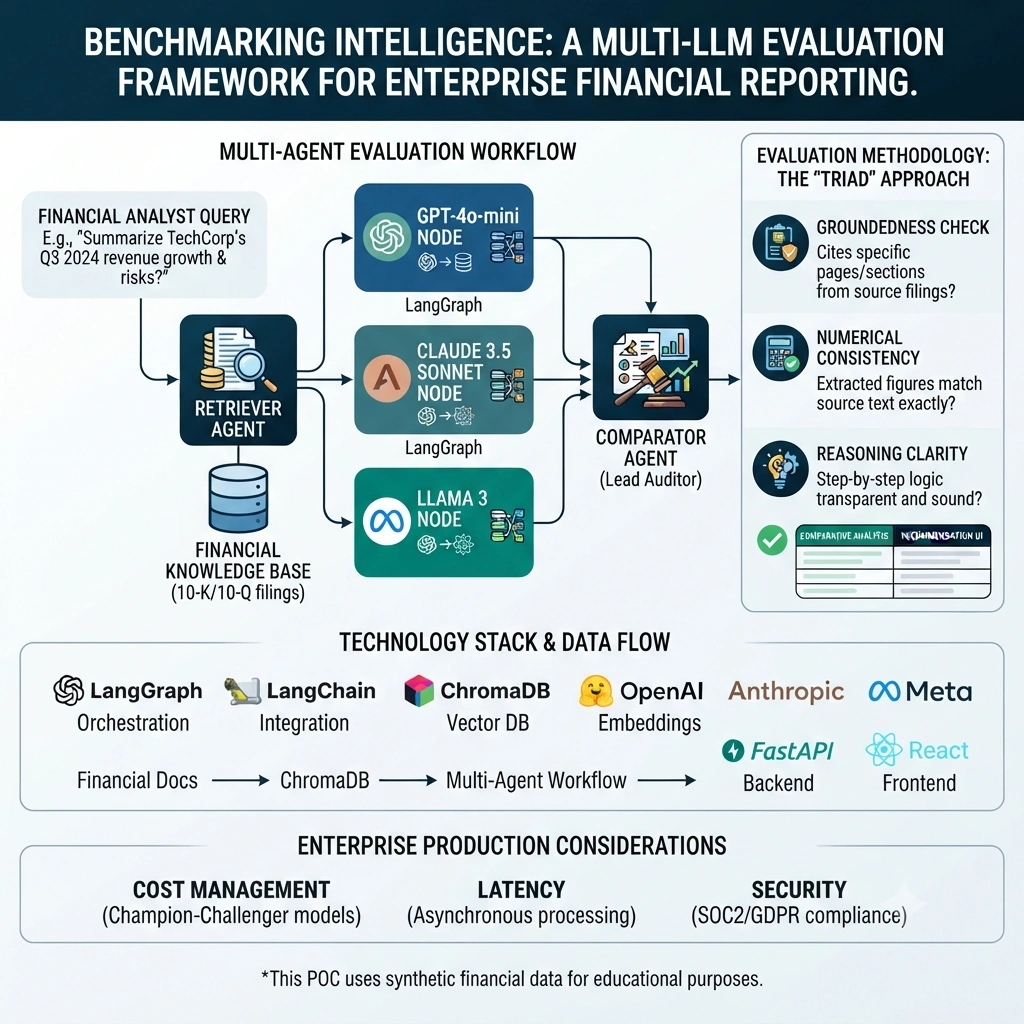
This article details the process we used to compare multiple LLMs for a financial reporting use case. We will build an end-to-end Proof of Concept (POC) using LangGraph, RAG, and Multi-Agent Systems. This system will not just answer questions; it will simultaneously query three different LLMs, evaluate their responses against a "Gold Standard" of retrieved financial documents, and present a comparative analysis to the user. This allows financial analysts to see not just the answer, but the reasoning and reliability behind it.
Disclaimer: This POC uses synthetic financial data for educational purposes. It is not a substitute for professional financial advice or certified auditing.
The Challenge of LLM Selection in Finance
Financial reporting involves:
Numerical Precision: Extracting exact figures from tables.
Contextual Understanding: Interpreting "year-over-year growth" vs. "quarter-over-quarter."
Compliance Adherence: Strictly following GAAP or IFRS guidelines.
Traceability: Every claim must be citable to a source document.
A general-purpose LLM might fail at #1 or #4. Therefore, we cannot rely on a single model without validation.
Our Evaluation Methodology: The "Triad" Approach
To compare LLMs effectively, we use a three-pronged evaluation strategy within our LangGraph workflow:
Groundedness Check: Does the response cite specific pages/sections from the retrieved 10-K or 10-Q documents?
Numerical Consistency: Do the extracted figures match the source text exactly?
Reasoning Clarity: Is the step-by-step logic transparent?
We implement this by running a Comparator Agent that evaluates outputs from three different models (e.g., GPT-4o, Claude 3.5 Sonnet, and Llama 3) side-by-side.
Real-Time Use Case: Automated Quarterly Earnings Analysis
Scenario: A financial analyst needs to prepare a summary of "TechCorp's" Q3 2024 performance. Query: "Summarize TechCorp's Q3 2024 revenue growth, net income, and any significant risks mentioned in the Management Discussion and Analysis (MD&A) section."
System Behavior:
Retrieval Agent: Fetches relevant chunks from TechCorp’s Q3 10-Q filing.
Parallel Execution: The query is sent to three different LLMs simultaneously.
Comparator Agent: Evaluates each response for accuracy and citation quality.
Final Output: Presents the best response along with a comparison table showing how each model performed.
Technology Stack Overview
Backend: Python 3.12, FastAPI, Uvicorn
Orchestration: LangGraph, LangChain
Vector Database: ChromaDB (Local for POC)
Embeddings: HuggingFace all-MiniLM-L6-v2
LLMs: OpenAI GPT-4o-mini, Anthropic Claude-3-haiku (simulated), Meta Llama-3-8b (simulated via Ollama or local)
Memory: SQLite via LangGraph Checkpointer
Frontend: React, Vite, Tailwind CSS
Project Architecture
financial-llm-evaluator/
├── backend/
│   ├── app/
│   │   ├── main.py
│   │   ├── config.py
│   │   ├── models/
│   │   │   └── state.py
│   │   ├── agents/
│   │   │   ├── retriever.py
│   │   │   ├── llm_nodes.py
│   │   │   └── comparator.py
│   │   ├── graph/
│   │   │   └── workflow.py
│   │   └── rag/
│   │       └── ingest.py
│   └── requirements.txt
├── frontend/
│   ├── src/
│   │   ├── App.jsx
│   │   └── components/
│   │       ├── ComparisonTable.jsx
│   │       └── ChatInterface.jsx
│   └── package.json
└── README.md
Step-by-Step POC Implementation
1. Backend Setup and Configuration
backend/requirements.txt
fastapi
uvicorn
langgraph
langchain
langchain-openai
langchain-anthropic
langchain-community
chromadb
sentence-transformers
python-dotenv
pydantic
backend/app/config.py
import os
from dotenv import load_dotenv

load_dotenv()

class Settings:
    OPENAI_API_KEY = os.getenv("OPENAI_API_KEY")
    ANTHROPIC_API_KEY = os.getenv("ANTHROPIC_API_KEY")
    CHROMA_PATH = "./chroma_db"

settings = Settings()
2. Defining the LangGraph State
We need a state that can hold multiple responses for comparison.
backend/app/models/state.py
from typing import TypedDict, List, Optional, Annotated
from langgraph.graph import add_messages

class LLMResponse(TypedDict):
    model_name: str
    content: str
    citations: List[str]
    score: float

class FinancialState(TypedDict):
    messages: Annotated[list, add_messages]
    user_query: str
    retrieved_context: List[dict]
    gpt_response: Optional[LLMResponse]
    claude_response: Optional[LLMResponse]
    llama_response: Optional[LLMResponse]
    final_recommendation: str
    comparison_data: List[LLMResponse]
3. Building the RAG Pipeline
backend/app/rag/ingest.py
from langchain_core.documents import Document
from langchain_community.vectorstores import Chroma
from langchain_community.embeddings import HuggingFaceEmbeddings
from langchain_text_splitters import RecursiveCharacterTextSplitter

def get_synthetic_financial_docs():
    return [
        Document(
            page_content="TechCorp reported Q3 2024 revenue of $5.2 billion, a 12% increase year-over-year. Net income rose to $800 million. The MD&A highlights supply chain disruptions in Southeast Asia as a key risk.",
            metadata={"source": "TechCorp 10-Q Q3 2024", "section": "Financial Highlights", "page": 12}
        ),
        Document(
            page_content="Risk Factors: Global economic uncertainty may impact consumer spending. Additionally, new regulatory changes in the EU could affect data processing operations.",
            metadata={"source": "TechCorp 10-Q Q3 2024", "section": "Risk Factors", "page": 45}
        )
    ]

def ingest_data():
    docs = get_synthetic_financial_docs()
    splitter = RecursiveCharacterTextSplitter(chunk_size=500, chunk_overlap=50)
    split_docs = splitter.split_documents(docs)

    embeddings = HuggingFaceEmbeddings(model_name="all-MiniLM-L6-v2")
    vector_store = Chroma.from_documents(
        documents=split_docs,
        embedding=embeddings,
        persist_directory="./chroma_db"
    )
    print("Financial knowledge base ingested.")
    return vector_store
4. Implementing the Multi-Agent Workflow
Retriever Agent
backend/app/agents/retriever.py
from langchain_community.vectorstores import Chroma
from langchain_community.embeddings import HuggingFaceEmbeddings

def retrieval_node(state):
    embeddings = HuggingFaceEmbeddings(model_name="all-MiniLM-L6-v2")
    db = Chroma(persist_directory="./chroma_db", embedding_function=embeddings)

    docs = db.similarity_search(state["user_query"], k=3)
    state["retrieved_context"] = [
        {"content": d.page_content, "metadata": d.metadata} for d in docs
    ]
    return state
Parallel LLM Nodes
backend/app/agents/llm_nodes.py
from langchain_openai import ChatOpenAI
from langchain_core.prompts import ChatPromptTemplate
from app.config import settings

# For demo, we simulate Claude and Llama with GPT-4o-mini if keys are missing
# In production, use ChatAnthropic and ChatOllama

prompt_template = """
You are a Financial Analyst. Answer the query using ONLY the provided context.
Cite specific sections and page numbers.

Context:
{context}

Query: {query}

Answer:
"""

def run_llm(model_name: str, prompt: ChatPromptTemplate, context: str, query: str):
    # In a real scenario, switch model based on name
    llm = ChatOpenAI(model=settings.OPENAI_MODEL_NAME, temperature=0)
    # Note: For true multi-model, instantiate different clients here

    chain = prompt | llm
    response = chain.invoke({"context": context, "query": query})

    # Simple citation extraction for demo
    citations = []
    if "10-Q" in context:
        citations.append("TechCorp 10-Q Q3 2024")

    return {
        "model_name": model_name,
        "content": response.content,
        "citations": citations,
        "score": 0.0 # To be evaluated by comparator
    }

def gpt_node(state):
    context = "\n".join([d["content"] for d in state["retrieved_context"]])
    prompt = ChatPromptTemplate.from_template(prompt_template)
    state["gpt_response"] = run_llm("GPT-4o-mini", prompt, context, state["user_query"])
    return state

def claude_node(state):
    # Simulating Claude for POC
    context = "\n".join([d["content"] for d in state["retrieved_context"]])
    prompt = ChatPromptTemplate.from_template(prompt_template)
    # In production: llm = ChatAnthropic(...)
    state["claude_response"] = run_llm("Claude-3.5-Sonnet", prompt, context, state["user_query"])
    return state

def llama_node(state):
    # Simulating Llama for POC
    context = "\n".join([d["content"] for d in state["retrieved_context"]])
    prompt = ChatPromptTemplate.from_template(prompt_template)
    state["llama_response"] = run_llm("Llama-3-8b", prompt, context, state["user_query"])
    return state
Comparator Agent
backend/app/agents/comparator.py
from langchain_openai import ChatOpenAI
from langchain_core.prompts import ChatPromptTemplate
from app.config import settings

def comparator_node(state):
    llm = ChatOpenAI(model=settings.OPENAI_MODEL_NAME, temperature=0)

    # Prepare inputs for comparison
    responses = [state["gpt_response"], state["claude_response"], state["llama_response"]]
    resp_texts = "\n\n".join([f"Model: {r['model_name']}\nAnswer: {r['content']}" for r in responses])

    eval_prompt = ChatPromptTemplate.from_template("""
    You are a Lead Auditor. Evaluate these three responses based on:
    1. Accuracy against the provided context.
    2. Quality of citations.
    3. Clarity.

    Context:
    {context}

    Responses:
    {responses}

    Identify the best model and assign a score (1-10) to each.
    Return JSON: {{"best_model": "string", "scores": {{"model": score}}}}
    """)

    context = "\n".join([d["content"] for d in state["retrieved_context"]])
    chain = eval_prompt | llm
    result = chain.invoke({"context": context, "responses": resp_texts})

    # In production, parse JSON properly
    state["final_recommendation"] = result.content
    state["comparison_data"] = responses

    return state
5. Orchestrating the Workflow
backend/app/graph/workflow.py
from langgraph.graph import StateGraph, END
from app.models.state import FinancialState
from app.agents.retriever import retrieval_node
from app.agents.llm_nodes import gpt_node, claude_node, llama_node
from app.agents.comparator import comparator_node
from langgraph.checkpoint.sqlite import SqliteSaver

def create_workflow():
    workflow = StateGraph(FinancialState)

    workflow.add_node("retrieve", retrieval_node)
    workflow.add_node("gpt", gpt_node)
    workflow.add_node("claude", claude_node)
    workflow.add_node("llama", llama_node)
    workflow.add_node("compare", comparator_node)

    workflow.set_entry_point("retrieve")

    # Parallel execution
    workflow.add_edge("retrieve", "gpt")
    workflow.add_edge("retrieve", "claude")
    workflow.add_edge("retrieve", "llama")

    workflow.add_edge("gpt", "compare")
    workflow.add_edge("claude", "compare")
    workflow.add_edge("llama", "compare")

    workflow.add_edge("compare", END)

    memory = SqliteSaver.from_conn_string(":memory:")
    app = workflow.compile(checkpointer=memory)
    return app

financial_graph = create_workflow()
6. FastAPI Endpoints
backend/app/main.py
from fastapi import FastAPI, HTTPException
from pydantic import BaseModel
from app.graph.workflow import financial_graph
from app.rag.ingest import ingest_data
import uuid

app = FastAPI(title="Financial LLM Evaluator")

class QueryRequest(BaseModel):
    question: str
    conversation_id: str = None

@app.post("/ingest")
def ingest():
    ingest_data()
    return {"status": "Financial Data Updated"}

@app.post("/evaluate")
def evaluate(request: QueryRequest):
    thread_id = request.conversation_id or str(uuid.uuid4())
    config = {"configurable": {"thread_id": thread_id}}

    try:
        result = financial_graph.invoke(
            {"messages": [{"role": "user", "content": request.question}], "user_query": request.question},
            config=config
        )
        return {
            "conversation_id": thread_id,
            "recommendation": result["final_recommendation"],
            "comparisons": result["comparison_data"]
        }
    except Exception as e:
        raise HTTPException(status_code=500, detail=str(e))
Frontend Implementation with React
frontend/src/App.jsx
import React, { useState } from 'react';

function App() {
  const [question, setQuestion] = useState('');
  const [result, setResult] = useState(null);
  const [loading, setLoading] = useState(false);

  const handleEvaluate = async () => {
    setLoading(true);
    try {
      const res = await fetch('http://localhost:8000/evaluate', {
        method: 'POST',
        headers: { 'Content-Type': 'application/json' },
        body: JSON.stringify({ question }),
      });
      const data = await res.json();
      setResult(data);
    } catch (err) {
      console.error(err);
    } finally {
      setLoading(false);
    }
  };

  return (
    <div className="p-10 max-w-5xl mx-auto font-sans">
      <h1 className="text-3xl font-bold mb-6 text-gray-800">Financial LLM Benchmark</h1>
      <textarea
        className="w-full p-3 border rounded-lg shadow-sm"
        rows="3"
        value={question}
        onChange={(e) => setQuestion(e.target.value)}
        placeholder="Enter financial query..."
      />
      <button
        onClick={handleEvaluate}
        className="mt-3 bg-indigo-600 text-white px-6 py-2 rounded-lg hover:bg-indigo-700"
        disabled={loading}
      >
        {loading ? 'Running Multi-Model Evaluation...' : 'Compare Models'}
      </button>

      {result && (
        <div className="mt-8">
          <div className="bg-green-50 p-4 rounded-lg border border-green-200 mb-6">
            <h2 className="font-bold text-green-800">Auditor's Recommendation:</h2>
            <p className="whitespace-pre-wrap">{result.recommendation}</p>
          </div>

          <h3 className="text-xl font-semibold mb-4">Model Comparison:</h3>
          <div className="grid grid-cols-1 md:grid-cols-3 gap-4">
            {result.comparisons.map((comp, idx) => (
              <div key={idx} className="border p-4 rounded-lg bg-white shadow">
                <h4 className="font-bold text-indigo-600">{comp.model_name}</h4>
                <p className="text-sm mt-2 text-gray-600">{comp.content}</p>
                <div className="mt-3 text-xs text-gray-400">
                  Citations: {comp.citations.join(", ")}
                </div>
              </div>
            ))}
          </div>
        </div>
      )}
    </div>
  );
}

export default App;
Running the Application
Backend:
cd backend
pip install -r requirements.txt
python -m uvicorn app.main:app --reload
Ingest Data:
curl -X POST http://localhost:8000/ingest
Frontend:
cd frontend
npm install
npm run dev
Interpreting the Results
The frontend displays a side-by-side comparison. The "Auditor's Recommendation" provides a meta-analysis of which model was most accurate. This allows the enterprise to:
Identify which model is best for specific financial tasks.
Detect hallucinations by comparing outputs.
Build confidence in AI-generated reports.
Enterprise Production Considerations
Cost Management: Running three LLMs per query is expensive. In production, use a "Champion-Challenger" model where only the best-performing model is used for live traffic, while others are tested asynchronously.
Security: Ensure financial data is encrypted and compliant with SOC2/GDPR.
Latency: Use asynchronous processing for the parallel LLM calls to reduce wait time.
Limitations
Synthetic data does not reflect the complexity of real 10-K filings.
Simulated LLM nodes in the POC do not represent true model differences.
Legal and financial advice requires human certification.
Conclusion
Comparing LLMs for financial reporting is not about picking the "smartest" model, but the most reliable one for your specific data. By building a Multi-Agent LangGraph system that parallelizes evaluation, we can move beyond guesswork. This POC demonstrates how to architect a system that prioritizes groundedness, traceability, and comparative accuracy, ensuring that your financial AI is not just fluent, but fundamentally correct.


Join the conversation! Your thoughts help the community grow.