

Overview
With Azure Functions, you can run small pieces of code without managing infrastructure. With the introduction of C# 13, you get access to more expressive syntax and advanced language features to build clean, testable, and efficient serverless applications.
The following are best practices for building robust, production-ready Azure Functions using C# 13:
- Clean Folder structure
- Dependency injection
- Configuration management
- Logging
- Error handling
- Unit testing
Project Setup
This project is built using the latest .NET 8 and C# 13 features, providing a modern, minimal, and efficient codebase. For scalable serverless execution, it leverages Azure Functions v4 and can be integrated with Azure Storage or Cosmos DB. In order to ensure a clean and testable architecture, this project uses xUnit as the unit testing framework, and Moq as the mocking dependency framework. The Azure CLI and Visual Studio Code offer a lightweight and productive workflow for development and deployment.
Tools & Stack
- .NET 8 / C# 13
- Azure Functions v4
- Azure Storage / Cosmos DB (optional)
- xUnit & Moq
- Azure CLI / Visual Studio Code
Folder Structure
Maintainability and scalability are ensured by the clean, modular structure of the project. In the root folder /AzureFunctionApp are all the main components of Azure Function. In the Functions folder, all function entry points are defined, while the business logic is abstracted into the Services folder. In the Interfaces folder, contracts and abstractions are defined. The Configuration folder contains configuration-related classes, including strongly typed settings, while the Tests folder contains unit tests. The host.json file contains global configuration for the Azure Functions runtime, and local.settings.json contains local development settings and secrets. In addition to aligning with best practices for serverless and test-driven development, this structure promotes the separation of concerns.
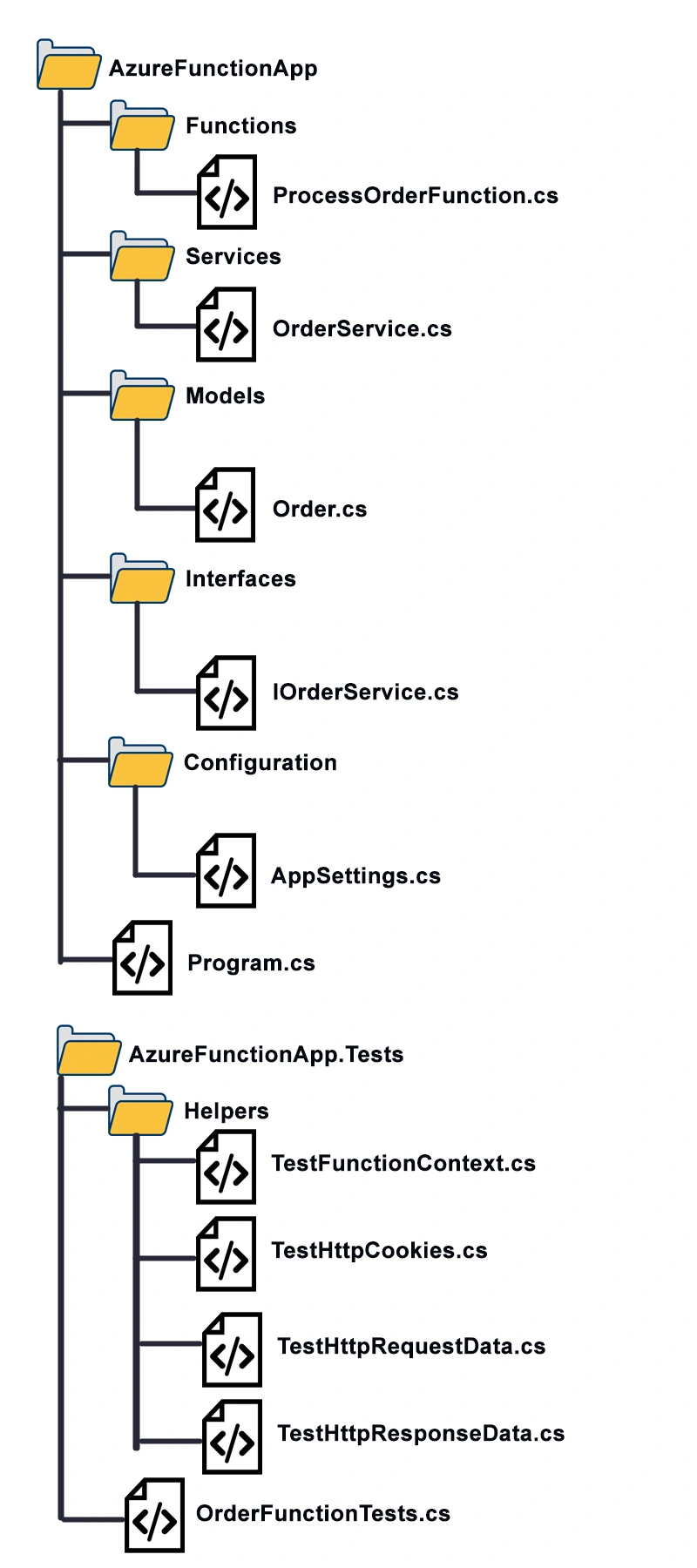
Function Example: HTTP Trigger to Process Orders
ProcessOrderFunction.cs
using System.Net;
using System.Text.Json;
using AzureFunctionApp.Interfaces;
using AzureFunctionApp.Models;
using Microsoft.Azure.Functions.Worker;
using Microsoft.Azure.Functions.Worker.Http;
using Microsoft.Extensions.Logging;

namespace AzureFunctionApp.Functions;

public class ProcessOrderFunction(IOrderService orderService, ILogger<ProcessOrderFunction> logger)
{
    private readonly IOrderService _orderService = orderService;
    private readonly ILogger<ProcessOrderFunction> _logger = logger;

    [Function("ProcessOrder")]
    public async Task<HttpResponseData> RunAsync(
        [HttpTrigger(AuthorizationLevel.Function, "post", Route = "orders")] HttpRequestData req)
    {
        try
        {
            var requestBody = await new StreamReader(req.Body).ReadToEndAsync();
            var order = JsonSerializer.Deserialize<Order>(requestBody);

            if (order is null)
            {
                _logger.LogWarning("Received null or invalid order payload.");
                return await CreateResponseAsync(req, HttpStatusCode.BadRequest, "Invalid order payload.");
            }

            await _orderService.ProcessOrderAsync(order);

            _logger.LogInformation("Order {OrderId} processed successfully.", order.Id);
            return await CreateResponseAsync(req, HttpStatusCode.OK, "Order processed successfully.");
        }
        catch (JsonException jsonEx)
        {
            _logger.LogError(jsonEx, "JSON parsing error.");
            return await CreateResponseAsync(req, HttpStatusCode.BadRequest, "Invalid JSON format.");
        }
        catch (Exception ex)
        {
            _logger.LogError(ex, "Unhandled exception while processing order.");
            return await CreateResponseAsync(req, HttpStatusCode.InternalServerError, "Internal server error.");
        }
    }

    private static async Task<HttpResponseData> CreateResponseAsync(HttpRequestData req, HttpStatusCode statusCode, string message)
    {
        var response = req.CreateResponse(statusCode);
        await response.WriteStringAsync(message);
        return response;
    }
}
Order.cs
namespace AzureFunctionApp.Models;

public record Order(Guid Id, string ProductName, int Quantity);
IOrderService.cs
using AzureFunctionApp.Models;

namespace AzureFunctionApp.Interfaces;

public interface IOrderService
{
    Task ProcessOrderAsync(Order order);
}
OrderService.cs
using AzureFunctionApp.Interfaces;
using AzureFunctionApp.Models;
using Microsoft.Extensions.Logging;

namespace AzureFunctionApp.Services;

public class OrderService(ILogger<OrderService> logger) : IOrderService
{
    private readonly ILogger<OrderService> _logger = logger;

    public async Task ProcessOrderAsync(Order order)
    {
        _logger.LogInformation("Processing order for {ProductName} with quantity {Quantity}", order.ProductName, order.Quantity);
        // Simulate processing time
        await Task.Delay(100);
        _logger.LogInformation("Order {OrderId} processed.", order.Id);
    }
}
AppSettings.cs
namespace AzureFunctionApp.Configuration;

public class AppSettings
{
    public string? Environment { get; init; }
    public string? StorageConnectionString { get; init; }
}
local.settings.json
{
    "IsEncrypted": false,
    "Values": {
        "AzureWebJobsStorage": "UseDevelopmentStorage=true",
        "FUNCTIONS_WORKER_RUNTIME": "dotnet-isolated"
    }
}
C# 13 Features Used
- Primary constructors (when available in .NET 8)
- List patterns (for filtering)
- Raw string literals (in configurations or templates)
- Interpolated string handlers for optimized logging
Unit Testing with xUnit and Moq
OrderFunctionTests.cs
using System.Net;
using System.Text.Json;
using System.Threading.Tasks;
using AzureFunctionApp.Functions;
using AzureFunctionApp.Interfaces;
using AzureFunctionApp.Models;
using AzureFunctionApp.Tests.Helpers;
using Microsoft.Extensions.Logging;
using Moq;

namespace AzureFunctionApp.Tests;

public class ProcessOrderFunctionTests
{
    [Fact]
    public async Task RunAsync_ShouldReturnOk_WhenOrderIsValid()
    {
        // Arrange
        var order = new Order(Guid.NewGuid(), "Laptop", 2);
        var orderJson = JsonSerializer.Serialize(order);
        var request = new TestHttpRequestData(orderJson);

        var mockOrderService = new Mock<IOrderService>();
        mockOrderService.Setup(s => s.ProcessOrderAsync(It.IsAny<Order>())).Returns(Task.CompletedTask);

        var logger = Mock.Of<ILogger<ProcessOrderFunction>>();

        var function = new ProcessOrderFunction(mockOrderService.Object, logger);

        // Act
        var response = await function.RunAsync(request);

        // Assert
        Assert.Equal(HttpStatusCode.OK, response.StatusCode);

        var bodyString = ((TestHttpResponseData)response).ReadBodyAsString();
        Assert.Contains("Order processed successfully", bodyString);
    }
}
TestFunctionContext.cs
using Microsoft.Azure.Functions.Worker;

namespace AzureFunctionApp.Tests.Helpers;
public class TestFunctionContext : FunctionContext
{
    private readonly IDictionary<object, object> _items = new Dictionary<object, object>();

    public override string InvocationId => Guid.NewGuid().ToString();
    public override string FunctionId => "test-function";

    public override BindingContext BindingContext => throw new NotImplementedException();
    public override FunctionDefinition FunctionDefinition => throw new NotImplementedException();
    public override TraceContext TraceContext => throw new NotImplementedException();
    public override IServiceProvider InstanceServices { get; set; } = null!;

    public override IDictionary<object, object> Items
    {
        get => _items;
        set => throw new NotSupportedException();
    }

    public override CancellationToken CancellationToken => CancellationToken.None;
    public override IInvocationFeatures Features => throw new NotImplementedException();

    public override RetryContext? RetryContext => null;
}
TestHttpCookie.cs
using Microsoft.Azure.Functions.Worker.Http;

namespace AzureFunctionApp.Tests.Helpers;
public class TestHttpCookie : IHttpCookie
{
    public TestHttpCookie(string name, string value)
    {
        Name = name;
        Value = value;
    }

    public string Name { get; set; } = string.Empty;

    public string Value { get; set; } = string.Empty;

    public string? Path { get; set; } = "/";

    public bool? HttpOnly { get; set; }

    public bool? Secure { get; set; }

    public string? Domain { get; set; }

    public DateTimeOffset? Expires { get; set; }

    public double? MaxAge { get; set; }

    public SameSite SameSite { get; set; } = SameSite.None;
}

public class TestHttpCookies : HttpCookies
{
    private readonly List<IHttpCookie> _cookies = new();

    public override void Append(string name, string value)
    {
        _cookies.Add(new TestHttpCookie(name, value));
    }

    public override void Append(IHttpCookie cookie)
    {
        _cookies.Add(cookie);
    }

    public override IHttpCookie CreateNew() => new TestHttpCookie("name","value");
}
TestHttpRequestData.cs
using Microsoft.Azure.Functions.Worker.Http;
using System.Security.Claims;

namespace AzureFunctionApp.Tests.Helpers;
public class TestHttpRequestData : HttpRequestData
{
    private readonly Uri _url;
    private readonly Stream _body;
    private readonly IReadOnlyCollection<IHttpCookie> _cookies;

    public TestHttpRequestData(string body)
        : base(new TestFunctionContext())
    {
        _url = new Uri("http://localhost");
        _body = new MemoryStream(System.Text.Encoding.UTF8.GetBytes(body));
        Method = "POST";
        Headers = new HttpHeadersCollection();
        Identities = Array.Empty<ClaimsIdentity>();
        _cookies = new List<IHttpCookie>();
    }

    public override Stream Body => _body;
    public override HttpHeadersCollection Headers { get; }
    public override IReadOnlyCollection<ClaimsIdentity> Identities { get; }
    public override Uri Url => _url;
    public override string Method { get; }
    public override IReadOnlyCollection<IHttpCookie> Cookies => _cookies;

    public override HttpResponseData CreateResponse()
    {
        return new TestHttpResponseData(this);
    }
}
TestHttpResponseData.cs
using AzureFunctionApp.Tests.Helpers;
using Microsoft.Azure.Functions.Worker.Http;
using System.Net;

namespace AzureFunctionApp.Tests.Helpers;
public class TestHttpResponseData : HttpResponseData
{
    private readonly MemoryStream _bodyStream = new();
    private HttpHeadersCollection _headers = new HttpHeadersCollection();
    private readonly TestHttpCookies _cookies = new TestHttpCookies();

    public TestHttpResponseData(HttpRequestData requestData) : base(requestData.FunctionContext)
    {
    }

    public override Stream Body
    {
        get => _bodyStream;
        set => throw new NotSupportedException("Setting the body stream is not supported.");
    }

    public override HttpHeadersCollection Headers
    {
        get => _headers;
        set => _headers = value;
    }

    public override HttpCookies Cookies => _cookies;

    public override HttpStatusCode StatusCode { get; set; }

    public new Task WriteStringAsync(string content)
    {
        var bytes = System.Text.Encoding.UTF8.GetBytes(content);
        return Body.WriteAsync(bytes, 0, bytes.Length);
    }

    public string ReadBodyAsString()
    {
        Body.Position = 0;
        using var reader = new StreamReader(Body);
        return reader.ReadToEnd();
    }
}
Best Practices Checklist
|
Best Practice |
Description |
|
Use Dependency Injection |
Register services in Startup.cs or Program.cs |
|
Isolate Logic in Services |
Avoid logic in the Function class |
|
Structure Project Cleanly |
Use Functions, Services, Models folders |
|
Environment Configuration |
Use local.settings.json and bind to classes |
|
Use Strong Logging |
Log both input and exception context |
|
Write Unit Tests for Each Scenario |
Cover valid/invalid paths with mocks |
|
Limit Function Responsibilities |
Each function should do one job only |
Registering Services
Program.cs
using AzureFunctionApp.Configuration;
using AzureFunctionApp.Interfaces;
using AzureFunctionApp.Services;
using Microsoft.Azure.Functions.Worker;
using Microsoft.Extensions.Configuration;
using Microsoft.Extensions.DependencyInjection;
using Microsoft.Extensions.Hosting;

var host = new HostBuilder()
   .ConfigureFunctionsWebApplication()
   .ConfigureAppConfiguration(config =>
   {
       config.AddJsonFile("local.settings.json", optional: true, reloadOnChange: true)
             .AddEnvironmentVariables();
   })
   .ConfigureServices((context, services) =>
   {
       var appSettings = new AppSettings();
       context.Configuration.Bind("AppSettings", appSettings);
       services.AddSingleton(appSettings);

       services.AddScoped<IOrderService, OrderService>();
       services.AddLogging();
       services.AddApplicationInsightsTelemetryWorkerService();
       services.ConfigureFunctionsApplicationInsights();
   })
   .Build();

host.Run();
local.settings.json
{
    "IsEncrypted": false,
    "Values": {
        "AzureWebJobsStorage": "UseDevelopmentStorage=true",
        "FUNCTIONS_WORKER_RUNTIME": "dotnet-isolated"
    }
}
Deployment Tips
The Azure CLI is recommended for quick, scriptable deployments of your Azure Function App. Here are the commands you can use:
az functionapp deployment source config-zip --resource-group <rg> --name <function-name> --src <zip-file>
Implement CI/CD pipelines to ensure code is tested and deployed consistently using tools like GitHub Actions or Azure DevOps. By enabling Application Insights, you can monitor performance, track errors, and gain valuable insights through centralised logging and telemetry. This combination makes your application resilient, observable, and easy to maintain.
Summary
Modern syntax and maintainability are brought to serverless architectures with Azure Functions built with C# 13. You ensure scalable and reliable functions in production by following a clean structure, separating concerns, using proper dependency injection, and thoroughly testing. In addition to improving code readability, this approach facilitates easier debugging and updating. In order to deliver high-quality serverless solutions, developers must follow these best practices to ensure their Azure Functions remain robust, efficient, and adaptable to changing business requirements.
You can access and download the code for this article from Ziggy Rafiq GitHub Repository.
Join the conversation! Your thoughts help the community grow.