

The Tipping Point: When Prompts Stop Working
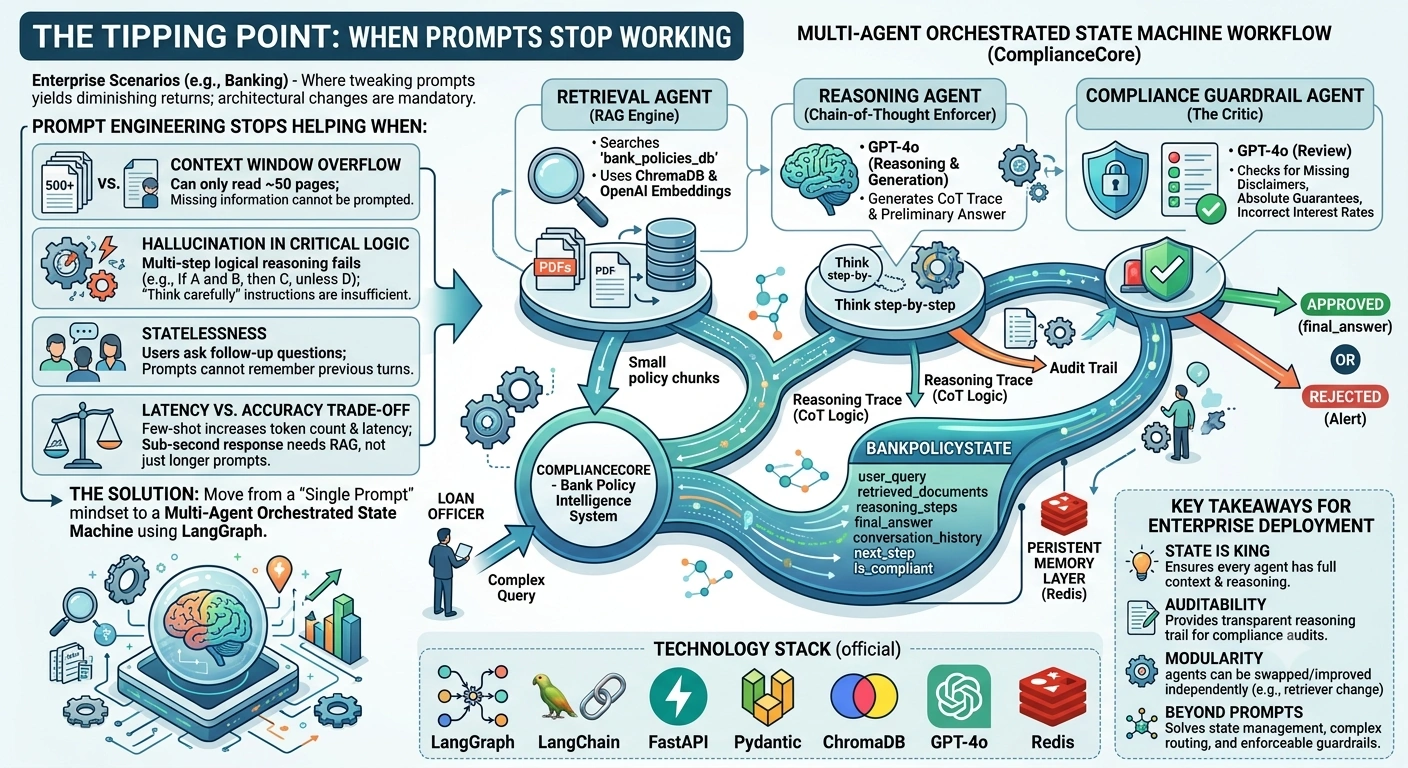
Prompt engineering is the "first line of defense" in LLM applications. It is cost-effective and fast. However, in enterprise scenarios—especially in regulated industries like banking—there is a clear tipping point where tweaking prompts yields diminishing returns, and architectural changes become mandatory.
Prompt Engineering Stops Helping When:
Context Window Overflow: You have 500 policy documents, but the LLM can only read 50 pages at a time. No amount of prompting can fix missing information.
Hallucination in Critical Logic: If the model consistently fails at multi-step logical reasoning (e.g., "If A and B, then C, unless D"), prompt instructions like "think carefully" are insufficient. You need Chain-of-Thought (CoT) enforced by code structure.
Statelessness: Users ask follow-up questions ("What about the interest rate for that loan?"). Prompts cannot remember previous turns without an external memory layer.
Latency vs. Accuracy Trade-off: Few-shot prompting increases token count and latency. If you need sub-second responses with high accuracy, you need Retrieval-Augmented Generation (RAG) with optimized vector search, not just longer prompts.
The Solution: Move from a "Single Prompt" mindset to a Multi-Agent Orchestrated State Machine using tools like LangGraph.
Real-Time Use Case: "ComplianceCore" – Bank Policy Intelligence System
Scenario: A major bank needs an internal assistant for loan officers. The system must:
Answer complex queries involving multiple policy documents (e.g., KYC + Loan Eligibility).
Maintain conversation state (memory) for follow-up questions.
Provide an audit trail of which documents were used (compliance requirement).
Route queries to specific specialists (e.g., a "Fraud Agent" vs. a "Loan Agent").
Why LangGraph? Unlike simple chains, LangGraph allows for cycles (loops for correction), conditional edges (routing), and persistent state (memory). This is critical for enterprise reliability.
Technology Stack
LangGraph: Orchestration framework for multi-agent workflows.
LangChain: Integration layer for LLMs and retrievers.
FastAPI: High-performance API framework.
Pydantic: Data validation and state schema definition.
ChromaDB: Vector database for policy document storage.
OpenAI GPT-4o: LLM for reasoning and generation.
Redis: For persistent session memory.
Step-by-Step Implementation
1. Define the Enterprise State Schema
In enterprise apps, state is not just a string. It’s a structured object with metadata for auditing.
from typing import Annotated, List, Optional
from pydantic import BaseModel, Field
from langgraph.graph import StateGraph, START, END
import operator

class BankPolicyState(BaseModel):
    """
    Comprehensive state object for the Bank Policy Assistant.
    Inherits from BaseModel for strict validation.
    """

    # Input
    user_query: str = Field(..., description="The current question from the loan officer")

    # Retrieved Context
    retrieved_documents: List[dict] = Field(default_factory=list, description="List of relevant policy chunks with metadata")

    # Reasoning Trace (For Audit & Debugging)
    reasoning_steps: List[str] = Field(default_factory=list, description="Step-by-step CoT logic")

    # Final Output
    final_answer: Optional[str] = Field(None, description="The compliant response to the user")

    # Memory & Session
    conversation_history: Annotated[List[dict], operator.add] = Field(default_factory=list, description="Full chat history")

    # Routing Decision
    next_step: Optional[str] = Field(None, description="Determines which agent to call next")

    # Compliance Flag
    is_compliant: bool = Field(True, description="Flag set by compliance checker")
2. The Retrieval Agent (RAG Engine)
This agent fetches relevant policies. In a real scenario, this would connect to Azure AI Search or Pinecone.
from langchain_openai import OpenAIEmbeddings
from langchain_chroma import Chroma

# Initialize Vector Store (Assume pre-populated with bank PDFs)
embeddings = OpenAIEmbeddings(model="text-embedding-ada-002")
vector_store = Chroma(persist_directory="./bank_policies_db", embedding_function=embeddings)

def retrieve_policies(state: BankPolicyState) -> BankPolicyState:
    """
    Retrieves relevant policy documents based on the user query.
    """
    print(f"🔍 [Retriever] Searching for: {state.user_query}")

    # Hybrid search could be implemented here for better accuracy
    docs = vector_store.similarity_search_with_score(state.user_query, k=3)

    # Format documents for context
    formatted_docs = [
        {"content": doc.page_content, "source": doc.metadata.get("source", "Unknown")}
        for doc, score in docs
    ]

    return BankPolicyState(
        **state.dict(),
        retrieved_documents=formatted_docs
    )
3. The Reasoning Agent (Chain-of-Thought Enforcer)
This agent doesn't just answer; it breaks down the logic. This is where we move beyond simple prompting to structured reasoning.
from langchain_openai import ChatOpenAI

llm = ChatOpenAI(model="gpt-4o", temperature=0.1)

REASONING_TEMPLATE = """
You are a Senior Bank Policy Analyst.
Analyze the user's query against the provided policy documents.

**Instructions:**
1. Identify the key policy clauses relevant to the query.
2. Think step-by-step (Chain-of-Thought).
3. If information is conflicting, highlight the discrepancy.
4. Draft a preliminary answer.

**Policy Documents:**
{context}

**User Query:**
{query}

**Output Format:**
Reasoning: [Your step-by-step logic]
Preliminary Answer: [Your draft answer]
"""

def reason_over_policies(state: BankPolicyState) -> BankPolicyState:
    """
    Generates a reasoned response using CoT.
    """
    print("🧠 [Reasoner] Analyzing policies...")

    context_text = "\n\n".join([doc['content'] for doc in state.retrieved_documents])

    prompt = REASONING_TEMPLATE.format(context=context_text, query=state.user_query)
    response = llm.invoke(prompt)

    # Parse response (In production, use StructuredOutputParser)
    content = response.content

    # Simple split for demonstration
    if "Preliminary Answer:" in content:
        reasoning, answer = content.split("Preliminary Answer:")
    else:
        reasoning = ""
        answer = content

    return BankPolicyState(
        **state.dict(),
        reasoning_steps=[reasoning],
        final_answer=answer.strip()
    )
4. The Compliance Guardrail Agent
This agent acts as a "critic" to ensure the answer meets regulatory standards.
COMPLIANCE_CHECK_PROMPT = """
You are a Compliance Officer. Review the following answer for regulatory risks.
Check for:
1. Missing disclaimers.
2. Absolute guarantees (e.g., "You will definitely get the loan").
3. Incorrect citation of interest rates.

If the answer is safe, return "APPROVED".
If risky, return "REJECTED" and explain why.

Answer to review:
{answer}
"""

def check_compliance(state: BankPolicyState) -> BankPolicyState:
    """
    Validates the answer against compliance rules.
    """
    print("🛡️ [Compliance] Auditing response...")

    prompt = COMPLIANCE_CHECK_PROMPT.format(answer=state.final_answer)
    response = llm.invoke(prompt)

    if "REJECTED" in response.content:
        state.is_compliant = False
        state.final_answer = "⚠️ Compliance Alert: The generated response requires human review due to potential regulatory risks."

    return state
5. Orchestrating with LangGraph
This is where the magic happens. We define the flow and conditional logic.
# Define the graph
workflow = StateGraph(BankPolicyState)

# Add nodes
workflow.add_node("retriever", retrieve_policies)
workflow.add_node("reasoner", reason_over_policies)
workflow.add_node("compliance_checker", check_compliance)

# Define edges
workflow.add_edge(START, "retriever")
workflow.add_edge("retriever", "reasoner")
workflow.add_edge("reasoner", "compliance_checker")
workflow.add_edge("compliance_checker", END)

# Compile the graph
app = workflow.compile()
6. FastAPI Endpoint with Memory Management
from fastapi import FastAPI
from pydantic import BaseModel

app = FastAPI(title="Bank Policy AI Assistant")

class QueryRequest(BaseModel):
    query: str
    session_id: str = "default_session"

@app.post("/ask-policy")
async def ask_policy(request: QueryRequest):
    """
    End-to-end endpoint handling state, memory, and multi-agent reasoning.
    """

    # Retrieve conversation history from Redis/DB (Mocked here)
    # history = get_history_from_redis(request.session_id)

    initial_state = BankPolicyState(
        user_query=request.query,
        conversation_history=[{"role": "user", "content": request.query}]
    )

    # Invoke the LangGraph
    final_state = await app.ainvoke(initial_state)

    # Save updated history to Redis/DB
    # save_history_to_redis(request.session_id, final_state.conversation_history)

    return {
        "answer": final_state.final_answer,
        "sources": [doc['source'] for doc in final_state.retrieved_documents],
        "reasoning_trace": final_state.reasoning_steps,
        "compliant": final_state.is_compliant
    }
Key Takeaways for Enterprise Deployment
State is King: By using
BankPolicyState, we ensure that every agent has access to the full context, including retrieval results and reasoning steps.Auditability: The
reasoning_stepsfield provides a transparent trail for compliance audits, which is non-negotiable in banking.Modularity: Each agent can be improved independently. For example, you can swap the
retrieverto use Azure AI Search without changing thereasoner.Beyond Prompts: This architecture solves problems that prompt engineering alone cannot: state management, complex routing, and enforceable guardrails.
Join the conversation! Your thoughts help the community grow.