Solving Real-World Industrial Computer Vision Challenges Through Multi-Orientation OCR, Spatial Text Processing and ISO 6346 Validation
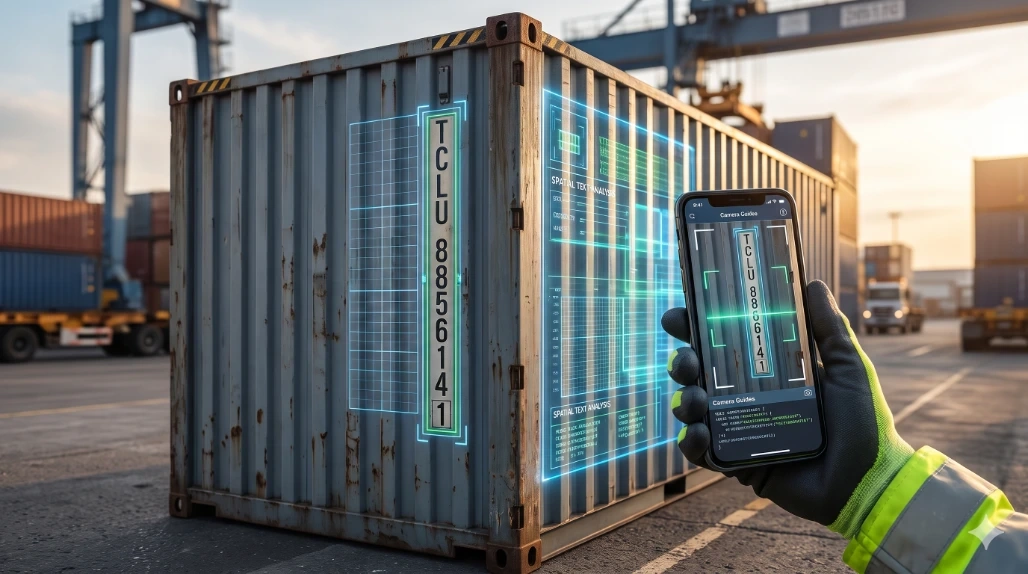
Introduction
Building software for real-world industrial environments presents challenges that go far beyond designing user interfaces or integrating APIs.
While developing a Warehouse Management System (WMS) mobile application, I encountered an interesting problem involving the automatic recognition of shipping container identification numbers.
Shipping containers carry standardized identification codes defined by ISO 6346. These codes are essential for tracking containers across warehouses, freight terminals, transportation networks and international logistics operations.
Although barcode scanning and conventional Optical Character Recognition (OCR) work effectively in many scenarios, identifying container numbers from physical container markings introduces several challenges:
Container identification numbers can be printed vertically.
Adjacent size and type markings can interfere with OCR recognition.
Characters may have inconsistent spacing, orientation and visibility.
Industrial lighting and camera positioning can affect recognition accuracy.
Mobile applications must process camera frames efficiently without introducing unnecessary latency.
To address these challenges, I developed a custom container recognition pipeline using Flutter, Google ML Kit Text Recognition, image rotation strategies, spatial text analysis and ISO 6346 mathematical validation.
This article explores the engineering decisions, algorithms and implementation techniques behind that solution.
1. Understanding the Problem: Why Standard OCR Is Not Enough
A typical shipping container identification number follows this structure:
Example: TCLU8856141
It consists of:
Component | Description | Example |
|---|
Owner Code | Three alphabetic characters | TCU |
Equipment Category | One alphabetic character | U |
Serial Number | Six numeric digits | 885614 |
Check Digit | One numeric digit | 1 |
The complete identification number contains 11 characters.
The challenge is that these markings are not always presented in a conventional horizontal text layout.
The Vertical Text Problem
Consider a container where the identification number is printed vertically:
T
C
L
U
8
8
5
6
1
4
1
Traditional OCR processing is optimized for recognizing text arranged along horizontal baselines.
When the camera captures vertically stacked characters, the recognition engine may interpret them as independent text elements instead of a complete container identifier.
This can result in:
Missing characters.
Incorrect character ordering.
Low-confidence recognition.
Incomplete container numbers.
Simply passing the original camera frame to an OCR engine is therefore not always sufficient.
The Adjacent Marking Problem
Shipping containers also display size and type codes near their identification numbers.
For example:
Container Number: TCLU8856141
Size/Type Code: 45G1
When both markings appear close together, OCR may combine characters from different columns.
A vertically printed container number could be interpreted as:
T4
C5
LG
U1
8
8
5
6
1
4
1
A naive text extraction algorithm might produce an incorrect sequence such as:
T4C5LGU18856141
The challenge is not simply recognizing individual characters. It is understanding their spatial relationships.
2. Designing a Multi-Orientation OCR Processing Engine
To address vertical text recognition, I implemented a multi-orientation OCR processing strategy.
Instead of requiring warehouse operators to rotate their mobile devices, the application processes camera frames using different image orientations.
The pipeline follows three recognition passes.
Pass 1: Native Orientation (0°)
The application first processes the camera frame using its original orientation.
This is useful when container numbers are already printed horizontally.
For example:
IAAU 193217 0
If a valid container identifier is detected, additional OCR processing can be skipped.
Pass 2: Rotated Orientation (90°)
If the first pass does not identify a valid container number, the application processes the image using a rotated orientation.
This transforms vertically arranged characters into a horizontal text sequence.
For example:
Original orientation:
T
C
L
U
8
8
5
6
1
4
1
After rotation, the OCR engine can process the characters as a conventional horizontal sequence.
This significantly improves the opportunity for the OCR engine to recognize the complete identification number.
Pass 3: Opposite Orientation (270°)
The third pass handles cases where the container marking is oriented in the opposite direction.
This is useful when the operator scans containers from different physical positions or when the identification number is printed in a bottom-to-top direction.
Implementation Concept
The following Dart example illustrates the orientation fallback approach:
final rotation90 =
    InputImageRotationValue.fromRawValue(
      (sensorOrientation + 90) % 360,
    );

if (rotation90 != null) {
  final rotatedImage = _convertCameraImage(
    image,
    overrideRotation: rotation90,
  );

  final recognizedText =
      await _textRecognizer.processImage(rotatedImage);

  final containers =
      ContainerOcrHelper.detectContainers(
    recognizedText,
    forcedVertical: true,
  );
}
The important architectural decision here is to separate image processing from container identification logic.
Google ML Kit handles text recognition, while a custom helper processes the recognized text and determines whether it represents a valid container identifier.
This separation makes the OCR pipeline easier to maintain and extend.
3. Solving OCR Column Collision Through Spatial Text Analysis
One of the most interesting parts of this implementation is the spatial analysis of recognized text.
OCR engines do not simply return strings. They also provide structural information such as:
Text blocks.
Individual lines.
Recognized elements.
Bounding boxes.
Character coordinates.
These coordinates can be used to understand how text is arranged in the original image.
I implemented multiple parsing strategies to reconstruct vertically printed container identifiers.
Strategy 1: Multi-Line First-Character Extraction
When OCR identifies multiple characters within individual lines, the application extracts the first alphanumeric character from each line.
For example:
T 4
C 5
L G
U 1
8
8
5
6
1
4
1
The algorithm extracts the first character from each line:
T
C
L
U
8
8
5
6
1
4
1
The resulting sequence becomes:
TCLU8856141
This approach helps prevent adjacent size/type markings from contaminating the container identifier.
Strategy 2: Adaptive X-Coordinate Column Grouping
Sometimes OCR splits vertically arranged characters into separate text blocks.
In this situation, extracting the first character from each line is not sufficient.
I addressed this by using bounding-box coordinates to identify text belonging to the same vertical column.
Each recognized line has a bounding box from which its horizontal center can be calculated:
centerX = (left + right) / 2
The application groups lines according to their horizontal proximity.
An adaptive grouping threshold can be calculated as:
threshold = clamp(
  0.8 * lineWidth,
  15.0,
  40.0
)
Lines belonging to the same column are grouped together.
The application then:
Calculates the horizontal center of each recognized line.
Groups lines using their X-coordinate proximity.
Sorts each group using the vertical top coordinate.
Extracts alphanumeric characters.
Reconstructs candidate container numbers.
Validates the resulting candidates.
This approach is especially useful when OCR recognition produces fragmented text blocks.
Strategy 3: Bidirectional Recognition
Vertical container markings can be read from top to bottom or bottom to top.
To handle both possibilities, the application evaluates the reconstructed character sequence in both directions.
For example:
final reversedCode =
    cleanChars.split('').reversed.join();
Both sequences are passed through the container validation pipeline.
This prevents the recognition algorithm from depending entirely on the physical reading direction.
4. Implementing ISO 6346 Mathematical Check Digit Validation
Recognizing an 11-character sequence does not automatically mean that it is a valid shipping container identifier.
The application must also validate the identifier according to ISO 6346.
This standard defines a mathematical check digit used to detect errors in container identification numbers.
Understanding the Container Identification Structure
An ISO 6346 container identification code contains:
Three owner-code letters.
One equipment-category identifier.
Six serial-number digits.
One check digit.
For example:
TCLU8856141
Position | Character | Meaning |
|---|
1–3 | TCU | Owner code |
4 | U | Equipment category |
5–10 | 885614 | Serial number |
11 | 1 | Check digit |
The recognized equipment category identifiers are:
Character Value Mapping
Each alphabetic character is assigned a numerical value.
Multiples of 11 are omitted from the sequence.
Some examples:
Character | Value |
|---|
A | 10 |
B | 12 |
C | 13 |
D | 14 |
E | 15 |
F | 16 |
G | 17 |
H | 18 |
I | 19 |
J | 20 |
K | 21 |
L | 23 |
M | 24 |
N | 25 |
O | 26 |
P | 27 |
Q | 28 |
R | 29 |
S | 30 |
T | 31 |
U | 32 |
V | 34 |
W | 35 |
X | 36 |
Y | 37 |
Z | 38 |
Numeric characters retain their corresponding numerical values.
The Mathematical Algorithm
The first ten characters are multiplied by positional weights.
The weights are powers of two:
Position:  0  1  2  3  4  5  6  7  8  9

Weight:    1  2  4  8 16 32 64 128 256 512
The weighted values are added together:
Total Sum =
Σ Value(Character[i]) × 2^i
The expected check digit is calculated using:
Check Digit =
(Total Sum % 11) % 10
Handling Missing Check Digits
An interesting practical challenge occurs when the check digit is printed inside a rectangular marking.
OCR engines may recognize the surrounding graphic but fail to extract the digit.
Instead of immediately rejecting the identifier, the application can reconstruct a candidate check digit when the first ten characters are confidently recognized.
For example:
Recognized: TCLU885614
The algorithm calculates the expected check digit:
Total Sum = 4181

4181 % 11 = 1

1 % 10 = 1
The reconstructed candidate becomes:
TCLU8856141
This technique helps recover identifiers when the final digit is missed by OCR.
However, mathematical reconstruction should not be treated as proof of physical identity. The reconstructed identifier should still be checked against the warehouse manifest or backend records.
5. OCR Sanitization and Strict Validation
OCR recognition is not always perfect.
Characters such as O, 0, I, 1, S and 5 can look similar in industrial markings.
To address these issues, I implemented position-aware character sanitization.
Alphabetic Prefix Sanitization
The first four positions represent the owner code and equipment category.
Common OCR substitutions can be corrected:
OCR Character | Expected Character |
|---|
1 | I |
0 | O |
8 | B |
5 | S |
2 | Z |
Numeric Serial Sanitization
The remaining seven positions must contain numeric characters.
Common substitutions include:
OCR Character | Expected Digit |
|---|
O, D, Q | 0 |
I, L, | | 1 |
Z | 2 |
S | 5 |
B | 8 |
The important point is that these substitutions are applied according to character position rather than globally.
For example, converting every O to 0 would corrupt legitimate alphabetic owner codes.
Strict Category Enforcement
The fourth character is validated against the recognized equipment-category identifiers.
Invalid category identifiers are rejected before mathematical validation.
This reduces false-positive results from unrelated warehouse labels, serial numbers and random OCR output.
Whitespace Normalization
The final candidate is normalized by removing unnecessary whitespace and non-alphanumeric characters.
For example:
IAAU 193217 0
Becomes:
IAAU1932170
The normalized identifier is then passed to the validation engine.
6. Building a Real-Time Barcode Scanning Engine
Container OCR is only one part of the warehouse scanning solution.
The application also supports conventional barcode scanning for cartons, inventory products and warehouse operations.
The scanner uses:
Flutter Camera.
Google ML Kit Barcode Scanning.
Real-time camera image streams.
CustomPainter for visual overlays.
Camera Frame Processing
Android camera streams can provide image data in formats such as YUV420.
Different Android manufacturers and chipsets may expose different plane layouts and row/pixel strides.
Therefore, image conversion must account for the actual camera buffer structure.
The implementation handles camera image planes and converts them into an ML Kit-compatible input format.
The objective is to minimize unnecessary memory allocations and avoid blocking the camera processing pipeline.
Real-Time Bounding Box Visualization
A barcode scanner becomes significantly more useful when operators can see exactly what the camera has detected.
I implemented a custom overlay using Flutter's CustomPainter.
The overlay maps detected barcode coordinates from camera image space to the Flutter canvas.
The transformation accounts for:
The application renders visual corner brackets and labels to indicate detected barcode information.
This improves operator feedback and makes the scanning experience more intuitive.
7. Designing a Tri-Mode Scanner State Machine
Different warehouse operations require different scanning strategies.
Running every recognition engine continuously can introduce unnecessary processing overhead.
To address this, I designed three scanner modes.
Mode 1: Both / All
This mode supports concurrent barcode and container identification workflows.
It is useful when operators need to identify different types of warehouse markings during transfer operations.
Mode 2: Container OCR
This mode prioritizes container identification.
The scanner uses the multi-orientation OCR pipeline and an expanded camera guide area to help operators align vertically printed container numbers.
Mode 3: Barcode
This mode focuses on conventional barcode recognition.
It is designed for inventory products, master cartons and inner-carton scanning.
Separating these modes makes the scanning workflow more predictable and allows processing to be optimized according to the current warehouse operation.
8. Designing an Offline-First Warehouse Management Application
Warehouse operations cannot always depend on continuous internet connectivity.
Large warehouses, basement storage areas, remote depots and container yards can experience unreliable network coverage.
For this reason, I designed the mobile application with offline capabilities.
Local Data Caching
The application caches important operational information, including:
The implementation uses SharedPreferences for lightweight local persistence through the offline putaway service.
This allows operators to access previously synchronized information even when network connectivity is unavailable.
Offline Transaction Handling
Warehouse operators should not lose their work simply because an internet connection disappears.
The application supports local persistence for pending putaway operations.
When connectivity becomes available again, the synchronization service can process pending transactions and submit them to the backend API.
Event-Driven Connectivity Monitoring
The application listens to connectivity changes using connectivity_plus.
When the network transitions from disconnected to a potentially available connection, the application triggers synchronization.
The overall workflow is:
Warehouse Operation
        |
        v
Is Network Available?
        |
   +----+----+
   |         |
  Yes        No
   |         |
   v         v
Backend    Local Storage
API             |
   |            |
   v            v
Confirm      Pending Queue
Operation       |
                |
                v
          Network Returns
                |
                v
          Background Sync
                |
                v
          Backend API
Connectivity detection alone does not guarantee backend availability. Production synchronization should also handle API timeouts, retries, duplicate submissions and server-side transaction validation.
The goal is to make warehouse operations less dependent on network availability.
9. Implementing Enterprise Warehouse Workflows
Beyond scanning, the application supports important warehouse management operations.
Inbound Operations
The inbound workflow manages incoming shipments and product receiving.
The process includes:
Fetching incoming Advanced Shipment Notices (ASNs).
Reviewing shipment details.
Retrieving associated product line items.
Recording received quantities.
Validating master and inner packaging.
Assigning products to pallet locations.
Relevant API endpoints include:
/api/getasn
/api/getasnproduct
/api/add_product
/api/put_product
Putaway Operations
Putaway is the process of assigning received inventory to appropriate warehouse storage locations.
The application allows operators to associate scanned products with pallet identifiers and warehouse bins.
This helps maintain a structured relationship between physical inventory and warehouse storage locations.
Outbound and Stock Transfer Operations
The application also supports internal and external Stock Transfer Notes.
The workflow includes:
Selecting the relevant STN.
Retrieving expected transfer items.
Displaying the expected container or carton identifier.
Scanning physical items.
Comparing scanned identifiers against the transfer manifest.
Confirming valid matches.
Rejecting unexpected items.
Manifest-Based Validation
For example:
Expected Container: CMAU5275793
Scanned Container:  CMAU5275793
When the scanned identifier matches the expected manifest, the application displays a successful validation response.
Unexpected identifiers trigger a warning.
This provides an additional verification layer before warehouse transfer operations are completed.
The application also handles different backend response statuses to route operators through the appropriate workflow, including inner-carton verification and transfer completion.
10. Android Production Build Considerations
Developing a production-grade Flutter application also requires attention to Android build configuration.
During development, I addressed Kotlin incremental compilation issues that can occur in Windows environments when project files and dependency caches reside on different drives.
The following configuration was used:
kotlin.incremental=false
kotlin.incremental.useClasspathSnapshot=false
I also configured ProGuard and R8 rules to preserve relevant ML Kit classes during release optimization.
Example:
-keep class com.google.mlkit.vision.** { *; }
-dontwarn com.google.mlkit.vision.text.chinese.**
-dontwarn com.google.mlkit.vision.text.devanagari.**
-dontwarn com.google.mlkit.vision.text.japanese.**
-dontwarn com.google.mlkit.vision.text.korean.**
Production builds are generated using Flutter's release build process:
flutter pub get

flutter build apk --release --no-tree-shake-icons
The final application is intended to run on Android devices used by warehouse operators.
11. Technology Stack
The project combines Flutter mobile development, on-device machine learning and enterprise API integration.
Technology | Purpose |
|---|
Flutter | Cross-platform mobile application framework |
Dart | Application development language |
Google ML Kit Text Recognition | Container number OCR |
Google ML Kit Barcode Scanning | Barcode detection |
Camera | Live camera frame processing |
CustomPainter | Scanner overlays and bounding boxes |
Connectivity Plus | Network connectivity monitoring |
SharedPreferences | Lightweight local persistence |
HTTP | REST API communication |
Geolocator | Location tracking |
Permission Handler | Runtime permissions |
Intl | Date and time formatting |
12. Key Engineering Lessons
Working on this application reinforced several important engineering principles.
1. Real-world problems require more than library integration.
Integrating an OCR SDK is relatively straightforward. Building a reliable recognition pipeline around industrial markings requires additional processing, validation and error handling.
2. Spatial information is as important as recognized text.
OCR output should not always be treated as a plain string. Bounding boxes, line positions and coordinate relationships can provide valuable information for reconstructing fragmented text.
3. Mathematical validation improves recognition reliability.
ISO 6346 check digit validation provides a deterministic mechanism for detecting many incorrect container identifiers.
4. Mobile applications must be designed for unreliable environments.
Offline capabilities are particularly important in warehouse environments where continuous connectivity cannot be guaranteed.
5. Performance and usability must be considered together.
Camera processing, image conversion, OCR execution and visual feedback must be coordinated to provide a practical scanning experience.
13. Future Engineering Improvements
There are several opportunities to take this solution further.
Potential improvements include:
Confidence-based OCR candidate ranking.
Region-of-interest detection before OCR execution.
Adaptive image enhancement for low-light environments.
Persistent transactional offline queues using SQLite.
Idempotent synchronization and conflict resolution.
Background synchronization with WorkManager.
Performance benchmarking across different Android chipsets.
OCR accuracy evaluation using a labeled container-image dataset.
Server-side manifest verification and audit logging.
These improvements would help make the scanning and synchronization pipeline even more reliable at enterprise scale.
Conclusion
Building an intelligent Warehouse Management System requires understanding both software engineering and the physical environment in which the application operates.
The most challenging part of this project was not simply integrating Google ML Kit or implementing a barcode scanner. It was designing additional intelligence around the recognition process to handle vertical text, adjacent markings, fragmented OCR output and standardized container identification rules.
By combining Flutter, Google ML Kit, multi-orientation image processing, spatial text analysis and ISO 6346 validation, I developed a specialized approach to container identification for warehouse operations.
The project also demonstrates how offline-first architecture, barcode scanning, manifest validation and warehouse workflow automation can come together in a single mobile application.
My biggest takeaway: Good engineering is not just about using the right technology. It is about understanding the real-world problem deeply enough to build a solution that works under real operating conditions.


Join the conversation! Your thoughts help the community grow.