

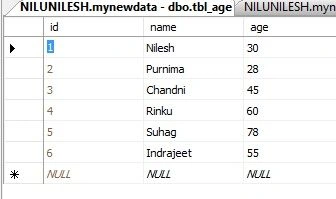
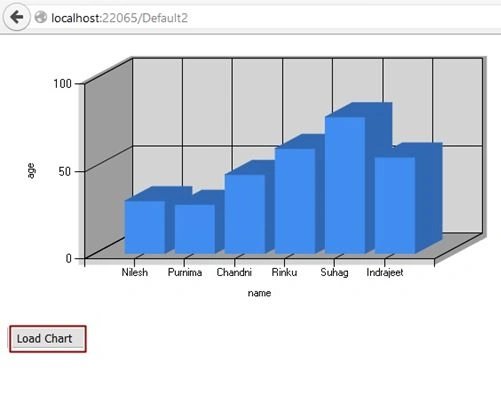
We take a chart between name and age and bind that data to our chart control.
Initial chamber
Step 1: Open Visual Studio 2010 and create an empty Website. Give a suitable name [ChartControl_demo].
Step 2: In Solution Explorer you get your empty website, Add a web form and SQL Database. By going like this –
For Web Form:
ChartControl_demo (Your Empty Website) - Right Click, Add New Item, then Web Form and name it ChartControl_demo.aspx.
For SQL Server Database:
ChartControl_demo (Your Empty Website) - Right Click, Add New Item, SQL Server Database and add Database inside the App_Data_folder.
Database chamber
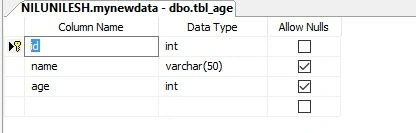
Step 3: In Server Explorer, click on your database [Database.mdf] - Tables, Add New Table and make table like the following:
Table - tbl_age [Don’t Forget to make ID as IS Identity -- True].
Show table data:
Design chamber
Step 4: Open ChartControl_demo.aspx file from the Solution Explorer and start designing your Application:
Here is the Code:
- <%@ Page Language="C#" AutoEventWireup="true" CodeFile="Default2.aspx.cs" Inherits="Default2" %>
- <%@ Register Assembly="System.Web.DataVisualization, Version=4.0.0.0, Culture=neutral, PublicKeyToken=31bf3856ad364e35" Namespace="System.Web.UI.DataVisualization.Charting" TagPrefix="asp" %>
- <!DOCTYPE html>
- <html xmlns="http://www.w3.org/1999/xhtml">
- <head runat="server">
- <title></title>
- </head>
- <body>
- <form id="form1" runat="server">
- <div>
- <asp:Chart ID="Chart1" runat="server" Palette="None" AntiAliasing="Graphics" Width="563px">
- <Series>
- <%-- <asp:Series ChartArea="ChartArea1" IsValueShownAsLabel="True" Name="Series1">
- </asp:Series>--%>
- </Series>
- <ChartAreas>
- <asp:ChartArea Name="ChartArea1">
- <AxisX Title ="name"></AxisX>
- <AxisY Title ="age"></AxisY>
- <Area3DStyle Enable3D="true" LightStyle="Realistic" />
- </asp:ChartArea>
- </ChartAreas>
- </asp:Chart>
- </div>
- <p>
- <asp:Button ID="Button1" runat="server" OnClick="Button1_Click" Text="Load Chart " />
- </p>
- </form>
- </body>
- </html>
At last open your ChartControl_demo.aspx.cs file to write the code for making the 3D Chart like we assumed.
Here is the code:
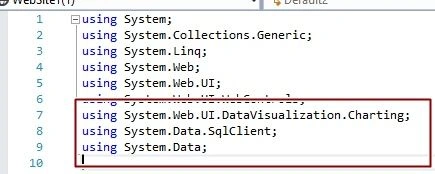
Add these Namespaces:
- using System;
- using System.Collections.Generic;
- using System.Linq;
- using System.Web;
- using System.Web.UI;
- using System.Web.UI.WebControls;
- using System.Web.UI.DataVisualization.Charting;
- using System.Data.SqlClient;
- using System.Data;
- public partial class Default2 : System.Web.UI.Page
- {
- protected void Page_Load(object sender, EventArgs e)
- {
- }
- protected void Button1_Click(object sender, EventArgs e)
- {
- SqlConnection con = new SqlConnection(@"Data Source=NiluNilesh;Initial Catalog=mynewdata;Integrated Security=True");
- con.Open();
- SqlCommand cmd = new SqlCommand("select name, age from tbl_age", con);
- SqlDataReader sdr = cmd.ExecuteReader();
- Chart1.DataBindTable(sdr, "name");
- }
- }
Hope you like it. Thank you for Reading. Have a good Day.
Arul RPosted Oct 28, 2015, 5:32 AM
Good one !!!
Santhakumar MunuswamyPosted Oct 6, 2015, 12:01 AM
Nice Share
Sumit JoshiPosted Oct 3, 2015, 4:33 PM
thanks for sharing.
Nilesh JadavPosted Oct 3, 2015, 12:00 PM
Thank you Rakesh Chavda
RakeshPosted Oct 3, 2015, 10:24 AM
Good one