

In this article, I am going to show, "How to bind a Repeater control to a List<> in Visual Studio 2008."
A Repeater control is a light weight templated data-bound list. It has no built-in selection, editing, layout or formatting capabilities. Thus, if you need the capabilities like paging, then you need to build it explicitly for your applications.
Let us create a List<>.
Right click on the project > Add New Item > Choose 'Class' from the Templates and type the name as 'EmployeeList' and finally, click OK.
The EmployeeList.cs will be as:
using System;
using System.Collections.Generic;
using System.Linq;
using System.Web;
public class EmployeeList
{
static EmployeeList()
{
emplst = new List<Employee>();
emplst.Add(new Employee() { EmpID = 1, DeptID = 1, EmpName = "Smith", Country="USA" });
emplst.Add(new Employee() { EmpID = 2, DeptID = 4, EmpName = "Adam", Country = "Japan" });
emplst.Add(new Employee() { EmpID = 3, DeptID = 3, EmpName = "Sara", Country = "China" });
emplst.Add(new Employee() { EmpID = 4, DeptID = 4, EmpName = "Ram", Country = "India" });
emplst.Add(new Employee() { EmpID = 5, DeptID = 3, EmpName = "Kalvin", Country = "UK" });
emplst.Add(new Employee() { EmpID = 6, DeptID = 2, EmpName = "Bravo", Country = "Rusia" });
emplst.Add(new Employee() { EmpID = 7, DeptID = 1, EmpName = "Awesalk", Country = "Japan" });
emplst.Add(new Employee() { EmpID = 8, DeptID = 1, EmpName = "MKargo", Country = "SA" });
emplst.Add(new Employee() { EmpID = 9, DeptID = 1, EmpName = "MSweden", Country = "USA" });
}
public static List<Employee> emplst { get; set; }
}
public class Employee
{
public int EmpID { get; set; }
public int DeptID { get; set; }
public string EmpName { get; set; }
public string Country { get; set; }
}
The Default.aspx will be:
<%@ Page Language="C#" AutoEventWireup="true" CodeFile="Default.aspx.cs" Inherits="_Default" %>
<!DOCTYPE html PUBLIC "-//W3C//DTD XHTML 1.0 Transitional//EN" "http://www.w3.org/TR/xhtml1/DTD/xhtml1-transitional.dtd">
<html xmlns="http://www.w3.org/1999/xhtml">
<head runat="server">
<title></title>
</head>
<body>
<form id="form1" runat="server">
<div>
<table cellpadding="0" cellspacing="0" width="40%" align="center" border="2">
<tr>
<td>
<asp:Repeater ID="rptEmployee" runat="server">
<HeaderTemplate>
<table>
<tr>
<th width="100px" align="center">
EmployeeID
</th>
<th width="100px" align="center">
DepartmentID
</th>
<th width="100px" align="center">
Name
</th>
<th width="100px" align="center">
Country
</th>
</tr>
</table>
</HeaderTemplate>
<ItemTemplate>
<table>
<tr>
<td width="100px" align="center">
<%# ((Employee)Container.DataItem).EmpID %>
</td>
<td width="100px" align="center">
<%# ((Employee)Container.DataItem).DeptID %>
</td>
<td width="100px" align="center">
<%# ((Employee)Container.DataItem).EmpName %>
</td>
<td width="100px" align="center">
<%# ((Employee)Container.DataItem).Country %>
</td>
</tr>
</table>
</ItemTemplate>
<FooterTemplate>
</table><br />
</FooterTemplate>
</asp:Repeater>
</td>
</tr>
</table>
</div>
</form>
</body>
</html>
The Default.aspx.cs is:
using System;
using System.Collections.Generic;
using System.Linq;
using System.Web;
using System.Web.UI;
using System.Web.UI.WebControls;
public partial class _Default : System.Web.UI.Page
{
protected void Page_Load(object sender, EventArgs e)
{
rptEmployee.DataSource = EmployeeList.emplst;
rptEmployee.DataBind();
}
}
When you run the application, the result will be:
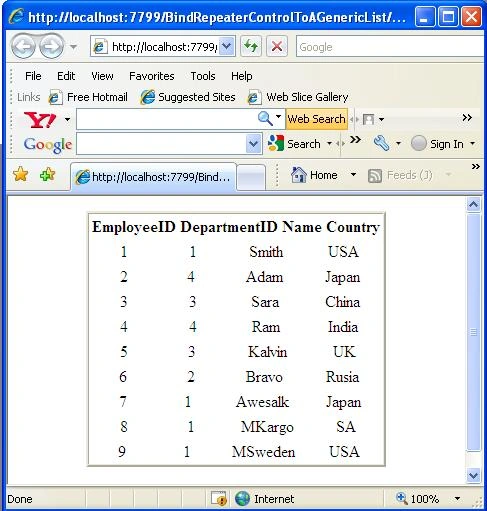
Image 1.
Join the conversation! Your thoughts help the community grow.