

Introduction
In my previous articles I told you about:
- How to Bind TextBox in various Ways Through Knockout in MVC
- How to Bind Password and Multi Line TextBox Through Knockout in MVC
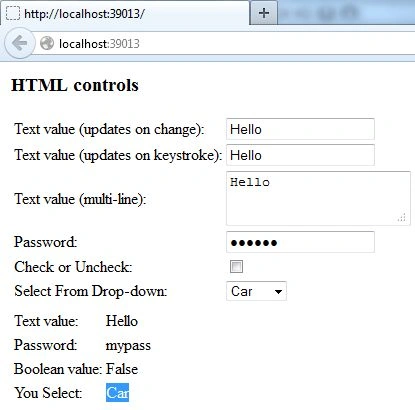
In this article I will tell you how to can bind a Checkbox and a Dropdown Menu using Knockout in MVC.
Step 1
We are working from the previous application so you don't need to make changes in the previous settings of the application.
First of all we will work on the Model Class of our application. So, add this code in the Model Class:
public bool Bool { get; set; }
public List<string> Options { get; set; }
public string DefaultSelected { get; set; }
Here I had created a Boolean Variable "Bool", after that I created a list of strings "Options", then finally I created another variable named "DefaultSelected". So after adding this code to the existing code your complete code will be like this:
using System.Web;
using PerpetuumSoft.Knockout;
using PerpetuumSoft;
using DelegateDecompiler;
using System.ComponentModel;
using System.ComponentModel.DataAnnotations;
using System.ComponentModel.DataAnnotations.Schema;
namespace MvcApplication20.Models
{
public class Class1
{
public string StringValue { get; set; }
public string PasswordValue { get; set; }
public bool Bool { get; set; }
public List<string> Options { get; set; }
public string DefaultSelected { get; set; }
}
}
Step 2
Now we will move on to the Controller class of our application and will add some code in this class also. Write this code in the Controller Class:
Bool = true,
Options = new List<string> { "Car", "Bike", "Cycle" },
DefaultSelected = "Bike"
Since in the Model I used a Boolean Variable here in this class I had declared a value of "Bool=True", so it will remain True by default.
Next I had passed a list of options in the variable "options". After that I passed an option as the default option under the variable DefaultSelected.
Now your complete code will be like this:
using PerpetuumSoft.Knockout;
namespace MvcApplication20.Controllers
{
public class HomeController : Controller
{
public ActionResult Index()
{
var model = new Class1
{
StringValue = "Hello",
PasswordValue = "mypass",
Bool = true,
Options = new List<string> { "Car", "Bike", "Cycle" },
DefaultSelected = "Bike"
};
return View(model);
}
}
}
Step 3
Now we will move to the View Class of our application. Here in this class Controls and their Bindind will be created.
You can update your previous code with this code:
<script src="~/Scripts/knockout-2.3.0.js"></script>
<script src="~/Scripts/knockout.mapping-latest.js"></script>
<script src="~/Scripts/perpetuum.knockout.js"></script>
@using PerpetuumSoft.Knockout
@model MvcApplication20.Models.Class1
@{
var ko = Html.CreateKnockoutContext();
}
<table id="maintable">
<tr>
<td>
<h3>HTML controls</h3>


Join the conversation! Your thoughts help the community grow.