

Introduction
Today we will learn how to bind JSON data to JQWidget, JQX Grid.
Downloads
Download the source files here.
Background
If you are new to JQWidget JQX Grid, please see here.
Using the code
Here I will use Visual Studio 2012. We will have a text file with the JSON data. You can use this file or you can manually load JSON data from the server side.
So let us start
First of all we must include the necessary files for the grid as in the following:
- <script src="jquery-1.9.1.js"></script>
- <script type="text/javascript" src="JQXItems/jqwidgets/jqxcore.js"></script>
- <script type="text/javascript" src="JQXItems/jqwidgets/jqxdata.js"></script>
- <script type="text/javascript" src="JQXItems/jqwidgets/jqxbuttons.js"></script>
- <script type="text/javascript" src="JQXItems/jqwidgets/jqxscrollbar.js"></script>
- <script type="text/javascript" src="JQXItems/jqwidgets/jqxlistbox.js"></script>
- <script type="text/javascript" src="JQXItems/jqwidgets/jqxdropdownlist.js"></script>
- <script type="text/javascript" src="JQXItems/jqwidgets/jqxmenu.js"></script>
- <script type="text/javascript" src="JQXItems/jqwidgets/jqxgrid.js"></script>
- <script type="text/javascript" src="JQXItems/jqwidgets/jqxgrid.filter.js"></script>
- <script type="text/javascript" src="JQXItems/jqwidgets/jqxgrid.sort.js"></script>
- <script type="text/javascript" src="JQXItems/jqwidgets/jqxgrid.selection.js"></script>
- <script type="text/javascript" src="JQXItems/jqwidgets/jqxgrid.pager.js"></script>
- <script type="text/javascript" src="JQXItems/jqwidgets/jqxgrid.columnsresize.js"></script>
- <script type="text/javascript" src="JQXItems/jqwidgets/jqxgrid.columnsreorder.js"></script>
- <script type="text/javascript" src="JQXItems/jqwidgets/jqxgrid.export.js"></script>
- <script type="text/javascript" src="JQXItems/jqwidgets/jqxdata.export.js"></script>
- <script type="text/javascript" src="JQXItems/jqwidgets/jqxdatatable.js"></script>
- <link href="JQXItems/jqwidgets/styles/jqx.base.css" rel="stylesheet" />
- <script type="text/javascript">
- $(document).ready(function ()
- {
- // prepare the data
- var data =
- {
- datatype: "json",
- datafields: [{ "name": "AreaCode", "type": "string" }, { "name": "Revenue", "type": "number" }],
- //id: 'id',
- url: "jsonData.txt"
- };
- $("#jqxgrid").jqxGrid(
- {
- source: data,
- columns: [{ "text": "Area Code", "dataField": "AreaCode", "cellsalign": "left", "cellsformat": "d" }, { "text": "Revenue", "dataField": "Revenue", "cellsalign": "right", "cellsformat": "c2" }],
- pageable: true,
- filterable: true,
- sortable: true
- });
- });
- </script>
- <h2>Bind Json Data to JQwidgets JQX grid - Sibeesh Passion</h2>
- <div id="jqxgrid"></div>
What about our data? We have not seen our data, right?
- [{"AreaCode":"B697-31","Revenue":12747128.190000001},{"AreaCode":"B697-92","Revenue":7922559.1600000048},{"AreaCode":"B697-76","Revenue":7541039.540000001},{"AreaCode":"B697-46","Revenue":7076495.5800000066},{"AreaCode":"B553-131","Revenue":5738816.5099999979},{"AreaCode":"B553-193","Revenue":4608556.52},{"AreaCode":"B697-74","Revenue":3895194.1099999994},{"AreaCode":"D158-233","Revenue":3572808.989999996},{"AreaCode":"B697-78","Revenue":3512657.6999999937},{"AreaCode":"B672-31","Revenue":2955916.9800000032},{"AreaCode":"B553-46","Revenue":2806813.7100000042}]
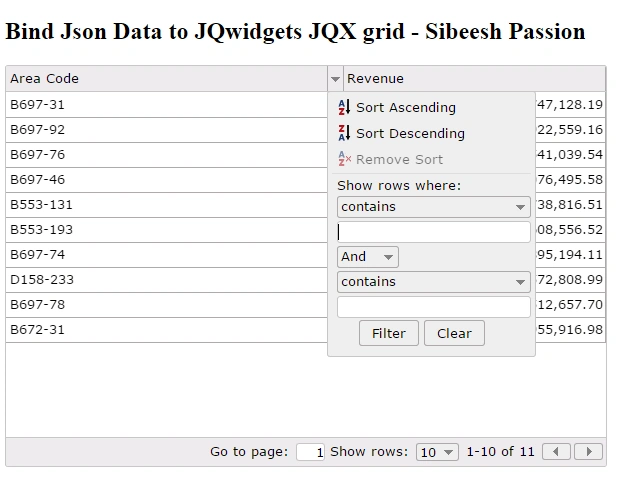
All set now. So shall we see the grid now?
Output
Things to remember
Make sure that your data type is JSON in source object.
- datatype: "json"
Conclusion
I hope you will like this article. Please share with me your valuable thoughts and comments. Your feedback is always welcomed.
Thanks in advance. Happy coding!
Sibeesh VenuPosted Jun 19, 2015, 1:00 AM
Santhakumar Munuswamy Thank you :)
Sibeesh VenuPosted Jun 19, 2015, 1:00 AM
Rakesh Chavda Thank you :)
Santhakumar MunuswamyPosted Jun 18, 2015, 2:23 PM
Thanks for Nice one
RakeshPosted Jun 18, 2015, 9:45 AM
Good one