

Introduction
This is part 2 of the article. It focuses on consuming the .NET Core API created in part 1, and binding the data in our Blazor app. By the end of the article, we will have a fully functional Blazor site with Add/Edit and Delete features.
Prerequisites
This article assumes you have a basic working knowledge of Blazor web assembly and .NET Core.
Read my previous article on Blazor Web Assembly 3.2 Add/Edit/Delete Fully Functional Application-Part 1
We will be consuming the .NET Core API created in the first part to bind in our Blazor client app.
Through this article, we will cover the following topics:
- Create and register data service in Blazor to consume a .NET Core API.
- Creating Blazor razor pages and data binding.
- Creating a custom Blazor component for Add Employee.
Output
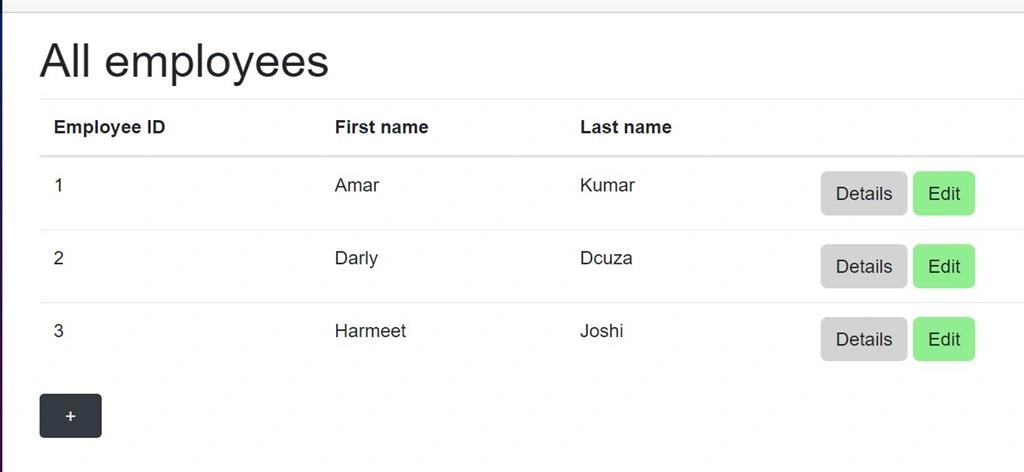
Employee Home Page
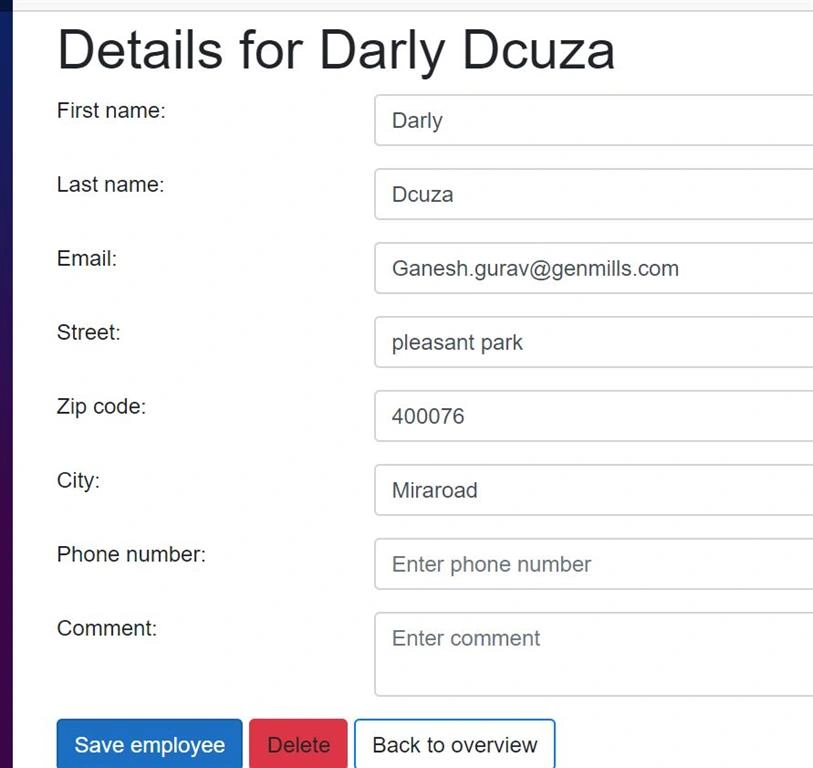
Employee Detail Page
Implementation
Step 1 - Create and register data service in Blazor to consume .NET Core API
Create a new folder service in EmployeePortal.Client and add IEmployeeDataService.
This will contain a definition of all the methods to be used in EmployeeDataService.
IEmployeeDataService
- public interface IEmployeeDataService {
- Task < IEnumerable < Employee >> GetAllEmployees();
- Task < Employee > AddEmployee(Employee employee);
- Task < Employee > GetEmployeeDetails(int employeeId);
- Task UpdateEmployee(Employee employee);
- Task DeleteEmployee(int employeeId);
- }
EmployeeDataService
- public class EmployeeDataService: IEmployeeDataService {
- private readonly HttpClient _httpClient;
- public EmployeeDataService(HttpClient httpClient) {
- _httpClient = httpClient;
- }
- public async Task < IEnumerable < Employee >> GetAllEmployees() {
- return await JsonSerializer.DeserializeAsync < IEnumerable < Employee >> (await _httpClient.GetStreamAsync($ "api/employee"), new JsonSerializerOptions() {
- PropertyNameCaseInsensitive = true
- });
- }
- public async Task < Employee > AddEmployee(Employee employee) {
- var employeeJson = new StringContent(JsonSerializer.Serialize(employee), Encoding.UTF8, "application/json");
- var response = await _httpClient.PostAsync($ "api/employee", employeeJson);
- if (response.IsSuccessStatusCode) {
- return await JsonSerializer.DeserializeAsync < Employee > (await response.Content.ReadAsStreamAsync());
- }
- return null;
- }
- public async Task < Employee > GetEmployeeDetails(int employeeId) {
- return await JsonSerializer.DeserializeAsync < Employee > (await _httpClient.GetStreamAsync($ "api/employee/{employeeId}"), new JsonSerializerOptions() {
- PropertyNameCaseInsensitive = true
- });
- }
- public async Task UpdateEmployee(Employee employee) {
- var employeeJson = new StringContent(JsonSerializer.Serialize(employee), Encoding.UTF8, "application/json");
- await _httpClient.PutAsync("api/employee", employeeJson);
- }
- public async Task DeleteEmployee(int employeeId) {
- await _httpClient.DeleteAsync($ "api/employee/{employeeId}");
- }
- }
Register EmployeeDataService and IEmployeeDataService in program.cs of cllient app
builder.Services.AddHttpClient<IEmployeeDataService, EmployeeDataService>(client => client.BaseAddress = new Uri(builder.HostEnvironment.BaseAddress));
Step 2 - Creating Blazor razor pages and data binding
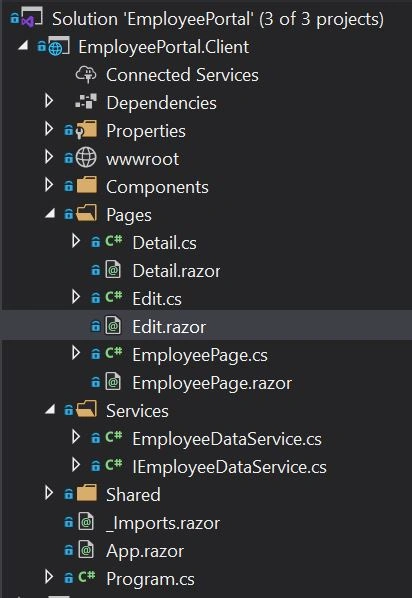
Add a new Razor component and EmployeePage class inside the pages folder.
EmployeePage.cs
- public partial class EmployeePage: ComponentBase {
- public IEnumerable < EmployeePortal.Shared.Employee > Employees {
- get;
- set;
- }
- [Inject]
- public IEmployeeDataService EmployeeDataService {
- get;
- set;
- }
- public AddEmployeeDialog AddEmployeeDialog {
- get;
- set;
- }
- protected async override Task OnInitializedAsync() {
- Employees = (await EmployeeDataService.GetAllEmployees()).ToList();
- }
- protected void QuickAddEmployee() {
- AddEmployeeDialog.Show();
- }
- public async void AddEmployeeDialog_OnDialogClose() {
- Employees = (await EmployeeDataService.GetAllEmployees()).ToList();
- StateHasChanged();
- }
- }
Employee page class will inherit from the Component base.
OnInitializedAsync will be called when the componenet is been Initialized and we would call GetAllEmployees at this point in time.
IEmployeeDataService needs to be injected to call the GetAllEmployees method.
Employeerazor
- @page "/"
- @using EmployeePortal.Client.Components;
- <h1 class="page-title">All employees</h1>
- @if (Employees == null)
- {
- <p>
- <em>Loading...</em>
- </p>
- }
- else
- {
- <table class="table">
- <thead>
- <tr>
- <th>Employee ID</th>
- <th>First name</th>
- <th>Last name</th>
- <th></th>
- </tr>
- </thead>
- <tbody>
- @foreach (var employee in Employees)
- {
- <tr>
- <td>@employee.EmployeeId</td>
- <td>@employee.FirstName</td>
- <td>@employee.LastName</td>
- <td>
- <a href="@($"detail/{employee.EmployeeId}")" class="btn btn-primary-details table-btn">
- <i class="fas fa-info-circle"></i>
- Details
- </a>
- <a Edit href="@($"edit/{employee.EmployeeId}")" class="btn btn-primary-edit table-btn">
- <i class="fas fa-edit"></i>
- Edit
- </a>
- </td>
- </tr>
- }
- </tbody>
- </table>
- }
- <button @onclick="QuickAddEmployee" class="btn btn-dark table-btn quick-add-btn"> + </button>
- <AddEmployeeDialog @ref="AddEmployeeDialog" CloseEventCallback="@AddEmployeeDialog_OnDialogClose"></AddEmployeeDialog>
@page "/" directive specifies this is the default page when blazor application is loaded.
Import Employee models from shared EmployeePortal.Shared
Since we are using aync call to load employee data, we need to check if the Employees object is null before binding.
Add a new class for Detail.
- public partial class Detail {
- [Parameter]
- public string EmployeeId {
- get;
- set;
- }
- public EmployeePortal.Shared.Employee Employee {
- get;
- set;
- }
- [Inject]
- public NavigationManager NavigationManager {
- get;
- set;
- }
- [Inject]
- public IEmployeeDataService EmployeeDataService {
- get;
- set;
- }
- protected async override Task OnInitializedAsync() {
- Employee = await EmployeeDataService.GetEmployeeDetails(int.Parse(EmployeeId));
- }
- protected void NavigateToOverview() {
- NavigationManager.NavigateTo("/");
- }
- }
Add a new razor component for Detail.razor.
- @page "/detail/{EmployeeId}"
- @if (@Employee == null)
- {
- <p>
- <em>Loading...</em>
- </p>
- }
- else
- {
- <section class="employee-detail">
- <h1 class="page-title">Details for @Employee.FirstName @Employee.LastName</h1>
- <div class="col-12 row">
- <div class="col-10 row">
- <div class="col-xs-12 col-sm-8">
- <div class="form-group row">
- <label class="col-sm-4 col-form-label">Employee ID</label>
- <div class="col-sm-8">
- <label type="text" class="form-control-plaintext">@Employee.EmployeeId</label>
- </div>
- </div>
- <div class="form-group row">
- <label class="col-sm-4 col-form-label">First name</label>
- <div class="col-sm-8">
- <label type="text" readonly class="form-control-plaintext">@Employee.FirstName</label>
- </div>
- </div>
- <div class="form-group row">
- <label class="col-sm-4 col-form-label">Last name</label>
- <div class="col-sm-8">
- <label type="text" readonly class="form-control-plaintext">@Employee.LastName</label>
- </div>
- </div>
- <div class="form-group row">
- <label class="col-sm-4 col-form-label">Email</label>
- <div class="col-sm-8">
- <label type="text" readonly class="form-control-plaintext">@Employee.Email</label>
- </div>
- </div>
- <div class="form-group row">
- <label class="col-sm-4 col-form-label">Street</label>
- <div class="col-sm-8">
- <label type="text" readonly class="form-control-plaintext">@Employee.Street</label>
- </div>
- </div>
- <div class="form-group row">
- <label class="col-sm-4 col-form-label">Zip</label>
- <div class="col-sm-8">
- <label type="text" readonly class="form-control-plaintext">@Employee.Zip</label>
- </div>
- </div>
- <div class="form-group row">
- <label class="col-sm-4 col-form-label">City</label>
- <div class="col-sm-8">
- <label type="text" readonly class="form-control-plaintext">@Employee.City</label>
- </div>
- </div>
- <div class="form-group row">
- <label class="col-sm-4 col-form-label">Phone number</label>
- <div class="col-sm-8">
- <label type="text" readonly class="form-control-plaintext">@Employee.PhoneNumber</label>
- </div>
- </div>
- </div>
- </div>
- </div>
- <a class="btn btn-outline-primary" @onclick="@NavigateToOverview">Back to overview</a>
- </section>
- }
Create a new Edit class.
- public partial class Edit {
- [Inject]
- public IEmployeeDataService EmployeeDataService {
- get;
- set;
- }
- [Parameter]
- public string EmployeeId {
- get;
- set;
- }
- [Inject]
- public NavigationManager NavigationManager {
- get;
- set;
- }
- public EmployeePortal.Shared.Employee Employee {
- get;
- set;
- }
- //used to store state of screen
- protected string Message = string.Empty;
- protected string StatusClass = string.Empty;
- protected bool Saved;
- protected override async Task OnInitializedAsync() {
- Saved = false;
- int.TryParse(EmployeeId, out
- var employeeId);
- if (employeeId == 0) //new employee is being created
- {
- Employee = new Employee {};
- } else {
- Employee = await EmployeeDataService.GetEmployeeDetails(int.Parse(EmployeeId));
- }
- }
- protected async Task HandleValidSubmit() {
- Saved = false;
- if (Employee.EmployeeId == 0) {
- var addedEmployee = await EmployeeDataService.AddEmployee(Employee);
- if (addedEmployee != null) {
- StatusClass = "alert-success";
- Message = "New employee added successfully.";
- Saved = true;
- } else {
- StatusClass = "alert-danger";
- Message = "Something went wrong adding the new employee. Please try again.";
- Saved = false;
- }
- } else {
- await EmployeeDataService.UpdateEmployee(Employee);
- StatusClass = "alert-success";
- Message = "Employee updated successfully.";
- Saved = true;
- }
- }
- protected void HandleInvalidSubmit() {
- StatusClass = "alert-danger";
- Message = "There are some validation errors. Please try again.";
- }
- protected async Task DeleteEmployee() {
- await EmployeeDataService.DeleteEmployee(Employee.EmployeeId);
- StatusClass = "alert-success";
- Message = "Deleted successfully";
- Saved = true;
- }
- protected void NavigateToOverview() {
- NavigationManager.NavigateTo("/");
- }
- }
Add a new razor component Edit.razor
- @page "/edit/{EmployeeId}"
- @using EmployeePortal.Shared;
- @if (Employee == null)
- {
- <p>
- <em>Loading...</em>
- </p>
- }
- else
- {
- @if (!Saved)
- {
- <section class="employee-edit">
- <h1 class="page-title">Details for @Employee.FirstName @Employee.LastName</h1>
- <EditForm Model="@Employee" OnValidSubmit="@HandleValidSubmit"
- OnInvalidSubmit="@HandleInvalidSubmit">
- <DataAnnotationsValidator />
- <ValidationSummary></ValidationSummary>
- <div class="form-group row">
- <label for="firstName" class="col-sm-3">First name: </label>
- <InputText id="firstName" class="form-control col-sm-8" @bind-Value="@Employee.FirstName" placeholder="Enter first name"></InputText>
- <ValidationMessage class="offset-sm-3 col-sm-8" For="@(() => Employee.FirstName)" />
- </div>
- <div class="form-group row">
- <label for="lastName" class="col-sm-3">Last name: </label>
- <InputText id="lastName" class="form-control col-sm-8" @bind-Value="@Employee.LastName" placeholder="Enter last name"></InputText>
- <ValidationMessage class="offset-sm-3 col-sm-8" For="@(() => Employee.LastName)" />
- </div>
- <div class="form-group row">
- <label for="email" class="col-sm-3">Email: </label>
- <InputText id="email" class="form-control col-sm-8" @bind-Value="@Employee.Email" placeholder="Enter email"></InputText>
- <ValidationMessage class="offset-sm-3 col-sm-8" For="@(() => Employee.Email)" />
- </div>
- <div class="form-group row">
- <label for="street" class="col-sm-3">Street: </label>
- <InputText id="street" class="form-control col-sm-8" @bind-Value="@Employee.Street" placeholder="Enter street"></InputText>
- </div>
- <div class="form-group row">
- <label for="zip" class="col-sm-3">Zip code: </label>
- <InputText id="zip" class="form-control col-sm-8" @bind-Value="@Employee.Zip" placeholder="Enter zip code"></InputText>
- </div>
- <div class="form-group row">
- <label for="city" class="col-sm-3">City: </label>
- <InputText id="city" class="form-control col-sm-8" @bind-Value="@Employee.City" placeholder="Enter city"></InputText>
- </div>
- <div class="form-group row">
- <label for="phonenumber" class="col-sm-3">Phone number: </label>
- <InputText id="phonenumber" class="form-control col-sm-8" @bind-Value="@Employee.PhoneNumber" placeholder="Enter phone number"></InputText>
- </div>
- <div class="form-group row">
- <label for="comment" class="col-sm-3">Comment: </label>
- <InputTextArea id="comment" class="form-control col-sm-8" @bind-Value="@Employee.Comment" placeholder="Enter comment"></InputTextArea>
- <ValidationMessage class="offset-sm-3 col-sm-8" For="@(() => Employee.Comment)" />
- </div>
- <button type="submit" class="btn btn-primary edit-btn">Save employee</button>
- <a class="btn btn-danger" @onclick="@DeleteEmployee">
- Delete
- </a>
- <a class="btn btn-outline-primary" @onclick="@NavigateToOverview">Back to overview</a>
- </EditForm>
- </section>
- }
- else
- {
- <div class="alert @StatusClass">@Message</div>
- }
- }
Run the application on your local machine.
You will able to see a list of employees and also able to Edit and Delete using our UI.
Step 3 - Creating a custom Blazor component to Add Employee.
We will be using a Modal pop up to allow users to add a new Employee.
This Modal pop up will be a custom Blazor component. It will have also basic validations for user input.
I had posted a dedicated article for creating and using Custom Add Employee Modal in our project.
Once the AddEmployee Component is integrated on EmployeePage we would able to add new Employee and the Employee list is refreshed with new data.
Summary
In this article, we learned how to create a fully functional Blazor web assembly app. In our next article, we will deploy this app to Azure using the PAAS model and Azure SQL to store user data.
Thanks a lot for reading. I hope you liked this article. Please share your valuable suggestions and feedback. Write in the comment box in case you have any questions. Have a good day!
Fahad MirzaPosted Aug 5, 2024, 8:57 AM
Part 1 is released on 26 Jul 2024 and this Part 2 is released on Aug 21, 2020. How did this time travel take place???
Alan WeiPosted Jul 21, 2022, 4:00 PM
Where is the code forAddEmployeeDialog, I don't see it in part 1 or part 2, thanks
Mario BockPosted Apr 20, 2021, 10:31 AM
I am looking for a solution for Blazor Webassembly with connection to an MS-SQL database 2019. I use storage procedures. This Blazor Web Assembly 3.2 article looked promising. Part 1 is great, with Part 2 I have considerable problems. Can you get the complete code as a project? Thank you for your answer..
Nathanael MattayPosted Feb 25, 2021, 4:54 PM
If I am going to have many data classes, will I have to have a separate data service and repository for every single class? Or is there a way to have a generic data service that has the same CRUD actions with a generic variable that can be used for various classes?
ian ebdaoPosted Jan 17, 2021, 8:53 AM
Im stuck in AddEmployeeDialog i can't find the code
Prasad RanePosted Oct 29, 2020, 9:17 AM
Can u copy paste part of your code here.I can have a check
Daniela SantamariaPosted Oct 28, 2020, 5:20 PM
Hi, i was wondering if you could help me. I get an CS1056 Unexpected character '$' on the EmployeeDataService, i don't know why and I can't fix it