

Introduction
In this article, I will explain how to blink an LED in Arduino Mega 2560.
Parts Of List:
- Arduino Mega 2560
- LED-3
- Bread Board
- USB Cable.
LED:
- Light Emitting Diode (LED) can emit light.
- The LED glows when the voltage is applied
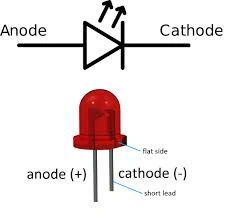
Figure 1: LED
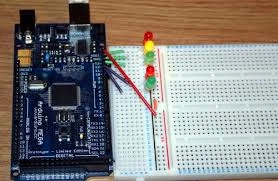
- Positive pin = 13;
- Negative pin = Gnd.
Second LED connection:
- Positive pin = 12;
- Negative pin = Gnd.
Third LED connection:
- Positive pin = 11;
- Negative pin = Gnd.
Programming:
Explanation:
- int led1 = 13;
- int led2 = 12;
- int led3 = 11;
- void setup()
- {
- pinMode(13, OUTPUT);
- pinMode(12, OUTPUT);
- pinMode(11, OUTPUT);
- }
- void loop()
- {
- digitalWrite(13, HIGH); // turn the LED on (HIGH is the voltage level)
- delay(1000); // wait for a second
- digitalWrite(13, LOW); // turn the LED off by making the voltage LOW
- delay(1000); // wait for a second
- digitalWrite(12, HIGH); // turn the LED on (HIGH is the voltage level)
- delay(1000); // wait for a second
- digitalWrite(12, LOW); // turn the LED off by making the voltage LOW
- delay(1000); // wait for a second
- digitalWrite(11, HIGH); // turn the LED on (HIGH is the voltage level)
- delay(1000); // wait for a second
- digitalWrite(11, LOW); // turn the LED off by making the voltage LOW
- delay(1000); // wait for a second
- }
- When the first LED is ON then automatically take the delay time.
- And the second LED is ON and finally the third LED is also ON.
- It can be repeatedly done.
Output
Read more articles on Arduino:
Sr KarthigaPosted Feb 29, 2016, 7:47 PM
thank you asfend sir
Sr KarthigaPosted Feb 29, 2016, 7:47 PM
thank you asfend sir
Asfend YarPosted Feb 29, 2016, 2:21 PM
thnaks
Asfend YarPosted Feb 29, 2016, 2:21 PM
good and nice share
Sr KarthigaPosted Feb 16, 2016, 9:51 PM
Thank you santhakumar sir we will rock
Santhakumar MunuswamyPosted Feb 16, 2016, 3:01 PM
I wish you both ( Kumaresh, Sr Karthiga) have good future and continue your rocking contribution for IOT.
Santhakumar MunuswamyPosted Feb 16, 2016, 2:57 PM
Thanks for nice article
Sr KarthigaPosted Feb 15, 2016, 8:51 PM
Thank you Syed Shanu sir i was happy for your wishes
Kumaresh RajalingamPosted Feb 15, 2016, 8:29 PM
Nice share Karthiga
Syed ShanuPosted Feb 15, 2016, 8:17 PM
Nice and happy to see more post from you.keep posting .Valthukal :)
Sr KarthigaPosted Feb 15, 2016, 7:54 PM
Thank you gowtham sir
Gowtham KPosted Feb 15, 2016, 11:57 AM
Good One
Sr KarthigaPosted Feb 15, 2016, 7:13 AM
Thank you raja sir
Sr KarthigaPosted Feb 15, 2016, 7:13 AM
Thank you shubham sir
Sr KarthigaPosted Feb 15, 2016, 7:12 AM
thanh you shubham sir
Sr KarthigaPosted Feb 15, 2016, 7:12 AM
thank you sibeesh sir
Sr KarthigaPosted Feb 15, 2016, 7:12 AM
Thank you mohammed sir
Raja TPosted Feb 15, 2016, 3:00 AM
Greate,Thanks for sharing
Shubham KumarPosted Feb 15, 2016, 12:58 AM
Good work
Sibeesh VenuPosted Feb 15, 2016, 12:35 AM
Nice Share
Mohammed IbrahimPosted Feb 14, 2016, 11:21 PM
nice
Sr KarthigaPosted Feb 14, 2016, 8:19 PM
Thank you kumaresh sir
Kumaresh RajalingamPosted Feb 14, 2016, 7:55 PM
Nice share Madam