A previous article showed that 100 simulated one-second waits can complete in about one second when each wait is Task.Delay. The natural follow-up question is what happens when the same 100 tasks wait by blocking a thread instead. I measured it, and the result was predictable in direction but not in size: roughly five seconds instead of one. This article presents the measurements, an explanation that fits them, and the forms this mistake takes in ordinary code.
1. The Test
csharp
using System.Diagnostics;

Console.WriteLine($"Logical processors: {Environment.ProcessorCount}");
Console.WriteLine($"Pool threads at start: {ThreadPool.ThreadCount}");

void Report(string label, long ms) =>
    Console.WriteLine($"{label,-30} {ms,7} ms   pool threads: {ThreadPool.ThreadCount}");

var sw = Stopwatch.StartNew();
await Task.WhenAll(Enumerable.Range(1, 100).Select(_ => Task.Delay(1000)));
Report("100 x Task.Delay(1000)", sw.ElapsedMilliseconds);

sw.Restart();
await Task.WhenAll(Enumerable.Range(1, 100).Select(_ => Task.Run(() => Thread.Sleep(1000))));
Report("100 x Task.Run(Thread.Sleep)", sw.ElapsedMilliseconds);
Each version starts 100 tasks and waits for all of them to finish. They differ only in how a task waits. Task.Delay registers a timer and gives the thread back immediately. Thread.Sleep, called inside Task.Run, keeps one thread-pool thread busy for the entire second.
2. Measurements
The program was run three times in a Release build on .NET 8, on a laptop with 20 logical processors. The thread pool held 0 threads at the start of every run.
Run | Task.Delay x100
| Pool threads | Thread.Sleep x100
| Pool threads |
|---|
1 | 1,063 ms | 4 | 5,093 ms | 22 |
2 | 1,046 ms | 4 | 5,085 ms | 22 |
3 | 1,040 ms | 3 | 5,102 ms | 22 |
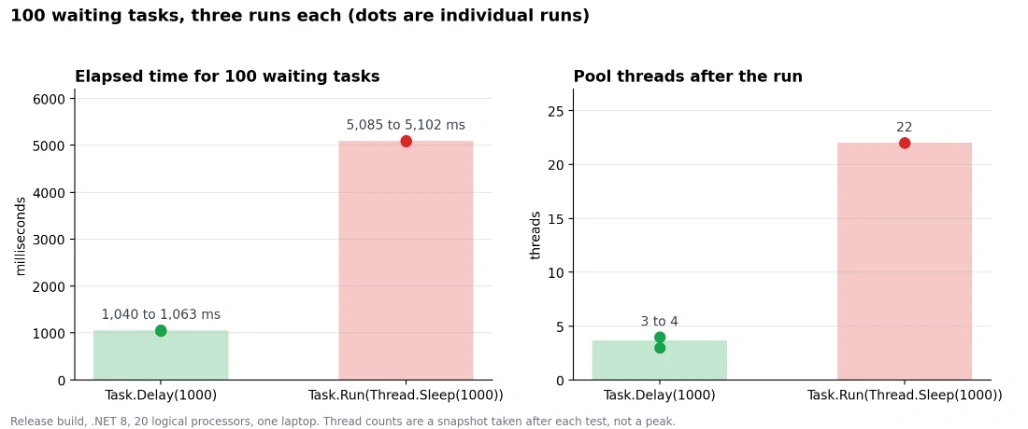
The blocking version took about 4.8 to 4.9 times as long and used 22 pool threads, compared with 3 or 4. The figures were nearly identical across the three runs.
3. Accounting for the Five Seconds
An explanation consistent with these numbers goes as follows. The .NET thread pool begins with a minimum number of worker threads, which by default equals the processor count; here that is 20. A task that blocks holds its thread for the full second. The first 20 blocked tasks therefore occupy every available thread, and the remaining tasks queue until threads free up:
100 tasks ÷ about 20 threads at once = 5 rounds of 1 second ≈ 5 seconds.
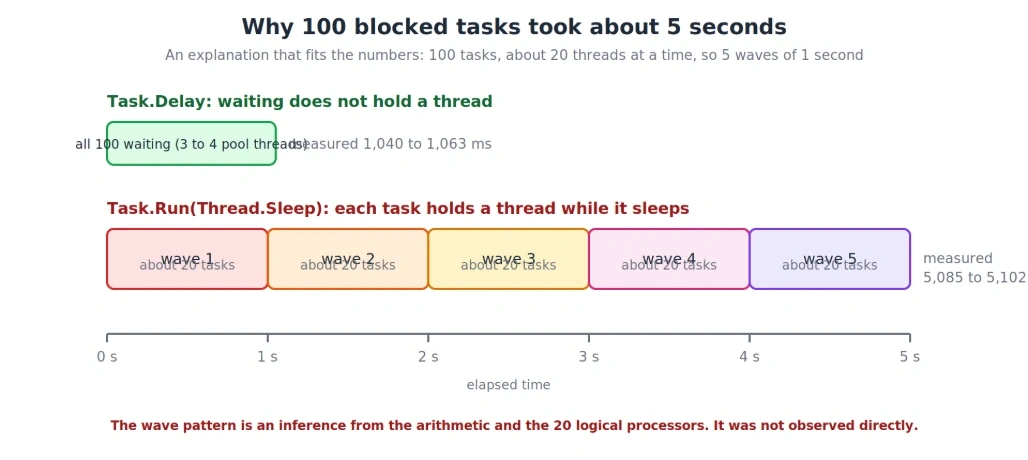
The measured 5.09 seconds sits very close to this arithmetic, and 22 threads suggests the pool added a couple above its minimum. This is an inference and not a direct observation. The minimum can be read at runtime to test the first part:
csharp
ThreadPool.GetMinThreads(out int minWorker, out int minIo);
Console.WriteLine($"Min worker threads: {minWorker}");
If the explanation holds, this prints 20 on a 20-processor machine.
4. What Task.Delay Does Differently
Task.Delay returns a task immediately and relies on a timer to complete it later. No thread sits idle while the time passes. That is why 100 of them could wait concurrently on only 3 or 4 pool threads, which are enough to run the continuation code when each timer fires. It is the same property that let 100 overlapping waits finish in about a second in the earlier article.
5. Everyday Forms of Blocking
Deliberately putting Thread.Sleep inside Task.Run is rare in production code. The same blocking commonly arrives in less obvious forms, where an asynchronous call is forced to complete synchronously:
csharp
// Each of these holds a pool thread until the call completes
var data = GetDataAsync().Result;
GetDataAsync().Wait();
GetDataAsync().GetAwaiter().GetResult();

// This releases the thread while the call is in flight
var data = await GetDataAsync();
6. Why It Matters More on a Server
ASP.NET Core serves requests on pool threads. When many requests block threads while waiting for a database or an external service, the free threads can run out. New requests then queue, and the pool grows only gradually, so the slowdown affects every request, not only the blocking ones. This is commonly called thread pool starvation. I did not run a web server for this article, so this section describes the mechanism rather than a measurement. The console experiment above shows the same effect at small scale.
7. An Experiment Not Yet Run
If the explanation in section 3 is correct, raising the minimum thread count should shorten the blocking version:
csharp
ThreadPool.GetMinThreads(out _, out int minIo);
ThreadPool.SetMinThreads(100, minIo);
// then repeat the Thread.Sleep test
I would expect a time near one second, because all 100 tasks could then hold a thread simultaneously, but I have not measured it. It is a way to test the explanation, not a recommended fix. A higher minimum conceals the symptom and consumes memory, whereas await removes the blocking.
8. Limits of These Results
The five seconds is specific to this machine. Following the same arithmetic, a 4-processor machine would take roughly 25 seconds (100 ÷ 4 × 1 s). I did not measure that.
Three runs on one laptop is a small sample, even though the runs agreed closely.
Thread counts are snapshots taken after each test, not peak values.
A debugger was probably attached. A test that mostly waits is unlikely to be affected much, but the figures should be rechecked without one before quoting them precisely.
9. When Blocking Is Acceptable
Blocking is not wrong everywhere. A small console utility or one-off script can use Thread.Sleep or .Result without harm. The problem appears on servers that handle many concurrent requests, where threads are a shared resource. Task.Run is intended for CPU-heavy work, not for passing time or waiting on I/O.
10. Choosing an Approach
Situation | Approach |
|---|
Waiting on a database, web call, or timer | await, with Task.Delay for delays
|
CPU-heavy calculation | Task.Run or parallel code, measured against sequential
|
A synchronous API that cannot be changed | Wrap it carefully and keep it off request paths |
Console utility or one-off script | Blocking is acceptable |
11. Auditing Your Own Code
Search the project for .Result, .Wait(), .GetAwaiter().GetResult() and Thread.Sleep, giving priority to anything reachable from a request. For each match, consider whether the enclosing method can become async and use await.
Takeaway
Waiting with Task.Delay released the thread, so 100 waits finished in about one second using 3 or 4 pool threads. Waiting by blocking held one thread per task, so the same 100 waits took about five seconds on 22 threads. The additional time came from tasks queuing for threads, and on a server that queue can slow every request. Use await for waiting, and keep blocking for places where little else is running.

Join the conversation! Your thoughts help the community grow.