
Introduction
The <blockquote> tag defines a long quotation like paragraphs (instead of HTML q tag used for in-line content). A browser inserts white space before and after a blockquote element. It also inserts margins for the blockquote element. The HTML blockquote element begins with the HTML <blockquote> tag and ends with the HTML </blockquote> tag.
Syntax:
<blockquote cite="http://www.c-sharpcorner.com/">
Cite - This is an optional attribute that can be used to specify the location (in the form of a URI) where the quote has come from.
Attributes
HTML tags can contain one or more attributes. Attributes are added to a tag to provide the browser with more information about how the tag should appear or behave.
Attributes consist of a name and a value separated by an equals (=) sign, with the value surrounded by double-quotes.
There are 3 kinds of attributes that you can add to your HTML tags: Element-specific, global, and event handler content attributes.
Element-Specific Attributes
The following table shows the attributes that are specific to this tag/element.
Attributes Introduced by HTML5
| Attributes | Description |
| cite | Indicates the source of the quotation. It must be a URI, for example, the URL of a web page. |
Global Attributes
The following attributes are standard across all HTML 5 tags.
|
HTML5 Global Attributes
|
||
| accesskey | draggable | style |
| class | hidden | tabindex |
| dir | spellcheck | |
| contenteditable | id | title |
| contextmenu | lang | |
Event Handler Content Attributes
Here are the standard HTML 5 event handler content attributes.
| onabort | onerror* | onmousewheel |
| onblur* | onfocus* | onpause |
| oncanplay | onformchange | onplay |
| oncanplaythrough | onforminput | onplaying |
| onchange | oninput | onprogress |
| onclick | oninvalid | onratechange |
| oncontextmenu | onkeydown | onreadystatechange |
| ondblclick | onkeypress | onscroll |
| ondrag | onkeyup | onseeked |
| ondragend | onload* | onseeking |
| ondragenter | onloadeddata | onselect |
| ondragleave | onloadedmetadata | onshow |
| ondragover | onloadstart | onstalled |
| ondragstart | onmousedown | onsubmit |
| ondrop | onmousemove | onsuspend |
| ondurationchange | onmouseout | ontimeupdate |
| onemptied | onmouseover | onvolumechange |
| onended | onmouseup | onwaiting |
- <!DOCTYPE HTML>
- <html>
- <body>
- <p>Here is a quote from WWF's website:
- <blockquote cite="http://www.csharpcorner.com">
- WWF's ultimate goal is to build a future where people live in harmony with nature.
- </blockquote>
- We hope that they succeed.
- </p>
- <blockquote>
- <p>A large quotation. The content of a blockquote element must include block-level elements such as headings, lists, paragraphs or div's.</p>
- <p>cite can be used to specify the location (in the form of a URI) where the quote has come from.</p>
- </blockquote>
- </body>
- </html>
Internet Explorer

Figure1
FireFox
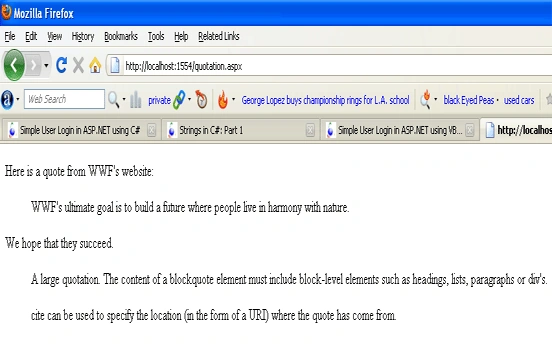
Figure2
Join the conversation! Your thoughts help the community grow.