Introduction
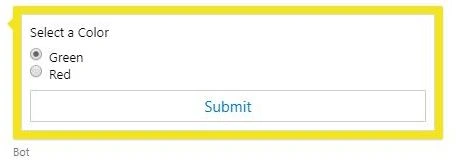
In this article, we will take a look at how we can react to the Action button in the Adaptive cards. Consider an example where we want to select a color from two options and send it to the bot. Something like the following lines.
In this, we want the bot to read the color selected using the radio button. We will now take a look at how to read the color.
Concept
Let us examine the adaptive card JSON definition for the above simple choice form.
- {
- "type": "AdaptiveCard",
- "body": [
- {
- "type": "TextBlock",
- "id": "textBlock",
- "text": "Select a Color"
- },
- {
- "type": "Input.ChoiceSet",
- "placeholder": "Placeholder text",
- "choices": [
- {
- "title": "Green",
- "value": "Green"
- },
- {
- "title": "Red",
- "value": "Red"
- }
- ],
- "id":"choiceset",
- "style": "expanded"
- }
- ],
- "actions": [
- {
- "type": "Action.Submit",
- "id": "submit",
- "title": "Submit",
- "data":{
- "action": "colorselector"
-
- }
- }
- ],
- "$schema": "http://adaptivecards.io/schemas/adaptive-card.json",
- "version": "1.0"
- }
To read more about how to desgin the adaptive cards, please visit the Adaptive Cards doco site,
Adaptive Cards.
The adaptive card is rendered by the emulator, as shown above. Now, let us examine what we get when we select any option in the adaptive card and click on "Submit".
- {
- "channelData": {
- "postback": true
- },
- "channelId": "emulator",
- "conversation": {
- "id": "4f1c47d0-f119-11e8-bad3-4f12f90d227a|livechat"
- },
- "from": {
- "id": "24474995-17e2-4290-be1f-79e27ee6140c",
- "name": "User"
- },
- "id": "5ce33270-f119-11e8-975a-45ab236171db",
- "localTimestamp": "2018-11-26T11:49:46+10:30",
- "locale": "",
- "recipient": {
- "id": "15",
- "name": "Bot",
- "role": "bot"
- },
- "serviceUrl": "http://localhost:58248",
- "timestamp": "2018-11-26T01:19:46.967Z",
- "type": "message",
- "value": {
- "action": "colorselector",
- "choiceset": "Green"
- }
- }
Above is the JSON sent by the channel to the Bot Service as a "Message Type activity" when the "submit" button is clicked. Let us examine the Value section of the message sent by the channel.
- "value": {
- "action": "colorselector",
- "choiceset": "Green"
- }
The value object contains the following properties "action" and "choiceset". If we correlate the above with our adaptive card JSON, we can clearly see that the value in the element with id "choiceset" is appended to the data object of the submit. Once we know this, it is very easy to put in a code that can handle this.
Another important point to note is that whenever the "Submit" button is clicked, the activity will be sent back by the channel as a "PostBack" if there is some reactive data in the adaptive card. If the Submit task is just sending out a string value, then it will be sent back as "ImBack".
Sample Code
Let us send the adaptive card that we have above as a welcome greeting message. Since we are just looking at a sample implementation, we will use the ConversationUpdate activity type. This activity type is emitted when a user or a bot is added to the conversation.
Note
The welcome message can be sent using following piece of code in OnTurnAsync method.
- case ActivityTypes.ConversationUpdate:
- foreach(var member in turnContext.Activity.MembersAdded)
- {
- if(member.Id != turnContext.Activity.Recipient.Id)
- {
- adaptiveCard = File.ReadAllText(@".\wwwroot\ColorSelector.json");
- var reply = turnContext.Activity.CreateReply();
- reply.Attachments = new List<Attachment>()
- {
- new Attachment()
- {
- ContentType = "application/vnd.microsoft.card.adaptive",
- Content = JsonConvert.DeserializeObject(adaptiveCard)
- }
- };
- await turnContext.SendActivityAsync(reply, cancellationToken:cancellationToken);
- }
- }
- break;
Now, let us handle the scenario where the user will click on Submit. As identified above, the channel sends out the activity marked with a PostBack object.
- "channelData": {
- "postback": true
- }
So, we handle the above scenario in our code as follows.
- case ActivityTypes.Message:
-
- var token = JToken.Parse(turnContext.Activity.ChannelData.ToString());
- string selectedcolor = string.Empty;
- if(System.Convert.ToBoolean(token["postback"].Value<string>()))
- {
- JToken commandToken = JToken.Parse(turnContext.Activity.Value.ToString());
- string command = commandToken["action"].Value<string>();
-
- if(command.ToLowerInvariant() == "colorselector")
- {
- selectedcolor = commandToken["choiceset"].Value<string>();
- }
-
- }
-
- await turnContext.SendActivityAsync($"You Selected {selectedcolor}", cancellationToken: cancellationToken);
-
- break;
We are basically reading the "postback" property in the "ChannelData" object and checking if it is true. If so, we finally read the "data" object in the incoming activity and parse and take a decision based on the data. That takes care of the adaptive card submit action.
Testing
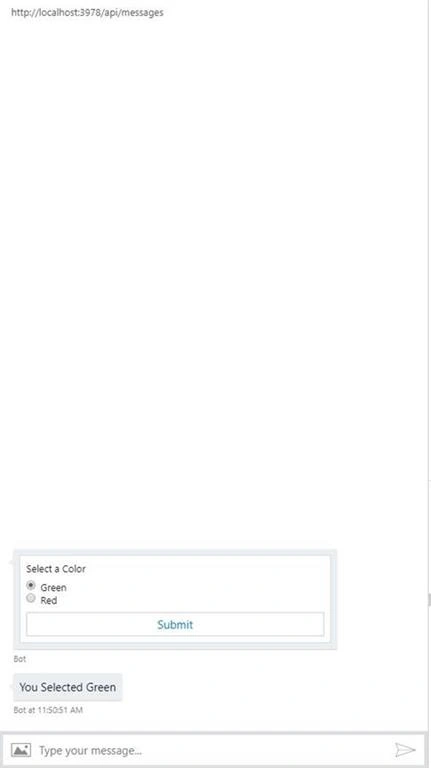
Let us check out a sample test scenario.
Clearly, our code is now capable of handling the Submit button that sends out the selected value.
Tip
In case you are planning to use multiple reactive adaptive cards, as a best practice, the data on the Submit should have a unique identifier, e.g., Here, we added "action": "colorselector" to the data object of the "Submit" button.
Conclusion
In this short article, we saw how to work with Reactive Adaptive Cards.


Nishikant MohantyPosted Jun 14, 2019, 6:29 AM
How can i send a jason to browser to display adaptive cards ,,,for static jason i am able to see in the browser .
Nishikant MohantyPosted Jun 14, 2019, 6:27 AM
Please submit the complete code for download.