

A task management app, also known as a to-do list app, is a great way to get started with building web applications using the Django web framework. Django is a powerful and flexible framework that allows you to quickly create web applications with a clean and organized structure.
In a task management app, the tasks are typically stored in a database and the app provides a user interface for interacting with the data. The app can be built to include features such as the ability to create new tasks, view a list of existing tasks, edit or delete tasks, mark tasks as complete, set reminders or due dates, prioritize tasks, add notes or attachments, and share tasks with others.
Prerequisites
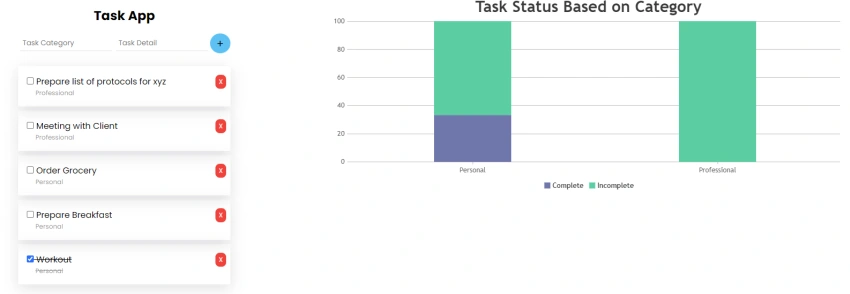
Here is a step-by-step guide for creating a simple task management app in Django.
1. Create a new Django project by running the following command in the command prompt:
django-admin startproject taskmanagement
2. Create a new app tasks within the project by running the following command:
python manage.py startapp tasks
3. In the tasks app's models.py file, create a model for the tasks by defining a class that inherits from models.Model. This class will represent a task and will have fields such as a detail, status, category & creation date. We have also defined status tupple with complete and incomplete values for choices being used in the status field.
class Task(models.Model):
  COMPLETE = "Complete"
  INCOMPLETE = "Incomplete"
  STATUS = [
    (COMPLETE, "Complete"),
    (INCOMPLETE, "Incomplete")
  ]

  detail = models.CharField(max_length=200, null=False, blank=False)
  status = models.CharField(max_length=200, choices=STATUS,default=INCOMPLETE)
  category = models.CharField(max_length=200, default=None)
  creation_date = models.DateTimeField('Creation Date', default=now)
4. Create a new file in the tasks app called views.py. In this file, create views for getting, creating, updating, and deleting tasks.
def index(request):
  task_list = Task.objects.order_by('-creation_date')
  context = {'task_list': task_list}
  return render(request, 'task/index.html', context)

def add(request):
  if request.method == "POST":
    if(request.POST['detail'] != "" and request.POST['category'] != ""):
      task = Task(detail=request.POST['detail'], status=Task.INCOMPLETE, category=string.capwords(request.POST['category']))
      task.save()
      return HttpResponseRedirect(reverse('task:index'));

    messages.error(request, "Task Detail & Category can't be blank" )
  else:
    messages.error(request, "Wrong Method" )
  return HttpResponseRedirect(reverse('task:index'));

def delete(request):
  if request.method == "POST":
    post_body = json.loads(request.body)
    task = get_object_or_404(Task, pk=post_body.get("id"))
    task.delete()
    return HttpResponse(json.dumps({
        "success": "deleted"
    }), content_type="application/json")

  return HttpResponse(json.dumps({
      "error": "Method Not Supported"
  }), content_type="application/json")

def update(request):
  if request.method == "POST":
    post_body = json.loads(request.body)
    task = get_object_or_404(Task, pk=post_body.get("id"))
    task.status = Task.COMPLETE if post_body.get("status") == "True" else Task.INCOMPLETE
    task.save(update_fields=['status'])
    return HttpResponse(json.dumps({
        "success": "updated"
    }), content_type="application/json")

  return HttpResponse(json.dumps({
      "error": "Method Not Supported"
  }), content_type="application/json")

def get_task(request):
  task_list = Task.objects.order_by('-creation_date')
  task_list_json = serializers.serialize('json', task_list)

  return HttpResponse(task_list_json, content_type="application/json")
5. Add index.html to the templates directory that displays a list of tasks.
{% load static %}
<h2 class="text-center">Task App</h2>
{% if messages %}
<ul class="messages">
  {% for message in messages %}
  <li{% if message.tags %} class="{{ message.tags }}"{% endif %}>{{ message }}</li>
  {% endfor %}
</ul>
{% endif %}
<form class="input-section" action="{% url 'task:add' %}" method="POST">
  {% csrf_token %}
  <input type="text" placeholder="Task Category" name="category" class=""/>
  <input type="text" placeholder="Task Detail" name="detail" class=""/>
  <button type="submit">+</button>
</form>
<div class="list-section">
{% if task_list %}
  <ul>
  {% for task in task_list %}
    <li class="card {% if task.status == 'Complete' %}completed{% endif %}" id="task-{{ task.id }}">
      <div class="task-info">
          <span><input type="checkbox" name="task-{{ task.id }}" class="status" {% if task.status == 'Complete' %}checked{% endif %}/> {{ task.detail }}  </span>
          <span class="task-category">{{ task.category }}</span>
      </div>
      <span class="delete-button">X</span>
    </li>
  {% endfor %}
  </ul>
{% else %}
  <p class="text-center">No Task to be Done</p>
{% endif %}
</div>
Join the conversation! Your thoughts help the community grow.