

In this article, we will learn how to develop a Web application from scratch using popular technologies such as SQL Server for database, dot net core, Web API for Backend Development and the latest ANGULAR 10 for Front-End Web development. We will first start creating databases and objects needed for our app, then develop API end points
using dot net core web API. Finally, we will be using angular 10 to design the front end part of our app.
We will learn how to create the navigation menu and tables using bootstrap and routing to our angular app. We will add a modal pop up window with drop downs and date pickers, and also add and upload profile picture functionality and store it in our app. We will also learn how to add custom filtering and sorting features without using any third party packages.
Step 1
Let's first open up SQL Server Management Studio. Let's connect to a local database to do that, just type dot in the server name and click on Connect.
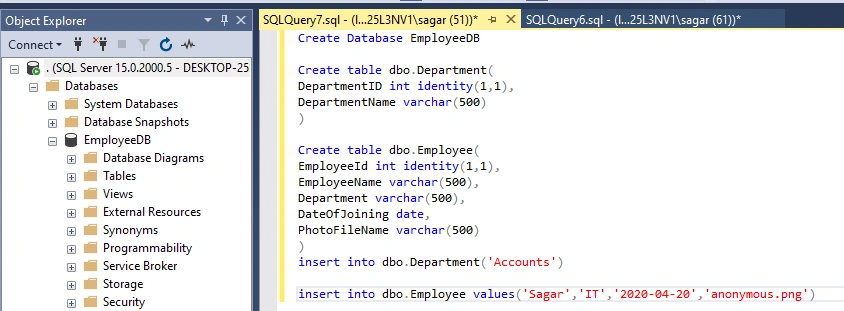
Now let's create the database named EmployeeDB.
- Create Database EmployeeDB
- Create table dbo.Department(
- DepartmentID int identity(1,1),
- DepartmentName varchar(500)
- )
- Create table dbo.Employee(
- EmployeeId int identity(1,1),
- EmployeeName varchar(500),
- Department varchar(500),
- DateOfJoining date,
- PhotoFileName varchar(500)
- )
- insert into dbo.Department('Accounts')
- insert into dbo.Employee values('Sagar','IT','2020-04-20','anonymous.png')
Step 2
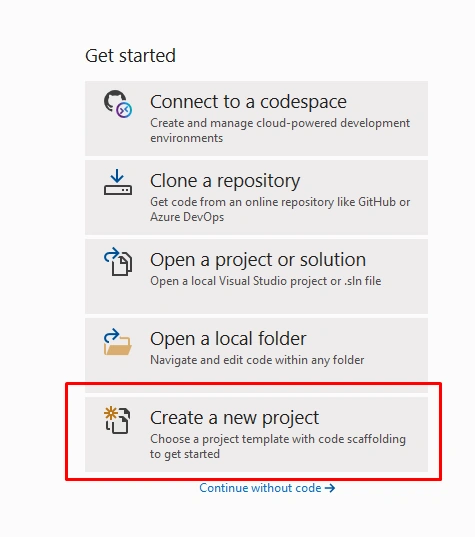
Now Let's open up VISUAL STUDIO 2019 and click on create a new project.
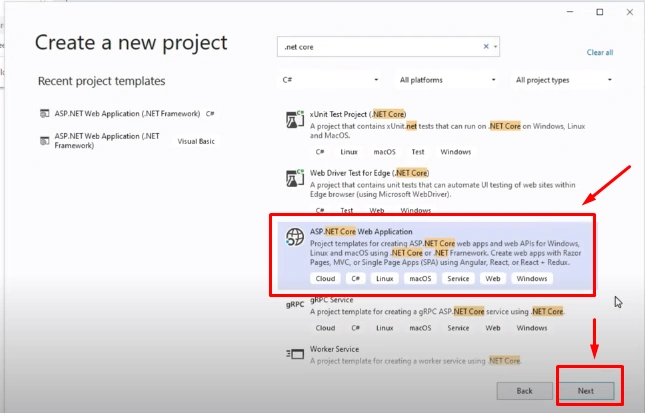
Select ASP.Net core Web Application and click on next.
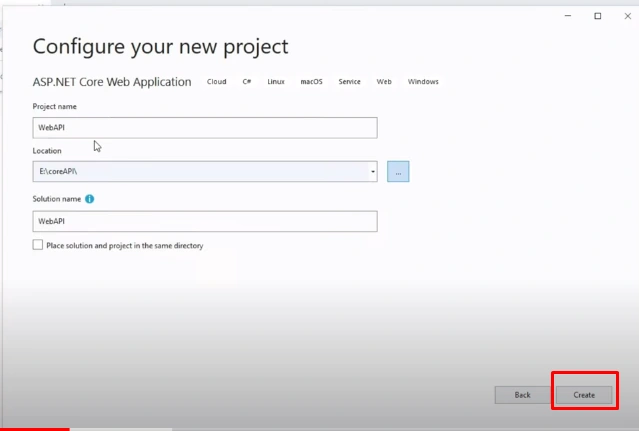
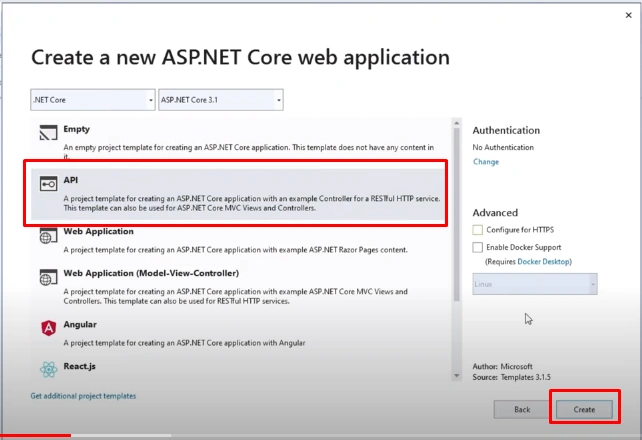
Select API and click on create
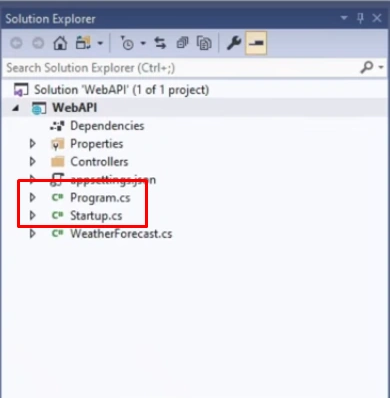
The program.cs contains the main program which is the entry point of our project also it creates web host which basically helps the app to listen to http requests
The startup class configures all the services required for our app services which are basically reusable components that can be used across our app using the dependency injection. It also contains the configure method which creates our app's request processing pipeline.
Step 3 - Let's make couple of changes to the start up class
As below we have enabled cors. By default all web api projects come with a security which blocks requests coming from different domains.
Now lets disable the security and allow the requests to be served.
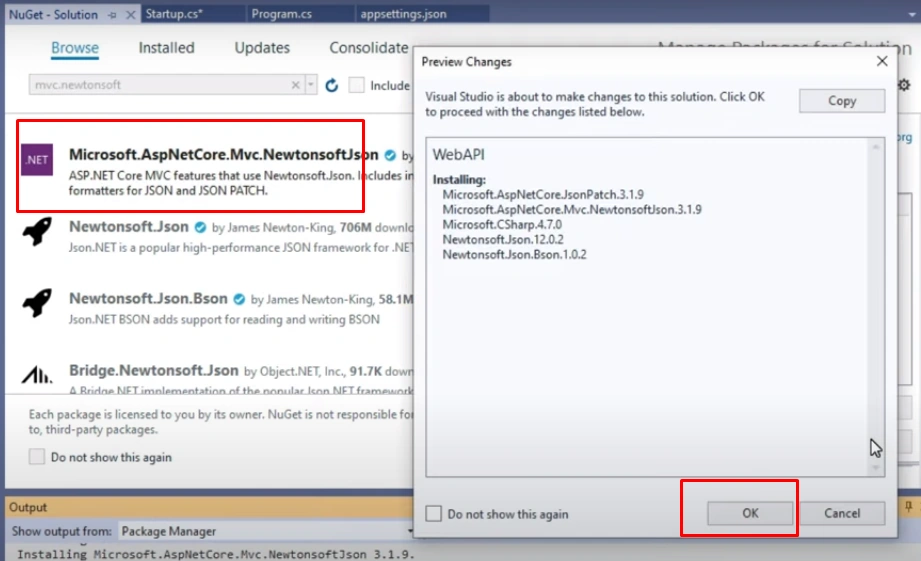
Lets also modify the serializer class to keep the json serializer as our default .To do that install the Nuget package
- using System;
- using System.Collections.Generic;
- using System.Linq;
- using System.Threading.Tasks;
- using Microsoft.AspNetCore.Builder;
- using Microsoft.AspNetCore.Hosting;
- using Microsoft.AspNetCore.Mvc;
- using Microsoft.Extensions.Configuration;
- using Microsoft.Extensions.DependencyInjection;
- using Microsoft.Extensions.Hosting;
- using Microsoft.Extensions.Logging;
- using Newtonsoft.Json.Serialization;
- using System.IO;
- using Microsoft.Extensions.FileProviders;
- namespace WebAPI
- {
- public class Startup
- {
- public Startup(IConfiguration configuration)
- {
- Configuration = configuration;
- }
- public IConfiguration Configuration { get; }
- // This method gets called by the runtime. Use this method to add services to the container.
- public void ConfigureServices(IServiceCollection services)
- {
- //Enable CORS
- services.AddCors(c =>
- {
- c.AddPolicy("AllowOrigin", options => options.AllowAnyOrigin().AllowAnyMethod()
- .AllowAnyHeader());
- });
- //JSON Serializer
- services.AddControllersWithViews()
- .AddNewtonsoftJson(options =>
- options.SerializerSettings.ReferenceLoopHandling = Newtonsoft
- .Json.ReferenceLoopHandling.Ignore)
- .AddNewtonsoftJson(options => options.SerializerSettings.ContractResolver
- = new DefaultContractResolver());
- services.AddControllers();
- }
- // This method gets called by the runtime. Use this method to configure the HTTP request pipeline.
- public void Configure(IApplicationBuilder app, IWebHostEnvironment env)
- {
- app.UseCors(options => options.AllowAnyOrigin().AllowAnyMethod().AllowAnyHeader());
- if (env.IsDevelopment())
- {
- app.UseDeveloperExceptionPage();
- }
- app.UseRouting();
- app.UseAuthorization();
- app.UseEndpoints(endpoints =>
- {
- endpoints.MapControllers();
- });
- app.UseStaticFiles(new StaticFileOptions
- {
- FileProvider = new PhysicalFileProvider(
- Path.Combine(Directory.GetCurrentDirectory(),"Photos")),
- RequestPath="/Photos"
- });
- }
- }
- }
Step 4
Lets create a model used for our app .Create a folder name Models and add a class file named department.cs ,Employee.cs and add properties
- using System;
- using System.Collections.Generic;
- using System.Linq;
- using System.Threading.Tasks;
- namespace WebAPI.Models
- {
- public class Department
- {
- public int DepartmentId { get; set; }
- public string DepartmentName { get; set; }
- }
- }
- using System;
- using System.Collections.Generic;
- using System.Linq;
- using System.Threading.Tasks;
- namespace WebAPI.Models
- {
- public class Employee
- {
- public int EmployeeId { get; set; }
- public string EmployeeName { get; set; }
- public string Department { get; set; }
- public string DateOfJoining { get; set; }
- public string PhotoFileName { get; set; }
- }
- }
Step 5
Configure the database connection in appsettings.json
- {
- "ConnectionStrings": {
- "EmployeeAppCon": "Data Source=.;Initial Catalog=EmployeeDB; Integrated Security=true"
- },
- "Logging": {
- "LogLevel": {
- "Default": "Information",
- "Microsoft": "Warning",
- "Microsoft.Hosting.Lifetime": "Information"
- }
- },
- "AllowedHosts": "*"
- }
Step 6
Now lets add a controller to add api methods for department
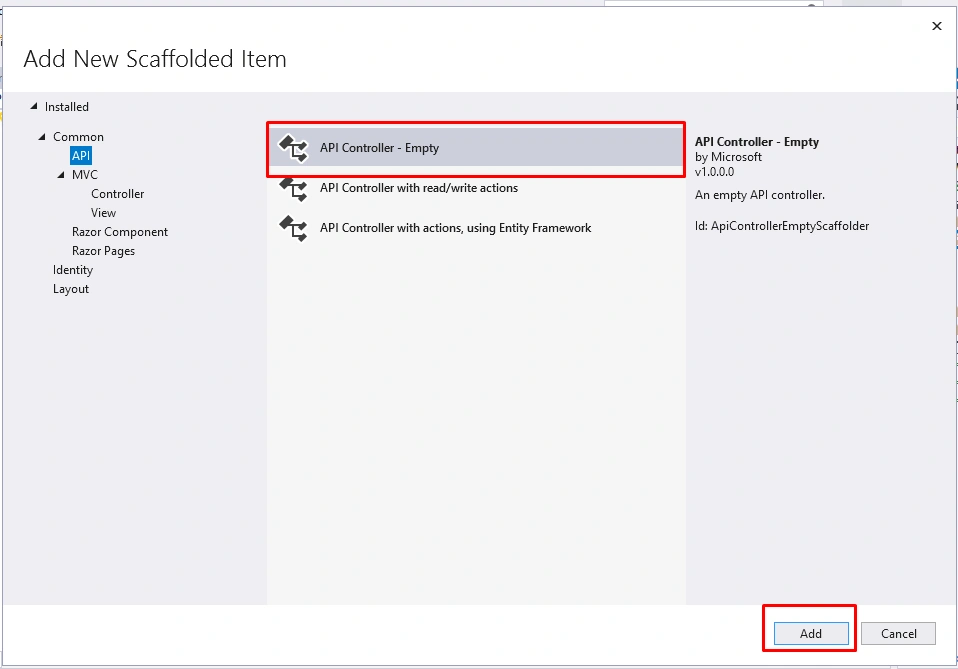
To access the configuration from appsettings file lets make use of the dependency injection as below and lets add the api methods to perform CRUD operations.Avoid using raw sql queries and make use of Stored procedures or entity framework
- using System;
- using System.Collections.Generic;
- using System.Linq;
- using System.Threading.Tasks;
- using Microsoft.AspNetCore.Http;
- using Microsoft.AspNetCore.Mvc;
- using Microsoft.Extensions.Configuration;
- using System.Data.SqlClient;
- using System.Data;
- using WebAPI.Models;
- namespace WebAPI.Controllers
- {
- [Route("api/[controller]")]
- [ApiController]
- public class DepartmentController : ControllerBase
- {
- private readonly IConfiguration _configuration;
- public DepartmentController(IConfiguration configuration)
- {
- _configuration = configuration;
- }
- [HttpGet]
- public JsonResult Get()
- {
- string query = @"
- select DepartmentId, DepartmentName from dbo.Department";
- DataTable table = new DataTable();
- string sqlDataSource = _configuration.GetConnectionString("EmployeeAppCon");
- SqlDataReader myReader;
- using(SqlConnection myCon=new SqlConnection(sqlDataSource))
- {
- myCon.Open();
- using (SqlCommand myCommand = new SqlCommand(query, myCon))
- {
- myReader = myCommand.ExecuteReader();
- table.Load(myReader); ;
- myReader.Close();
- myCon.Close();
- }
- }
- return new JsonResult(table);
- }
- [HttpPost]
- public JsonResult Post(Department dep)
- {
- string query = @"
- insert into dbo.Department values
- ('"+dep.DepartmentName+@"')
- ";
- DataTable table = new DataTable();
- string sqlDataSource = _configuration.GetConnectionString("EmployeeAppCon");
- SqlDataReader myReader;
- using (SqlConnection myCon = new SqlConnection(sqlDataSource))
- {
- myCon.Open();
- using (SqlCommand myCommand = new SqlCommand(query, myCon))
- {
- myReader = myCommand.ExecuteReader();
- table.Load(myReader); ;
- myReader.Close();
- myCon.Close();
- }
- }
- return new JsonResult("Added Successfully");
- }
- [HttpPut]
- public JsonResult Put(Department dep)
- {
- string query = @"
- update dbo.Department set
- DepartmentName = '"+dep.DepartmentName+@"'
- where DepartmentId = "+dep.DepartmentId + @"
- ";
- DataTable table = new DataTable();
- string sqlDataSource = _configuration.GetConnectionString("EmployeeAppCon");
- SqlDataReader myReader;
- using (SqlConnection myCon = new SqlConnection(sqlDataSource))
- {
- myCon.Open();
- using (SqlCommand myCommand = new SqlCommand(query, myCon))
- {
- myReader = myCommand.ExecuteReader();
- table.Load(myReader); ;
- myReader.Close();
- myCon.Close();
- }
- }
- return new JsonResult("Updated Successfully");
- }
- [HttpDelete("{id}")]
- public JsonResult Delete(int id)
- {
- string query = @"
- delete from dbo.Department
- where DepartmentId = " + id + @"
- ";
- DataTable table = new DataTable();
- string sqlDataSource = _configuration.GetConnectionString("EmployeeAppCon");
- SqlDataReader myReader;
- using (SqlConnection myCon = new SqlConnection(sqlDataSource))
- {
- myCon.Open();
- using (SqlCommand myCommand = new SqlCommand(query, myCon))
- {
- myReader = myCommand.ExecuteReader();
- table.Load(myReader); ;
- myReader.Close();
- myCon.Close();
- }
- }
- return new JsonResult("Deleted Successfully");
- }
- }
- }
- using System;
- using System.Collections.Generic;
- using System.Linq;
- using System.Threading.Tasks;
- using Microsoft.AspNetCore.Http;
- using Microsoft.AspNetCore.Mvc;
- using Microsoft.Extensions.Configuration;
- using System.Data.SqlClient;
- using System.Data;
- using WebAPI.Models;
- using System.IO;
- using Microsoft.AspNetCore.Hosting;
- namespace WebAPI.Controllers
- {
- [Route("api/[controller]")]
- [ApiController]
- public class EmployeeController : ControllerBase
- {
- private readonly IConfiguration _configuration;
- private readonly IWebHostEnvironment _env;
- public EmployeeController(IConfiguration configuration, IWebHostEnvironment env)
- {
- _configuration = configuration;
- _env = env;
- }
- [HttpGet]
- public JsonResult Get()
- {
- string query = @"
- select EmployeeId, EmployeeName, Department,
- convert(varchar(10),DateOfJoining,120) as DateOfJoining
- ,PhotoFileName
- from dbo.Employee
- ";
- DataTable table = new DataTable();
- string sqlDataSource = _configuration.GetConnectionString("EmployeeAppCon");
- SqlDataReader myReader;
- using (SqlConnection myCon = new SqlConnection(sqlDataSource))
- {
- myCon.Open();
- using (SqlCommand myCommand = new SqlCommand(query, myCon))
- {
- myReader = myCommand.ExecuteReader();
- table.Load(myReader); ;
- myReader.Close();
- myCon.Close();
- }
- }
- return new JsonResult(table);
- }
- [HttpPost]
- public JsonResult Post(Employee emp)
- {
- string query = @"
- insert into dbo.Employee
- (EmployeeName,Department,DateOfJoining,PhotoFileName)
- values
- (
- '" + emp.EmployeeName + @"'
- ,'" + emp.Department + @"'
- ,'" + emp.DateOfJoining + @"'
- ,'" + emp.PhotoFileName + @"'
- )
- ";
- DataTable table = new DataTable();
- string sqlDataSource = _configuration.GetConnectionString("EmployeeAppCon");
- SqlDataReader myReader;
- using (SqlConnection myCon = new SqlConnection(sqlDataSource))
- {
- myCon.Open();
- using (SqlCommand myCommand = new SqlCommand(query, myCon))
- {
- myReader = myCommand.ExecuteReader();
- table.Load(myReader); ;
- myReader.Close();
- myCon.Close();
- }
- }
- return new JsonResult("Added Successfully");
- }
- [HttpPut]
- public JsonResult Put(Employee emp)
- {
- string query = @"
- update dbo.Employee set
- EmployeeName = '" + emp.EmployeeName + @"'
- ,Department = '" + emp.Department + @"'
- ,DateOfJoining = '" + emp.DateOfJoining + @"'
- where EmployeeId = " + emp.EmployeeId + @"
- ";
- DataTable table = new DataTable();
- string sqlDataSource = _configuration.GetConnectionString("EmployeeAppCon");
- SqlDataReader myReader;
- using (SqlConnection myCon = new SqlConnection(sqlDataSource))
- {
- myCon.Open();
- using (SqlCommand myCommand = new SqlCommand(query, myCon))
- {
- myReader = myCommand.ExecuteReader();
- table.Load(myReader); ;
- myReader.Close();
- myCon.Close();
- }
- }
- return new JsonResult("Updated Successfully");
- }
- [HttpDelete("{id}")]
- public JsonResult Delete(int id)
- {
- string query = @"
- delete from dbo.Employee
- where EmployeeId = " + id + @"
- ";
- DataTable table = new DataTable();
- string sqlDataSource = _configuration.GetConnectionString("EmployeeAppCon");
- SqlDataReader myReader;
- using (SqlConnection myCon = new SqlConnection(sqlDataSource))
- {
- myCon.Open();
- using (SqlCommand myCommand = new SqlCommand(query, myCon))
- {
- myReader = myCommand.ExecuteReader();
- table.Load(myReader); ;
- myReader.Close();
- myCon.Close();
- }
- }
- return new JsonResult("Deleted Successfully");
- }
- [Route("SaveFile")]
- [HttpPost]
- public JsonResult SaveFile()
- {
- try
- {
- var httpRequest = Request.Form;
- var postedFile = httpRequest.Files[0];
- string filename = postedFile.FileName;
- var physicalPath = _env.ContentRootPath + "/Photos/" + filename;
- using(var stream = new FileStream(physicalPath, FileMode.Create))
- {
- postedFile.CopyTo(stream);
- }
- return new JsonResult(filename);
- }
- catch (Exception)
- {
- return new JsonResult("anonymous.png");
- }
- }
- [Route("GetAllDepartmentNames")]
- public JsonResult GetAllDepartmentNames()
- {
- string query = @"
- select DepartmentName from dbo.Department
- ";
- DataTable table = new DataTable();
- string sqlDataSource = _configuration.GetConnectionString("EmployeeAppCon");
- SqlDataReader myReader;
- using (SqlConnection myCon = new SqlConnection(sqlDataSource))
- {
- myCon.Open();
- using (SqlCommand myCommand = new SqlCommand(query, myCon))
- {
- myReader = myCommand.ExecuteReader();
- table.Load(myReader); ;
- myReader.Close();
- myCon.Close();
- }
- }
- return new JsonResult(table);
- }
- }
- }
Step 7
Now lets create the angular project
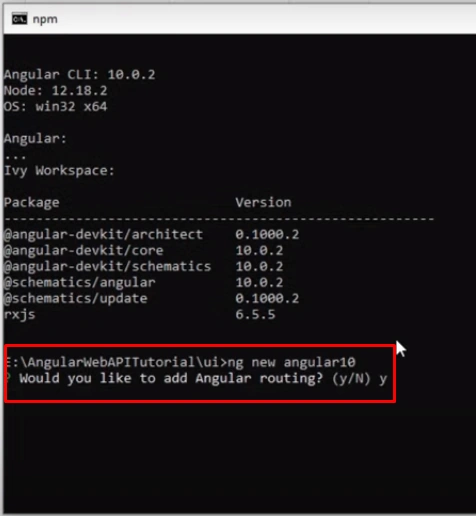
Type comand Code. It will open Visual Studio code as shown below
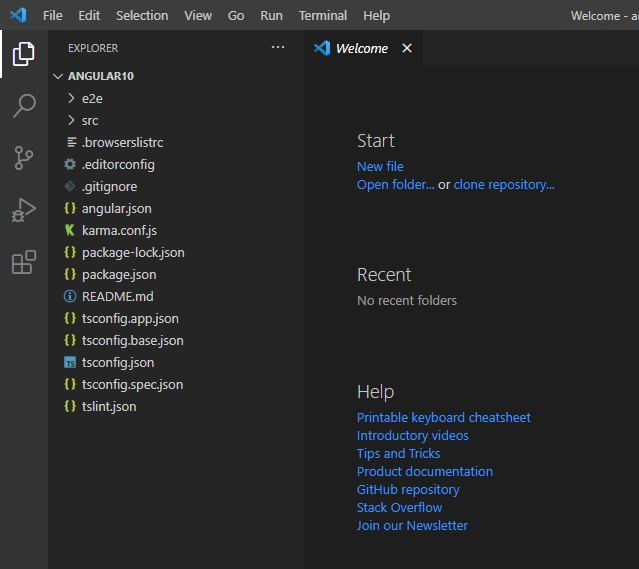
Step 8
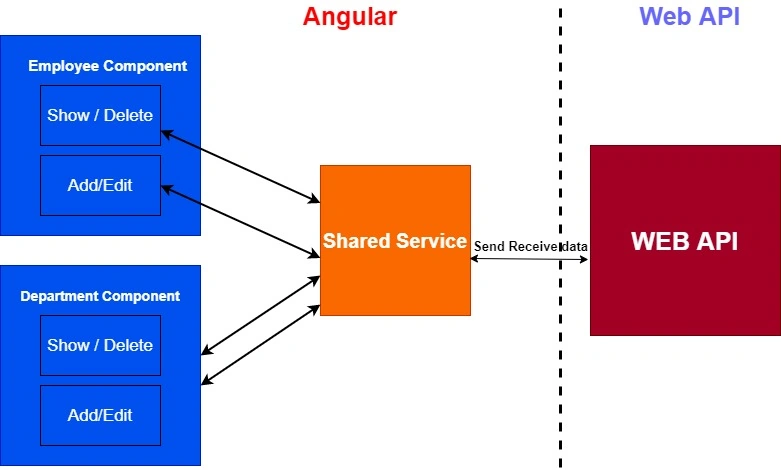
Now let's create the services and components required for the application based on the below architecture.
We need two main components, one for the department and another for employee. Again, each of these components will have two child components; one to show or delete and another one to add or update. Also we need one service file to consume the API's.
We need two main components, one for the department and another for employee. Again, each of these components will have two child components; one to show or delete and another one to add or update. Also we need one service file to consume the API's.
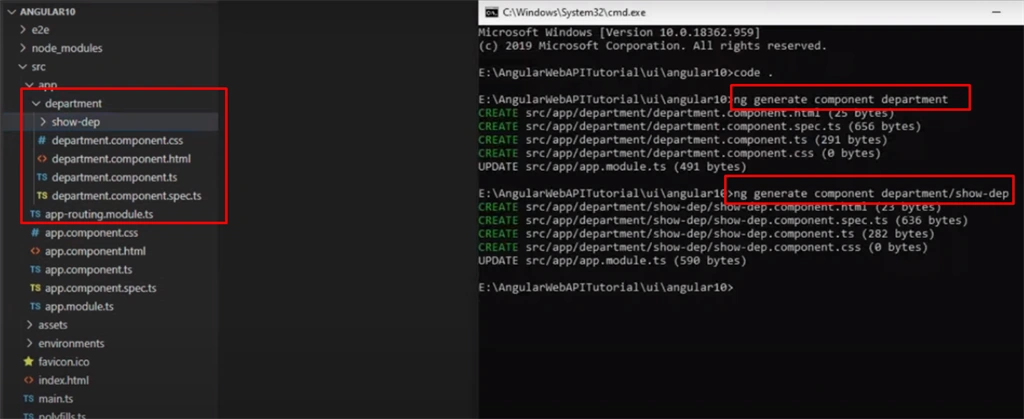
First create the components
- ng generate component department
- ng generate component department/show-dep
- ng generate component employee
- ng generate component employee/show-emp
- ng generate component employee/add-edit-emp
Now let's create the service file type.
- ng generate service shared
We can find all the components and an entry for service as below.
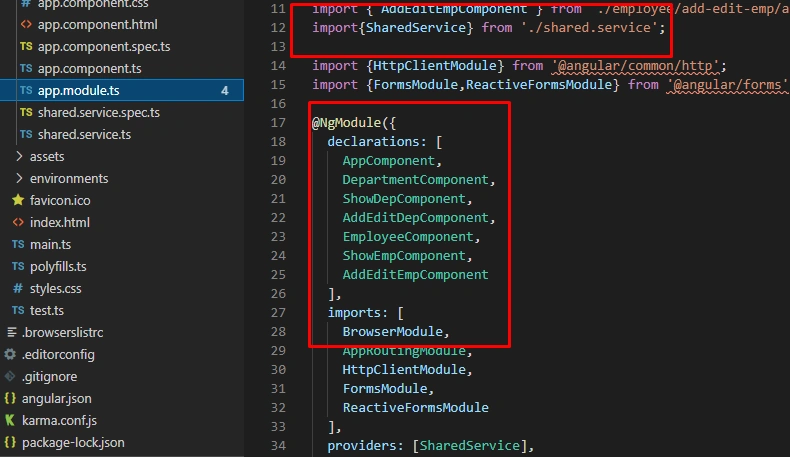
Now let's consume the api in shared service file.
Import the http client module and observables module.Observables are used to handle asynchronous requests and responses
Import the http client module and observables module.Observables are used to handle asynchronous requests and responses
- import { Injectable } from '@angular/core';
- import {HttpClient} from '@angular/common/http';
- import {Observable} from 'rxjs';
- @Injectable({
- providedIn: 'root'
- })
- export class SharedService {
- readonly APIUrl = "http://localhost:53535/api";
- readonly PhotoUrl = "http://localhost:53535/Photos/";
- constructor(private http: HttpClient) {}
- getDepList(): Observable < any[] > {
- return this.http.get < any > (this.APIUrl + '/department');
- }
- addDepartment(val: any) {
- return this.http.post(this.APIUrl + '/Department', val);
- }
- updateDepartment(val: any) {
- return this.http.put(this.APIUrl + '/Department', val);
- }
- deleteDepartment(val: any) {
- return this.http.delete(this.APIUrl + '/Department/' + val);
- }
- getEmpList(): Observable < any[] > {
- return this.http.get < any > (this.APIUrl + '/Employee');
- }
- addEmployee(val: any) {
- return this.http.post(this.APIUrl + '/Employee', val);
- }
- updateEmployee(val: any) {
- return this.http.put(this.APIUrl + '/Employee', val);
- }
- deleteEmployee(val: any) {
- return this.http.delete(this.APIUrl + '/Employee/' + val);
- }
- UploadPhoto(val: any) {
- return this.http.post(this.APIUrl + '/Employee/SaveFile', val);
- }
- getAllDepartmentNames(): Observable < any[] > {
- return this.http.get < any[] > (this.APIUrl + '/Employee/GetAllDepartmentNames');
- }
- }
Step 9
Now let's add routing in app.routing.ts file
- import { NgModule } from '@angular/core';
- import { Routes, RouterModule } from '@angular/router';
- import {EmployeeComponent} from './employee/employee.component';
- import {DepartmentComponent} from './department/department.component';
- const routes: Routes = [
- {path:'employee',component:EmployeeComponent},
- {path:'department',component:DepartmentComponent}
- ];
- @NgModule({
- imports: [RouterModule.forRoot(routes)],
- exports: [RouterModule]
- })
- export class AppRoutingModule { }
Step 10
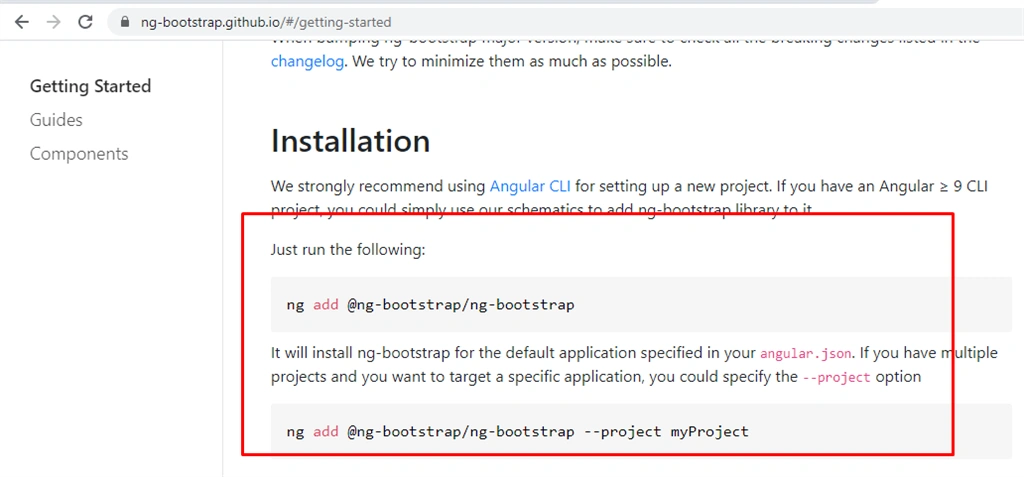
Add the bootstrap files for design.
Conclusion
In this article, we discussed how to build an application using .Net core angular 10 and sql server . I hope you all enjoyed reading this and learned from it.
VidyaPosted May 16, 2024, 10:42 AM
Hi Sir, am inform you that your insert into dbo.Department('Accounts') not correct ,Please correct /update your query insert into dbo.Department values ('Accounts')
Satyaprakash SamantarayPosted Dec 24, 2022, 5:15 AM
Where is the output
freddyPosted May 2, 2022, 2:17 PM
Tons of hard coded SQL in the Employees Controller! ouch!
Catarina RunaPosted Sep 22, 2021, 12:33 PM
Is this Angular/C#/SQL app functioning? Is it available for download?