

The Build Events in Visual Studio makes life much easier. I use them primarily to copy the files around after building the projects, but we can use them to run any command that we want. We have two types of build events.
- Pre-build event
- Post-build event
Let's have a look at the options.
Go to Solution Explorer and right-click on the project then select Properties then go to the Build Events tab.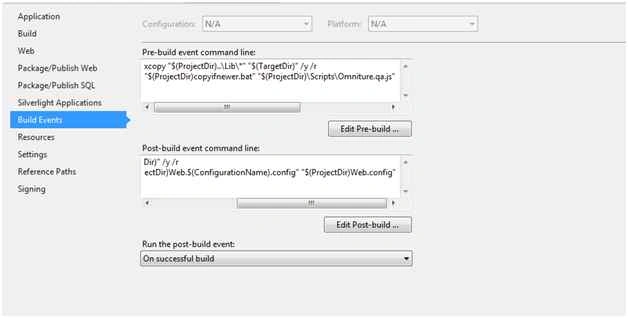
If you click on the Edit Pre/Post build event command line button the following dialog will open.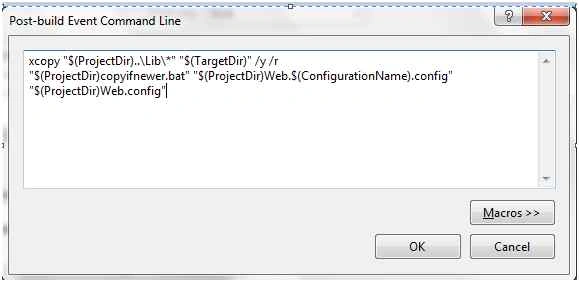
But, when we click the "Macros", we can see how Visual Studio can really help us out:
The following I will explain how I use them.
First Scenario
I have a requirement to maintain three different configurations (web.config) files for Web.LocalDev.config, Web.QA.config and Web.Production.config. When I build the project based upon the Configuration name selection the main web.config file must be updated.
Assume we select the Production configuration name then the main Web.config file will be updated with Web.Production.config.
The following is the procedure to do that.
- Create new configurations.
Go to the Solution Configuration files dropdown and select the Configuration manager.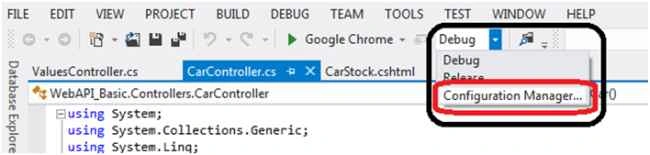
The Configuration Manager dialog box will open and expand the Active solution configuration dropdown and click on New.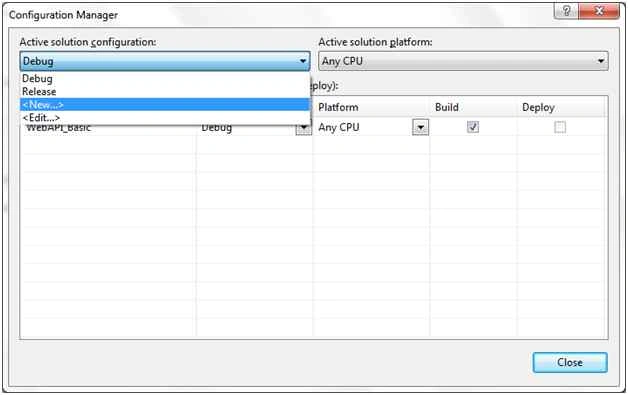
Once you clicked on New, the New Solution configuration dialog box will open, enter the configuration Name and click on the OK button.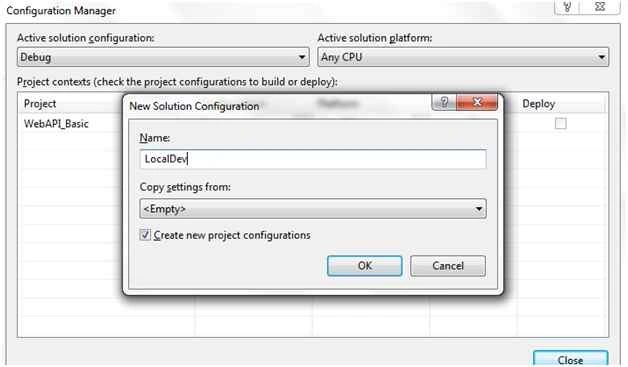
Now you can see it in Solution configuration files list.
- Creating various configuration files.
After creating the Configuration names in the Solution configuration files, go to the main Web.config file and right-click on it and select Add config transform then it will add the config file as shown in the following screen shot.
- Now writing scrpts for post-build events.
Before that we need to create a batch file (with the name copyifnewer.bat) to compare the file names of the selected config name and config file name. The following shows how I specified the batch file code.
Go to the Solution Explorer the right-click the project then select Properties then go to the Build Events tab.- @echo off
- echo Comparing two files: %1 with %2
- if not exist %1 goto File1NotFound
- if not exist %2 goto File2NotFound
- fc %1 %2
- if %ERRORLEVEL%==0 GOTO NoCopy
- echo Files are not the same. Copying %1 over %2
- copy %1 %2 /y & goto END
- :NoCopy
- echo Files are the same. Did nothing
- goto END
- :File1NotFound
- echo %1 not found.
- goto END
- :File2NotFound
- copy %1 %2 /y
- goto END
- :END
- echo Done.
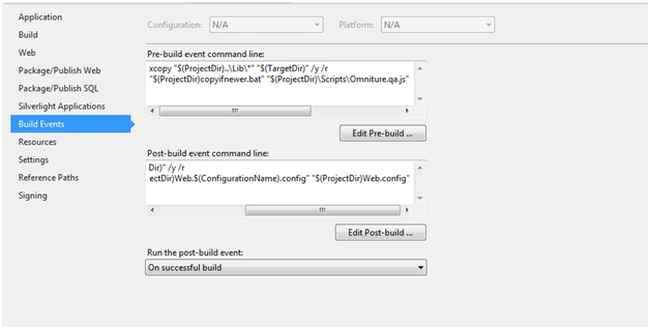
Paste the following script in the post-build event command line:
xcopy "$(ProjectDir)..\Lib\*" "$(TargetDir)" /y /r
"$(ProjectDir)copyifnewer.bat" "$(ProjectDir)Web.$(ConfigurationName).config" "$(ProjectDir)Web.config"
Now if you build the project based upon the selection of configuration name , the Web.config file will be updated.
Second Scenario
I have two js (JavaScript) files, Omniture.qa.js and Omniture.Prod.js. When building the project Omniture.Prod.js must be updated with Omniture.qa.js.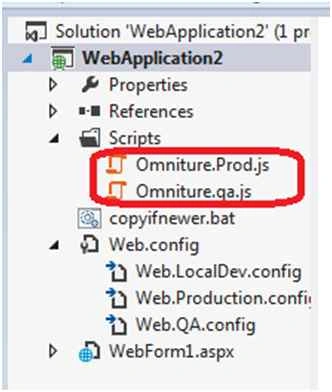
Paste the following script in the Pre/Post build event command line:
xcopy "$(ProjectDir)..\Lib\*" "$(TargetDir)" /y /r
"$(ProjectDir)copyifnewer.bat" "$(ProjectDir)\Scripts\Omniture.qa.js" "$(ProjectDir)\Scripts\Omniture.Prod.js"
Mohammed IbrahimPosted Jul 31, 2015, 8:45 PM
nice
RakeshPosted Jul 31, 2015, 11:16 AM
Good one
Chervine BhiwooPosted Jul 31, 2015, 9:40 AM
Nice work!
Nilesh JadavPosted Jul 31, 2015, 6:27 AM
Nice one sir
Rajeesh MenothPosted Jul 31, 2015, 2:55 AM
Good One
Sibeesh VenuPosted Jul 31, 2015, 1:57 AM
Nice Share!.
Debasis SahaPosted Jul 31, 2015, 12:43 AM
Good One..
Gopi ChandPosted Jul 31, 2015, 12:35 AM
Well done
Neeraj KumarPosted Jul 30, 2015, 6:21 PM
Good Article :)