

Introduction
The Blockchain we did so far runs on one computer and creates one instance. It is time to run our Blockchain on multiple computers as a network. Because a Blockchain has no central authority to store data and manage the data exchange process, each computer should have a full copy of the Blockchain application and use a P2P protocol to communicate with each other.
What is a P2P network?
P2P stands for Peer-To-Peer. In plain English, a P2P network is created when two or more computers are connected and share resources without going through a separate server computer. All computers in a P2P network have an equal privilege. There is no need for central coordination. A computer in a P2P network is usually called a node. One of the most famous P2P systems is Napster, a file-sharing system.
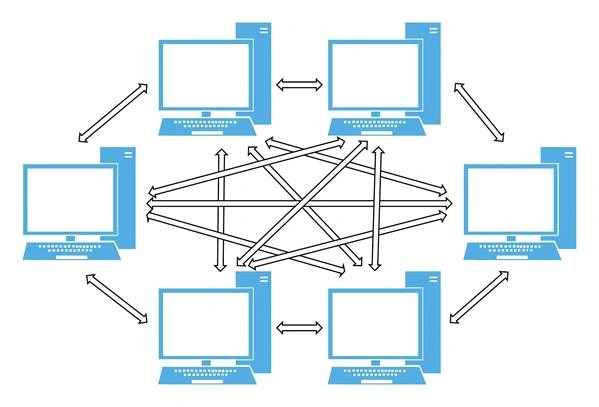
In a P2P network, a computer is both a server and a client. Use BitTorrent, an application layer protocol for P2P file sharing, as of example. After a BitTorrent application is installed on a computer. The computer can connect to other BitTorrent computers to get files and it also serves local files to any computers on the BitTorrent network.
What is the benefit of a P2P network?
A P2P network has the following benefits:
- It is resilient. If one computer is down in the network, other computers can continue to work and communicate. There is no single point of failure.
- It is efficient. Because any computer on the network is both a client and a server, so a computer can get data from the closest peer computer.
The blockchain is a decentralized, distributed database. The data in a Blockchain will reside at every single node of the Blockchain network. There are always computers join the network and computers left the network, so we can’t rely on a particular computer for storing data and exchanging data. Therefore, a P2P network is the best option for building a Blockchain network.
WebSocket
There are a lot of ways to implement a P2P network, for demo purposes, I decided to use a high-level protocol, WebSocket. WebSocket provides full-duplex communication channels over a single TCP connection. It is located at layer 7 in the OSI model. The WebSocket handshake uses the HTTP Upgrade header to change from the HTTP protocol to the WebSocket protocol.
WebSocket Handshake
First of all, a server must listen for incoming socket connections using a standard TCP socket. For example, let’s assume that your server is listening on example.com, port 1234 and your socket server responds to GET requests on /chat.
Client Handshake Request
A client will start the WebSocket handshake process by sending a standard HTTP GET request
- GET /chat HTTP/1.1
- Host: example.com:8000
- Upgrade: websocket
- Connection: Upgrade
- Sec-WebSocket-Key: dGhlIHNhbXBsZSBub25jZQ==
- Sec-WebSocket-Version: 13
Server Handshake Response
When a server gets the request, it will send a standard HTTP response
- HTTP/1.1 101 Switching Protocols
- Upgrade: websocket
- Connection: Upgrade
- Sec-WebSocket-Accept: s3pPLMBiTxaQ9kYGzzhZRbK+xOo=
Then a full-duplex connection is established and the client and server can send messages to each other. For our demo purpose, we will use .NET WebSocket to deal with all the handshake details.
Implementation
To add P2P capability into our Blockchain, we need to make the following changes
P2PServer
P2P Server is used to listen for client connections via WebSocket.
- public class P2PServer: WebSocketBehavior
- {
- bool chainSynched = false;
- WebSocketServer wss = null;
- public void Start()
- {
- wss = new WebSocketServer($"ws://127.0.0.1:{Program.Port}");
- wss.AddWebSocketService<P2PServer>("/Blockchain");
- wss.Start();
- Console.WriteLine($"Started server at ws://127.0.0.1:{Program.Port}");
- }
- protected override void OnMessage(MessageEventArgs e)
- {
- if (e.Data == "Hi Server")
- {
- Console.WriteLine(e.Data);
- Send("Hi Client");
- }
- else
- {
- Blockchain newChain = JsonConvert.DeserializeObject<Blockchain>(e.Data);
- if (newChain.IsValid() && newChain.Chain.Count > Program.PhillyCoin.Chain.Count)
- {
- List<Transaction> newTransactions = new List<Transaction>();
- newTransactions.AddRange(newChain.PendingTransactions);
- newTransactions.AddRange(Program.PhillyCoin.PendingTransactions);
- newChain.PendingTransactions = newTransactions;
- Program.PhillyCoin = newChain;
- }
- if (!chainSynched)
- {
- Send(JsonConvert.SerializeObject(Program.PhillyCoin));
- chainSynched = true;
- }
- }
- }
- }
After a server established a connection with a client, the server will receive a copy of the Blockchain on the client computer. The server verifies it and compares it with its own Blockchain. If the client blockchain is valid and it is longer than the server Blockchain, the server uses the client blockchain, otherwise, the server will send a copy of its own Blockchain to the client.
P2PClient
P2P Client is used to initializing a connection with a server via WebSocket.
- public class P2PClient
- {
- IDictionary<string, WebSocket> wsDict = new Dictionary<string, WebSocket>();
- public void Connect(string url)
- {
- if (!wsDict.ContainsKey(url))
- {
- WebSocket ws = new WebSocket(url);
- ws.OnMessage += (sender, e) =>
- {
- if (e.Data == "Hi Client")
- {
- Console.WriteLine(e.Data);
- }
- else
- {
- Blockchain newChain = JsonConvert.DeserializeObject<Blockchain>(e.Data);
- if (newChain.IsValid() && newChain.Chain.Count > Program.PhillyCoin.Chain.Count)
- {
- List<Transaction> newTransactions = new List<Transaction>();
- newTransactions.AddRange(newChain.PendingTransactions);
- newTransactions.AddRange(Program.PhillyCoin.PendingTransactions);
- newChain.PendingTransactions = newTransactions;
- Program.PhillyCoin = newChain;
- }
- }
- };
- ws.Connect();
- ws.Send("Hi Server");
- ws.Send(JsonConvert.SerializeObject(Program.PhillyCoin));
- wsDict.Add(url, ws);
- }
- }
- public void Send(string url, string data)
- {
- foreach (var item in wsDict)
- {
- if (item.Key == url)
- {
- item.Value.Send(data);
- }
- }
- }
- public void Broadcast(string data)
- {
- foreach (var item in wsDict)
- {
- item.Value.Send(data);
- }
- }
- public IList<string> GetServers()
- {
- IList<string> servers = new List<string>();
- foreach (var item in wsDict)
- {
- servers.Add(item.Key);
- }
- return servers;
- }
- public void Close()
- {
- foreach (var item in wsDict)
- {
- item.Value.Close();
- }
- }
- }
A client creates a new instance of WebSocket and initializes a connection with a Server. After the connection is established. The client sends a copy of its own Blockchain to a server and receives a copy of the server’s blockchain. Same as the server, the client will take the server’s blockchain if it is valid any longer.
Execution
To simulate two nodes on the same computer, I gave different port numbers for different instances.
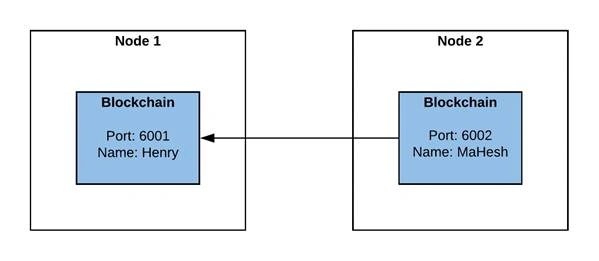
Start Nodes
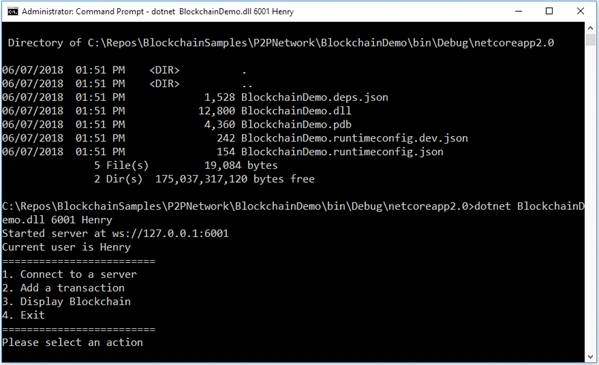
I run the following command in CMD window
> dotnet BlockchainDemo.dll 6001 Henry
It started the first “node”. The first “node” was running at port 6001 and owned by Henry
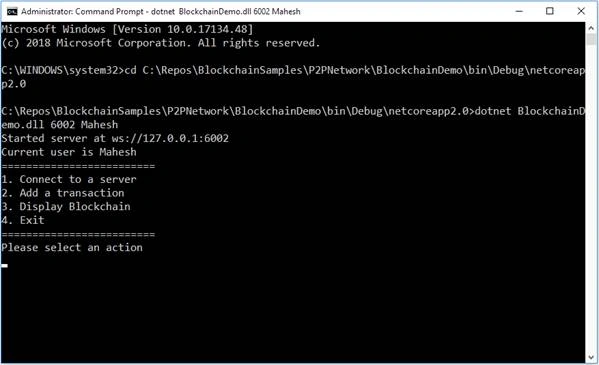
And then, I open a new CMD window and run the following command to start the second “node”
> dotnet BlockchainDemo.dll 6001 Mahesh
Switch back to the first “node”, I display Blockchain on-screen by select #3 first
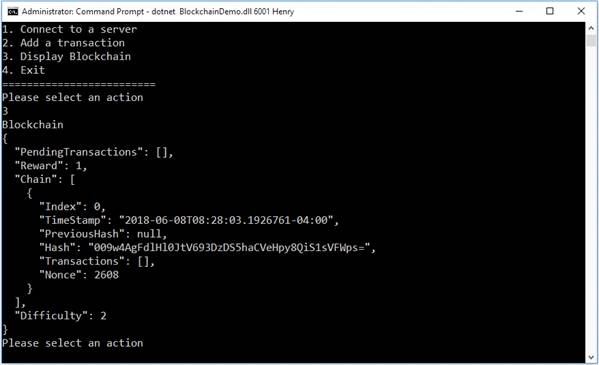
The display shows there is only one block in the Blockchain, Genesis block.
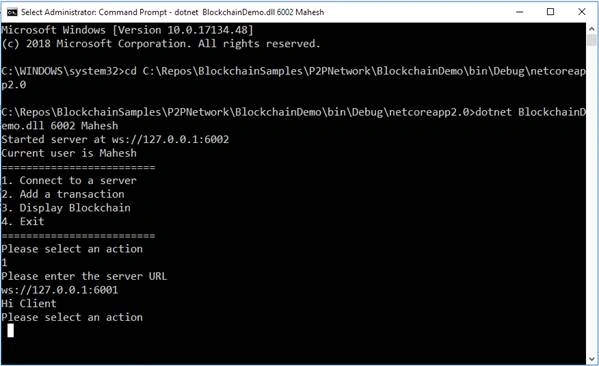
Switch to the second “node”. I connect the second “node” to the first “node” by select #1 and enter the Url of the first “node”. The first “node” received a handshake message from the second “node”
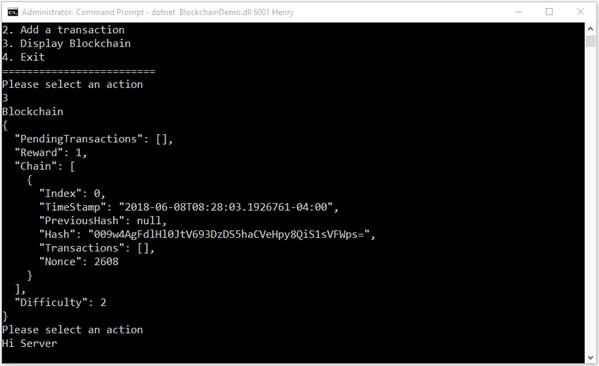
It returns with a handshake message to the second “node”
I display Blockchain on the second “node” by select #3
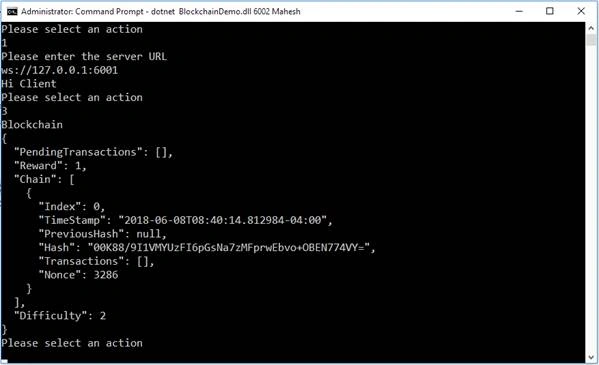
Same as the first node, there is only one block, Genesis block.
Add A Transaction
I add a new transaction for the second “node” by choose option #2 and provides a receiver name and amount.
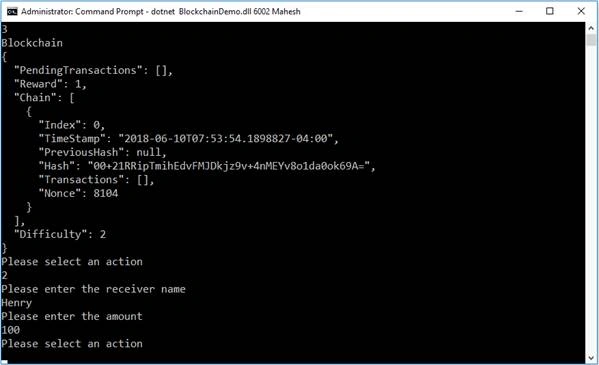
From the display of the Blockchain on the second “node”, I can see a new block is created to contain the new transaction.
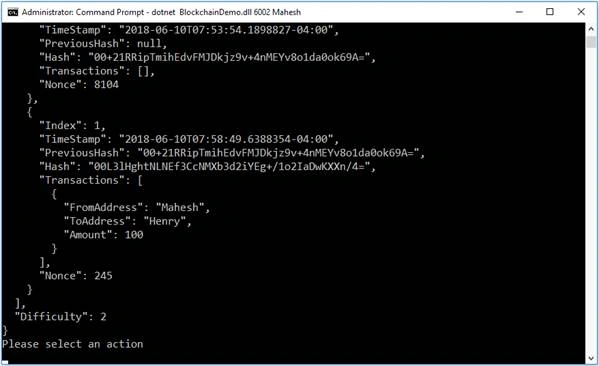
I switch to the first “node” and display the blockchain. I can also see a new node and a new transaction in the new node.
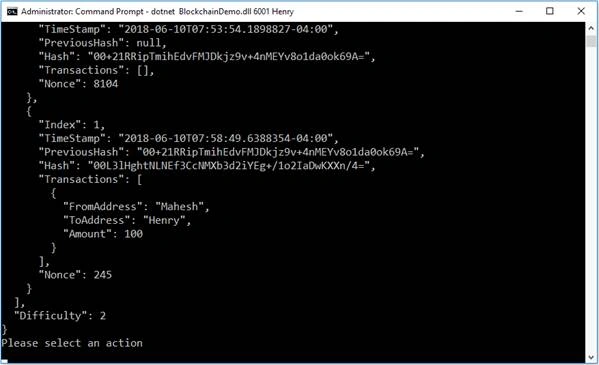
This is because nodes in the network broadcast changes in their blockchain. Nodes receive the broadcast will compare the received Blockchain with their local Blockchain. If the received Blockchain is valid and has a longer chain than the local chain, then it will replace the local Blockchain with the received Blockchain.
Summary
Our basic Blockchain is one step closer to a real-world Blockchain now. We can see how two “nodes” communicate with each other and update changes. There are still a lot of things that can be improved for this Blockchain. I will continue to improve it in my next article.
Nguyen HuyPosted Nov 24, 2022, 7:48 AM
How to run on 2 PCs from other network on other location?
Frank AlvarezPosted Oct 21, 2021, 2:56 PM
How would this work with automatic peer discovery without having to specify the server port?
Tin Le VanPosted Oct 14, 2021, 2:43 AM
What happen if node 1 and node 2 create new block at the same time?
Jordan PetersonPosted May 11, 2021, 3:55 AM
I'm probably a big doof, but what is the Program referring to in Program.Port and Program.PhillyCoin.Chain.Count? It's giving me errors in my own code and in yours that I downloaded.
William PiersolPosted Jan 30, 2021, 4:39 PM
Is this the last article? Will there be anymore?
wooyoung moonPosted Sep 6, 2020, 11:26 AM
I saw a good lecture. However, looking at the code, the P2P logic is invisible and it synchronizes the whole, not the partial synchronization. How should I synchronize?
сергій кузьмичPosted May 6, 2020, 4:13 AM
Thank You! Great Work!
Mizan MamunPosted Dec 4, 2019, 3:38 AM
Thank you for such great tutorial series on blockchain. But how can we update both sides pending transactions?
harsh pareekPosted Jul 23, 2019, 11:36 PM
Hi Great tutorial series for block chain .Only one thing that i am not able to understand is if blockchain is distributed network then why we have client and server here. is it just for understanding or block chains do have server in P2P network to monitor and control. Please throw some light on it.
Расим РацкинPosted Jun 27, 2019, 2:35 PM
Super Man !!!!!
Jerzy StacheraPosted Apr 10, 2019, 4:46 PM
Hi Henry , great series , are you going to extend it ?
SAMEER SAYANIPosted Mar 29, 2019, 8:45 AM
Hi Henry, I downloaded code, while running its throwing error: System.InvalidOperationException: 'The current state of the connection is not Open.' Can you shed some light ! I m using .NET Core 2.2.
Shiqi LinPosted Nov 23, 2018, 7:15 PM
Thank you Henry, great articles. I have a question, if two nodes have same length but with different transactions, and after some time, one of node get another transaction, as a result, this will cause other node updates it's chain to the longer node, and losts it's original different transactions. Note that pendingTransactions don't have the original transaction, because the transactions have been already processed by "Bill".
Ravichandra VydhyaPosted Sep 12, 2018, 5:56 AM
The second node should start at 6002 port like this. dotnet BlockchainDemo.dll 6002 Mahesh
Jie ZhuPosted Aug 31, 2018, 9:22 AM
One of the best series of article I have read for block chain topic for .net developers. Clean code, easy to be understood. Thanks Henry.
razi fazaPosted Aug 19, 2018, 4:24 AM
Hi thanks for your great article ,i can't figure out how can i starting node and simulate two nodes on the same computer? do i need some Prerequisite?
purushu mPosted Aug 15, 2018, 5:48 AM
Great article, this is a basic of blockchain 1.0. The next level of blockcahin 2.0 supports running program (smartcontract) in the blockchain. Do you have github link and do you want to continue to expand this code? Hopefuly many can contribute to this initiative.
FivilPosted Jul 20, 2018, 7:10 PM
Hi, great article. just one question can web sockets be used in real world scenario as well or not? , and also can these web sockets do NAT traversal like bitcoin or this is practical only within one NAT, TNX
Michael HermanPosted Jul 11, 2018, 12:52 PM
Henry, please reach out and contact me ... mwherman at parallelspace dot net Thank you
Sohail SoleimaniPosted Jun 22, 2018, 10:58 AM
Thank you Henry, great series of articles. I have few questions: 1) what is the number for “difficulty” in real world like bitcoin? 2) when do you decide to create the next block? In other word, let’s assume transactions are coming in none stop at what point do you decide to create the new block for current pending transactions and start a new list of pending transactions? How often a new block gets generated in real world? 3) does a pending transactions go to only one node? If not can you explain if there is a potential conflict between nodes? 4) what happens if two nodes generate two new blocks at the very same time for different transactions?
KeithPosted Jun 21, 2018, 3:41 AM
After starting this step in the series, I'd questioned the appropriate sockets option; after reading this post, it had triggered a thought to me whether SignalR could be implemented into this? I've never worked with SignalR, but, maybe you've touched base with it before - https://stackoverflow.com/questions/42635246/what-is-the-state-of-websockets-on-asp-net-core - any thoughts?
thanh bacPosted Jun 18, 2018, 9:33 PM
Thanks Henry, I already read all your articles on this site, very helpful!
Mahesh ChandPosted Jun 13, 2018, 10:25 PM
Thanks Henry. I would be interested to know, what other common protocols, low level and high level, that are commonly used for common public blockchains. Is there any one that is most used?
Packiaraj SanthiyaguPosted Jun 13, 2018, 1:46 PM
nice article dude