

Introduction
Every modern web application wants to understand how users interact with its interface. Which pages do visitors open? Where do they click? How far do they scroll? Which actions lead to conversions?
There are many analytics platforms available today, but while working on multiple enterprise applications, I wanted to understand how a production-grade analytics SDK actually works behind the scenes.
That curiosity led me to build Web SDK—a lightweight, high-performance web analytics SDK along with a complete backend ingestion platform and a real-time analytics dashboard.
This project wasn't just about collecting events. It was about designing an end-to-end system that is fast, scalable, developer-friendly, and capable of serving multiple clients from a single platform.
Why Build Another Analytics SDK?
Most analytics solutions provide excellent features, but they often come with trade-offs:
Large JavaScript bundles
Performance overhead
Limited customization
Vendor lock-in
Complex integrations
I wanted to build something that focused on engineering principles first:
Lightweight footprint
Zero unnecessary dependencies
Non-blocking execution
Reliable event delivery
Multi-tenant architecture
End-to-end type safety
The challenge was simple:
Capture meaningful customer interactions without impacting website performance.
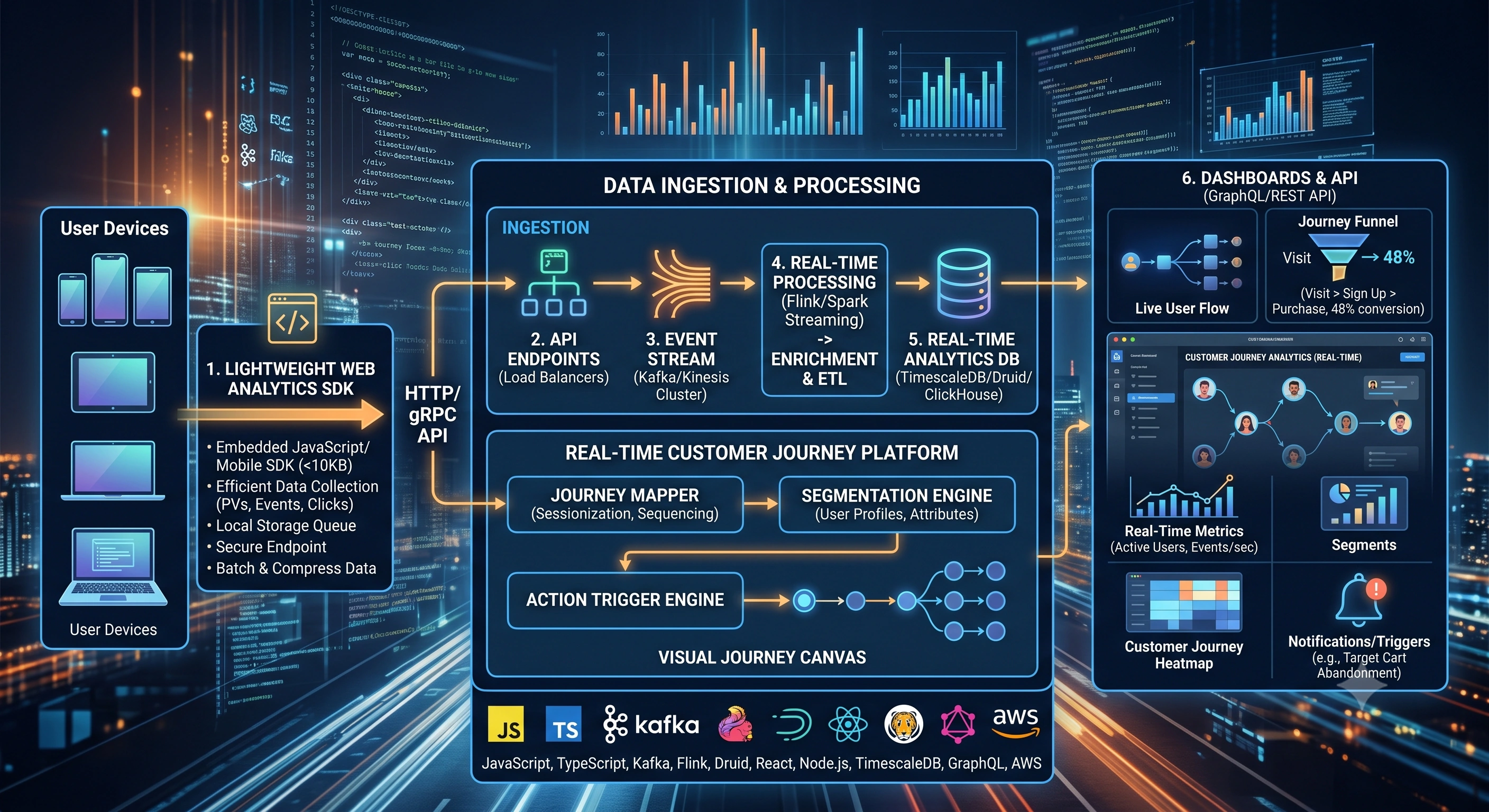
High-Level Architecture
The platform consists of three major components.
Website
     │
     ▼
Web SDK
     │
     ▼
Event Queue & Batching
     │
     ▼
Node.js Ingestion API
     │
     ▼
PostgreSQL
     │
     ▼
Real-Time Dashboard (Next.js)
Each layer has a single responsibility, making the overall architecture modular and scalable.
1. Designing the SDK
The SDK was built using TypeScript and bundled with Rollup.
The primary objective was to keep it extremely lightweight while maintaining developer ergonomics.
Core Design Goals
Small bundle size
Zero external runtime dependencies
Easy integration
Automatic event collection
Custom event APIs
Reliable transport mechanism
Once initialized, the SDK automatically starts collecting useful interaction data such as:
Page views
Click events
Scroll milestones
Session information
Browser metadata
Device information
Referrer information
Screen resolution
Custom application events
Developers can also send business-specific events using a simple API.
Examples include:
Purchase Completed
Add to Cart
Login
Registration
Subscription
Checkout Started
This allows product teams to combine automatic analytics with business-specific metrics.
Keeping Performance First
One of the biggest priorities was ensuring the SDK never slowed down the host website.
That meant avoiding:
Blocking JavaScript execution
Heavy synchronous operations
Frequent network requests
Expensive DOM operations
Instead, the SDK works quietly in the background while users continue interacting with the page.
Reliable Event Delivery
Analytics become useless if events are lost.
Modern browsers often terminate pending requests when users close a tab or navigate away from a page.
To solve this, the SDK primarily uses the browser's Beacon API, with an asynchronous fallback mechanism for environments where it's unavailable.
This significantly improves delivery reliability while keeping the main browser thread free.
Intelligent Event Queue
Sending one HTTP request for every click or page view is inefficient.
Instead, events are stored in an internal queue.
The queue automatically flushes when:
A batch size threshold is reached
A configured timer expires
The user leaves the page
This batching strategy dramatically reduces network overhead while increasing backend throughput.
Retry Strategy
Networks fail.
Users lose connectivity.
Servers restart.
Instead of dropping analytics events, the SDK includes a retry mechanism that temporarily stores failed payloads and resends them later.
This improves data reliability without requiring additional developer effort.
2. Building the Ingestion Platform
Once events leave the browser, they arrive at a backend built with:
Node.js
Express
TypeScript
The ingestion API is responsible for:
Authenticating tenants
Validating requests
Processing batched events
Storing analytics data
Returning lightweight responses
Since the platform is multi-tenant, every request is isolated to its own client.
This makes it possible to onboard multiple organizations while keeping their analytics completely separated.
Multi-Tenant Design
One of the most interesting engineering challenges was tenant isolation.
Each organization has:
Separate API credentials
Independent event streams
Individual dashboards
Dedicated analytics
This architecture allows a single platform to securely serve many customers simultaneously.
Storage Layer
Analytics systems generate a significant volume of write operations.
The backend uses PostgreSQL with connection pooling to efficiently handle concurrent event ingestion.
During development and testing, an in-memory fallback layer keeps the application operational even when a database isn't available.
This approach helped maintain development velocity without sacrificing production architecture.
3. Real-Time Dashboard
Collecting data is only half the problem.
Users also need meaningful ways to explore it.
The frontend dashboard was built using:
Next.js 14
TypeScript
Tailwind CSS
The dashboard provides:
Client onboarding
API credential management
Integration code generation
Live event streams
Active visitor monitoring
Customer journey visualization
Event inspection
Seeing analytics update in real time was one of the most rewarding parts of the project.
Type Safety Across the Entire Stack
One lesson became obvious very quickly:
Shared TypeScript models save an enormous amount of time.
The same interfaces are reused across:
SDK
Backend
Dashboard
This eliminates many common integration bugs and greatly simplifies maintenance.
Strong typing also makes future feature development significantly faster.
Engineering Lessons Learned
1. Performance Matters More Than Features
Even the best analytics solution loses value if it slows down a website.
Keeping the SDK lightweight required constant attention to bundle size and runtime efficiency.
2. Batching Is Essential
Sending one request per interaction quickly becomes expensive.
Batching improves:
Network efficiency
Backend scalability
Browser performance
while reducing infrastructure costs.
3. Modular Architecture Pays Off
Separating responsibilities into:
SDK
Backend
Dashboard
made development easier, testing cleaner, and future expansion much simpler.
4. TypeScript Improves Large Projects
Having compile-time guarantees across multiple applications significantly reduced debugging time and improved developer productivity.
5. Multi-Tenancy Requires Planning
Tenant isolation influences nearly every architectural decision—from authentication and storage to analytics queries and dashboard permissions.
Designing for it early avoids major refactoring later.
What's Next?
This project serves as the foundation for several future enhancements, including:
Heatmaps
Session replay
Funnel analytics
Conversion tracking
Performance monitoring
Custom event schemas
AI-powered customer insights
Real-time alerting
Marketing attribution
Predictive analytics
Building the SDK was just the beginning.
Final Thoughts
Creating a web analytics platform from scratch provided a much deeper understanding of browser APIs, client-side performance, event processing, scalable backend design, and real-time data visualization.
Beyond the code itself, the project reinforced an important principle:
Great developer tools should be powerful, but they should also stay out of the way.
By focusing on performance, simplicity, and scalability from the beginning, it became possible to build an analytics platform that is lightweight for developers, efficient for browsers, and scalable for growing applications.
If you're building SDKs, developer tools, analytics platforms, or distributed systems, I'd love to hear about the architectural decisions you've made and the lessons you've learned along the way.
Summary
Building a production-grade web analytics platform involves much more than capturing events. It requires careful consideration of SDK performance, reliable event delivery, efficient batching, scalable backend architecture, multi-tenant isolation, and real-time visualization. By emphasizing lightweight design, modular architecture, and end-to-end type safety, this project demonstrates how an analytics platform can deliver reliable insights while remaining fast, scalable, and developer-friendly.
Jasen FiciPosted Aug 13, 2026, 1:27 PM
Great article! We featured it in DotNetNews here: https://dotnetnews.co/archive/the-net-news-daily-issue-518/