

There is a massive chasm between a "Tutorial RAG" and a "Production RAG."
In a tutorial, you split text, dump it into a vector database, and pass the top 3 results to an LLM. It works 70% of the time. But in production, that 30% failure rate means hallucinated answers, outdated information, and frustrated users. When a retrieval fails, a standard LangChain pipeline just blindly generates a bad answer.
To build a Production-Grade RAG system, we need an architecture that can self-correct. We need the AI to realize when a retrieval is poor, rewrite the query, and try again. We need it to check its own work for hallucinations before answering the user.
This requires cyclic workflows. This requires LangGraph.
In this end-to-end guide, we will build a production-grade RAG pipeline using LangGraph, covering everything from advanced ingestion strategies to a self-correcting query graph.
The Real-Time Use Case: Enterprise Cloud Incident Copilot
Imagine you are building an AI Copilot for a DevOps/SRE (Site Reliability Engineering) team at a major fintech company.
When a critical alert fires (e.g., "Payment Gateway Latency > 500ms"), engineers need immediate answers. They ask the Copilot:
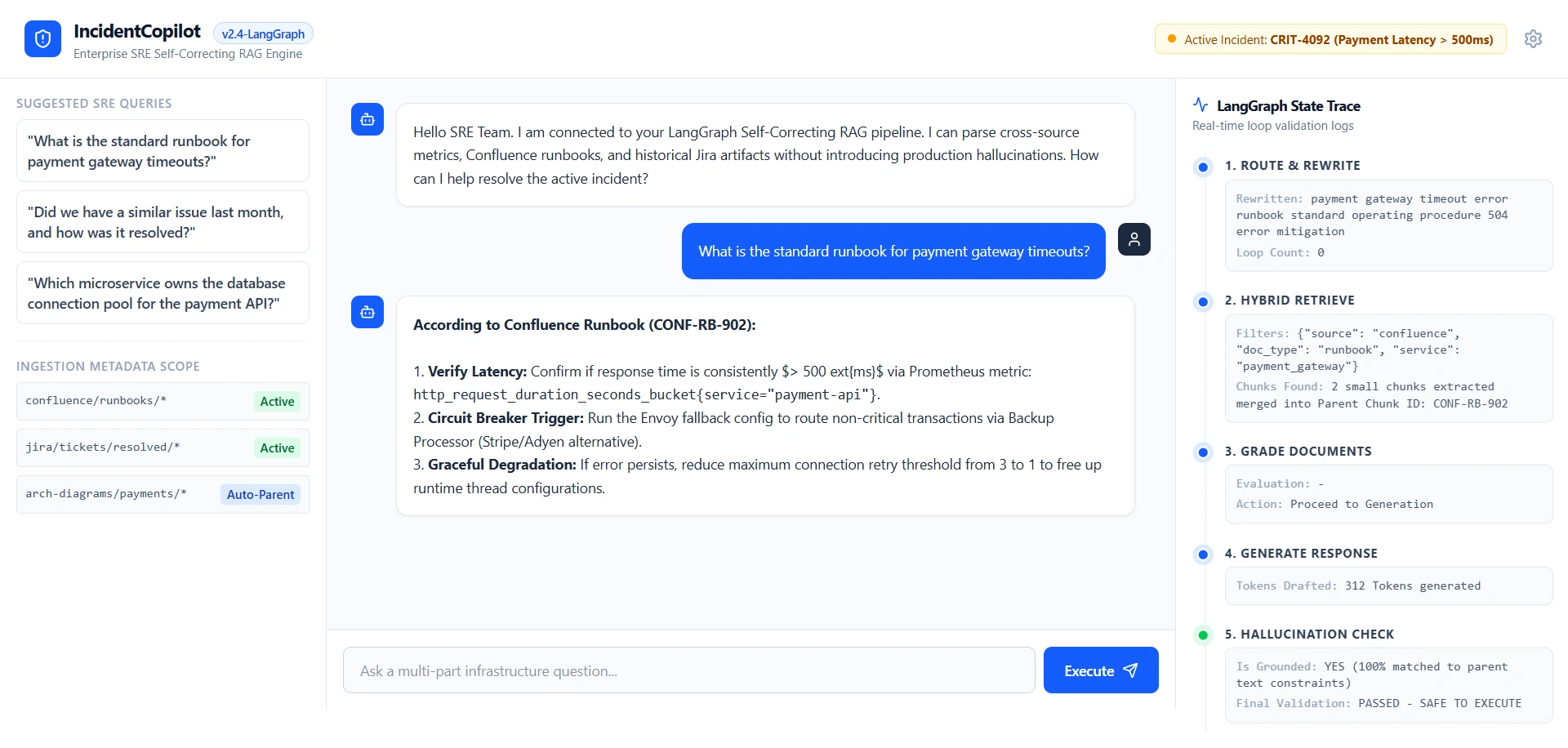
"What is the standard runbook for payment gateway timeouts?"
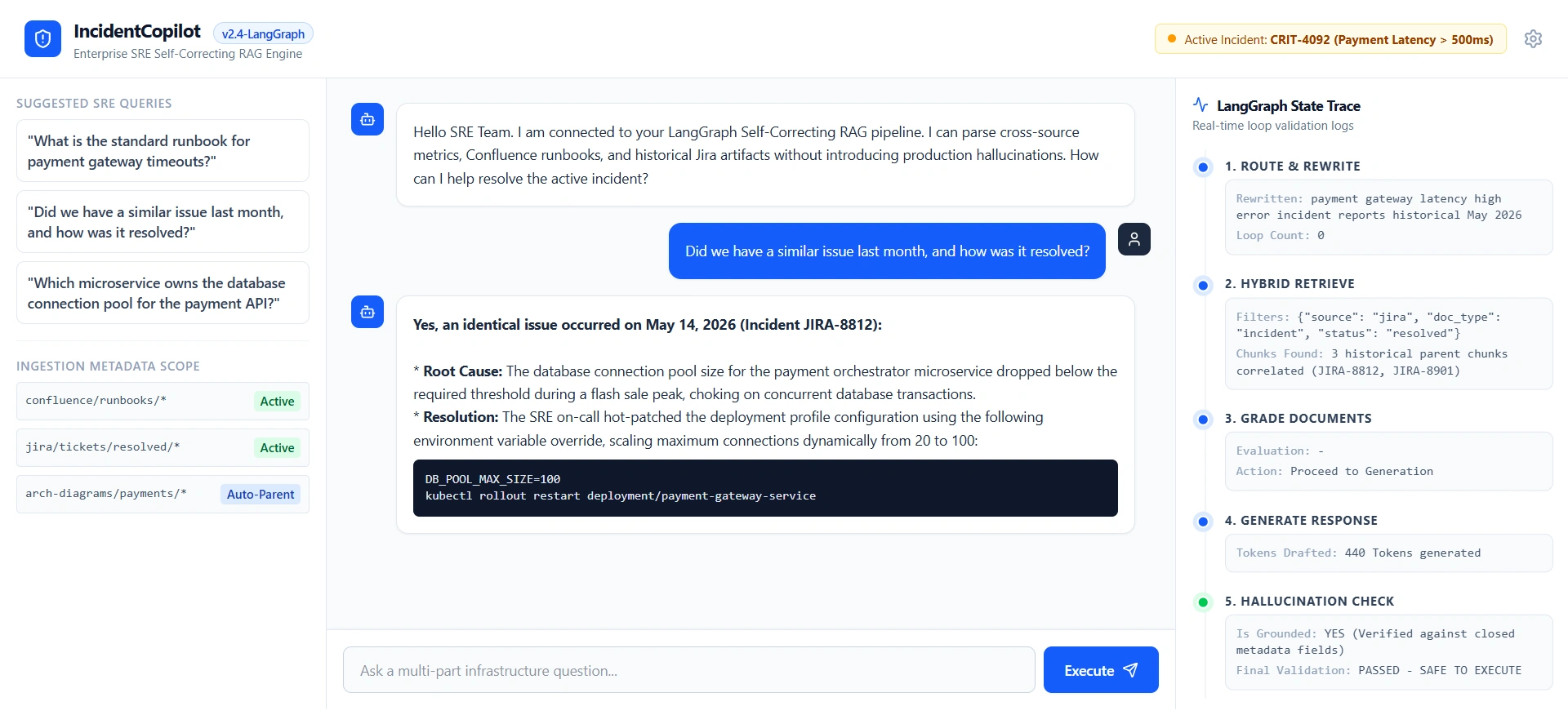
"Did we have a similar issue last month, and how was it resolved?"
"Which microservice owns the database connection pool for the payment API?"
The Production Challenges:
Mixed Data Sources: The knowledge base contains Confluence runbooks, Jira incident tickets, and architecture diagrams.
High Stakes: A hallucinated runbook step could cause an engineer to take down the production database.
Complex Queries: Users ask multi-part questions that require synthesizing data from a Jira ticket and a Confluence page.
Phase 1: Production-Grade Ingestion (The Foundation)
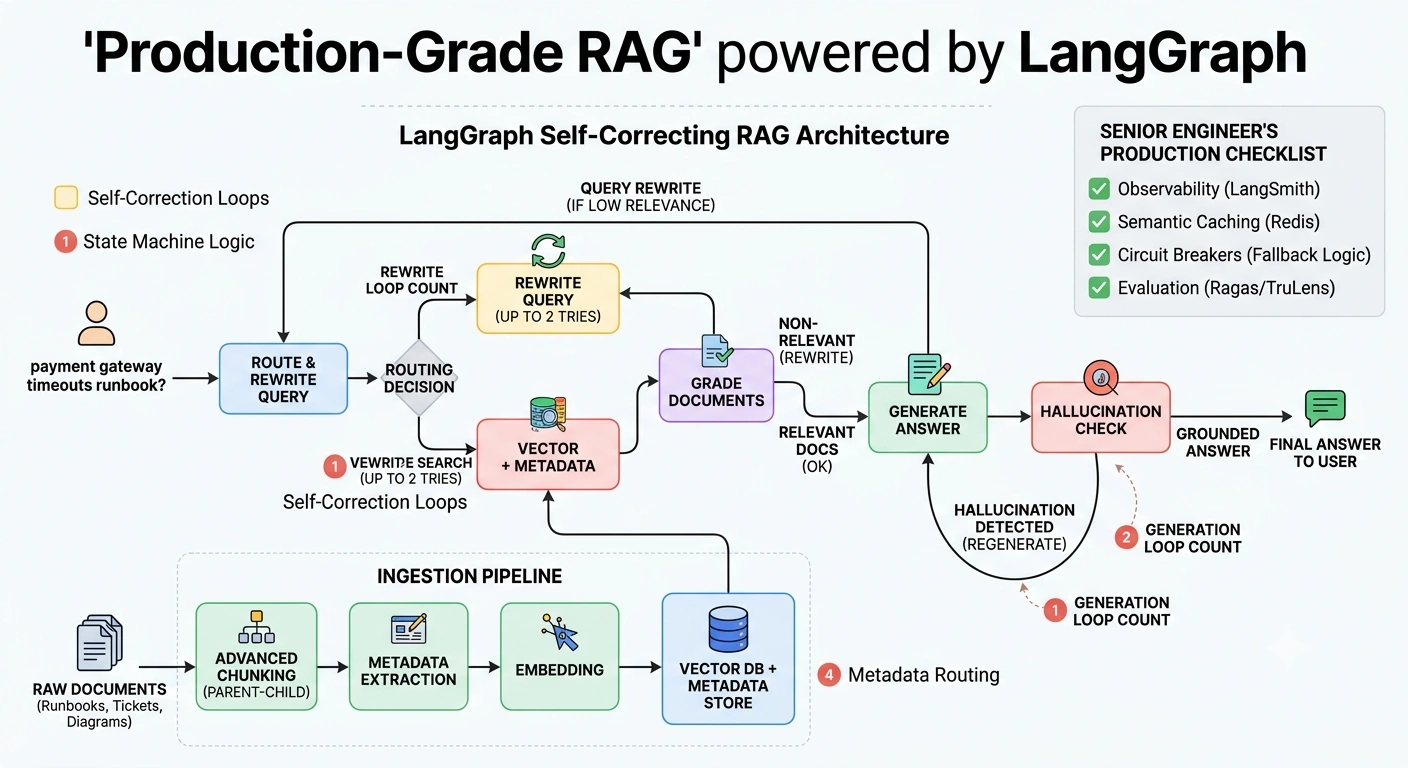
A LangGraph query pipeline is only as good as the data it retrieves. Standard RecursiveCharacterTextSplitter destroys context. For production, we need Advanced Chunking and Metadata Routing.
1. Parent-Child (Auto-Merging) Chunking
Instead of just splitting text, we index small chunks for precise vector search, but we retrieve the larger "parent" chunk to give the LLM full context.
Small chunks (512 tokens): Used for highly accurate semantic search.
Parent chunks (2048 tokens): Retrieved and passed to the LLM to prevent context fragmentation.
2. Metadata Extraction & Routing
Before embedding, we use an LLM to extract metadata from every document.
Confluence Runbook:
{"source": "confluence", "doc_type": "runbook", "service": "payment_gateway"}Jira Ticket:
{"source": "jira", "doc_type": "incident", "status": "resolved"}
This metadata is stored alongside the vectors. During retrieval, the LangGraph agent will use this metadata to filter results (e.g., only search Jira tickets if the user asks about past incidents).
(Note: While ingestion is often handled by batch jobs like Airflow, you can also use LangGraph to orchestrate the ingestion pipeline: Parse -> Chunk -> Extract Metadata -> Embed -> Store, ensuring every document passes through strict validation gates before hitting the Vector DB).
Phase 2: The LangGraph RAG Architecture (The Brain)
Now we build the query pipeline. We will use LangGraph to create a Self-Correcting RAG Agent.
The Graph Topology
Route & Rewrite: Classify the query and rewrite it for optimal vector search.
Retrieve: Fetch documents using hybrid search (Vector + Metadata filtering).
Grade Documents: An LLM evaluates if the retrieved docs are actually relevant. (If no, loop back to Rewrite).
Generate: Draft the answer.
Hallucination Check: An LLM checks if the generated answer is grounded only in the retrieved docs. (If yes, loop back to Generate).
Final Answer: Return to the user.
Phase 3: Implementation in LangGraph
Let’s write the code for this self-correcting pipeline.
Step 1: Define the State
The state tracks the conversation, the retrieved documents, and the loop counters to prevent infinite cycles.
from typing import List, TypedDict, Literal
from langgraph.graph import StateGraph, END, START
from langchain_core.documents import Document
from langchain_core.messages import HumanMessage, AIMessage

class RAGState(TypedDict):
    messages: list # User query and conversation history
    rewritten_query: str
    documents: List[Document]
    generation: str
    loop_count_retrieve: int
    loop_count_generate: int
Step 2: Define the Nodes
Node 1: Query Rewriter
Users ask bad questions. "Why is the payment thing broken?" We rewrite this for the vector DB.
def rewrite_query(state: RAGState):
    user_query = state["messages"][-1].content
    # Prompt LLM to rewrite the query for better semantic search
    rewritten = llm.invoke(f"Rewrite this query for vector search: {user_query}")
    return {"rewritten_query": rewritten.content, "loop_count_retrieve": 0}
Node 2: Retriever
We use the rewritten query and apply metadata filters based on the route.
def retrieve_documents(state: RAGState):
    query = state["rewritten_query"]
    # In production, use a hybrid retriever with metadata filtering
    docs = vector_store.similarity_search(query, k=5, filter={"doc_type": "runbook"})
    return {"documents": docs}
Node 3: Document Grader (The Self-Correction Magic)
Did we get good documents? If not, we don't generate; we rewrite the query and try again.
def grade_documents(state: RAGState):
    docs = state["documents"]
    query = state["rewritten_query"]

    # LLM grades each document for relevance
    relevant_docs = [doc for doc in docs if llm_grader.invoke(f"Is {doc.page_content} relevant to {query}?")]

    return {"documents": relevant_docs, "loop_count_retrieve": state["loop_count_retrieve"] + 1}
Node 4: Generator & Hallucination Grader
def generate_answer(state: RAGState):
    docs_content = "\n".join([doc.page_content for doc in state["documents"]])
    prompt = f"Context:\n{docs_content}\n\nQuestion: {state['messages'][-1].content}\nAnswer:"
    response = llm.invoke(prompt)
    return {"generation": response.content, "loop_count_generate": state["loop_count_generate"] + 1}

def check_hallucination(state: RAGState):
    # LLM checks if the generation is strictly grounded in the documents
    is_grounded = llm_grader.invoke(f"Is {state['generation']} grounded in {state['documents']}?")
    return {"is_hallucinated": not is_grounded}
Step 3: Define the Conditional Edges (The Graph Logic)
This is where LangGraph shines. We define the logic for when to loop and when to exit.
def route_after_grading(state: RAGState) -> Literal["generate", "rewrite_query"]:
    # If we have relevant docs, generate. If not, and we haven't looped too much, rewrite.
    if len(state["documents"]) > 0:
        return "generate"
    elif state["loop_count_retrieve"] < 2:
        return "rewrite_query"
    else:
        return "generate" # Fallback to generate with whatever we have to avoid infinite loops

def route_after_hallucination_check(state: RAGState) -> Literal["end", "generate"]:
    if state.get("is_hallucinated", False) and state["loop_count_generate"] < 2:
        return "generate" # Regenerate if hallucinated
    return "end"
Step 4: Compile the Graph
workflow = StateGraph(RAGState)

# Add Nodes
workflow.add_node("rewrite_query", rewrite_query)
workflow.add_node("retrieve", retrieve_documents)
workflow.add_node("grade", grade_documents)
workflow.add_node("generate", generate_answer)
workflow.add_node("check_hallucination", check_hallucination)

# Add Edges
workflow.add_edge(START, "rewrite_query")
workflow.add_edge("rewrite_query", "retrieve")
workflow.add_edge("retrieve", "grade")

# Conditional Edges (The Loops)
workflow.add_conditional_edges("grade", route_after_grading, {
    "generate": "generate",
    "rewrite_query": "rewrite_query"
})

workflow.add_edge("generate", "check_hallucination")
workflow.add_conditional_edges("check_hallucination", route_after_hallucination_check, {
    "generate": "generate",
    "end": END
})

# Compile
app = workflow.compile()
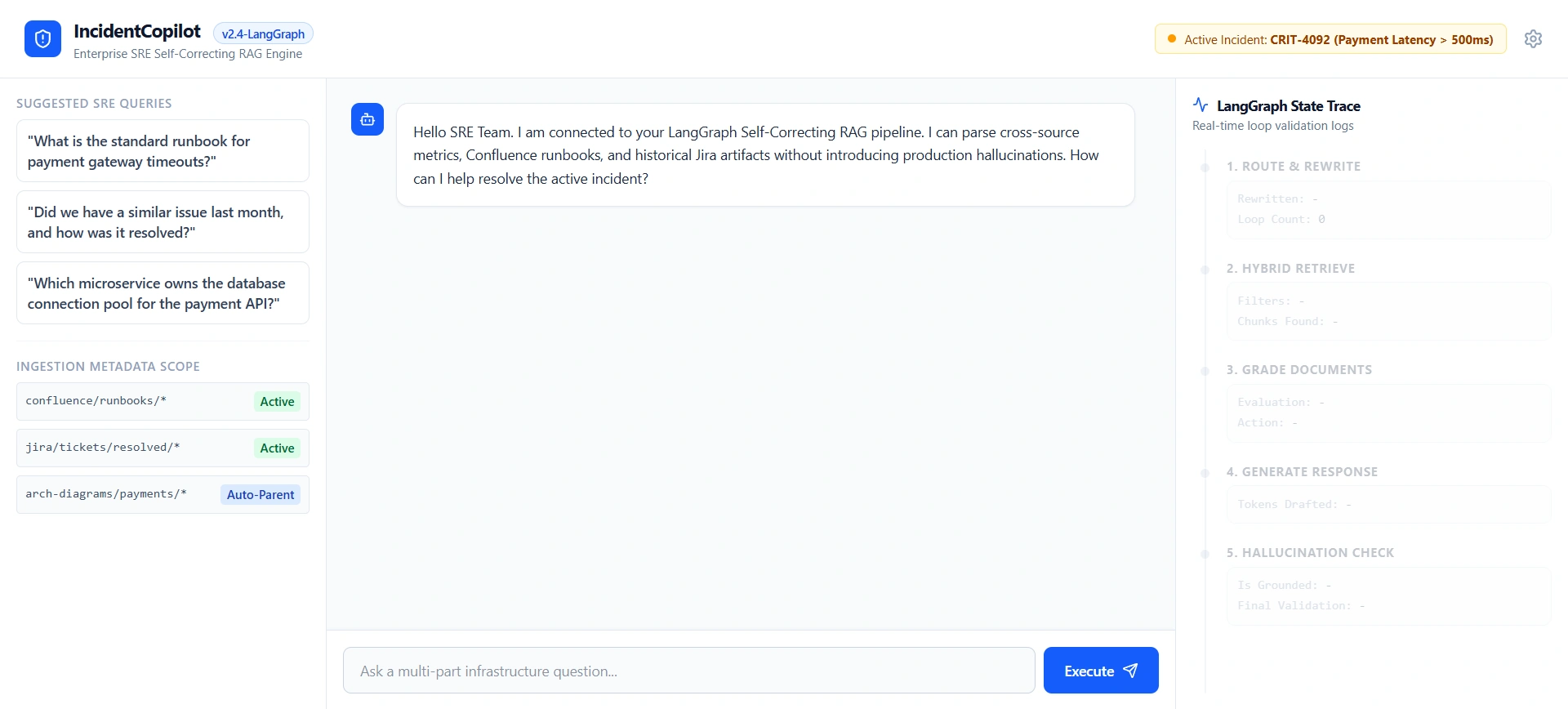
Output
Phase 4: Production Hardening (The Senior Engineer's Checklist)
Building the graph is only 60% of the work. To make it truly production-grade, you must implement the following:
Observability (LangSmith): You cannot debug a cyclic graph in the console. You must trace every node execution, token count, and latency metric using LangSmith. If the
grade_documentsnode loops 3 times, you need to see exactly why the retriever failed.Semantic Caching: If an engineer asks, "What is the runbook for payment timeouts?" at 9:00 AM, and another asks the exact same question at 9:05 AM, do not run the graph. Use a semantic cache (like Redis with vector search) to return the cached answer in 50ms.
Circuit Breakers: If the Vector DB is down, or the LLM provider is experiencing high latency, the graph must have fallback edges. (e.g., If
retrievefails, route to a "Fallback Node" that returns a polite error message instead of crashing the app).Evaluation (Offline & Online): Use frameworks like Ragas or TruLens to evaluate your pipeline. Track metrics like Context Precision, Faithfulness, and Answer Relevancy on a weekly basis against a golden dataset.
Summary
Moving from a junior developer to a senior AI engineer means realizing that LLMs are probabilistic, but business requirements are deterministic.
A basic LangChain RAG pipeline hopes the retrieval is good and prays the LLM doesn't hallucinate. A Production-Grade LangGraph RAG pipeline assumes the retrieval might be bad, checks for it, corrects it, generates the answer, checks for hallucinations, and corrects those too.
By treating your RAG pipeline as a state machine with self-correcting loops, you transform a fragile demo into a resilient, enterprise-grade system capable of handling the high-stakes demands of production environments.
Join the conversation! Your thoughts help the community grow.