

Introduction
In this article, we'll create an Azure Function with a Timer Trigger that fetches weather data for a specific city using the OpenWeatherMap API and then uploads the data to an Azure Blob Storage Table. The function will run periodically at a specified interval to keep the weather data up-to-date.
Prerequisites
- Azure account with Function App and Blob Storage set up.
- OpenWeatherMap API key.
Step 1. Setting up the Azure Function App and Blob Storage
- install Visual Studio Code, and add the Azure extension. Harness the power of this lightweight code editor and seamlessly integrate Azure cloud services to supercharge your development workflow. The next step is to sign in to your Azure account directly within the extension.

- Use the extension to create a new Function App in Azure.

- Inside the Azure extension, you will see a section for "Work space." click the Azure function Icon.

- After clicking "Create Function," you will be prompted to choose the programming language for your Azure Function. You can select from options like Python, JavaScript, C#, etc.
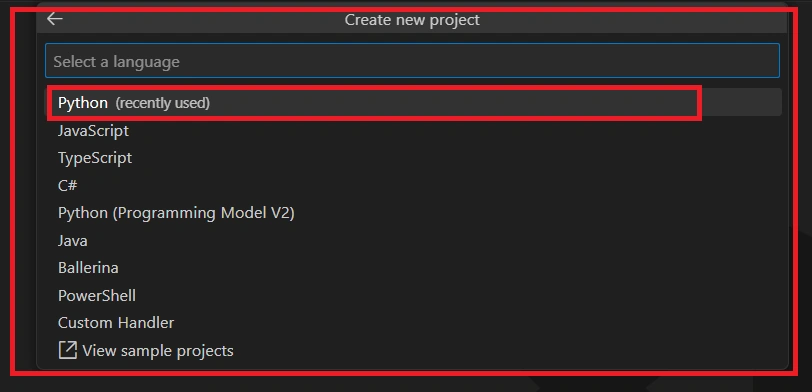
- Then choose Python interpreter.
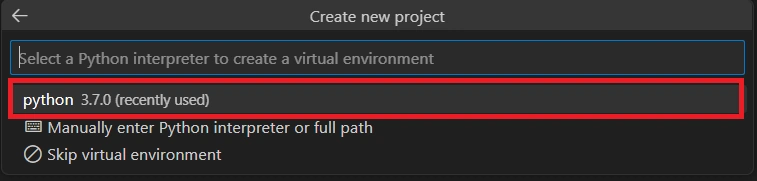
- Next, you'll need to choose a template for your function, such as HTTP Trigger, Timer Trigger, Blob Trigger, etc.

- Once you've selected the language and template, you'll need to provide additional information about your function, such as the function name and timing.

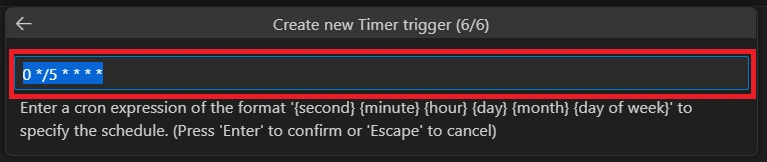
- Then your function app is ready.

- After creating the Function App, click on the "Create New" button in the "Storage Account" section of the Azure Functions extension. Fill in the required details to create a new Storage Account. Choose the appropriate options for Account kind, Replication, and other settings as per your requirements.
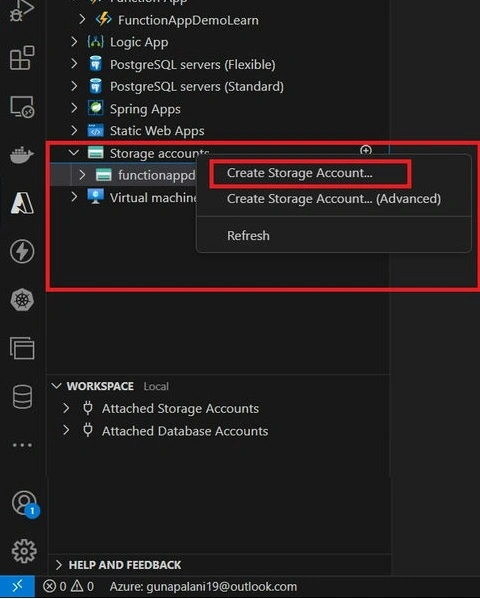
- Once the Storage Account is created, go to the "Table" section and click on "Create New".

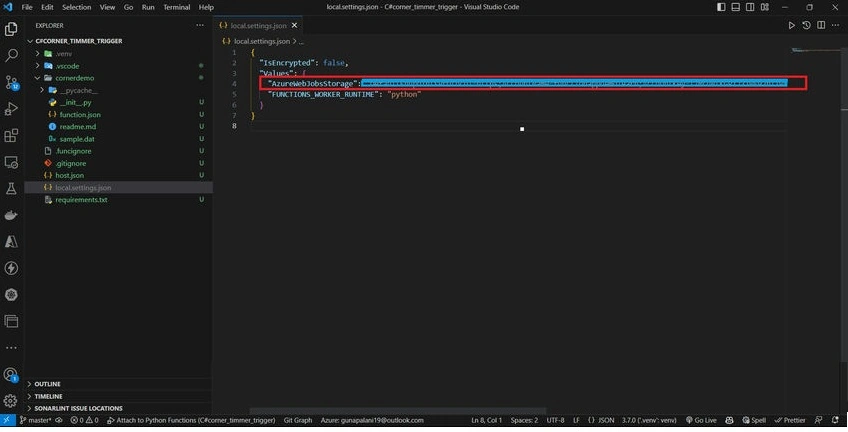
- Go to the "Access keys" section of the created Storage Account in the Azure portal.Copy the "Connection string" from one of the key options (either "Key1" or "Key2").In your local Visual Studio Code project, navigate to the "local.settings.json" file.Open the "local.settings.json" file and find the "Values" section. Add a new key-value pair under "Values" with the key as "AzureWebJobsStorage" and the value as the copied connection string. Save the changes to the "local.settings.json" file.
- Now, your Function App in Visual Studio Code is configured to use the specified Storage Account connection string for local development and testing.
- Press the F5 key on your keyboard or go to the "Run" menu and select "Start Debugging."The Function App will start running, and the Timer Trigger will be triggered according to the schedule you have defined. You can monitor the output and logs in the "Terminal" or "Output" window to see the execution results of the Timer Trigger.

- Go to the OpenWeatherMap website: https://openweathermap.org/Click on the "Sign Up" button at the top right corner of the page. Sign up for a new account using your email or by connecting with your social media account. After signing up, log in to your OpenWeatherMap account. Once logged in, navigate to the "API" section by clicking on the "API" link in the top navigation bar. and copy our key. If you want a new on, click the create option and create a new one also. then move to vs code.

- To create the check_weather file and add the given code in Visual Studio Code.
- Your check_weather.py file should now contain the following code:
-
import requests

def get_weather_data(api_key,city_name):
    base_url="http://api.openweathermap.org/data/2.5/weather"
    params = {
        "q":city_name,
        "appid":api_key,
        "units":"matric"
    }

    try:
        response = requests.get(base_url,params=params)
        response.raise_for_status()

        weather_data = response.json()
        return weather_data
    except requests.exceptions.RequestException as e:
        print(f"Error fetching weather data: {e}")
        return None
Now, you have created the check_weather.py file with the provided code. This file will be used in your Azure Function App to fetch weather data from the OpenWeatherMap API.
- You call the get_weather_data function in the main function. This API key will be used to authenticate your requests to the OpenWeatherMap API and fetch weather data.
import datetime import logging from .check_weather import get_weather_data from .upload_table_azure import upload_weather_data import azure.functions as func def main(mytimer: func.TimerRequest) -> None: api_key ="your_weather_api_key" city_name ="Chennai" utc_timestamp = datetime.datetime.utcnow().replace( tzinfo=datetime.timezone.utc).isoformat() if mytimer.past_due: logging.info('The timer is past due!') logging.info('Python timer trigger function ran at %s', utc_timestamp) weather_data = get_weather_data(api_key,city_name) if weather_data: print(f"Weather in {city_name}: {weather_data['weather'][0]['description']}") print(f"Temperature: {weather_data['main']['temp']}°C") print(f"Humidity: {weather_data['main']['humidity']}%") print(f"Wind Speed: {weather_data['wind']['speed']} m/s") else: print("Weather data not available.") - Once you done all, just run your function app using f5.
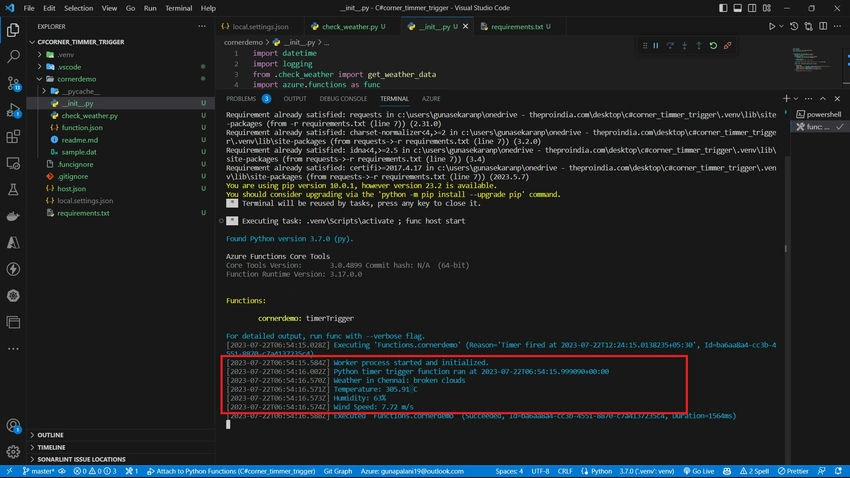
- Then upload the Azure table progress. To create the upload_azure_table.py file in your Azure Function App project and include the provided code.
- Copy and paste the following code into the upload_azure_table.py file:
import uuid import random from azure.data.tables import TableClient from azure.core.exceptions import ResourceExistsError def upload_weather_data(weather_data): connection_string = 'your_storage_account_connection_string' # Create a TableClient table_client = TableClient.from_connection_string(connection_string, "weatherdata") # Define the entity properties partition_key = str(uuid.uuid4()) row_key = str(random.randint(1, 100000)) weather = f"{weather_data['weather'][0]['description']}" temperature =f"{weather_data['main']['temp']}°C" humidity = f"{weather_data['main']['humidity']}%" speed =f"{weather_data['wind']['speed']} m/s" # Create the entity entity = { "PartitionKey": partition_key, "RowKey": row_key, "Weather": weather, "Temperature": temperature, "Humidity": humidity, "Speed": speed, } try: # Insert the entity into the table table_client.create_entity(entity) print("Entity successfully uploaded to Azure Storage Table.") except ResourceExistsError: print("Entity with the same PartitionKey and RowKey already exists in the table.") except Exception as e: print(f"Error uploading entity to Azure Storage Table: {e}") - Now, you have successfully created the upload_azure_table.py file with the upload_weather_data function that will upload weather data to the Azure Blob Storage Table as per the provided code. Please make sure to replace the connection_string with the appropriate connection string for your Azure Storage Account. Additionally, ensure that the Azure Table named weatherdata exists in your storage account to avoid any errors during entity insertion.
- To call the upload_weather_data function from the upload_azure_table.py file in your __init__.py
from .upload_azure_table import upload_weather_data - Now the main file is.
import datetime import logging from .check_weather import get_weather_data from .upload_table_azure import upload_weather_data import azure.functions as func def main(mytimer: func.TimerRequest) -> None: api_key ="your_api_key" city_name ="Chennai" utc_timestamp = datetime.datetime.utcnow().replace( tzinfo=datetime.timezone.utc).isoformat() if mytimer.past_due: logging.info('The timer is past due!') logging.info('Python timer trigger function ran at %s', utc_timestamp) weather_data = get_weather_data(api_key,city_name) if weather_data: print(f"Weather in {city_name}: {weather_data['weather'][0]['description']}") print(f"Temperature: {weather_data['main']['temp']}°C") print(f"Humidity: {weather_data['main']['humidity']}%") print(f"Wind Speed: {weather_data['wind']['speed']} m/s") upload_weather_data(weather_data) else: print("Weather data not available.") - Next, please remind requirements.txt
azure-functions
urllib3==1.26.7 --for unsupported function app
requests
azure-data-tables
Usage of requirements.txt file:
The requirements.txt file is used to list all the external Python packages that your Azure Function App depends on. When you deploy your Azure Function App, the Azure platform will use this file to install the specified packages and their dependencies in the Python environment for your function.
- All done; please run our function app.

- You should also see the log statements you added in your functions (e.g., "Entity successfully uploaded to Azure Storage Table") indicating that your functions are executing correctly.
- Check Azure Table Storage: If your Function App is successfully posting weather data to Azure Table Storage, you can check your Azure Table to verify that the data is being stored correctly. You can do this using the Azure Storage Explorer tool.

Conclusion
We have successfully created an Azure Function with a Timer Trigger that fetches weather data from the OpenWeatherMap API and uploads it to an Azure Blob Storage Table. This function runs at a specified interval, ensuring that the weather data remains current and up-to-date. If you have any doubts, please use the comment section.
Join the conversation! Your thoughts help the community grow.