

Technological interviews are stressful. Even senior developers get anxious when asked to "design a scalable system" or "explain the event loop" on the spot. The best way to prepare is practice—mock interviews. But finding a peer who can give you objective, deep technical feedback at 11 PM on a Sunday is nearly impossible.
That's why I built AI Tech Interview—a voice-first platform that acts as your always-available technical interviewer. In this article, I'll walk you through how I leveraged Next.js 16, Azure OpenAI, and Azure Speech Services to create a realistic interview simulation that talks to you, listens to your answers, and grades you like a hiring manager.
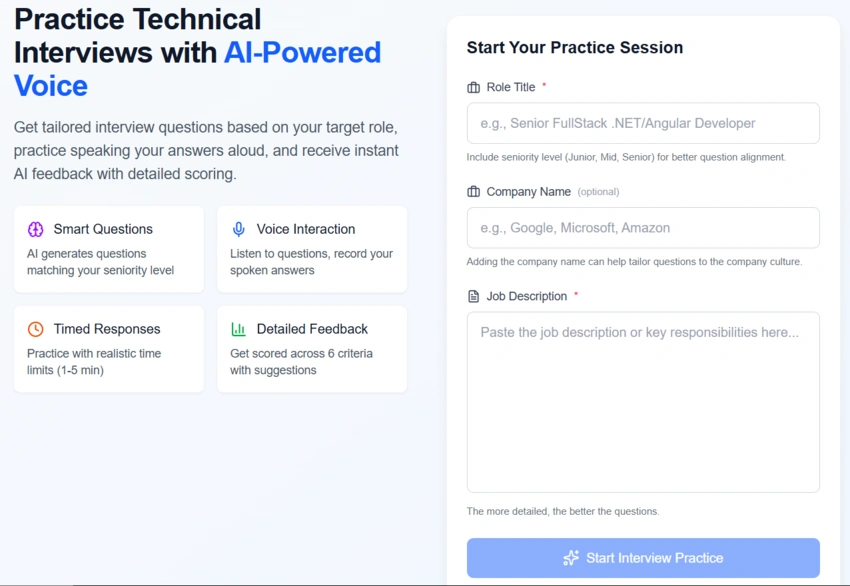
(For for setting up a session with a target role and job description)
The Problem: "It's Not Just What You Know, It's How You Say It"
Most interview prep platforms are text-based. You read a LeetCode problem, type a solution, and pass a test case. But real engineering roles require communication. You need to explain trade-offs, discuss architecture, and articulate your thoughts clearly.
I wanted to solve three specific problems:
Lack of Verbal Practice: Writing code is different from explaining it.
Generic Feedback: "Correct/Incorrect" isn't enough; we need nuance (e.g., "Your solution works, but you missed the scalability concern").
Role Mismatch: A Junior Developer shouldn't be asked the same system design questions as a Principal Architect.
The Solution: A Voice-First Simulator
AI Tech Interview isn't just a quiz app. It simulates the flow of a real video interview:
Context Aware: You paste the Job Description and the Role Title (e.g., "Senior .NET Developer").
The Interviewer Speaks: The AI generates relevant questions and reads them aloud using a neural voice.
You Speak: You answer via microphone. No typing.
Real-time Analysis: The system records, transcribes, and evaluates your answer using strict hiring criteria.
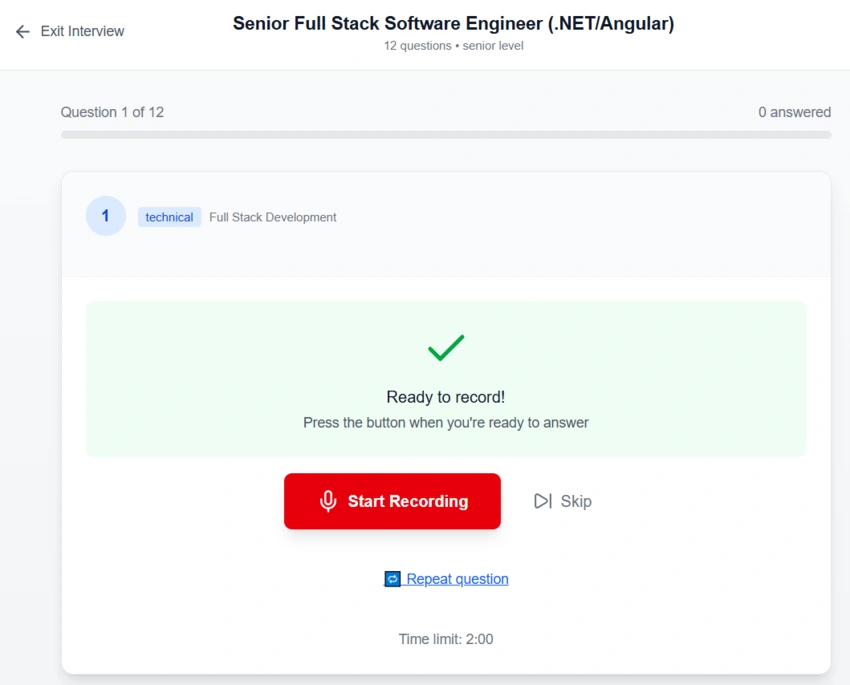
(The active interview room with the question being read aloud)
Under the Hood: The Tech Stack
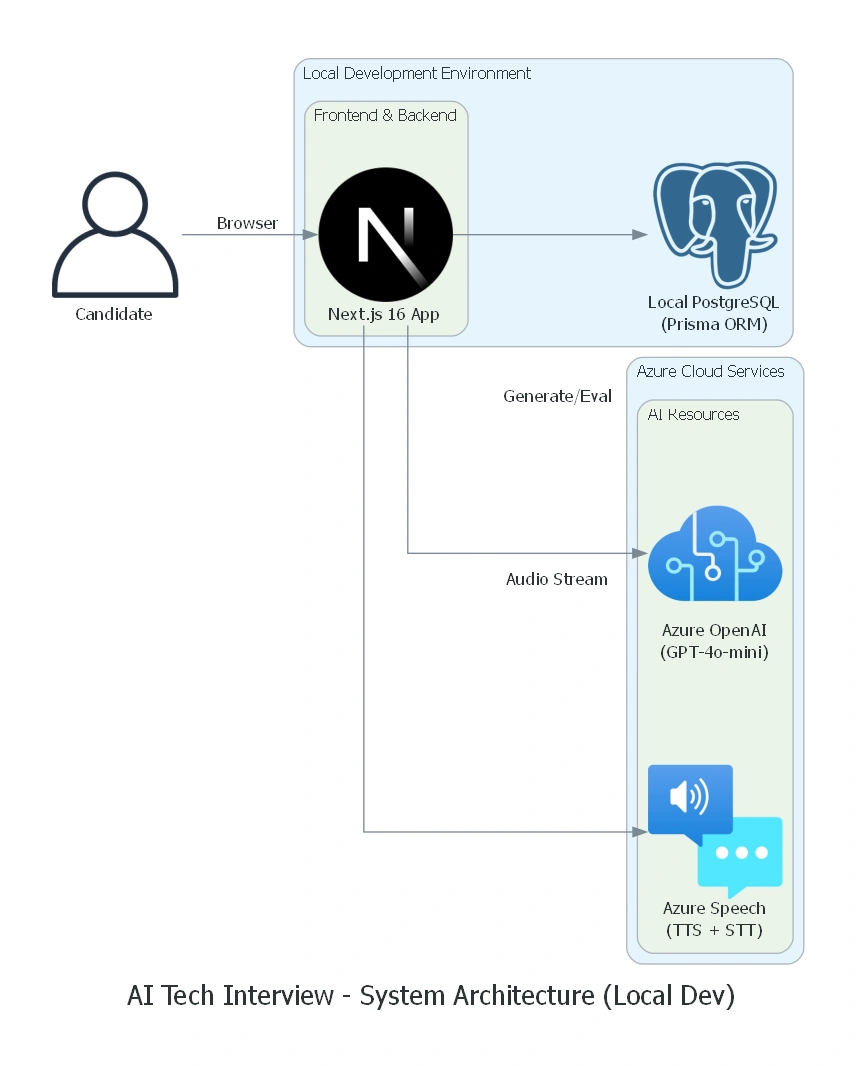
(The hybrid architecture: A local Next.js app connecting to Azure AI services)
To build a seamless, real-time experience, I chose a modern stack focusing on performance and type safety. Critically, this project is designed to run locally. You don't need a complex cloud deployment to get started; you just need your Azure API keys.
1. The Core: Next.js 16 & Local Database
I used the latest Next.js 16 with the App Router. The new Server Actions feature was a game-changer for this project. Instead of building a separate API layer for handling interview sessions, I could execute database logic and AI calls directly from my components securely.
Database Flexibility: By using Prisma, the app defaults to a local PostgreSQL database, but it can easily be swapped for SQLite or a cloud managed database. The app itself is platform-agnostic and can be hosted anywhere (Vercel, Azure Container Apps, or your laptop), as long as it can reach the Azure AI endpoints.
2. The Brain: Azure OpenAI (GPT-4o-mini)
The intelligence comes from GPT-4o-mini. I chose this model because it balances speed and intelligence perfectly. It handles two key jobs:
Question Generation: It analyzes the "seniority" in your role title (e.g., detecting "Senior" vs "Junior") and dynamically adjusts the difficulty.
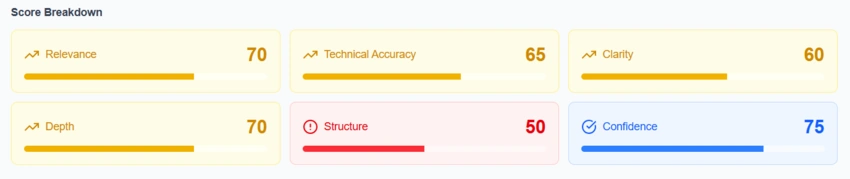
Evaluation: It acts as the hiring manager, scoring your answers on 6 dimensions: Relevance, Technical Accuracy, Clarity, Depth, Structure, and Confidence.
3. The Voice: Azure Speech Services
This is what makes the app feel "alive."
Text-to-Speech (TTS): I used Azure's Neural voices to give the interviewer a natural, non-robotic tone.
Speech-to-Text (STT): Real-time transcription converts your spoken voice into text for the LLM to analyze.
4. Deep Dive: Building for Resilience
Real interviews don't stop if your WiFi flickers, and neither should this app. I implemented a robust Offline-First architecture using IndexedDB.
If your connection drops mid-interview:
The app continues recording and saves your audio blob locally.
It queues the synchronization task in
IndexedDB.A background hook (
useOfflineSupport) monitors the network status.As soon as you're online, it automatically retries the upload without losing your answer.
// Simplified logic from useOfflineSupport.ts
useEffect(() => {
  const unsubscribe = onNetworkChange((online) => {
    if (online && state.pendingCount > 0) {
       triggerSync(); // Auto-upload queued answers
    }
  });
  return unsubscribe;
}, [triggerSync]);
How It Works: The User Flow
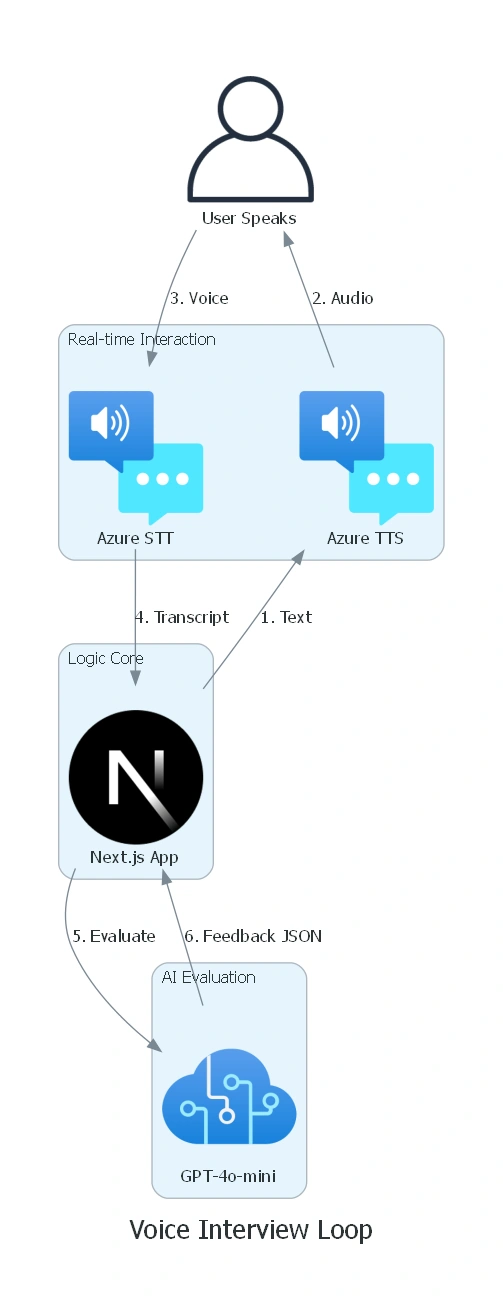
To better understand the interaction between the User, React Client, and Azure Services, here is a detailed sequence diagram:
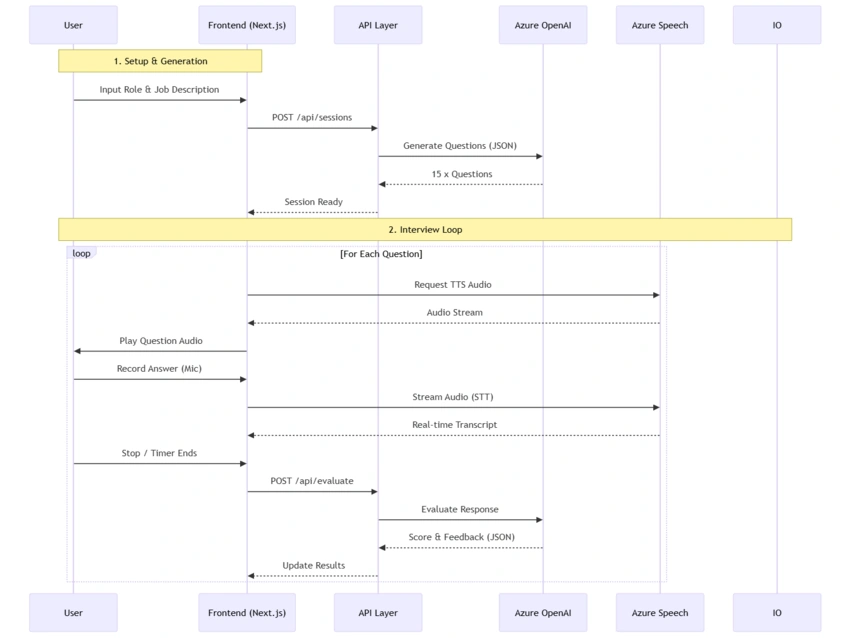
Step 1: define Your Target
You start by telling the system what you are applying for. The AI analyzes the job description to extract key technologies (e.g., "Kubernetes," "React," "Microservices") to ensure the questions are relevant.
Step 2: The Pressure Cooker
Once the session starts, you're on the clock.
| Category | Time Limit | Description | Focus |
|---|---|---|---|
| Technical | 2 minutes | Deep-dive questions on specific technologies, languages, frameworks | Correct usage, best practices, internals |
| System Design | 5 minutes | Architecture, scalability, trade-offs | System thinking, component design, trade-offs |
| Behavioral | 3 minutes | Leadership, teamwork, conflict resolution | STAR method responses, real examples |
| Problem Solving | 4 minutes | Debugging, optimization, algorithmic thinking | Approach, reasoning, solution quality |
The countdown timer adds that realistic "interview pressure" that is missing from casual practice.
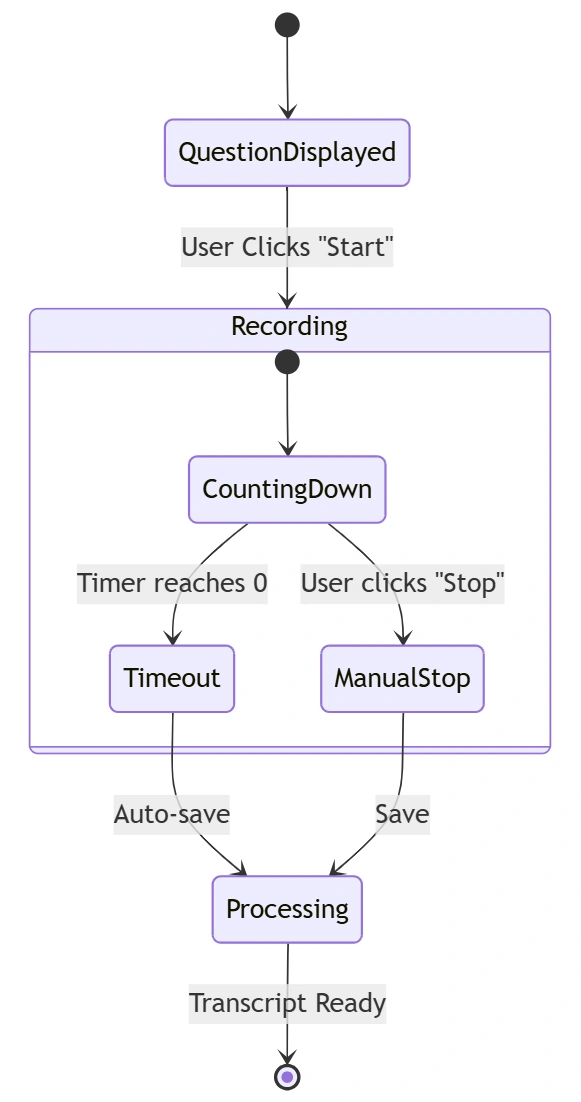
Step 3: Instant Feedback Loop
Immediately after finishing a question, the system provides a detailed scorecard.
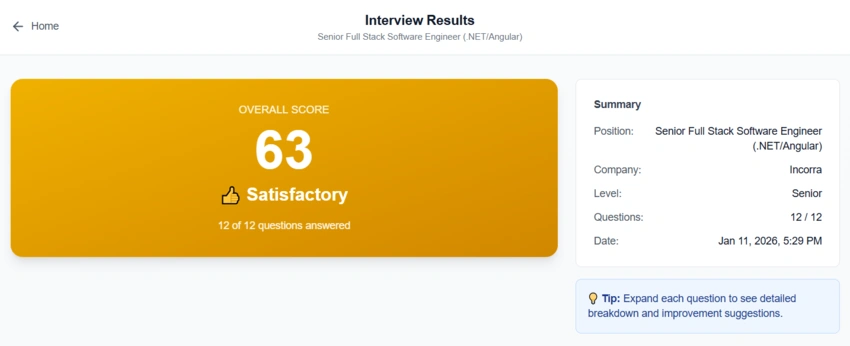
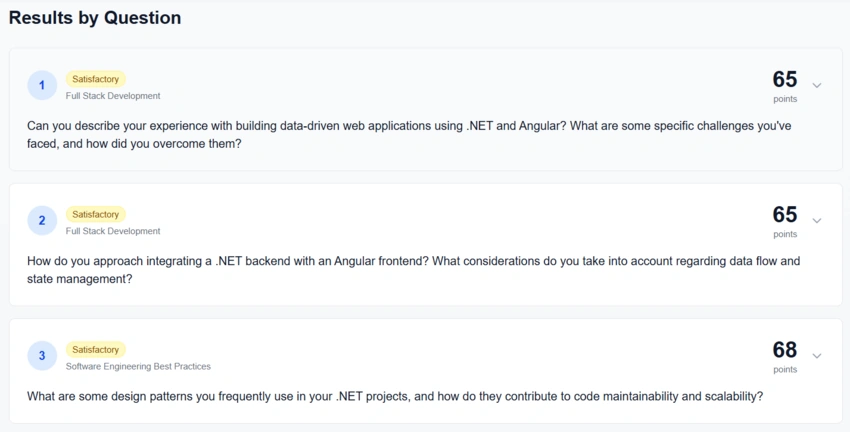
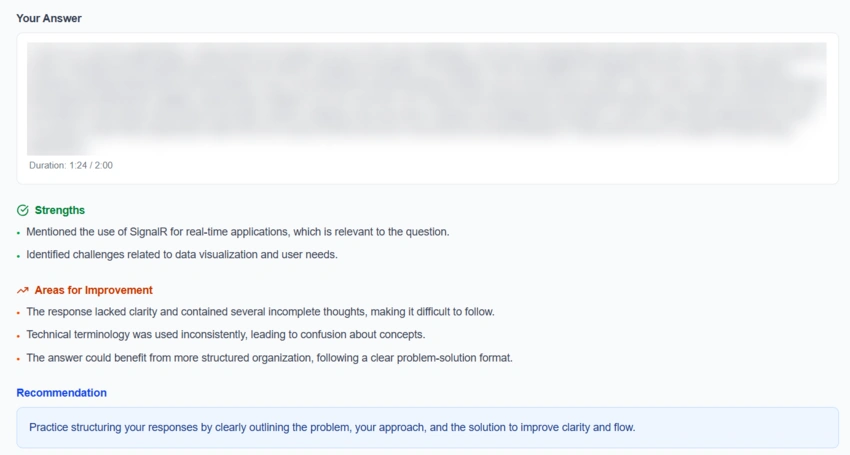
(The results dashboard showing scores across multiple dimensions and detailed feedback)
Instead of just a score, you get actionable advice:
"You correctly identified the need for a load balancer, but you didn't mention how you'd handle session persistence (Sticky Sessions vs Distributed Cache). Try to use the STAR method for your behavioral answer."
Example of the question 1:
Lessons Learned Building It
1. Latency Matters
When you stop speaking, you expect immediate feedback. By using GPT-4o-mini, I reduced the evaluation time significantly compared to larger models, without losing much on the quality of the feedback.
2. Audio is Tricky
Handling browser microphone permissions and visualizing audio waves (to show the user the mic is working) required careful state management in React. I used the Web Audio API alongside Azure's SDK to create a robust recorder.
3. Prompt Engineering for Seniority
One of the hardest parts was getting the AI to "be meaner" to senior candidates. I had to tune the system prompts to strictly forbid asking junior-level definitions to Principal Engineers.
I implemented a dynamic distribution rule in prompts.ts:
Senior Roles: 80% System Design/Architecture, 0% Definition questions.
Junior Roles: 80% Fundamentals, 20% Applied knowledge.
This ensures a Senior .NET Architect isn't asked "What is a variable?", but rather "How would you design a distributed caching strategy for high availability?".
Conclusion
Building AI Tech Interview has been a fantastic journey into the capabilities of modern AI. It shifts the paradigm from "memorizing code" to "mastering communication."
For developers, it's a safe sandbox to fail, learn, and improve before the stakes are real. For me, it was a proof of concept that Next.js 16 and Azure AI are a potent combination for building complex, interactive applications rapidly.
I hope this tool helps you land your next dream role. Happy coding!
Check out the GitHub Repository to see the code or contribute!
Join the conversation! Your thoughts help the community grow.