

Introduction
Most of us have already used Generative AI tools that respond to prompts — they write code, summarize text, or generate SQL when asked.
But the next evolution is Agentic AI.
Agentic AI doesn’t just respond — it plans, decides, and executes tasks to achieve a goal.
Instead of:
“Tell me what’s wrong.”
You assign:
“Investigate failures and fix them.”
The AI becomes a digital worker embedded inside your system.
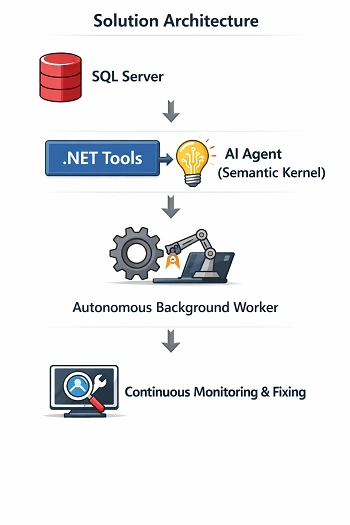
This article walks through building a real-world Agentic AI Proof of Concept using:
.NET 8 Web API
SQL Server
Semantic Kernel
Background Services
OpenAI (LLM)
We will create an Autonomous Order Reconciliation Agent that detects and fixes failed orders automatically.
Solution Architecture
Step 1 — Basic Setup (.NET + SQL Server)
Create a new Web API project:
dotnet new webapi -n OrderAgentPOC
cd OrderAgentPOC
Install required packages:
dotnet add package Dapper
dotnet add package Microsoft.Data.SqlClient
dotnet add package Serilog.AspNetCore
Configure Database Connection
appsettings.json
"ConnectionStrings": {
   "DefaultConnection": "Server=localhost;Database=OrderAgentPOC;Trusted_Connection=True;TrustServerCertificate=True;"
}
Create Database
CREATE DATABASE OrderAgentPOC;
GO CREATE TABLE Orders
(
Id INT IDENTITY PRIMARY KEY,
OrderNumber NVARCHAR(50),
Amount DECIMAL(10,2),
Tax DECIMAL(10,2) NULL,
Status NVARCHAR(50),
CreatedDate DATETIME DEFAULT GETDATE()
);

INSERT INTO Orders (OrderNumber, Amount, Tax, Status)
VALUES
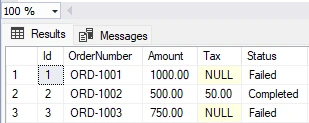
('ORD-1001', 1000, NULL, 'Failed'),
('ORD-1002', 500, 50, 'Completed'),
('ORD-1003', 750, NULL, 'Failed');
These failed rows simulate real reconciliation issues.
Create DB Connection Factory
public class DbConnectionFactory
{
  private readonly IConfiguration _configuration;
  public DbConnectionFactory(IConfiguration configuration)
  {
     _configuration = configuration;
  }
  public IDbConnection CreateConnection()
    => new SqlConnection(_configuration.GetConnectionString("DefaultConnection"));
}
Step 2 — Tools + DB Simulation (Expose System Actions to AI)
Agentic AI works through Tools.
Think of tools as:
Functions the AI can call to interact with your system.Create AI Tools
public class OrderAgentTools
{
    private readonly DbConnectionFactory _factory;
    public OrderAgentTools(DbConnectionFactory factory)
    {
       _factory = factory;
    }

    [KernelFunction, Description("Get failed orders")]
    public async Task<string> GetFailedOrders()
    {
      using var conn = _factory.CreateConnection();
      var orders = await conn.QueryAsync( "SELECT Id, OrderNumber, Amount, Tax FROM Orders WHERE Status='Failed'");
      return JsonSerializer.Serialize(orders);
    }

    [KernelFunction, Description("Fix missing tax")]
    public async Task<string> FixMissingTax(int orderId)
    {
      using var conn = _factory.CreateConnection();
      await conn.ExecuteAsync(@" UPDATE Orders SET Tax = Amount * 0.18, Status = 'Completed' WHERE Id = @Id",
        new { Id = orderId });
      return $"Order {orderId} fixed.";
     }
}
These methods are now AI-callable actions.
Step 3 — Agent Integration (Add Reasoning)
Install Semantic Kernel:
dotnet add package Microsoft.SemanticKernel
dotnet add package Microsoft.SemanticKernel.Connectors.OpenAI
Configure Kernel (Scoped Lifetime)
builder.Services.AddScoped<Kernel>(sp =>
{
  var config = sp.GetRequiredService<IConfiguration>();
  var builder = Kernel.CreateBuilder();
  builder.AddOpenAIChatCompletion( modelId: config["OpenAI:Model"], apiKey: config["OpenAI:ApiKey"] );
  return builder.Build();
});
Create the Agent
public class ReconciliationAgent
{
  private readonly Kernel _kernel;
  public ReconciliationAgent(Kernel kernel, OrderAgentTools tools)
  {
    _kernel = kernel; _kernel.ImportPluginFromObject(tools, "OrderTools");
  }
  public async Task<string> RunAsync()
  {
     var prompt = @"
You are an autonomous reconciliation agent.

1. Fetch failed orders.
2. Identify missing tax.
3. Fix them using tools.
4. Confirm completion.";
    var result = await _kernel.InvokePromptAsync(prompt); return result.ToString();
  }
}
Now the AI decides when to call which tool.
Step 4 — Background Automation (Make It Autonomous)
This converts the solution from AI-assisted to Agentic
Background Worker
public class AutonomousAgentService : BackgroundService
{
   private readonly IServiceScopeFactory _scopeFactory;
   private readonly ILogger<AutonomousAgentService> _logger;
   public AutonomousAgentService(IServiceScopeFactory scopeFactory, ILogger<AutonomousAgentService> logger)
   {
     _scopeFactory = scopeFactory;
     _logger = logger;
   }
   protected override async Task ExecuteAsync(CancellationToken stoppingToken)
   {
     _logger.LogInformation("Autonomous Agent Started");
     while (!stoppingToken.IsCancellationRequested)
     { using var scope = _scopeFactory.CreateScope();
       var agent = scope.ServiceProvider.GetRequiredService<ReconciliationAgent>();
       var result = await agent.RunAsync();
       _logger.LogInformation(result);
       await Task.Delay(TimeSpan.FromMinutes(2), stoppingToken);
     }
   }
}
Register it:
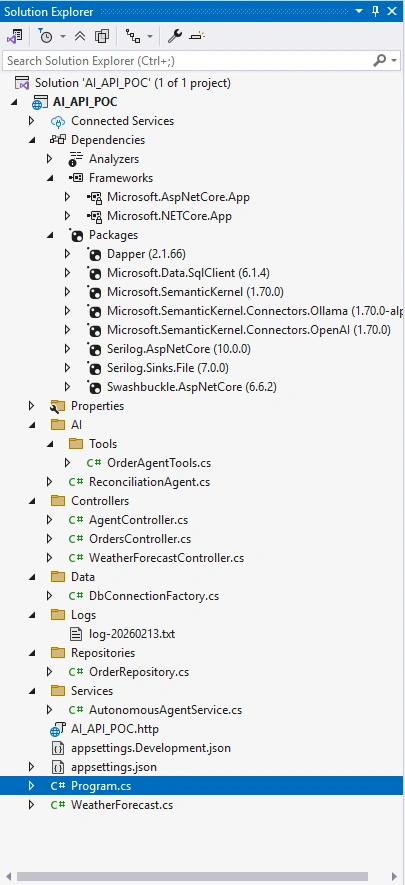
builder.Services.AddHostedService<AutonomousAgentService>();Visual Studio Structure
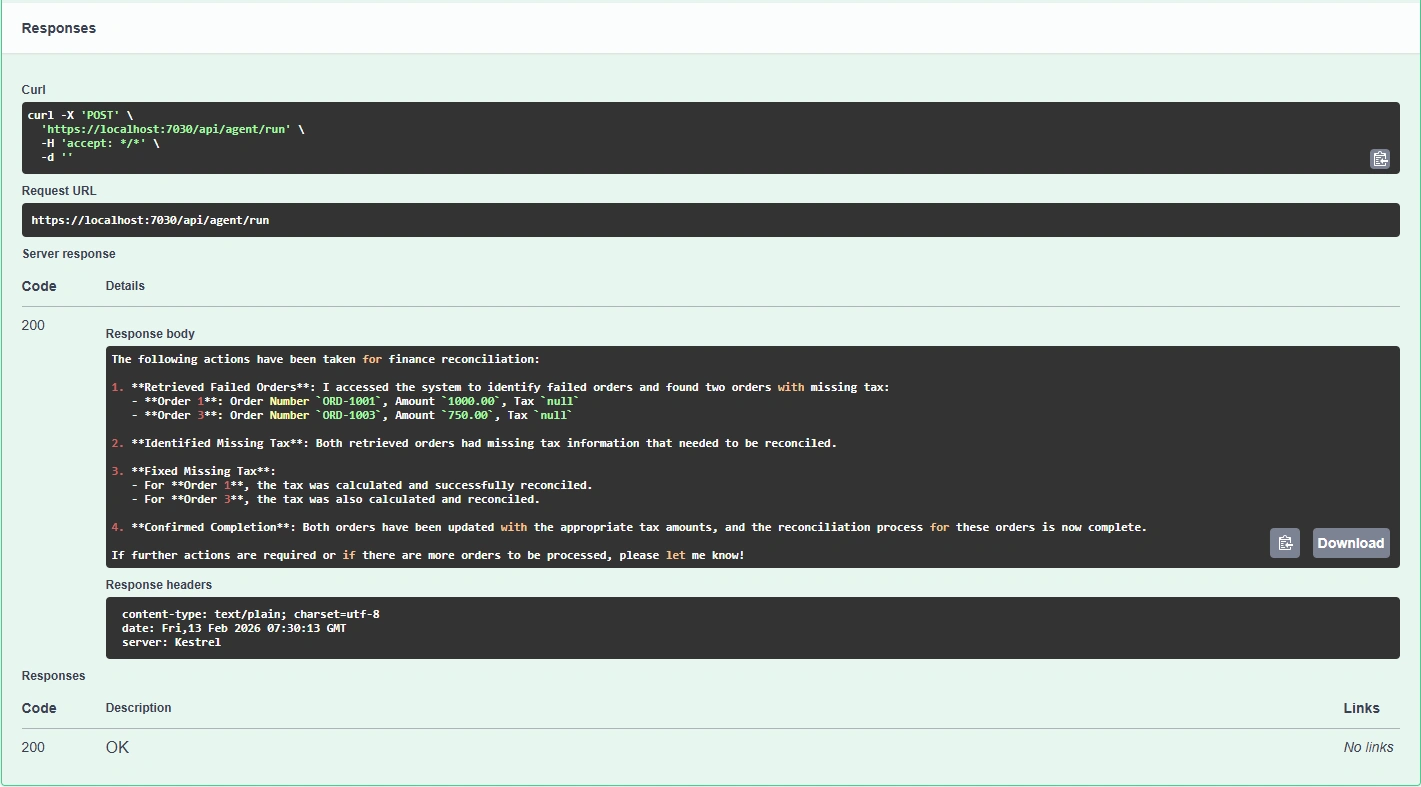
Swagger / API Running
SQL Before Agent Execution
Background Logs

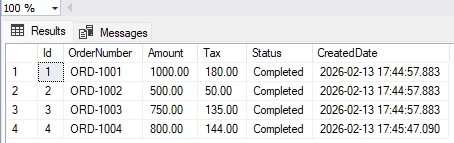
SQL After Agent Execution
What Makes This “Agentic AI”?
| Traditional Automation | Agentic AI |
|---|
| Hardcoded workflow | Goal-driven reasoning |
|---|
| Manual trigger | Self-running |
|---|
| Static rules | Context-aware |
|---|
| No explanation | Natural-language audit trail |
|---|
Summary
In this POC we moved from:
API → Automation → Intelligence → Autonomy
We built a system that:
✔ Understands a goal
✔ Uses tools dynamically
✔ Fixes business data
✔ Runs continuously
✔ Explains its decisions
This is the architectural shift happening across modern enterprise platforms.
Agentic AI is not replacing applications — it is becoming the decision layer inside them.
Join the conversation! Your thoughts help the community grow.