

Introduction
FastAPI is a modern, high-performance Python framework ideal for building APIs quickly and efficiently. It offers asynchronous support, automatic validation, and interactive API documentation out of the box. AutoGen (Managed By Microsoft ) is an open-source programming framework designed to create multi-agent AI applications that act autonomously or assist humans through complex workflows. Together, these tools enable developers to rapidly build scalable web services powered by conversational AI agents with persistent state management and streaming capabilities.
What is FastAPI? Fast API Documentation
FastAPI is a Python web framework that helps build RESTful APIs with minimal code but powerful features:
- Uses Python type hints for automatic input validation and API docs generation.
- Supports asynchronous endpoints for handling I/O efficiently.
- Provides automatic interactive API documentation via Swagger UI and ReDoc.
- Built-in dependency injection system makes code modular and testable.
- Includes tools for security, OAuth2, JWT handling, and more.
FastAPI is widely used in production for microservices and AI/ML model serving due to its speed and developer-friendly features.
What is AutoGen? Autogen Documentation
AutoGen is a Python framework enabling the creation of autonomous or cooperative AI agents that can perform tasks, chat, code, or act based on natural language prompts. Features include:
- Multi-agent conversation and workflow orchestration.
- Integration with large language models (LLMs) such as OpenAI’s GPT.
- Persistent session states to maintain context over interactions.
- Support for streaming real-time responses.
- Extensible APIs for customizing agent behavior and capabilities.
- AutoGen Studio for low-code/no-code AI interactions.
AutoGen simplifies complex AI application development, especially for conversational assistants and autonomous workflows.
Architecture of Autogen
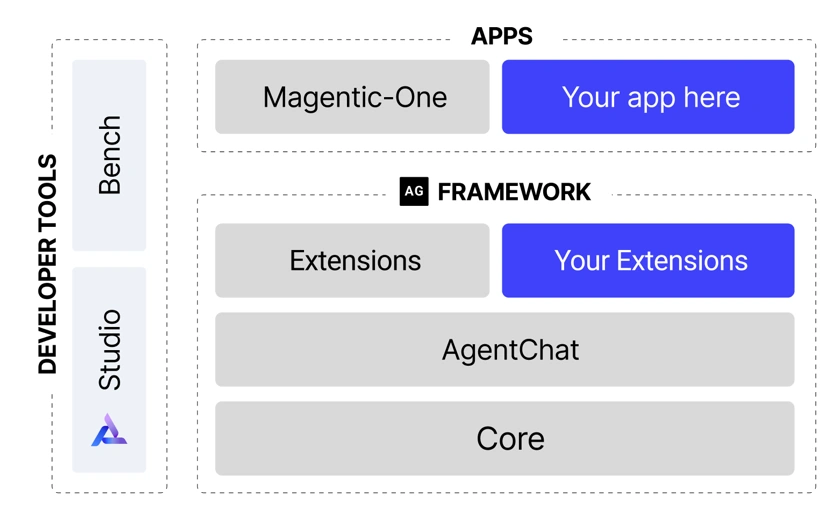
Above Diagram by Autogen team, source AutoGen Diagram
Setup and Installation
- Ensure Python 3.10+ is installed
- Create Virtual Environment
python -m venv venv - Then activate the Virtual Environment
venv\Scripts\activate - Install FastAPI and Uvicorn.
pip install fastapi uvicorn - Create a Requirement.txt file as below.
fastapi uvicorn[standard] pydantic python-dotenv openai autogen-agentchat autogen-core autogen-ext dotenv tiktoken - Now Run Commonand to install all packages there in requirement.txt
pip install -r requirement.txt
Code Base setup
If all required Packages are installed now, let's set up the required file for the router and service files. Follow the folder structure as below.
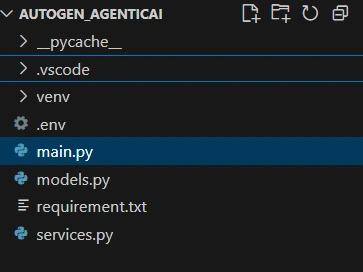
Main.py -> It has all routing paths, also all configuration from .env will be loaded here.
from fastapi import FastAPI, HTTPException
from models import GenericResponse
from services import autogenService
from models import PlanetInfo
from dotenv import load_dotenv
import os
from fastapi.responses import StreamingResponse

app = FastAPI()
load_dotenv()
APP_NAME = os.getenv("APP_NAME")


autogen_service = autogenService()

@app.get("/autogen/SimpleAgent")
async def get_autogen(message: str):
    autogen = await autogen_service.simpleautogenagent(message)
    if not autogen:
        raise HTTPException(status_code=404, detail="autogen not found")
    return autogen

@app.get("/autogen/StructuredAgent",response_model=GenericResponse[PlanetInfo])
async def get_autogen(message: str):
    autogen = await autogen_service.structuredagent(message)
    if not autogen:
        raise HTTPException(status_code=404, detail="autogen not found")
    return autogen

@app.get("/autogen/MultiModalAgent")
async def get_multimodel(message: str,image_url:str=None,source:str="user"):
    autogen = await autogen_service.get_multimodel(message,image_url=image_url,source=source)
    if not autogen:
        raise HTTPException(status_code=404, detail="autogen not found")
    return autogen

@app.get("/autogen/StreamMultiModalAgent")
async def get_stream_multimodel(message: str):
    if not message:
        raise HTTPException(status_code=400, detail="Message parameter is required")

    # Return StreamingResponse for proper streaming
    return StreamingResponse(
        autogen_service.getStream_multimodel(message),
        media_type="text/plain"
    )
services.py -> This file has all business logic code as below.
from datetime import datetime
from models import PlanetInfo,GenericResponse
from dotenv import load_dotenv
import openai
import os
from autogen_agentchat.agents import AssistantAgent
from autogen_ext.models.openai import OpenAIChatCompletionClient
import asyncio
from io import BytesIO
import PIL
import requests
from autogen_agentchat.messages import MultiModalMessage
from autogen_core import EVENT_LOGGER_NAME, Image
from autogen_agentchat.ui import Console
import logging


# Configure logging
logging.basicConfig(level=logging.WARNING)
logger = logging.getLogger(EVENT_LOGGER_NAME)
logger.addHandler(logging.StreamHandler())
logger.setLevel(logging.INFO)

# Load environment variables
load_dotenv()
openai.api_key = os.environ.get("OPENAI_API_KEY")
model_client = OpenAIChatCompletionClient(model='gpt-4o-mini', api_key=os.environ.get("OPENAI_API_KEY"))
if not openai.api_key:
    raise ValueError("Please set the OPENAI_API_KEY environment variable.")

# Define the autogenService class
class autogenService:
    def __init__(self):
        self.autogens = {}  # Simulating a DB with a dictionary
        self.counter = 1

# Define Simple Agent using Autgen
    async def simpleautogenagent(self,message: str) -> str:
            logger.info("Running simpleautogenagent")
            firstagent = AssistantAgent(
                name="simple_assistant",
                model_client=model_client
            )
            result = await firstagent.run(task=message)
            return result

# Define Structured Agent using Autgen
    async def structuredagent(self,message: str) -> str:
       firstagent = AssistantAgent(
           name="structured_assistant",
           model_client=model_client,
           output_content_type=PlanetInfo
       )
       result = await firstagent.run(task=message)
       return GenericResponse[PlanetInfo](
            success=True,
            message=None,
            data=result.messages[-1].content,
            error_code=None,
            timestamp=datetime.utcnow(),
            request_id=""
        )

# Define MultiModal Agent using Autgen
    async def get_multimodel(self,message: str,image_url:str,source:str) -> str:
        multimodelagent = AssistantAgent(
            name="my_assistant",
            model_client=model_client,
            output_content_type=PlanetInfo
        )
        content = [message]
        if image_url:
            pil_image = PIL.Image.open(BytesIO(requests.get(image_url).content))
            img = Image(pil_image)
            content.append(img)
        multimodel_agent = MultiModalMessage(content=content, source=source)
        result = await (multimodelagent.run(task=multimodel_agent))
        return result.messages[-1].content

# Define Streaming Agent using Autgen
    async def getStream_multimodel(self,message):
        streaming_agent = AssistantAgent(
            name="my_assistant",
            model_client=model_client,
            model_client_stream=True,
        )
        async for message in streaming_agent.run_stream(task="Name two cities in South America"):
           yield str(message) + "\n"
In the above file, there are a total of four functions with the names simpleautogenagent, structuredagent, get_multimodel, and getStream_multimodel.
- The following method is used to establish a connection with the Models
model_client = OpenAIChatCompletionClient(model='gpt-4o-mini', api_key=os.environ.get("OPENAI_API_KEY")) - The code below is an In-built agent by Autogen, and we can also create our own custom. We will see in another article.
AssistantAgent(name="simple_assistant",model_client=model_client) - The method below is used to run the agent (We can use the run() method to get the agent run on a given task.).
result = await firstagent.run(task=message) - The AssistantAgent can handle multi-modal input by providing the input as a MultiModalMessage.
multimodel_agent = MultiModalMessage(content=content, source=source) - We can also stream each message as it is generated by the agent by using the run_stream() method.
streaming_agent.run_stream(task="Name two cities in South America") - .env Sample
APP_NAME=autogenManagementApp
DEBUG=True
ENVIRONMENT=development
OPENAI_API_KEY="OPENAI_API_KEY"
Note
- Loads API key and configures logging.
- Uses Autogen + OpenAI (
gpt-4o-mini) as the model client. - Provides a service class
autogenServicewith different agent methods:- Simple Agent → basic text responses.
- Structured Agent → returns structured data (
GenericResponse[PlanetInfo]). - MultiModal Agent → handles text + image inputs.
- Streaming Agent → streams responses in real time.
- Demonstrates text, structured, multimodal, and streaming AI use cases.
Conclusion
This approach enables seamless integration of advanced AI capabilities, including structured responses, multimodal inputs, and real-time interaction. It provides a flexible foundation for building intelligent and scalable solutions across diverse business needs.
Join the conversation! Your thoughts help the community grow.