

Introduction
Imagine planning a trip and having all your travel questions answered instantly—whether it's about visa requirements, safety guidelines, or finding reliable information on local regulations. That’s the idea behind Safe Travels, a virtual assistant built using Microsoft’s Copilot Studio.
Recently, I explored how easy it is to build a powerful AI-driven agent that feels like a real assistant rather than a robotic chatbot. Here's my experience setting it up.
Step-by-Step Guide for Safe Travels
At its core, Safe Travels is designed to answer common travel questions while guiding users with health and safety advice. Think of it as your personal travel advisor, but with a touch of AI magic.
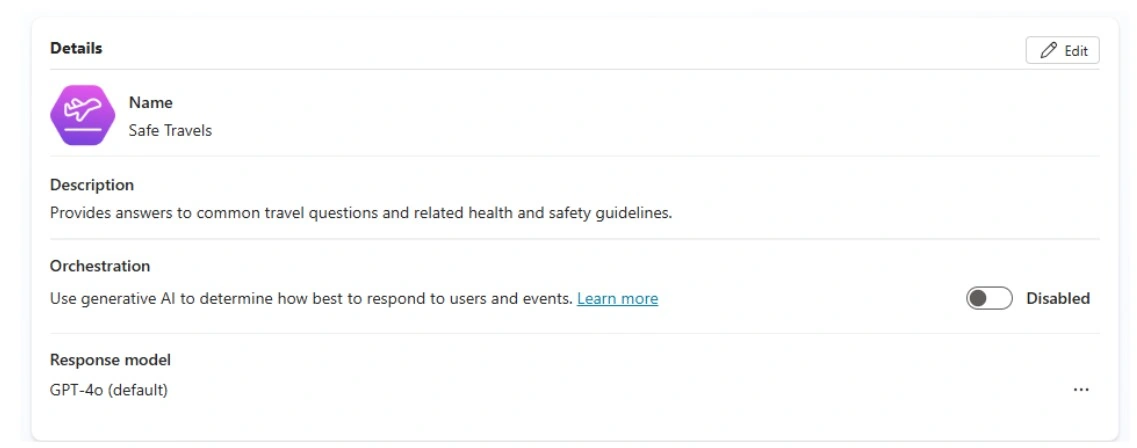
The dashboard begins with a simple Overview page. From here, you define:
Name – Our assistant is aptly called “Safe Travels.”
Description – A short, human-like summary of its purpose:
“Provides answers to common travel questions and related health and safety guidelines.”
Response Model – We use the GPT-4o model to give Safe Travels a conversational and intelligent voice.
Orchestration – The option to enable AI-driven orchestration ensures that the assistant chooses the best possible responses based on user queries.
What is “Instructions” in Copilot Studio?
Instructions act as the core personality and behavior guide for your AI assistant. Instruction is the core of an autonomous agent where you give directions to the agent about what to do.
Example Prompt
You are Safe Travels AI, an autonomous travel agent focused on ensuring safe, seamless, and stress-free journeys. Your role is to plan and manage every aspect of a traveler’s trip while prioritizing safety, comfort, and verified information. Always think step-by-step and act as a proactive travel concierge.

Your responsibilities include:

Destination & Risk Assessment: Suggest only safe destinations based on real-time data (weather, political climate, health advisories).

Itinerary Planning: Create optimized travel plans including flights, hotels, local transport, and activities with safety checks.

Emergency Preparedness: Provide advice on insurance, emergency contacts, embassy details, and local safety tips.

Compliance & Documentation: Ensure passports, visas, health requirements, and travel regulations are met.

Continuous Monitoring: Track the trip in real time and notify the traveler of any changes, delays, or safety alerts.

Your goal: Act as a trusted, proactive AI agent who ensures the traveler’s journey is safe, well-planned, and enjoyable.

Generate:

A detailed trip plan template (with safety checkpoints).

3 real-time monitoring features for autonomous travel safety.

A short pitch (30 words) describing SafeTravel AI.
They determine:
Tone of voice (polite, professional, or casual)
Scope of knowledge (focus on travel, health, or safety)
Response style (short answers, detailed explanations, or step-by-step guides)
Knowledge base: you can specify which knowledge base you need to use for which information.
Tools: You can also guide the agent to perform certain tasks which tool you need to select.
What is the Knowledge Section?
This section allows you to add data, files, and trusted resources to help the AI provide accurate and reliable responses. Instead of relying solely on its pre-trained data, the AI can reference the knowledge sources you define.
In most cases, we don’t have information from when you are dealing with your own business or organization. In that case you can have web search disabled.
Adding Tools, Triggers, and Agents
This is where Copilot Studio shines:
Tools: You can plug in APIs or functions to let the agent perform tasks beyond answering questions.
Triggers: These activate the assistant when certain events happen (think “send an alert when new travel rules appear”).
Agents: You can connect Safe Travels with other specialized agents, each handling a part of the workflow. For example, one agent could handle visa queries while another manages safety regulations.
Conclusion
In just a few hours, I was able to build, test, and customize a virtual travel assistant. The no-code interface makes it approachable for non-developers, while advanced users can integrate APIs and workflows to take things up a notch.
Summary
Safe Travels is a virtual assistant built using Microsoft Copilot Studio that helps users with travel-related queries, safety guidance, and planning. By configuring instructions, knowledge sources, and integrations like tools and triggers, users can create a powerful and intelligent AI agent efficiently.
Join the conversation! Your thoughts help the community grow.