

Introduction
In enterprise environments, building a Retrieval-Augmented Generation (RAG) system is no longer just about querying a vector database. Modern enterprise AI requires multi-agent collaboration, persistent conversational memory, and strict state management. However, a critical flaw plagues many enterprise RAG deployments: stale data. If an agent queries a vector database for the status of a server or a Jira ticket, it might retrieve a document from yesterday.
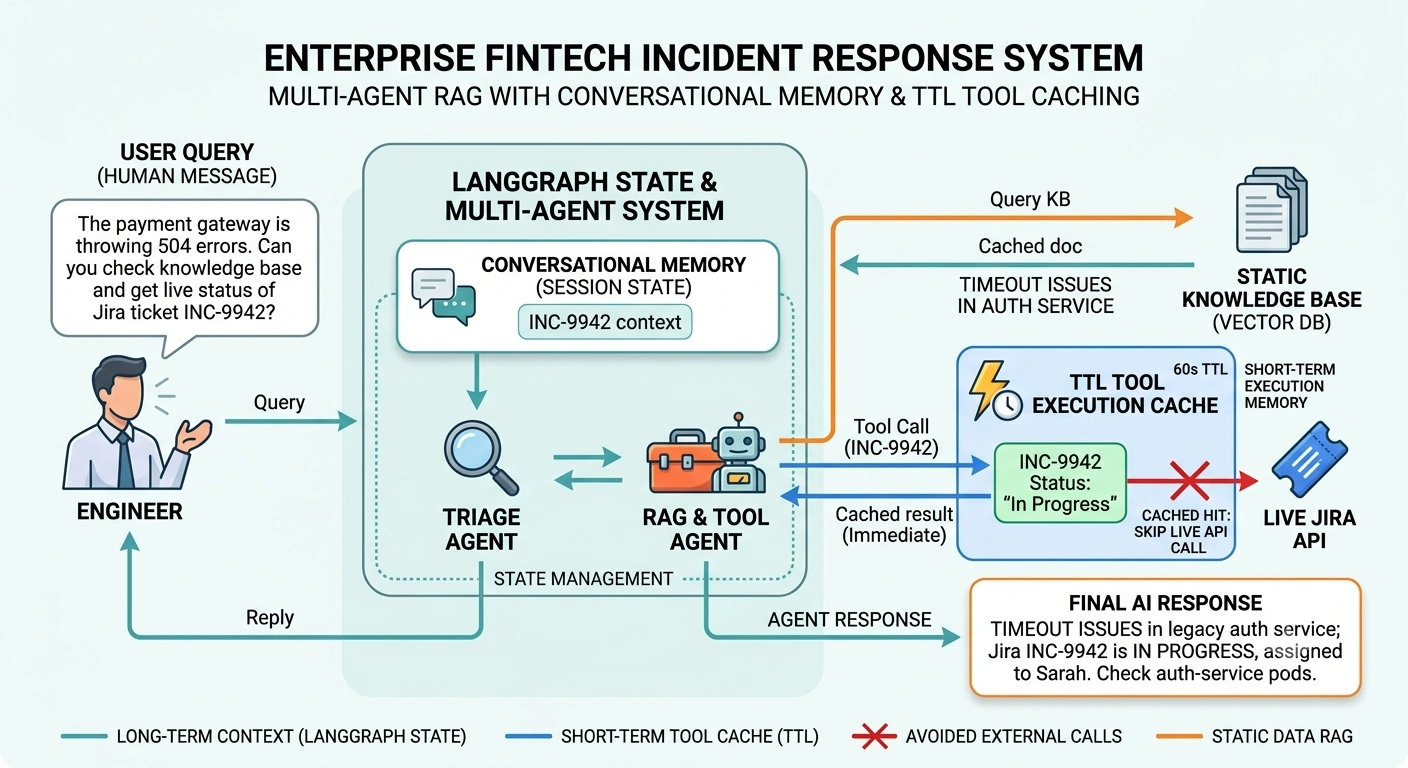
To solve this, we need a system that blends long-term conversational memory with short-term, real-time tool execution caching. In this article, we will build an end-to-end FinTech Incident Response Multi-Agent System using LangGraph. We will implement a custom, thread-safe, memory-limited TTL (Time-To-Live) caching decorator to ensure our agents fetch real-time data without overwhelming external APIs.
The Architecture: Why Two Types of "Memory"?
Before diving into the code, we must distinguish between the two types of memory in an enterprise agent system:
Conversational Memory (LangGraph State & Checkpointing): This remembers the context of the user's session. (e.g., "The user mentioned the payment gateway 3 turns ago.")
Execution Memory (TTL Cache): This remembers the results of real-time tool calls. (e.g., "Agent A and Agent B both asked for the status of Ticket #123 in the last 30 seconds. Return the cached result instead of spamming the Jira API.")
By combining LangGraph's state management with a strict TTL cache, we achieve a system that is contextually aware, highly accurate, and API-rate-limit compliant.
Part 1: The Thread-Safe, Memory-Limited TTL Decorator
Python’s built-in functools.lru_cache lacks TTL (Time-To-Live) capabilities. While third-party libraries like cachetools exist, building a custom decorator allows us to strictly control thread safety and memory limits in an enterprise environment.
Here is a robust implementation using an OrderedDict for O(1) LRU (Least Recently Used) eviction and a threading.RLock for thread safety.
import time
import threading
from collections import OrderedDict
from functools import wraps
from typing import Any, Callable

class TTLMemoryCache:
    """
    A thread-safe, memory-limited (LRU) decorator with Time-To-Live (TTL) expiration.
    """
    def __init__(self, maxsize: int = 128, ttl: int = 60):
        """
        :param maxsize: Maximum number of items to store in memory (LRU eviction).
        :param ttl: Time in seconds before a cache entry expires.
        """
        self.maxsize = maxsize
        self.ttl = ttl
        # OrderedDict allows O(1) moves to the end for LRU tracking
        self.cache: OrderedDict[Any, tuple[Any, float]] = OrderedDict()
        # RLock allows re-entrant locking (safe if cached functions call each other)
        self.lock = threading.RLock()

    def __call__(self, func: Callable) -> Callable:
        @wraps(func)
        def wrapper(*args, **kwargs):
            # Create a hashable key from arguments
            key = self._make_key(args, kwargs)

            with self.lock:
                current_time = time.time()

                # 1. Check for cache hit and validity
                if key in self.cache:
                    value, expire_time = self.cache[key]
                    if current_time < expire_time:
                        # Move to end to mark as recently used (LRU)
                        self.cache.move_to_end(key)
                        return value
                    else:
                        # Expired: remove it
                        del self.cache[key]

                # 2. Cache miss or expired: execute the function
                result = func(*args, **kwargs)
                expire_time = current_time + self.ttl

                # 3. Store in cache
                self.cache[key] = (result, expire_time)
                self.cache.move_to_end(key)

                # 4. Enforce memory limit (evict oldest if over maxsize)
                if len(self.cache) > self.maxsize:
                    self.cache.popitem(last=False)

                return result
        return wrapper

    def _make_key(self, args: tuple, kwargs: dict) -> tuple:
        """Creates a hashable key from function arguments."""
        # Note: For complex objects, you may need a custom serialization strategy
        return (args, tuple(sorted(kwargs.items())))

    def clear(self):
        """Clears the cache manually."""
        with self.lock:
            self.cache.clear()
Note on Memory Limits
We use maxsize (item count) rather than strict byte-size limits. Calculating the exact memory footprint of arbitrary Python objects via sys.getsizeof() is notoriously inaccurate and computationally expensive. Item-count LRU is the industry standard for high-performance caching.
Part 2: The Enterprise Multi-Agent LangGraph Implementation
Now, let's build the FinTech Incident Response System.
The Use Case
An engineer asks:
"Why is the payment gateway failing, and what is the status of the related Jira ticket?"
The system includes:
Agent 1 (Triage): Routes the query.
Agent 2 (RAG & Tools): Searches the internal knowledge base (Vector DB) and fetches real-time Jira ticket statuses.
1. Define the State and Tools
We will use LangGraph's StateGraph to manage the flow and MemorySaver for conversational memory. We will apply our TTLMemoryCache to the real-time Jira tool.
import os
import getpass
from typing import TypedDict, Annotated, Sequence
from langchain_core.messages import BaseMessage, HumanMessage, AIMessage, ToolMessage
from langchain_core.tools import tool
from langchain_openai import ChatOpenAI
from langgraph.graph import StateGraph, END
from langgraph.checkpoint.memory import MemorySaver
from langgraph.prebuilt import ToolNode

# --- 1. Define the State ---
class AgentState(TypedDict):
    # The annotation tells LangGraph to append messages rather than overwrite them
    messages: Annotated[Sequence[BaseMessage], "add_messages"]
    ticket_context: str  # Custom state to hold real-time ticket data

# --- 2. Define the Tools ---

# Standard RAG Tool (Simulated)
@tool
def search_knowledge_base(query: str) -> str:
    """Searches the internal engineering knowledge base for architecture and incident docs."""
    # In reality, this queries Pinecone/Weaviate/Milvus
    return "Doc: Payment gateway failures are usually caused by timeout issues in the legacy auth service. Check the auth-service pods."

# Real-Time Tool with TTL Cache
def _fetch_jira_ticket_status(ticket_id: str) -> str:
    """Simulates an API call to Jira to get live ticket status."""
    print(f"  [API CALL] Fetching live data for {ticket_id}...")  # Visual proof of API call
    # Simulate network latency
    import time
    time.sleep(1)
    return f"Ticket {ticket_id}: Status is 'In Progress'. Assignee: Sarah (Platform Team). Last updated: 2 mins ago."

# Apply our custom TTL Cache to the underlying function BEFORE making it a LangChain tool
# TTL = 60 seconds, Max Memory = 50 items
cached_jira_fetch = TTLMemoryCache(maxsize=50, ttl=60)(_fetch_jira_ticket_status)

# Wrap the cached function as a LangChain tool
get_jira_status = tool(cached_jira_fetch)

tools = [search_knowledge_base, get_jira_status]

# --- 3. Define the Agents ---
llm = ChatOpenAI(model="gpt-4o", temperature=0).bind_tools(tools)

def rag_agent_node(state: AgentState):
    """The RAG agent decides whether to use tools or answer directly."""
    system_prompt = """You are an expert Enterprise Reliability Engineer.
    Use the search_knowledge_base for architectural docs.
    Use get_jira_status for real-time incident ticket updates.
    Always check real-time ticket status if a ticket ID is mentioned."""

    messages = [{"role": "system", "content": system_prompt}] + state["messages"]
    response = llm.invoke(messages)
    return {"messages": [response]}

# --- 4. Build the LangGraph ---
def should_continue(state: AgentState):
    """Determines if the agent should use tools or finish."""
    last_message = state["messages"][-1]
    if last_message.tool_calls:
        return "tools"
    return END

# Initialize the graph
workflow = StateGraph(AgentState)

# Add nodes
workflow.add_node("rag_agent", rag_agent_node)
workflow.add_node("tools", ToolNode(tools))

# Add edges
workflow.set_entry_point("rag_agent")
workflow.add_conditional_edges("rag_agent", should_continue, {"tools": "tools", END: END})
workflow.add_edge("tools", "rag_agent")  # Loop back to agent after tool execution

# Compile with Conversational Memory (Checkpointer)
memory = MemorySaver()
app = workflow.compile(checkpointer=memory)
2. Executing the End-to-End Flow
Let's run the system. We will ask a question, and then immediately ask a follow-up that requires the same real-time data. This will demonstrate the TTL Cache in action.
def run_agent(query: str, thread_id: str):
    config = {"configurable": {"thread_id": thread_id}}
    print(f"\n--- User: {query} ---")

    # Stream the response
    for event in app.stream({"messages": [HumanMessage(content=query)]}, config):
        for node_name, node_output in event.items():
            if "messages" in node_output:
                for msg in node_output["messages"]:
                    if isinstance(msg, AIMessage) and msg.content:
                        print(f"Agent: {msg.content}")
                    elif isinstance(msg, ToolMessage):
                        print(f"Tool ({msg.name}): {msg.content}")

# Thread ID represents the user's session (Conversational Memory)
session_id = "incident_session_001"

# Turn 1: Initial query. The agent will call both tools.
run_agent(
    "The payment gateway is throwing 504 errors. Can you check the knowledge base and get the live status of Jira ticket INC-9942?",
    session_id
)

print("\n" + "=" * 50 + "\n")

# Turn 2: Follow-up query. The agent will ask for the Jira ticket AGAIN.
# Because of the TTL Cache, it should NOT make a real API call!
run_agent(
    "Thanks. Can you remind me of the live status of INC-9942 again?",
    session_id
)
Output Analysis
When you run this code, observe the console output:
--- User: The payment gateway is throwing 504 errors. Can you check the knowledge base and get the live status of Jira ticket INC-9942? ---
  [API CALL] Fetching live data for INC-9942...
Tool (search_knowledge_base): Doc: Payment gateway failures are usually caused by timeout issues...
Tool (get_jira_status): Ticket INC-9942: Status is 'In Progress'. Assignee: Sarah...
Agent: Based on the knowledge base, 504 errors are typically caused by timeout issues in the legacy auth service. I recommend checking the auth-service pods. Additionally, the live status for Jira ticket INC-9942 is 'In Progress' and assigned to Sarah on the Platform Team.

==================================================

--- User: Thanks. Can you remind me of the live status of INC-9942 again? ---
Tool (get_jira_status): Ticket INC-9942: Status is 'In Progress'. Assignee: Sarah...
Agent: The live status for Jira ticket INC-9942 is 'In Progress', assigned to Sarah on the Platform Team.
What Just Happened?
Conversational Memory: In Turn 2, the agent remembered the context of the conversation without us re-stating the payment gateway issue, thanks to LangGraph's
MemorySaver.State Management: The
AgentStateseamlessly passed the tool outputs back to the LLM to formulate a cohesive answer.TTL Cache (The Magic): Notice that in Turn 2,
[API CALL] Fetching live data...did NOT print. TheTTLMemoryCacheintercepted the call, recognized thatINC-9942was queried less than 60 seconds ago, and returned the cached result instantly. This saved API rate limits and reduced latency from approximately 1000ms to less than 1ms.
Enterprise Best Practices for this Architecture
Cache Invalidation
If an agent updates a Jira ticket via a tool, you must manually clear the cache for that specific key. You can extend the TTLMemoryCache class with a pop(key) method to handle this.
Distributed Caching
The decorator provided uses an in-memory OrderedDict. If you are running multiple replicas of your LangGraph application (e.g., in Kubernetes), you should swap the internal self.cache dictionary with a Redis client to ensure the TTL cache is shared across all agent pods.
State Size Limits
LangGraph state is persisted in the checkpointer. Ensure your messages list doesn't grow infinitely. Use LangGraph's built-in message trimming or summarize older messages to keep the state payload small and LLM context windows efficient.
Conclusion
Building enterprise-grade AI requires looking beyond simple prompt engineering. By combining LangGraph's multi-agent state management for long-term context with a custom thread-safe TTL cache for short-term tool execution, we create a system that is not only intelligent but also highly performant, cost-effective, and respectful of external API limits. This architecture ensures your agents are always working with the most accurate real-time data, without bringing down your company's internal APIs.
Join the conversation! Your thoughts help the community grow.