

Introduction
In the enterprise world, data doesn’t wait for the nightly batch job. Whether it’s a newly signed legal contract, a breaking financial earnings report, or an updated IT runbook, business users need answers based on the latest information immediately.
Traditional RAG (Retrieval-Augmented Generation) pipelines often rely on rigid, linear ETL (Extract, Transform, Load) scripts for ingestion and simple retrieve-then-generate flows for querying. This approach fails in enterprise environments where documents are complex, parsing requires conditional logic, and hallucinations are unacceptable.
Enter LangGraph. By modeling both the ingestion pipeline and the query pipeline as stateful, cyclical graphs, we can build a resilient, near-real-time Enterprise RAG system.
In this end-to-end guide, we will build a Financial Market Intelligence System that ingests real-time SEC filings, earnings transcripts, and market news, allowing analysts to query breaking data minutes after it is published.
1. The Use Case: "AlphaSearch" Financial Intelligence
The Scenario
Investment analysts at a hedge fund need to query the latest 10-K filings, 8-K material event reports, and real-time financial news.
The Problem
If a company releases an 8-K at 10:00 AM, the analyst needs to ask the RAG system, "What are the new risk factors mentioned in the 8-K?" by 10:05 AM. A batch-processed vector database won't cut it.
The Solution
An event-driven, near-real-time ingestion pipeline orchestrated by LangGraph, feeding into a Self-Correcting Agentic RAG query pipeline.
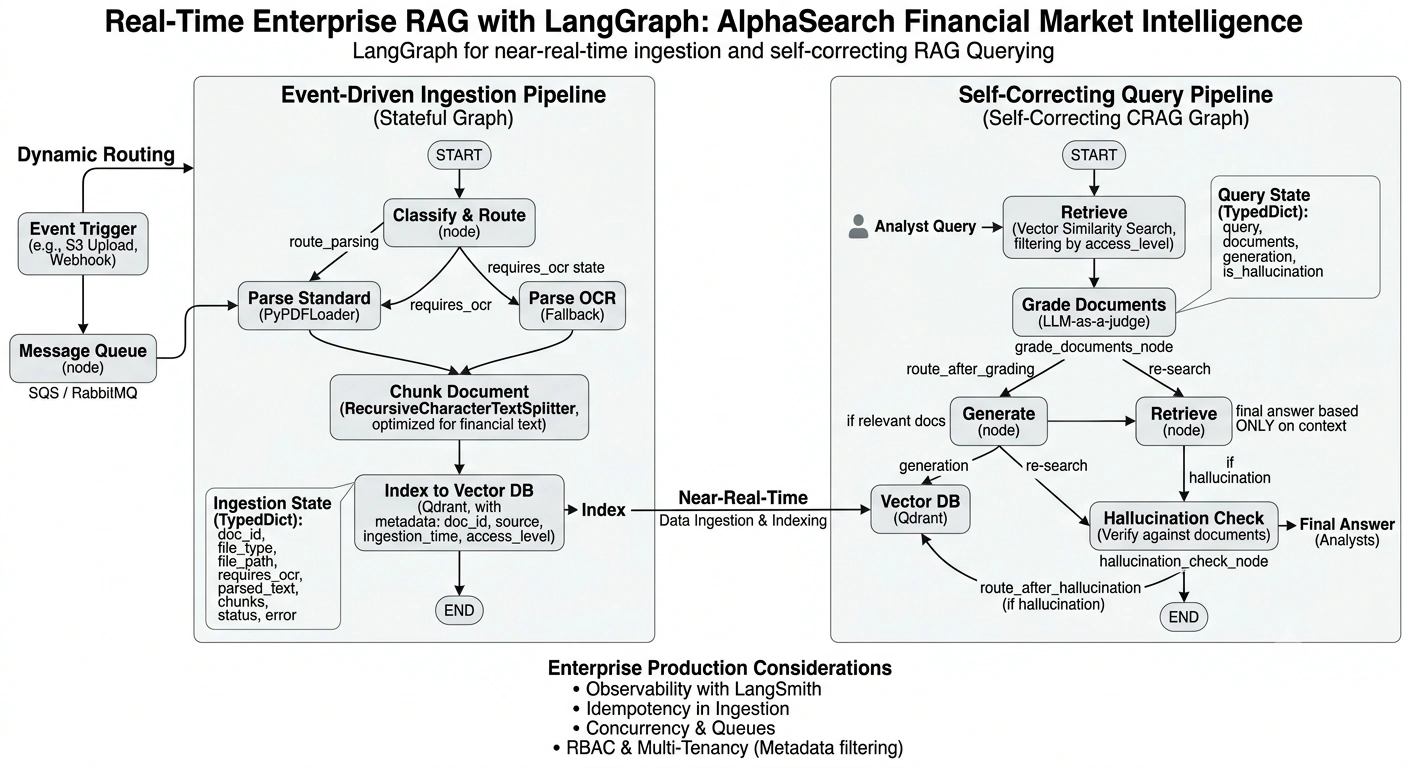
High-Level Architecture
Event Trigger: A new document is uploaded to an S3 bucket or sent via Webhook.
Message Queue: AWS SQS / RabbitMQ queues the event to ensure no data is lost.
LangGraph Ingestion Pipeline: Parses, conditionally routes (e.g., OCR vs. Text), chunks, and indexes the document.
Vector Database: Qdrant (chosen for its enterprise-grade metadata filtering and RBAC capabilities).
LangGraph Query Pipeline: Retrieves, grades document relevance, generates an answer, and checks for hallucinations.
2. The LangGraph Ingestion Pipeline
Why use LangGraph for ingestion? Because document processing is rarely a straight line. A standard text PDF requires a different parsing path than a scanned image or a complex financial table. LangGraph allows us to build conditional routing directly into the ingestion flow.
Step 2.1: Define the Ingestion State
from typing import TypedDict, List, Literal
from langgraph.graph import StateGraph, START, END

class IngestionState(TypedDict):
    doc_id: str
    file_type: str
    file_path: str
    requires_ocr: bool
    parsed_text: str
    chunks: List[str]
    status: str
    error_message: str
Step 2.2: Define the Nodes
We will create nodes for classification, parsing, chunking, and indexing.
from langchain_community.document_loaders import PyPDFLoader, UnstructuredFileLoader
from langchain_text_splitters import RecursiveCharacterTextSplitter
from langchain_qdrant import QdrantVectorStore
from qdrant_client import QdrantClient
from langchain_openai import OpenAIEmbeddings

# Initialize Enterprise Vector DB (Qdrant)
qdrant_client = QdrantClient(host="localhost", port=6333)
embeddings = OpenAIEmbeddings(model="text-embedding-3-large")

vectorstore = QdrantVectorStore(
    client=qdrant_client,
    collection_name="financial_docs",
    embedding=embeddings
)

def classify_and_route(state: IngestionState) -> IngestionState:
    """Determines if the document needs OCR or standard text extraction."""

    # In a real app, use a lightweight model or file metadata to check for scanned PDFs
    if state["file_type"] == "scanned_pdf" or state["file_type"] == "image":
        return {"requires_ocr": True}

    return {"requires_ocr": False}

def parse_standard(state: IngestionState) -> IngestionState:
    """Standard text extraction."""

    loader = PyPDFLoader(state["file_path"])
    docs = loader.load()

    text = "\n".join([doc.page_content for doc in docs])

    return {"parsed_text": text}

def parse_ocr(state: IngestionState) -> IngestionState:
    """Fallback OCR extraction using LlamaParse or Unstructured."""

    # Placeholder for LlamaParse / Tesseract logic
    text = f"[OCR Extracted Text from {state['file_path']}]"

    return {"parsed_text": text}

def chunk_document(state: IngestionState) -> IngestionState:
    """Semantic chunking optimized for financial text."""

    text_splitter = RecursiveCharacterTextSplitter(
        chunk_size=1000,
        chunk_overlap=200,
        separators=["\n\n", "\n", ".", " "]
    )

    chunks = text_splitter.split_text(state["parsed_text"])

    return {"chunks": chunks}

def index_to_vector_db(state: IngestionState) -> IngestionState:
    """Upserts chunks to Qdrant with enterprise metadata."""

    from langchain_core.documents import Document

    langchain_docs = [
        Document(
            page_content=chunk,
            metadata={
                "doc_id": state["doc_id"],
                "source": state["file_path"],
                "ingestion_time": "2026-06-21T10:00:00Z",
                "access_level": "analyst_tier_1"
            }
        )
        for chunk in state["chunks"]
    ]

    vectorstore.add_documents(langchain_docs)

    return {"status": "completed"}
Step 2.3: Compile the Ingestion Graph
def route_parsing(state: IngestionState) -> Literal["parse_standard", "parse_ocr"]:
    if state.get("requires_ocr"):
        return "parse_ocr"

    return "parse_standard"

ingestion_workflow = StateGraph(IngestionState)

# Add Nodes
ingestion_workflow.add_node("classify", classify_and_route)
ingestion_workflow.add_node("parse_standard", parse_standard)
ingestion_workflow.add_node("parse_ocr", parse_ocr)
ingestion_workflow.add_node("chunk", chunk_document)
ingestion_workflow.add_node("index", index_to_vector_db)

# Add Edges
ingestion_workflow.add_edge(START, "classify")
ingestion_workflow.add_conditional_edges("classify", route_parsing)
ingestion_workflow.add_edge("parse_standard", "chunk")
ingestion_workflow.add_edge("parse_ocr", "chunk")
ingestion_workflow.add_edge("chunk", "index")
ingestion_workflow.add_edge("index", END)

# Compile
ingestion_app = ingestion_workflow.compile()
3. The LangGraph Query Pipeline (Self-Correcting RAG)
Now that documents are ingested in near-real-time, we need a query pipeline that guarantees accuracy. Financial analysts cannot afford hallucinations. We will build a Corrective RAG (CRAG) graph that grades retrieved documents and re-searches if the context is irrelevant.
Step 3.1: Define the Query State
from typing import Annotated
from langgraph.graph.message import add_messages

class QueryState(TypedDict):
    messages: Annotated[list, add_messages]
    query: str
    documents: List[str]
    generation: str
    is_hallucination: bool
Step 3.2: Define Query Nodes
from langchain_openai import ChatOpenAI
from langchain_core.prompts import ChatPromptTemplate
from langchain_core.output_parsers import StrParser

llm = ChatOpenAI(model="gpt-4o", temperature=0)

def retrieve_node(state: QueryState):
    """Retrieves documents using metadata filtering for RBAC."""

    query = state["query"]

    # Filter by access level to ensure enterprise security
    docs = vectorstore.similarity_search(
        query,
        k=5,
        filter={"access_level": "analyst_tier_1"}
    )

    return {"documents": [doc.page_content for doc in docs]}

def grade_documents_node(state: QueryState):
    """LLM-as-a-judge to grade document relevance."""

    prompt = ChatPromptTemplate.from_template(
        "Given the query: {query}\nAnd document: {doc}\nIs the document relevant? Answer 'yes' or 'no'."
    )

    chain = prompt | llm | StrParser()

    relevant_docs = []

    for doc in state["documents"]:
        grade = chain.invoke(
            {"query": state["query"], "doc": doc}
        )

        if grade.lower() == "yes":
            relevant_docs.append(doc)

    return {"documents": relevant_docs}

def generate_node(state: QueryState):
    """Generates the final answer."""

    prompt = ChatPromptTemplate.from_template(
        "Answer the query based ONLY on the context.\nQuery: {query}\nContext: {context}"
    )

    context = "\n\n".join(state["documents"])

    response = (prompt | llm | StrParser()).invoke(
        {
            "query": state["query"],
            "context": context
        }
    )

    return {"generation": response}

def hallucination_check_node(state: QueryState):
    """Checks if the generation is grounded in the documents."""

    prompt = ChatPromptTemplate.from_template(
        "Is the generation grounded in the documents?\nDocs: {docs}\nGeneration: {gen}\nAnswer 'yes' or 'no'."
    )

    context = "\n\n".join(state["documents"])

    grade = (prompt | llm | StrParser()).invoke(
        {
            "docs": context,
            "gen": state["generation"]
        }
    )

    return {"is_hallucination": grade.lower() != "yes"}
Step 3.3: Compile the Query Graph
def route_after_grading(state: QueryState) -> Literal["generate", "retrieve"]:
    """If no relevant docs are found, we could trigger a web search or rewrite query.
       Here, we just proceed to generate (which will state it doesn't know) or re-retrieve."""

    if not state["documents"]:
        return "generate"

    return "generate"

def route_after_hallucination(state: QueryState) -> Literal["generate", "end"]:
    if state["is_hallucination"]:
        return "generate"

    return "end"

query_workflow = StateGraph(QueryState)

query_workflow.add_node("retrieve", retrieve_node)
query_workflow.add_node("grade", grade_documents_node)
query_workflow.add_node("generate", generate_node)
query_workflow.add_node("check_hallucination", hallucination_check_node)

query_workflow.add_edge(START, "retrieve")
query_workflow.add_edge("retrieve", "grade")
query_workflow.add_conditional_edges("grade", route_after_grading)
query_workflow.add_edge("generate", "check_hallucination")

query_workflow.add_conditional_edges(
    "check_hallucination",
    route_after_hallucination,
    {
        "generate": "generate",
        "end": END
    }
)

query_app = query_workflow.compile()
4. Tying It Together: The Event-Driven API
To achieve near-real-time ingestion, we wrap the LangGraph ingestion pipeline in a FastAPI application that listens to webhooks or message queues.
from fastapi import FastAPI, BackgroundTasks
import uuid

app = FastAPI()

@app.post("/webhook/ingest-document")
async def ingest_document(
    file_path: str,
    file_type: str,
    background_tasks: BackgroundTasks
):
    doc_id = str(uuid.uuid4())

    # Define initial state
    initial_state = {
        "doc_id": doc_id,
        "file_path": file_path,
        "file_type": file_type,
        "requires_ocr": False,
        "parsed_text": "",
        "chunks": [],
        "status": "pending",
        "error_message": ""
    }

    # Run the LangGraph Ingestion Pipeline in the background
    def run_ingestion():
        ingestion_app.invoke(initial_state)

    background_tasks.add_task(run_ingestion)

    return {
        "message": "Ingestion started",
        "doc_id": doc_id
    }

@app.post("/query")
async def query_rag(query: str):
    initial_state = {
        "messages": [],
        "query": query,
        "documents": [],
        "generation": "",
        "is_hallucination": False
    }

    # Invoke the Query Graph
    final_state = query_app.invoke(initial_state)

    return {"answer": final_state["generation"]}
5. Enterprise Considerations for Production
When moving this from a prototype to a production enterprise environment, keep the following in mind:
Observability with LangSmith
LangGraph generates complex, multi-step traces. Integrate LangSmith to trace every node execution, monitor LLM token usage, and debug why a document was graded as "irrelevant."
Idempotency in Ingestion
If a webhook fires twice, your ingestion graph should check the Vector DB (using doc_id metadata) to ensure documents aren't duplicated.
Concurrency & Queues
For high-volume ingestion, replace the FastAPI BackgroundTasks with a robust message broker such as:
Celery + Redis
AWS SQS + Lambda
LangGraph integrates well with distributed task queues.
RBAC & Multi-Tenancy
Notice how we added access_level to the Qdrant metadata. In an enterprise environment, the Query Graph must pass the user's role into the filter parameter of the similarity_search method to ensure users only retrieve documents they are authorized to access.
Conclusion
By leveraging LangGraph, we transform RAG from a fragile, linear script into a resilient, stateful enterprise application. Modeling the ingestion pipeline as a graph allows us to handle the messy reality of enterprise documents by routing dynamically between OCR and standard text extraction. Modeling the query pipeline as a graph enables self-correction, document grading, and hallucination detection.
Coupled with an event-driven architecture, this setup ensures that when a critical financial filing is published, your enterprise RAG system can ingest it within seconds and answer analyst queries using verified, near-real-time information.
Join the conversation! Your thoughts help the community grow.