

In this article, I will represent different techniques to build and make use of parameterized queries. The first way is the classical one, and I mean by that the ADO.Net technique. Then I'll expose the second one using the new technology, namely DLINQ.
First, the customers table that will be used as data source is represented as under:
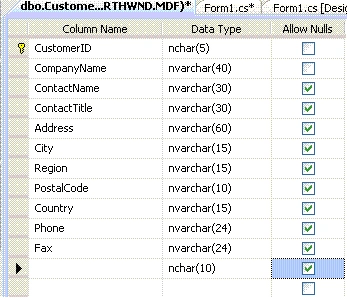
Figure 1
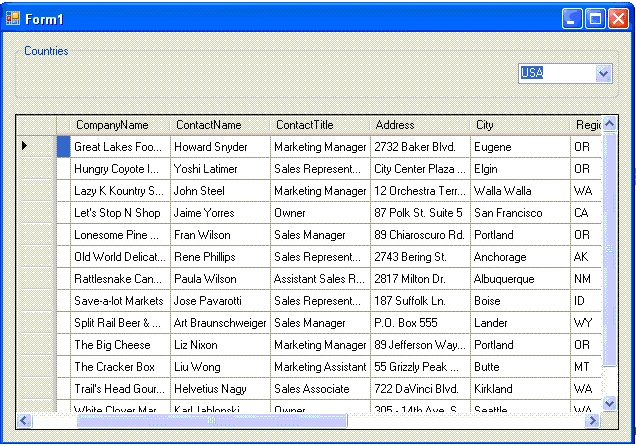
Say that we want to build a parameterized query that enables to select information about different customers those correspond to the country entered by the user. To do this, let's first leverage the UI. For this reason, we create a new windows project named ParameterizedQuery. Then we add a data grid view, a group box and a combo box into the Form1 and we dispose them as follow:
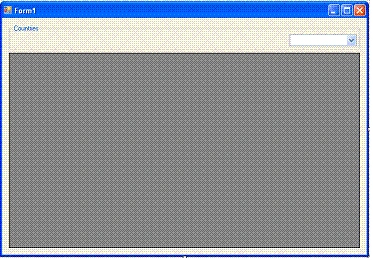
Figure 2
The ADO.Net classic technique:
The data source used to leverage this example is the Customers table located in the NorthWind SQL server data base sample that is downloadable from http://www.microsoft.com/downloads/details.aspx?FamilyID=06616212-0356-46A0-8DA2-EEBC53A68034&displaylang=en
After downloading and deploying the msi file, the NorthWind data base could be reached in C:\SQL Server 2000 data bases\NORTHWIND.MDF
In order to build a more secure system, we have to query data using stored procedures via SQL parameters rather than querying tables via inputs from the user input control such as a given text box and that for the only purpose to avoid SQL injections queries.
First, let's create the stored procedure that enables querying data according to the country entered by the user via the ComboBox1 control. We can either use Visual Studio or Microsoft SQL Server to leverage that. And, indeed, this is the stored procedure core
ALTER PROCEDURE dbo.StoredProcedure1
(
@Country nvarchar(15)
)
AS
/* SET NOCOUNT ON */
SELECT CompanyName, ContactName, ContactTitle, Address, City, PostalCode, Phone, Fax
FROM Customers
WHERE Country = @Country
RETURN
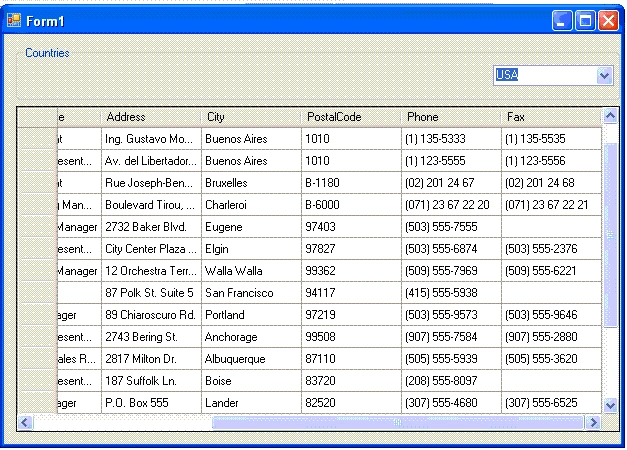
This is the result corresponding to the @Country = 'USA' parameterized executed query from within SQL Server.
Running [dbo].[StoredProcedure1] ( @Country = USA ).
CompanyName ContactName ContactTitle Address City Region PostalCode Phone Fax
---------------------------------------- ------------------------------ ------------------------------ ------------------------------------------------------------ --------------- --------------- ---------- ------------------------ ------------------------
Great Lakes Food Market Howard Snyder Marketing Manager 2732 Baker Blvd. Eugene OR 97403 (503) 555-7555 <NULL>
Hungry Coyote Import Store Yoshi Latimer Sales Representative City Center Plaza 516 Main St. Elgin OR 97827 (503) 555-6874 (503) 555-2376
Lazy K Kountry Store John Steel Marketing Manager 12 Orchestra Terrace Walla Walla WA 99362 (509) 555-7969 (509) 555-6221
Let's Stop N Shop Jaime Yorres Owner 87 Polk St. Suite 5 San Francisco CA 94117 (415) 555-5938 <NULL>
Lonesome Pine Restaurant Fran Wilson Sales Manager 89 Chiaroscuro Rd. Portland OR 97219 (503) 555-9573 (503) 555-9646
Old World Delicatessen Rene Phillips Sales Representative 2743 Bering St. Anchorage AK 99508 (907) 555-7584 (907) 555-2880
Rattlesnake Canyon Grocery Paula Wilson Assistant Sales Representative 2817 Milton Dr. Albuquerque NM 87110 (505) 555-5939 (505) 555-3620
Save-a-lot Markets Jose Pavarotti Sales Representative 187 Suffolk Ln. Boise ID 83720 (208) 555-8097 <NULL>
Split Rail Beer & Ale Art Braunschweiger Sales Manager P.O. Box 555 Lander WY 82520 (307) 555-4680 (307) 555-6525
The Big Cheese Liz Nixon Marketing Manager 89 Jefferson Way Suite 2 Portland OR 97201 (503) 555-3612 <NULL>
The Cracker Box Liu Wong Marketing Assistant 55 Grizzly Peak Rd. Butte MT 59801 (406) 555-5834 (406) 555-8083
Trail's Head Gourmet Provisioners Helvetius Nagy Sales Associate 722 DaVinci Blvd. Kirkland WA 98034 (206) 555-8257 (206) 555-2174
White Clover Markets Karl Jablonski Owner 305 - 14th Ave. S. Suite 3B Seattle WA 98128 (206) 555-4112 (206) 555-4115
No rows affected.
(13 row(s) returned)
@RETURN_VALUE = 0
Finished running [dbo].[StoredProcedure1].
Now, let's switch to the Form1 code behind and declare some objects:
SqlConnection oConnection;
//The parameter used to enter data via UI input control
SqlParameter CountryParam = new SqlParameter("@Country", SqlDbType.NChar);
//The sql command
SqlCommand cmdDataGrid = new SqlCommand("StoredProcedure1");
//The Source is the data set used as the data grid view data source
DataSet Source = new DataSet();
SqlDataAdapter oAdapter = new SqlDataAdapter();
And then we implement the load event handler with this code:
private void Form1_Load(object sender, EventArgs e)
{
//Precise that the type of the data source is a stored procedure
cmdDataGrid.CommandType = CommandType.StoredProcedure;
//This list is used to populate the combo box later
List<string> oList = new List<string>();
//The connection must be initialized
oConnection = new SqlConnection();
//The connection string could be changed to fit given needs
oConnection.ConnectionString = @"Data Source=.\SQLEXPRESS;AttachDbFilename=" +
@"C:\SQL Server 2000 Sample Databases\NORTHWND.MDF';Integrated Security=True;" +
@"Connect Timeout=30;User Instance=True";
//The try here enables to catch sql exceptions when opening the connection
try
{
oConnection.Open();
//This command is used to select all countries in the Customers data table
SqlCommand cmdCombo = new SqlCommand("SELECT DISTINCT Country FROM Customers", oConnection);
//The reader here is used to populate the oList
SqlDataReader oReader = cmdCombo.ExecuteReader();
try
{
while (oReader.Read())
{
oList.Add(oReader[0].ToString());
}
}
finally { oReader.Close(); }
//Set the data source of the data set Source as oList
comboBox1.DataSource = oList;
}
catch (SqlException caught)
{
MessageBox.Show(caught.Message);
}
finally
{
oConnection.Close();
}
}
After that, we implement the comboBox1 SelectedIndexChanged event handler with the following code:
private void comboBox1_SelectedIndexChanged(object sender, EventArgs e)
{
try
{
//Set the connection
cmdDataGrid.Connection = oConnection;
//Set the sql parameter value as the selected comboBox1 text
Join the conversation! Your thoughts help the community grow.