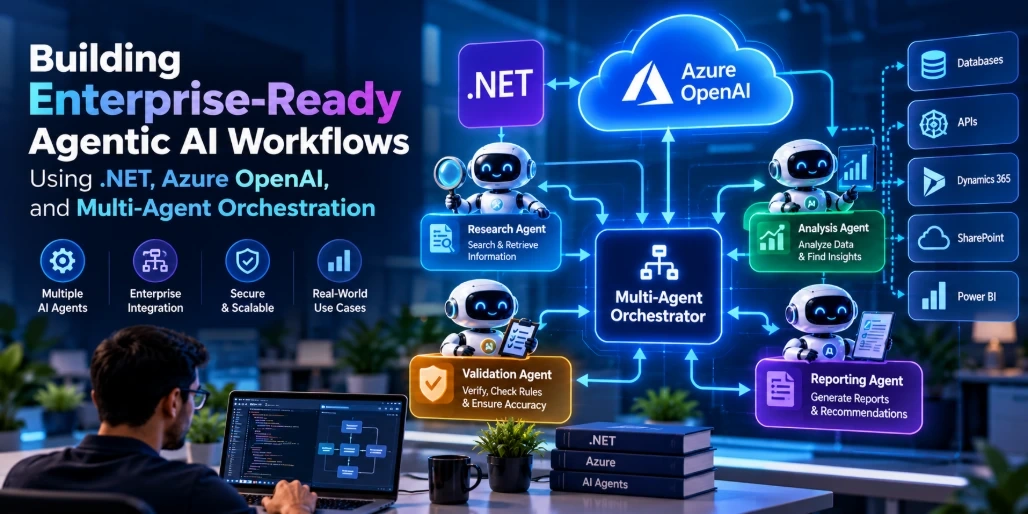
Artificial intelligence is evolving from simple question-answering systems into intelligent applications capable of planning tasks, coordinating operations, interacting with enterprise systems, and executing complex workflows. This shift is driving the adoption of Agentic AI across industries.
Traditional AI-powered applications generally depend on a single model to process a request and generate a response. However, enterprise processes frequently involve multiple responsibilities, different data sources, business rules, and decision-making stages. A single AI model may struggle to manage these requirements consistently.
This is where multi-agent AI orchestration becomes valuable.
By combining .NET, Azure OpenAI, and multi-agent orchestration frameworks, development teams can build specialized AI agents that collaborate to complete complex business tasks. Each agent can focus on a particular responsibility, such as retrieving information, analyzing data, validating business rules, or preparing recommendations.
For example, an enterprise procurement automation system could use multiple agents to analyze purchase requests, verify supplier information, compare quotations, evaluate compliance requirements, and prepare an approval recommendation.
In this article, we explore how to build enterprise-ready Agentic AI workflows using .NET and Azure OpenAI, including architecture design, implementation approaches, orchestration strategies, security considerations, and real-world applications.
What Is Agentic AI?
Agentic AI refers to AI systems that can interpret objectives, plan actions, interact with tools, evaluate results, and execute multiple steps toward achieving a defined goal.
Unlike conventional AI applications that primarily generate responses, agentic systems can participate in application workflows and perform controlled operations.
An AI agent typically consists of several components:
LLM: Processes instructions, interprets context, and supports decision-making.
Instructions: Define the agent's role, objectives, and behavioral constraints.
Tools: Allow the agent to interact with external APIs, databases, and business applications.
Memory and Context: Maintain relevant information across interactions.
Execution Logic: Determines how tasks are performed and when additional actions are required.
Evaluation: Checks whether the expected result has been achieved.
Consider an enterprise employee asking:
"Analyze our latest quarterly sales performance, identify underperforming regions, and prepare recommendations for improving revenue."
A conventional chatbot might generate general suggestions.
An Agentic AI workflow could perform several operations:
Retrieve quarterly sales information.
Analyze regional performance.
Compare results against previous quarters.
Identify underperforming regions.
Investigate possible contributing factors.
Generate recommendations.
Prepare an executive summary.
Each operation can be handled by a specialized agent or a deterministic application service.
The important distinction is that an agentic system combines model-driven reasoning with controlled software execution.
Why Use Multi-Agent AI Architecture for Enterprise Applications?
A single AI agent can handle many tasks, but complex enterprise processes often benefit from dividing responsibilities across specialized agents.
A multi-agent architecture allows developers to create independent agents with specific instructions, tools, and responsibilities.
For example, an enterprise business intelligence application could contain:
Each agent focuses on a particular operation instead of handling the entire workflow through one large prompt.
Key Benefits of Multi-Agent Orchestration
1. Specialized Responsibilities
Individual agents can be configured for specific business functions. A financial analysis agent can focus on numerical interpretation, while a reporting agent can concentrate on producing structured summaries.
2. Modular Architecture
Agents can be developed, tested, updated, and maintained independently. Changes to one agent do not necessarily require redesigning the entire application.
3. Parallel Processing
Independent tasks can run simultaneously. For example, sales analysis and customer feedback analysis can be performed concurrently before their results are combined.
4. Better Workflow Coordination
An orchestrator manages task execution, dependencies, handoffs, and completion conditions.
5. Enterprise System Integration
Agents can interact with approved APIs, databases, CRM platforms, ERP systems, and internal applications through controlled tools.
6. Reusability
The same specialized agent can be reused across multiple workflows, reducing duplicated development effort.
However, adding agents does not automatically improve accuracy. Multi-agent systems introduce additional model calls, coordination overhead, latency, and operational costs. Developers should use multiple agents only when task specialization or coordination provides measurable value.
Understanding the Enterprise Multi-Agent Architecture
A production-ready Agentic AI application requires more than connecting multiple language models.
It needs an architecture that coordinates agents, manages shared context, controls access to enterprise systems, and handles execution failures.
A typical architecture using .NET and Azure OpenAI includes the following components.
1. Application Layer
The application layer provides the user interface and entry points for AI-powered workflows.
It may include:
The application receives user instructions and sends requests to the backend orchestration service.
2. Orchestration Layer
The orchestration layer coordinates the execution of multiple agents.
Its responsibilities include:
Breaking complex tasks into smaller operations.
Selecting appropriate agents.
Managing execution order.
Passing information between agents.
Handling dependencies.
Managing retries and failures.
Collecting final results.
The orchestrator can use deterministic workflow logic, an AI-based manager agent, or a combination of both.
3. Agent Layer
The agent layer contains specialized AI agents.
For example:
Agent | Responsibility |
|---|
Research Agent | Retrieves relevant information |
Data Analysis Agent | Analyzes structured datasets |
Planning Agent | Creates execution plans |
Validation Agent | Checks business rules and output quality |
Reporting Agent | Generates final reports |
Each agent receives a defined objective and only the tools and data required for its responsibility.
4. AI Model Layer
Azure OpenAI provides the language models used by agents for reasoning, instruction processing, summarization, and response generation.
Different agents may use different model deployments depending on their workload, accuracy requirements, latency constraints, and budget.
5. Enterprise Integration Layer
This layer connects agents with existing business systems.
Examples include:
Agents should access these systems through application-controlled services rather than unrestricted direct access.
6. Data and Memory Layer
The data layer maintains information required during workflow execution.
It may include:
SQL databases
Azure AI Search
Vector databases
Blob Storage
Redis
Conversation history
Workflow state storage
The architecture should distinguish short-term conversational context from persistent business records and long-term knowledge.
Architecture Workflow
User Request → ASP.NET Core API → Orchestrator → Specialized Agents → Azure OpenAI → Enterprise Tools and Data → Validation → Final Response
The orchestrator coordinates the complete execution process and returns the final result to the application.
Choosing the Right .NET Framework for Multi-Agent Development
Developers can implement multi-agent orchestration using custom C# services or dedicated agent frameworks.
Several technologies are relevant to the Microsoft development ecosystem.
Microsoft Agent Framework
Microsoft Agent Framework is an open-source framework for building and orchestrating AI agents and multi-agent workflows using .NET and Python.
It brings together capabilities associated with Semantic Kernel and AutoGen while providing additional workflow orchestration and production-oriented functionality.
Important capabilities include:
Agent creation and execution.
Tool and MCP integration.
Agent sessions and state management.
Sequential orchestration.
Concurrent orchestration.
Handoff orchestration.
Group chat orchestration.
Magentic orchestration.
Middleware and telemetry.
Human-in-the-loop workflows.
For developers building new multi-agent applications in the Microsoft ecosystem, Agent Framework is a strong option.
Semantic Kernel
Semantic Kernel provides capabilities for integrating AI models, plugins, functions, and application logic into .NET applications.
It is relevant to existing implementations that already use its abstractions. Teams should evaluate the current Agent Framework and Semantic Kernel documentation when choosing an architecture rather than assuming that older agent examples represent the latest recommended APIs.
Custom .NET Orchestration
For smaller or highly controlled enterprise workflows, developers can also implement orchestration using standard .NET components.
This approach provides direct control over:
Execution order.
Dependency injection.
Error handling.
Parallel operations.
Business validation.
Approval processes.
A custom orchestrator can be a good starting point when the workflow is predictable and does not require autonomous planning.
The choice depends on the application's complexity, execution requirements, framework capabilities, and long-term maintenance strategy.
Step-by-Step: Building a Multi-Agent Workflow Using .NET and Azure OpenAI
Let's consider an enterprise business intelligence application that analyzes quarterly sales performance.
The objective is to build a workflow with multiple specialized agents.
The application will contain four agents:
Data Retrieval Agent
Sales Analysis Agent
Validation Agent
Reporting Agent
The workflow will retrieve sales information, analyze performance, validate the findings, and generate a final business report.
Step 1: Configure the Development Environment
Start by preparing the development environment.
Required technologies include:
.NET 10 SDK or another supported .NET version.
Visual Studio or Visual Studio Code.
Azure subscription.
Azure OpenAI or Azure AI Foundry model deployment.
Azure CLI.
SQL Server or another enterprise data source.
Create an ASP.NET Core Web API project:
dotnet new webapi -n EnterpriseAgenticAI
cd EnterpriseAgenticAI
For a direct Azure OpenAI implementation using the Azure OpenAI .NET client:
dotnet add package Azure.AI.OpenAI
dotnet add package Azure.Identity
For an implementation using Microsoft Agent Framework and its Foundry integration, install the corresponding packages:
dotnet add package Microsoft.Agents.AI
dotnet add package Microsoft.Agents.AI.Foundry
dotnet add package Azure.AI.Projects
dotnet add package Azure.Identity
Check the current stable package versions and compatibility requirements before selecting dependencies. Prerelease package versions may be required for particular integrations.
Step 2: Configure Azure OpenAI
Create an Azure OpenAI resource or an appropriate Azure AI Foundry project and deploy a supported model.
Collect the following configuration details:
For local development, authenticate through Azure CLI:
az login
Configure environment variables:
AZURE_OPENAI_ENDPOINT=
AZURE_OPENAI_DEPLOYMENT=
Use environment variables, secure configuration providers, or Azure Key Vault for application configuration.
Avoid storing credentials or sensitive configuration values directly in source code.
Step 3: Create a Shared AI Service
Instead of connecting every agent independently to the model service, create a reusable abstraction.
This simplifies dependency injection, testing, and configuration management.
IAICompletionService.cs
public interface IAICompletionService
{
    Task<string> GenerateAsync(
        string systemPrompt,
        string userPrompt,
        CancellationToken cancellationToken);
}
Next, implement the interface using Azure OpenAI.
AzureOpenAICompletionService.cs
using Azure.AI.OpenAI;
using Azure.Identity;
using OpenAI.Chat;

public class AzureOpenAICompletionService
    : IAICompletionService
{
    private readonly ChatClient _chatClient;

    public AzureOpenAICompletionService(
        IConfiguration configuration)
    {
        var endpoint = configuration[
            "AZURE_OPENAI_ENDPOINT"];

        var deployment = configuration[
            "AZURE_OPENAI_DEPLOYMENT"];

        if (string.IsNullOrWhiteSpace(endpoint) ||
            string.IsNullOrWhiteSpace(deployment))
        {
            throw new InvalidOperationException(
                "Azure OpenAI configuration is missing.");
        }

        var client = new AzureOpenAIClient(
            new Uri(endpoint),
            new DefaultAzureCredential());

        _chatClient = client.GetChatClient(deployment);
    }

    public async Task<string> GenerateAsync(
        string systemPrompt,
        string userPrompt,
        CancellationToken cancellationToken)
    {
        var messages = new ChatMessage[]
        {
            new SystemChatMessage(systemPrompt),
            new UserChatMessage(userPrompt)
        };

        var result = await _chatClient.CompleteChatAsync(
            messages,
            cancellationToken: cancellationToken);

        return string.Join(
            "",
            result.Value.Content.Select(x => x.Text));
    }
}
This implementation uses the Azure OpenAI client to send instructions and user input to the deployed model.
The shared service can now be injected into multiple specialized agents.
For production use, also consider model-specific token limits, request timeouts, content filtering, retry policies, and structured output validation.
Step 4: Create Specialized AI Agents
Each agent should have a clearly defined responsibility.
This is one of the most important design decisions in a multi-agent application.
Avoid creating several agents with identical instructions. Each agent should perform a distinct operation.
DataRetrievalAgent.cs
public class DataRetrievalAgent
{
    private readonly IAICompletionService _ai;

    public DataRetrievalAgent(
        IAICompletionService ai)
    {
        _ai = ai;
    }

    public Task<string> ExecuteAsync(
        string request,
        CancellationToken ct)
    {
        return _ai.GenerateAsync(
            """
            You are a data research assistant.
            Identify the data required for the request.
            Do not invent records or numerical values.
            Clearly identify missing information.
            """,
            request,
            ct);
    }
}
For a real enterprise implementation, the data retrieval agent should call a controlled repository or database service. The model should not fabricate records or independently execute unrestricted database queries.
SalesAnalysisAgent.cs
public class SalesAnalysisAgent
{
    private readonly IAICompletionService _ai;

    public SalesAnalysisAgent(
        IAICompletionService ai)
    {
        _ai = ai;
    }

    public Task<string> ExecuteAsync(
        string salesData,
        CancellationToken ct)
    {
        return _ai.GenerateAsync(
            """
            You are a sales performance analyst.

            Analyze the supplied sales information.
            Identify trends, performance gaps,
            regional differences, and anomalies.

            Use only the supplied data.
            Do not invent numerical values.
            """,
            salesData,
            ct);
    }
}
ValidationAgent.cs
public class ValidationAgent
{
    private readonly IAICompletionService _ai;

    public ValidationAgent(
        IAICompletionService ai)
    {
        _ai = ai;
    }

    public Task<string> ExecuteAsync(
        string analysis,
        CancellationToken ct)
    {
        return _ai.GenerateAsync(
            """
            You are an enterprise validation analyst.

            Review the supplied analysis for:
            - Unsupported conclusions
            - Inconsistent figures
            - Missing evidence
            - Logical errors
            - Unclear assumptions

            Identify issues and provide a
            structured validation result.
            Do not silently modify source data.
            """,
            analysis,
            ct);
    }
}
ReportingAgent.cs
public class ReportingAgent
{
    private readonly IAICompletionService _ai;

    public ReportingAgent(
        IAICompletionService ai)
    {
        _ai = ai;
    }

    public Task<string> ExecuteAsync(
        string validatedAnalysis,
        CancellationToken ct)
    {
        return _ai.GenerateAsync(
            """
            You are an enterprise business reporting specialist.

            Create a professional executive report
            using the validated analysis.

            Include:
            - Executive summary
            - Key findings
            - Performance gaps
            - Business recommendations
            - Limitations and assumptions

            Do not introduce unsupported figures.
            """,
            validatedAnalysis,
            ct);
    }
}
These classes demonstrate a simple role-based agent architecture. Each agent uses a shared model service but applies different instructions.
They are intentionally lightweight. A production agent may also require tools, persistent sessions, structured outputs, access policies, and workflow state.
Step 5: Build the Multi-Agent Orchestrator
The orchestrator coordinates all specialized agents.
For this example, the workflow follows a sequential execution pattern:
Data Retrieval → Sales Analysis → Validation → Reporting
Create an orchestration service.
SalesWorkflowOrchestrator.cs
public class SalesWorkflowOrchestrator
{
    private readonly DataRetrievalAgent _retrieval;
    private readonly SalesAnalysisAgent _analysis;
    private readonly ValidationAgent _validation;
    private readonly ReportingAgent _reporting;

    public SalesWorkflowOrchestrator(
        DataRetrievalAgent retrieval,
        SalesAnalysisAgent analysis,
        ValidationAgent validation,
        ReportingAgent reporting)
    {
        _retrieval = retrieval;
        _analysis = analysis;
        _validation = validation;
        _reporting = reporting;
    }

    public async Task<string> ExecuteAsync(
        string request,
        CancellationToken ct)
    {
        // Stage 1: Identify required information
        var data = await _retrieval.ExecuteAsync(
            request, ct);

        // Stage 2: Analyze available information
        var analysis = await _analysis.ExecuteAsync(
            data, ct);

        // Stage 3: Validate findings
        var validation = await _validation.ExecuteAsync(
            analysis, ct);

        // Stage 4: Prepare executive report
        var report = await _reporting.ExecuteAsync(
            validation, ct);

        return report;
    }
}
This example demonstrates how multiple specialized AI components can work together through an explicit orchestration service.
The orchestrator determines the execution order and passes the output of one stage to the next.
In a real application, the data retrieval stage should return actual data from an authorized source rather than relying on a language model to retrieve business records.
Similarly, validation should include deterministic checks against source data, not just another model-generated opinion.
Step 6: Register Services with Dependency Injection
ASP.NET Core provides dependency injection for managing application components.
Register the shared AI service, agents, and orchestrator.
Program.cs
var builder = WebApplication.CreateBuilder(args);

builder.Services.AddControllers();

builder.Services.AddSingleton<
    IAICompletionService,
    AzureOpenAICompletionService>();

builder.Services.AddTransient<DataRetrievalAgent>();
builder.Services.AddTransient<SalesAnalysisAgent>();
builder.Services.AddTransient<ValidationAgent>();
builder.Services.AddTransient<ReportingAgent>();

builder.Services.AddScoped<
    SalesWorkflowOrchestrator>();

var app = builder.Build();

app.MapControllers();

app.Run();
For a production deployment, configure Azure authentication explicitly, validate configuration during startup, and ensure the selected client lifetime is compatible with the SDK and application design.
Step 7: Expose the Workflow Through an API
The next step is exposing the orchestrator through an ASP.NET Core endpoint.
SalesController.cs
using Microsoft.AspNetCore.Mvc;

[ApiController]
[Route("api/sales")]
public class SalesController : ControllerBase
{
    private readonly SalesWorkflowOrchestrator _workflow;

    public SalesController(
        SalesWorkflowOrchestrator workflow)
    {
        _workflow = workflow;
    }

    [HttpPost("analyze")]
    public async Task<IActionResult> Analyze(
        [FromBody] SalesRequest request,
        CancellationToken ct)
    {
        if (string.IsNullOrWhiteSpace(request.Query))
        {
            return BadRequest(
                new { error = "Query is required." });
        }

        var result = await _workflow.ExecuteAsync(
            request.Query,
            ct);

        return Ok(new
        {
            status = "Completed",
            report = result
        });
    }
}

public record SalesRequest(string Query);
A frontend application can now submit requests to the endpoint.
Example API request
POST /api/sales/analyze
Content-Type: application/json
{
  "query": "Analyze quarterly sales performance and identify underperforming regions."
}
The application executes the agents in the defined sequence and returns the final report.
This is a basic synchronous orchestration example. For production workloads, consider asynchronous jobs, persisted workflow state, progress events, and a separate endpoint for retrieving results.
Multi-Agent Orchestration Patterns for Enterprise Workflows
Not every enterprise process requires the same orchestration strategy.
Choosing the appropriate pattern helps control execution complexity, model costs, and workflow reliability.
Microsoft Agent Framework supports several orchestration approaches, including sequential, concurrent, handoff, group chat, and Magentic orchestration.
1. Sequential Orchestration
In sequential orchestration, agents execute one after another.
Each agent receives the output of the previous stage.
Example:
Research Agent
      |
      v
Analysis Agent
      |
      v
Validation Agent
      |
      v
Reporting Agent
Suitable for:
This approach is useful when later operations depend on the output of earlier operations.
2. Concurrent Orchestration
Concurrent orchestration allows independent agents to execute simultaneously.
For example, a business performance workflow may require three independent analyses:
These agents can run concurrently, after which a reporting agent combines their results.
A simple .NET implementation uses Task.WhenAll():
var salesTask = salesAgent.ExecuteAsync(
    salesInput, ct);

var customerTask = customerAgent.ExecuteAsync(
    customerInput, ct);

var marketingTask = marketingAgent.ExecuteAsync(
    marketingInput, ct);

await Task.WhenAll(
    salesTask,
    customerTask,
    marketingTask);

var combinedResults = new
{
    Sales = await salesTask,
    Customer = await customerTask,
    Marketing = await marketingTask
};
This is useful when tasks have no dependencies on one another.
However, concurrency should be bounded in production. Too many simultaneous model requests can increase costs, trigger rate limits, and affect service availability.
3. Handoff Orchestration
Handoff orchestration transfers control from one agent to another based on the current task or context.
For example, a customer service agent may initially receive a customer request.
If the request involves billing, it can transfer control to a specialized billing agent.
If it involves technical troubleshooting, it can transfer control to a support agent.
This pattern is useful when different agents need to take ownership of different branches of a conversation or workflow.
4. Group Chat Orchestration
Group chat orchestration allows multiple agents to collaborate through a shared conversation.
For example:
Research Agent presents findings.
Financial Agent evaluates cost implications.
Compliance Agent identifies regulatory concerns.
Manager Agent coordinates the discussion and produces the final recommendation.
This can help with complex analysis tasks, but developers should implement clear termination conditions, turn limits, and responsibility boundaries to avoid unnecessary model interactions.
5. Magentic Orchestration
Magentic orchestration uses a manager agent to coordinate specialized agents dynamically.
Instead of following only a fixed execution sequence, the manager evaluates the task, determines which specialists are required, assigns work, and reviews the results.
For example, an enterprise strategic planning agent could decide whether a request requires financial analysis, market research, customer analysis, or compliance review.
This approach is useful for open-ended tasks that cannot be fully described through a fixed workflow.
However, dynamic planning should be bounded by permitted tools, execution budgets, maximum iterations, and approval policies.
Integrating Enterprise Tools and APIs with AI Agents
An enterprise AI agent becomes useful when it can access relevant business capabilities.
These capabilities should be exposed through controlled tools.
For example, a CRM assistant may need to retrieve customer records, check sales opportunities, and summarize account activity.
Instead of allowing an agent unrestricted access to a CRM database, developers should create specific application services.
Example:
public interface ICrmService
{
    Task<CustomerDto?> GetCustomerAsync(
        int customerId,
        CancellationToken ct);

    Task<IReadOnlyList<OpportunityDto>>
        GetOpportunitiesAsync(
            int customerId,
            CancellationToken ct);
}
The service implementation can connect to Salesforce, Microsoft Dynamics 365, or an internal CRM platform.
The agent can request these operations through an approved tool interface.
The application should validate:
User identity.
User permissions.
Customer ownership.
Parameter validity.
Data access scope.
Operation authorization.
For operations that modify records, additional approval may be necessary.
The language model should decide when a tool may be relevant, but the application must decide whether the operation is allowed.
Implementing RAG in Multi-Agent Enterprise Applications
Enterprise agents frequently need access to internal information that is not available in the model's general knowledge.
Retrieval-Augmented Generation (RAG) allows applications to retrieve relevant content from external knowledge sources and provide it to an LLM as contextual information.
A typical RAG architecture includes:
Document ingestion.
Text extraction and preprocessing.
Document chunking.
Embedding generation.
Vector indexing.
Similarity-based retrieval.
Context construction.
Model response generation.
Azure AI Search can serve as the retrieval layer for enterprise document collections.
In a multi-agent architecture, different agents can use different retrieval configurations.
For example:
Agent | Knowledge source |
|---|
Technical Agent | Product documentation |
Finance Agent | Financial policies and reports |
Compliance Agent | Regulatory documents |
Support Agent | Troubleshooting knowledge base |
This creates specialized knowledge access without requiring every agent to process every enterprise document.
For security, retrieval must enforce document-level permissions and tenant boundaries. The system should not assume that information retrieved by one user can be shared with another agent or user without authorization.
Managing Shared Memory and Workflow State
Multi-agent applications need a consistent approach to managing context.
There are several types of memory to consider.
1. Short-Term Conversation Memory
Stores recent user interactions and relevant agent responses during an active conversation.
2. Workflow State
Stores the current execution stage, completed tasks, pending approvals, and intermediate results.
3. Long-Term Memory
Stores selected information that may be useful across future interactions.
4. Enterprise Knowledge
Contains business information retrieved from databases, document repositories, and knowledge bases.
A production architecture should not treat all these categories as interchangeable.
For example, workflow state should be persisted independently from conversational messages.
A useful state model might contain:
{
  "workflowId": "WF-10025",
  "status": "InProgress",
  "currentStage": "Validation",
  "completedAgents": [
    "DataRetrieval",
    "SalesAnalysis"
  ],
  "pendingAgents": [
    "Validation",
    "Reporting"
  ],
  "requiresApproval": false
}
The application can persist this information in SQL Server or another durable storage system.
For long-running workflows, checkpointing and recovery mechanisms are particularly important. If an application restarts during execution, it should be able to resume from a known state instead of repeating every completed operation.
Security Considerations for Enterprise Agentic AI
Security is one of the most important aspects of enterprise AI development.
Multi-agent systems may interact with sensitive business information, financial records, customer data, and internal applications.
A secure implementation should consider the following practices.
Identity and Authentication
Use Microsoft Entra ID and managed identities for service-to-service authentication where supported.
Avoid exposing Azure credentials to frontend applications or individual agents.
Role-Based Access Control
Apply permissions at the application and tool levels.
An agent should not inherit administrative privileges simply because it is part of an enterprise workflow.
Tool Authorization
Every tool call should be validated before execution.
A model-generated request must never be treated as authorization.
Prompt Injection Protection
User input and retrieved documents may contain malicious instructions.
Treat these inputs as untrusted content. Use explicit tool allowlists, clear instruction boundaries, output validation, and application-side authorization.
Human-in-the-Loop Approval
Require explicit approval for sensitive operations such as:
Financial transactions.
Customer record modifications.
Contract approvals.
External email communication.
Data deletion.
High-impact business decisions.
Data Privacy
Apply encryption, tenant isolation, retention policies, and data minimization.
Avoid storing sensitive prompts and responses unnecessarily.
Audit Logging
Record workflow execution, agent identity, tool invocation, authorization outcomes, approvals, and errors.
Logs should provide traceability without unnecessarily exposing confidential information.
Scaling Multi-Agent Workflows in Azure
A prototype that works with a few requests may not be suitable for enterprise workloads.
Production applications need to handle concurrent users, long-running operations, model rate limits, and external API failures.
Several Azure services can support this architecture.
Azure App Service
Suitable for hosting ASP.NET Core APIs and application services.
Azure Container Apps
Useful for containerized agent services and independently scalable workloads.
Azure Kubernetes Service
Suitable for complex deployments requiring advanced orchestration and container management.
Azure Service Bus
Can coordinate asynchronous communication between application components and background workers.
Azure Functions
Can execute event-driven operations and background processing tasks.
Azure Key Vault
Provides secure storage for application secrets and other sensitive configuration.
Azure Monitor and Application Insights
Help monitor application performance, failures, dependencies, and execution behavior.
A scalable architecture may separate the API, orchestration engine, agent workers, and enterprise integration services.
For example:
ASP.NET Core API
       |
       v
Workflow Orchestrator
       |
       v
Azure Service Bus
       |
       +------------------+
       |                  |
       v                  v
  Agent Worker 1     Agent Worker 2
       |                  |
       v                  v
  Azure OpenAI       Enterprise APIs
       |                  |
       +--------+---------+
                |
                v
        Result Aggregation
                |
                v
          Workflow Storage
This design helps isolate workloads and scale individual components independently.
The appropriate architecture depends on workload duration, throughput, availability requirements, and operational complexity.
Monitoring and Evaluating Multi-Agent Systems
Traditional application monitoring is not sufficient for complex agentic workflows.
Developers need visibility into individual agent execution and the complete workflow.
Important metrics include:
Metric | Why It Matters |
|---|
Workflow completion rate | Measures successful task execution |
Agent success rate | Identifies unreliable agents |
Model latency | Measures response time |
Token consumption | Helps control AI costs |
Tool failure rate | Identifies integration problems |
Retry frequency | Highlights instability |
Human approval rate | Measures intervention requirements |
Output quality | Evaluates response usefulness |
OpenTelemetry-based distributed tracing can help track operations across APIs, orchestrators, model requests, and external services.
Microsoft Agent Framework also provides observability integrations for agent and workflow execution.
Evaluation should include:
Task completion accuracy.
Tool selection accuracy.
Output consistency.
Groundedness in retrieved information.
Resistance to prompt injection.
Permission enforcement.
Failure recovery.
Human approval behavior.
A useful practice is to maintain a representative evaluation dataset containing normal requests, ambiguous instructions, invalid inputs, adversarial prompts, and failure scenarios.
Changes to prompts, models, and orchestration logic should be tested against this dataset before deployment.
Real-World Enterprise Use Cases of Multi-Agent AI
Multi-agent workflows can support different business processes across industries.
1. Intelligent CRM Automation
A CRM automation workflow may include:
These agents can retrieve customer information, summarize interactions, identify opportunities, and prepare sales recommendations.
2. Financial Analysis and Reporting
Financial workflows can use specialized agents to retrieve financial records, calculate performance metrics, identify anomalies, validate results, and prepare management reports.
Numerical calculations should be performed by deterministic financial services rather than relying exclusively on LLM-generated arithmetic.
3. Supply Chain Management
A supply chain workflow could coordinate inventory monitoring, supplier analysis, demand forecasting, and procurement recommendations.
For example, an inventory agent can identify stock shortages while a supplier agent evaluates available sourcing options.
4. Enterprise Customer Support
Multiple agents can manage customer inquiries by coordinating knowledge retrieval, issue classification, technical troubleshooting, and ticket creation.
Human support teams can handle complex or sensitive cases.
5. Software Development Automation
Agentic workflows can support software development activities such as:
However, code changes and production deployments should remain subject to established development, testing, and approval processes.
Best Practices for Building Production-Ready Agentic AI Workflows
Developing a successful multi-agent system requires careful architectural planning.
Consider these recommendations:
Start with a Defined Business Problem: Identify a workflow that benefits from specialized AI reasoning rather than adding agents simply because the technology is available.
Keep Agent Responsibilities Narrow: Each agent should have a specific role, defined input, expected output, and permitted tool set.
Prefer Deterministic Execution Where Possible: Use conventional C# services for calculations, data validation, transactions, and business rules.
Select the Right Orchestration Pattern: Use sequential workflows for dependent tasks, concurrent execution for independent tasks, and dynamic orchestration only when the problem requires it.
Control Agent Communication: Define structured output contracts instead of passing large, unstructured conversations between agents.
Implement Failure Recovery: Use timeouts, retries, idempotency, checkpoints, and compensation logic where required.
Control Model Consumption: Apply token limits, concurrency limits, and model selection policies to manage costs.
Enforce Human Oversight: Require approval before sensitive or irreversible operations.
Measure Business Outcomes: Evaluate whether the workflow improves task completion time, operational efficiency, accuracy, and user experience.
Conclusion
Building enterprise-ready Agentic AI workflows using .NET and Azure OpenAI provides a practical approach to introducing intelligent automation into modern business applications.
By combining specialized AI agents, controlled tool integration, workflow orchestration, and enterprise data access, organizations can develop systems capable of handling complex multi-step business processes.
.NET provides the application infrastructure, Azure OpenAI supplies advanced language-model capabilities, and multi-agent frameworks provide the coordination mechanisms needed to manage specialized AI tasks.
However, successful implementation depends on more than model selection. Security, authorization, workflow reliability, observability, data governance, and cost management must be part of the architecture from the beginning.
For organizations exploring enterprise AI adoption, working with an experienced AI development team can help transform Agentic AI concepts into scalable, secure, and maintainable business applications.
WeblineIndia helps businesses explore custom AI development, intelligent automation, enterprise software integration, and AI-powered application solutions.
Frequently Asked Questions
1. What is multi-agent orchestration in Agentic AI?
Multi-agent orchestration is the process of coordinating multiple specialized AI agents to complete a larger task. An orchestrator manages agent execution, task distribution, communication, dependencies, and final result aggregation.
2. Can we build multi-agent AI workflows using .NET?
Yes. Developers can build multi-agent workflows using C#, ASP.NET Core, Azure OpenAI, and frameworks such as Microsoft Agent Framework. Custom .NET orchestration services can also coordinate specialized agents.
3. What is Microsoft Agent Framework?
Microsoft Agent Framework is an open-source framework for building, orchestrating, and deploying AI agents and multi-agent workflows. It supports .NET and Python, multiple model providers, workflow orchestration, state management, and observability.
4. What is the difference between single-agent and multi-agent AI systems?
A single-agent system handles tasks through one agent, potentially using multiple tools. A multi-agent system divides responsibilities across specialized agents that collaborate through an orchestration mechanism.
5. Which Azure services are useful for Agentic AI development?
Common services include Azure OpenAI, Azure AI Foundry, Azure AI Search, Azure App Service, Azure Container Apps, Azure Service Bus, Azure Key Vault, Azure Monitor, and Application Insights.
6. What are the different types of multi-agent orchestration?
Common orchestration patterns include sequential, concurrent, handoff, group chat, and manager-led dynamic orchestration such as Magentic. Each pattern supports different execution requirements.
7. How does Azure OpenAI support multi-agent workflows?
Azure OpenAI provides language models that agents use to interpret instructions, reason about tasks, generate responses, and request tool execution. Multiple specialized agents can use the same or different model deployments.
8. Can multiple AI agents access the same enterprise database?
Yes, but database access should be managed through authorized application services. Developers should enforce role-based access, tenant isolation, query validation, and data permissions for every operation.
9. How can RAG improve multi-agent AI applications?
RAG provides agents with relevant information from enterprise documents and knowledge bases. It improves access to organization-specific information and helps ground responses in retrieved content.
10. How do you secure multi-agent AI workflows?
Use managed identities, role-based access control, restricted tools, input validation, encryption, audit logging, prompt-injection defenses, and human approval for sensitive operations.
11. Can multi-agent AI workflows execute tasks in parallel?
Yes. Independent agents can execute concurrently, reducing overall workflow time. Developers should implement bounded concurrency, timeout handling, and rate-limit management.
12. What are the major challenges of enterprise Agentic AI implementation?
Common challenges include agent coordination, model hallucinations, data privacy, tool permissions, workflow failures, latency, token consumption, observability, and maintaining reliable business outcomes.
13. Is multi-agent AI more expensive than a single-agent system?
It can be. Multiple agents may require additional model calls, input and output tokens, and infrastructure resources. Cost optimization requires selecting appropriate models, limiting unnecessary agent interactions, and using deterministic application logic where possible.
14. What is the future of Agentic AI in enterprise software development?
Agentic AI is expected to become increasingly integrated into enterprise applications, supporting intelligent workflow automation, business process coordination, software development, customer operations, and decision support. Its adoption will depend on reliable orchestration, governance, security, and measurable business value.


Join the conversation! Your thoughts help the community grow.