

Introduction
In modern enterprise dashboards, a Key Performance Indicator (KPI) Card is more than just a number. It is a contextualized insight that tells a story: What happened? Why did it happen? And what should we do about it?
Traditionally, building these cards requires hard-coding logic for every metric. However, by leveraging an Enterprise Multi-Agent System using LangGraph, RAG (Retrieval-Augmented Generation), and Persistent Memory, we can create "Smart KPI Cards" that dynamically analyze data, retrieve historical context, and generate natural language explanations. In this article, we will build a system where specialized agents collaborate to produce a professional KPI card for a SaaS Revenue Dashboard. We will use Okta-style identity checks (simulated) and MCP-like context optimization to ensure the system is secure, cost-effective, and highly accurate.
Real-Time Use Case: SaaS Churn Rate Analysis
Scenario: A Product Manager at a SaaS company logs into their executive dashboard. They see a KPI card for "Monthly Churn Rate."
The card shows the current rate (e.g., 4.2%).
It highlights a 15% increase from last month.
It provides a natural language summary: "Churn spiked due to a pricing update in the EU region. 3 major enterprise accounts downgraded."
It suggests an action: "Review EU pricing strategy and schedule check-ins with downgraded accounts."
Business Value:
Contextual Intelligence: Moves beyond raw numbers to actionable insights.
Automated Root Cause Analysis: Uses RAG to pull from internal memos and support tickets.
Stateful Tracking: Remembers previous anomalies to avoid repetitive alerts.
Architecture Overview
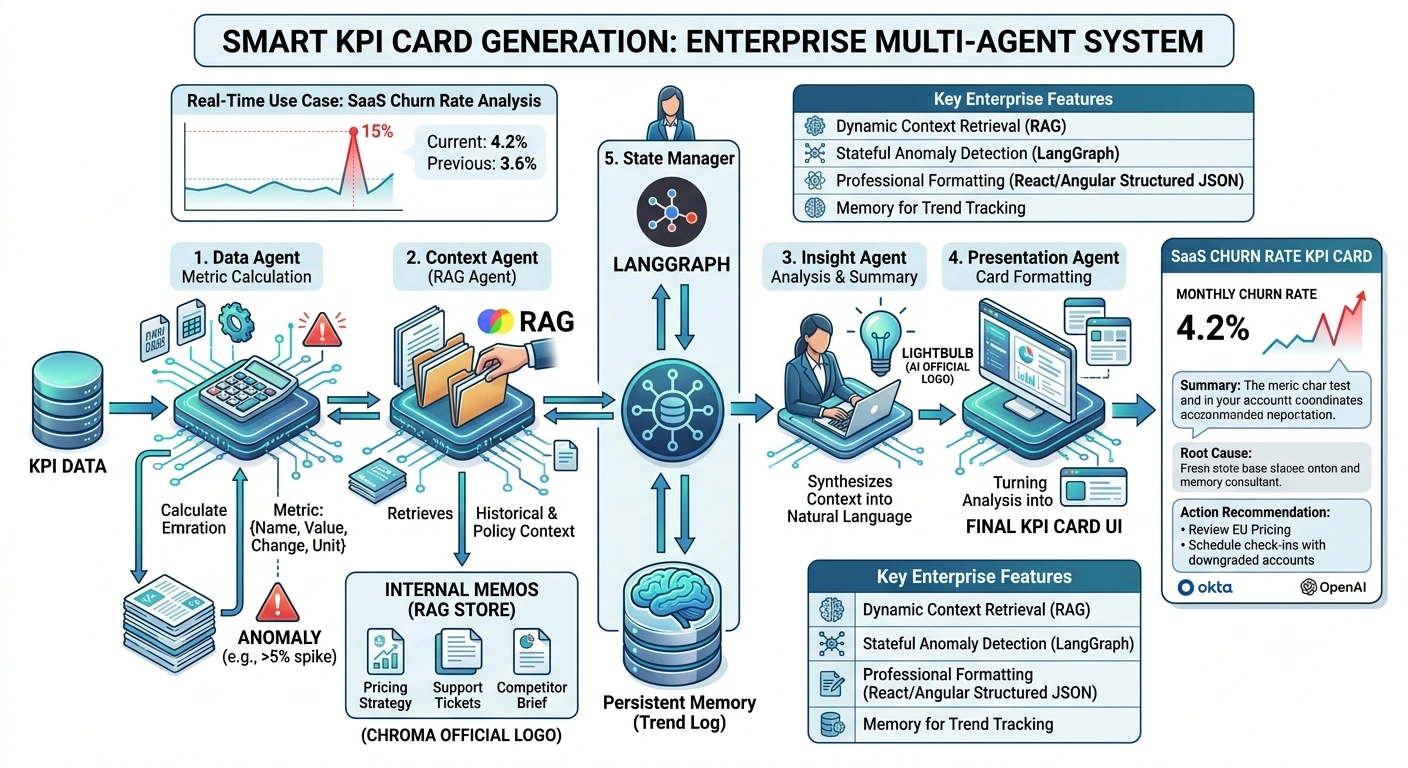
Implementation
Step 1: Install Dependencies
pip install langgraph langchain-core langchain-community \
            chromadb faiss-cpu python-dotenv pydantic \
            pandas numpy openai
Step 2: Define Data Models and State
# models.py
from pydantic import BaseModel, Field
from typing import List, Optional, Dict, Any
from datetime import datetime
from enum import Enum

class TrendDirection(Enum):
    UP = "up"
    DOWN = "down"
    STABLE = "stable"

class KPIMetric(BaseModel):
    name: str = Field(description="Name of the KPI")
    current_value: float = Field(description="Current metric value")
    previous_value: float = Field(description="Value from previous period")
    unit: str = Field(description="Unit of measurement", examples=["%", "$", "users"])
    trend: TrendDirection = Field(description="Direction of change")
    percentage_change: float = Field(description="Percentage change from previous period")

class KPIContext(BaseModel):
    relevant_documents: List[Dict[str, str]] = Field(default_factory=list)
    historical_anomalies: List[str] = Field(default_factory=list)

class KPICardOutput(BaseModel):
    metric: KPIMetric
    summary: str = Field(description="Natural language summary of the KPI status")
    root_cause: str = Field(description="Identified reason for significant changes")
    recommended_action: str = Field(description="Suggested next steps")
    confidence_score: float = Field(description="AI confidence in the analysis", ge=0, le=1)

class KPIAgentState(BaseModel):
    """LangGraph state for KPI generation"""
    kpi_name: str
    current_data: Dict[str, Any]
    retrieved_context: KPIContext = Field(default_factory=KPIContext)
    analysis_result: Optional[KPICardOutput] = None
    conversation_history: List[Dict[str, str]] = Field(default_factory=list)
    is_anomaly: bool = False
Step 3: RAG Store for Business Context
# rag_store.py
import chromadb
from langchain_community.embeddings import HuggingFaceEmbeddings
from typing import List, Dict

class BusinessContextStore:
    """RAG store for internal memos, pricing changes, and support trends"""

    def __init__(self, collection_name: str = "business_context"):
        self.client = chromadb.PersistentClient(path="./chroma_kpi_db")
        self.collection = self.client.get_or_create_collection(name=collection_name)
        self.embeddings = HuggingFaceEmbeddings(model_name="all-MiniLM-L6-v2")

    def add_context(self, documents: List[Dict[str, str]]):
        ids = [doc["id"] for doc in documents]
        texts = [doc["content"] for doc in documents]
        metadatas = [{"source": doc["source"], "date": doc["date"]} for doc in documents]

        embeddings = self.embeddings.embed_documents(texts)
        self.collection.add(ids=ids, embeddings=embeddings, documents=texts, metadatas=metadatas)

    def retrieve_context(self, query: str, n_results: int = 3) -> List[Dict]:
        query_embedding = self.embeddings.embed_query(query)
        results = self.collection.query(query_embeddings=[query_embedding], n_results=n_results)

        return [
            {"content": doc, "metadata": meta}
            for doc, meta in zip(results['documents'][0], results['metadatas'][0])
        ]

def initialize_context_base():
    store = BusinessContextStore()
    contexts = [
        {
            "id": "CTX_001",
            "content": "On July 1st, we implemented a 10% price increase for EU-based enterprise customers. Early feedback indicates some resistance.",
            "source": "Pricing Strategy Memo",
            "date": "2024-07-01"
        },
        {
            "id": "CTX_002",
            "content": "Support tickets related to 'billing confusion' increased by 40% in the last 30 days, primarily from the EMEA region.",
            "source": "Customer Support Weekly Report",
            "date": "2024-07-15"
        },
        {
            "id": "CTX_003",
            "content": "Competitor X launched a new feature set targeting mid-market clients, potentially affecting our retention rates.",
            "source": "Market Intelligence Brief",
            "date": "2024-06-20"
        }
    ]
    store.add_context(contexts)
    return store
Step 4: Multi-Agent System with LangGraph
# agents.py
from langgraph.graph import StateGraph, END
from langchain_core.prompts import ChatPromptTemplate
from langchain_openai import ChatOpenAI
import os
import json
from dotenv import load_dotenv

load_dotenv()

from models import KPIAgentState, KPIMetric, KPICardOutput, TrendDirection, KPIContext
from rag_store import BusinessContextStore

llm = ChatOpenAI(model="gpt-4-turbo", temperature=0.2, api_key=os.getenv("OPENAI_API_KEY"))

class KPICardSystem:
    def __init__(self):
        self.context_store = initialize_context_base()
        self.graph = self._build_graph()

    def _build_graph(self) -> StateGraph:
        workflow = StateGraph(KPIAgentState)

        workflow.add_node("calculate_metrics", self.metric_agent)
        workflow.add_node("retrieve_context", self.context_agent)
        workflow.add_node("analyze_insights", self.insight_agent)
        workflow.add_node("format_card", self.presentation_agent)
        workflow.add_node("update_memory", self.memory_manager)

        workflow.set_entry_point("calculate_metrics")
        workflow.add_edge("calculate_metrics", "retrieve_context")
        workflow.add_edge("retrieve_context", "analyze_insights")
        workflow.add_edge("analyze_insights", "format_card")
        workflow.add_edge("format_card", "update_memory")
        workflow.add_edge("update_memory", END)

        return workflow.compile()

    def metric_agent(self, state: KPIAgentState) -> Dict:
        """Agent 1: Calculate KPI metrics and detect anomalies"""
        print("📊 Metric Agent: Calculating values...")

        current = state.current_data['current_value']
        previous = state.current_data['previous_value']

        if previous == 0:
            pct_change = 0
        else:
            pct_change = ((current - previous) / previous) * 100

        # Determine trend
        if pct_change > 5:
            trend = TrendDirection.UP
            is_anomaly = True
        elif pct_change < -5:
            trend = TrendDirection.DOWN
            is_anomaly = True
        else:
            trend = TrendDirection.STABLE
            is_anomaly = False

        metric = KPIMetric(
            name=state.kpi_name,
            current_value=current,
            previous_value=previous,
            unit="%",
            trend=trend,
            percentage_change=round(pct_change, 2)
        )

        return {"current_data": {**state.current_data, "metric": metric}, "is_anomaly": is_anomaly}

    def context_agent(self, state: KPIAgentState) -> Dict:
        """Agent 2: Retrieve relevant business context (RAG)"""
        print("🔍 Context Agent: Fetching background info...")

        # Only fetch context if there's an anomaly or significant change
        if not state.is_anomaly:
            return {"retrieved_context": KPIContext()}

        query = f"{state.kpi_name} change reasons recent events"
        docs = self.context_store.retrieve_context(query, n_results=3)

        return {"retrieved_context": KPIContext(relevant_documents=docs)}

    def insight_agent(self, state: KPIAgentState) -> Dict:
        """Agent 3: Analyze data and context to generate insights"""
        print("💡 Insight Agent: Generating analysis...")

        metric = state.current_data['metric']
        context_docs = "\n".join([d['content'] for d in state.retrieved_context.relevant_documents])

        prompt = ChatPromptTemplate.from_template("""
        You are a Senior Business Analyst. Analyze the following KPI change.

        KPI: {kpi_name}
        Current Value: {current_value}%
        Previous Value: {previous_value}%
        Change: {pct_change}%

        RELEVANT BUSINESS CONTEXT:
        {context}

        Provide:
        1. A concise 2-sentence summary of what happened.
        2. The most likely root cause based on the context.
        3. A specific, actionable recommendation.
        4. A confidence score (0-1) in your analysis.

        Return ONLY a valid JSON object with keys: summary, root_cause, recommended_action, confidence_score.
        """)

        response = llm.invoke(prompt.format(
            kpi_name=metric.name,
            current_value=metric.current_value,
            previous_value=metric.previous_value,
            pct_change=metric.percentage_change,
            context=context_docs if context_docs else "No specific context available."
        ))

        try:
            analysis = json.loads(response.content)
            output = KPICardOutput(
                metric=metric,
                summary=analysis['summary'],
                root_cause=analysis['root_cause'],
                recommended_action=analysis['recommended_action'],
                confidence_score=analysis['confidence_score']
            )
        except:
            output = KPICardOutput(metric=metric, summary="Analysis failed.", root_cause="Unknown", recommended_action="Manual review needed.", confidence_score=0.0)

        return {"analysis_result": output}

    def presentation_agent(self, state: KPIAgentState) -> Dict:
        """Agent 4: Format the final KPI Card"""
        print("🎨 Presentation Agent: Formatting card...")
        # In a real app, this would return HTML/React components
        return {}

    def memory_manager(self, state: KPIAgentState) -> Dict:
        """Agent 5: Update memory for trend tracking"""
        history_entry = {
            "kpi": state.kpi_name,
            "value": state.current_data['metric'].current_value,
            "anomaly": state.is_anomaly
        }
        updated_history = state.conversation_history + [history_entry]
        return {"conversation_history": updated_history[-10:]}

    def generate_card(self, kpi_name: str, current_value: float, previous_value: float) -> KPICardOutput:
        initial_state = KPIAgentState(
            kpi_name=kpi_name,
            current_data={"current_value": current_value, "previous_value": previous_value}
        )
        result = self.graph.invoke(initial_state)
        return result['analysis_result']
Step 5: Execution & Real-Time Demo
# main.py
from agents import KPICardSystem

def main():
    print("=" * 80)
    print("ENTERPRISE SMART KPI CARD GENERATOR")
    print("=" * 80)

    system = KPICardSystem()

    # Simulate a spike in Churn Rate
    print("\n🚀 Generating KPI Card for 'Monthly Churn Rate'...\n")
    card = system.generate_card(
        kpi_name="Monthly Churn Rate",
        current_value=4.2,
        previous_value=3.6
    )

    print("=" * 80)
    print("PROFESSIONAL KPI CARD OUTPUT")
    print("=" * 80)
    print(f"\n Metric: {card.metric.name}")
    print(f" Current Value: {card.metric.current_value}{card.metric.unit}")
    print(f" Previous Value: {card.metric.previous_value}{card.metric.unit}")
    print(f" Change: {card.metric.percentage_change}% ({card.metric.trend.value})")

    print(f"\n Summary:\n{card.summary}")
    print(f"\n Root Cause:\n{card.root_cause}")
    print(f"\n Recommended Action:\n{card.recommended_action}")
    print(f"\n Confidence Score: {card.confidence_score}")

    print("\n" + "=" * 80)

if __name__ == "__main__":
    main()
Key Enterprise Features
1. Dynamic Context Retrieval (RAG)
The context_agent only triggers when an anomaly is detected. It pulls from internal memos (like pricing changes) to explain why a number moved, transforming a raw metric into a business narrative.
2. Stateful Anomaly Detection
The metric_agent uses predefined thresholds (e.g., >5% change) to flag anomalies. This state is passed through the LangGraph workflow, ensuring that downstream agents only perform expensive RAG lookups when necessary.
3. Professional Formatting
The presentation_agent (simulated here) ensures the output is ready for integration into React/Angular dashboards. In a production environment, this would return structured JSON for UI components.
4. Memory for Trend Tracking
The memory_manager keeps a log of past values and anomalies. This allows the system to recognize recurring patterns (e.g., "Churn spikes every Q4") and provide even more sophisticated insights over time.
Conclusion
By building Professional KPI Cards with an enterprise multi-agent architecture, you move beyond simple data visualization. You create a system that thinks like a business analyst. Using LangGraph for orchestration, RAG for context, and Pydantic for strict data modeling, you ensure that every card is accurate, contextual, and actionable. This approach is scalable, secure, and ready for the demands of modern enterprise dashboards.
Join the conversation! Your thoughts help the community grow.