

In the previous article Kafka features and use cases, we discussed different features and the use cases of Kafka.
In this article, we will be building one real-time application using Kafka and .Net Core and we will be covering the below topics,
- Understanding business scenario
- Setting up Kafka broker and Zookeeper locally
- Working with Kafka using Command Line
- Centralizing Kafka Producer and Consumer Code
Before we get started let’s first understand the business scenario,
Business Scenario
Here we are going to develop 2 applications, one will act as a producer and the other one will act as a consumer.
We will be registering a user on suppose X website and for that, we will be producing a message in Kafka topic containing the data required to register a User and on the other hand there will be a consumer service which will consume this data and will do the real work of User registration. Now we can also think and map it to some complex operation where there will be multiple stages and each stage will be catered by a different service in the entire request chain. You can take the example of creating orders on amazon.com.
I have taken this simple flow of User registration just to simplify the process and help you understand the core concept. Thus, not designing the workflow with a lot of producers and consumers as it may be difficult to understand all of that in the beginning.
So, the pictorial representation will look like below,
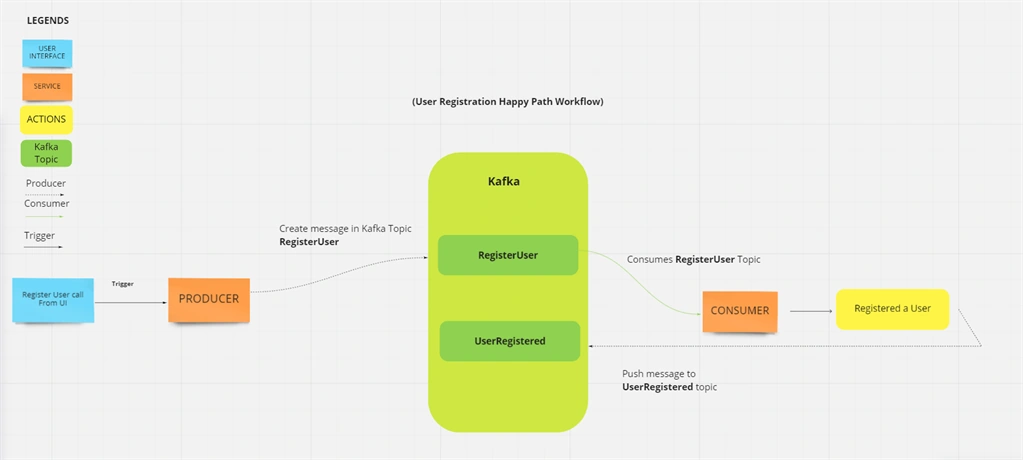
Here we can see that we will be talking about the happy path scenario for now and our consumer service post user registration will produce another message in topic UserRegistered, which can later be consumed by some other service to show message or send some notification about successful registration to the user who did registration.
As we have understood by now the workflow which we are going to create so let’s quickly set up Kafka locally so that we can actually get to see this in action.
Setting up Kafka broker and ZooKeeper locally
To set up Kafka locally, we have written all the configurations in the docker-compose file and you just need to go to the location where the file resides and run the below command.
- docker-compose up
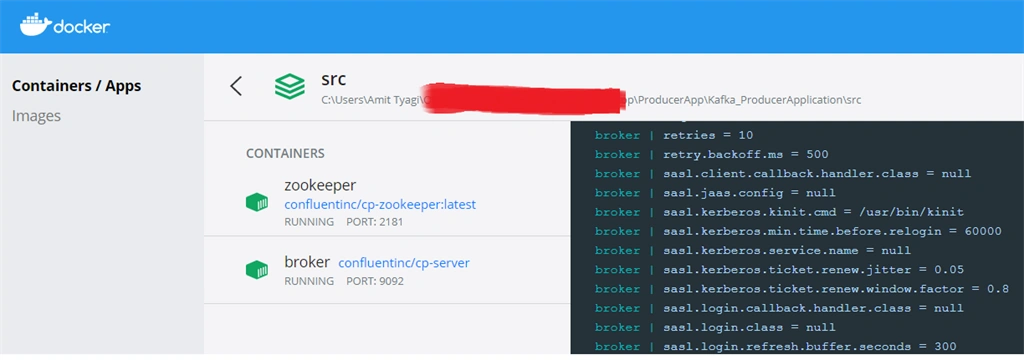
We can see that both Broker and Zookeeper are running successfully.
Working with Kafka using Command Line
As our set up is done so now quickly see some command which will be really helpful to work with Kafka.
First of all, see all running containers using the below command
- docker ps

Then, go inside broker container using the below command,
- docker exec -it b8e163422dfc bash
Once we are in, let’s see if we have any topics created. So to LIST ALL KAKFA TOPICS use the below command.
- kafka-topics --list --bootstrap-server localhost:9092

We can see as of now we just have some default data.
- kafka-console-producer --bootstrap-server localhost:9092 --topic TestTopic

Now we can check if our topic “TestTopic” has some saved message. To READ VALUE FROM KAFKA TOPIC, use the below command.
- kafka-console-consumer --bootstrap-server localhost:9092 --topic TestTopic --from-beginning

Centralizing Kafka Producer and Consumer Code
We created one separate project to have all the code related to Kafka producer and consumer so that in every service we don’t have to write that again and again. As of now, we have placed this Kafka project in both our producer and consumer application, but we can make a NuGet package out of this and then install that Nuget package in all our services wherever we are going to produce or consume messages from Kafka.
We have written generic producers and consumers so that we just need to pass the key and value based on which we can either add the messages to the topic or consume the message from the topic.
Producer Code
- using System;
- using System.Threading.Tasks;
- using Confluent.Kafka;
- using Kafka.Interfaces;
- namespace Kafka.Producer
- {
- /// <summary>
- /// Base class for implementing Kafka Producer.
- /// </summary>
- /// <typeparam name="TKey">Indicates message's key in Kafka topic</typeparam>
- /// <typeparam name="TValue">Indicates message's value in Kafka topic</typeparam>
- public class KafkaProducer<TKey, TValue> : IDisposable, IKafkaProducer<TKey,TValue> where TValue : class
- {
- private readonly IProducer<TKey, TValue> _producer;
- /// <summary>
- /// Initializes the producer
- /// </summary>
- /// <param name="config"></param>
- public KafkaProducer(ProducerConfig config)
- {
- _producer = new ProducerBuilder<TKey, TValue>(config).SetValueSerializer(new KafkaSerializer<TValue>()).Build();
- }
- /// <summary>
- /// Triggered when the service creates Kafka topic.
- /// </summary>
- /// <param name="topic">Indicates topic name</param>
- /// <param name="key">Indicates message's key in Kafka topic</param>
- /// <param name="value">Indicates message's value in Kafka topic</param>
- /// <returns></returns>
- public async Task ProduceAsync(string topic,TKey key, TValue value)
- {
- await _producer.ProduceAsync(topic, new Message<TKey, TValue> { Key = key, Value = value });
- }
- /// <summary>
- ///
- /// </summary>
- public void Dispose()
- {
- _producer.Flush();
- _producer.Dispose();
- }
- }
- }
Consumer Code
- using System;
- using System.Threading;
- using System.Threading.Tasks;
- using Confluent.Kafka;
- using Kafka.Interfaces;
- using Microsoft.Extensions.DependencyInjection;
- namespace Kafka.Consumer
- {
- /// <summary>
- /// Base class for implementing Kafka Consumer.
- /// </summary>
- /// <typeparam name="TKey"></typeparam>
- /// <typeparam name="TValue"></typeparam>
- public class KafkaConsumer<TKey, TValue> : IKafkaConsumer<TKey, TValue> where TValue : class
- {
- private readonly ConsumerConfig _config;
- private IKafkaHandler<TKey, TValue> _handler;
- private IConsumer<TKey, TValue> _consumer;
- private string _topic;
- private readonly IServiceScopeFactory _serviceScopeFactory;
- /// <summary>
- /// Indicates constructor to initialize the serviceScopeFactory and ConsumerConfig
- /// </summary>
- /// <param name="config">Indicates the consumer configuration</param>
- /// <param name="serviceScopeFactory">Indicates the instance for serviceScopeFactory</param>
- public KafkaConsumer(ConsumerConfig config, IServiceScopeFactory serviceScopeFactory)
- {
- _serviceScopeFactory = serviceScopeFactory;
- _config = config;
- }
- /// <summary>
- /// Triggered when the service is ready to consume the Kafka topic.
- /// </summary>
- /// <param name="topic">Indicates Kafka Topic</param>
- /// <param name="stoppingToken">Indicates stopping token</param>
- /// <returns></returns>
- public async Task Consume(string topic, CancellationToken stoppingToken)
- {
- using var scope = _serviceScopeFactory.CreateScope();
- _handler = scope.ServiceProvider.GetRequiredService<IKafkaHandler<TKey, TValue>>();
- _consumer = new ConsumerBuilder<TKey, TValue>(_config).SetValueDeserializer(new KafkaDeserializer<TValue>()).Build();
- _topic = topic;
- await Task.Run(() => StartConsumerLoop(stoppingToken), stoppingToken);
- }
- /// <summary>
- /// This will close the consumer, commit offsets and leave the group cleanly.
- /// </summary>
- public void Close()
- {
- _consumer.Close();
- }
- /// <summary>
- /// Releases all resources used by the current instance of the consumer
- /// </summary>
- public void Dispose()
- {
- _consumer.Dispose();
- }
- private async Task StartConsumerLoop(CancellationToken cancellationToken)
- {
- _consumer.Subscribe(_topic);
- while (!cancellationToken.IsCancellationRequested)
- {
- try
- {
- var result = _consumer.Consume(cancellationToken);
- if (result != null)
- {
- await _handler.HandleAsync(result.Message.Key, result.Message.Value);
- }
- }
- catch (OperationCanceledException)
- {
- break;
- }
- catch (ConsumeException e)
- {
- // Consumer errors should generally be ignored (or logged) unless fatal.
- Console.WriteLine($"Consume error: {e.Error.Reason}");
- if (e.Error.IsFatal)
- {
- break;
- }
- }
- catch (Exception e)
- {
- Console.WriteLine($"Unexpected error: {e}");
- break;
- }
- }
- }
- }
- }
This was just a glimpse of our own generic producers and consumers. I will be sharing the entire code in the next articles.
SUMMARY
In this article we have discussed the business scenario and also saw how we can actually set up Kafka locally. We also tried our hands on some of the commands using which we can interact with Kafka locally and saw our generically written producer and consumer. So in the next article we will be writing our producer and consumer app code and will see the event/message streaming happening.
I hope you find this article helpful. Stay tuned for more … Cheers!!
Dontthinkonce DontthinkoncePosted Sep 18, 2023, 7:35 PM
Where is the docker-compose file?
shashikant rajakPosted Jul 23, 2023, 8:16 AM
Now how can we send this data to UI, can signalr be use to do so?
Leela SRPosted Nov 9, 2022, 8:29 AM
Hi Amit, Can you please share details on writing custom middleware for Producer ? I have one for consumer which is a background service whereas Producer is not a background service.
Vishal NayanPosted Aug 4, 2022, 7:16 PM
Hey Amit, Great Article, Question I have is when we have more than one topic, should we create kafkaconsumer for each topic, so that there is separate queue for each topic and background service. If there is one kafkaconsumber object and all background services are subscribed from the same kafkaconsumer object , and if it goes down, all background services will stop processing messages.
Vijay PobaruPosted Oct 14, 2021, 1:22 PM
Can you please provide information for how to add authentication for kafka and use it?