

In the real world, LLM-powered applications do not operate in a vacuum. External APIs go down, databases experience latency spikes, and third-party services enforce strict rate limits. When building multi-agent systems with LangGraph, a single failing tool can cause an entire agent workflow to crash or hang indefinitely if not handled correctly.
To build production-grade AI systems, we must design graphs that expect failure, gracefully handle timeouts, and allow agents to "reason" through errors.
In this end-to-end guide, we will explore how to handle tool execution errors and timeouts in a LangGraph multi-agent setup, using a real-world E-commerce Customer Support use case.
The Real-World Use Case: "TechGadgets" Support Bot
Imagine we are building a multi-agent customer support system for an e-commerce company, TechGadgets.
The system consists of three agents:
Triage Agent: Understands the user's intent and routes the conversation.
Order Lookup Agent: Queries the internal inventory/order database via an external API.
Error Recovery Agent: A specialized agent that steps in when external systems fail, deciding whether to retry, ask the user for alternative info, or escalate to a human.
The Problem: The check_order_status API is notoriously flaky. It sometimes returns a 500 Internal Server Error, and occasionally, it just hangs (timeout).
The Goal: If the API fails or times out, the graph must not crash. Instead, it should capture the error, pass it to the Error Recovery Agent, and generate a helpful, human-readable response to the customer.
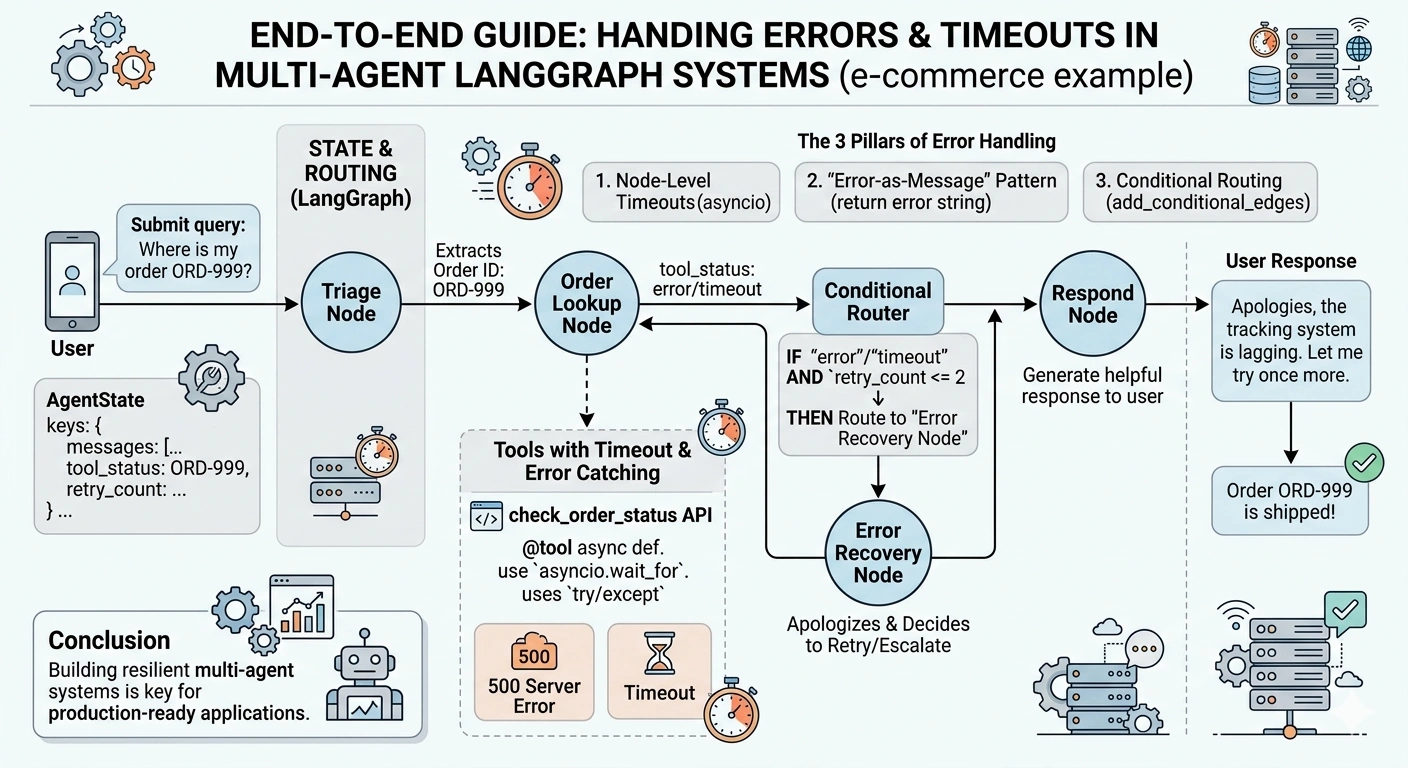
The 3 Pillars of Error Handling in LangGraph
Before writing code, we must establish the architecture for resilience:
Node-Level Timeouts: Use Python's
asyncioto enforce strict time limits on tool executions so the graph never hangs.The "Error-as-Message" Pattern: Never let a tool raise an unhandled Python exception. Catch it, and return the error as a string/message in the graph state. LLMs can read text; they cannot read Python stack traces.
Conditional Routing: Use LangGraph's conditional edges to inspect the state. If an error is detected, route the workflow to a dedicated Error Recovery node/agent instead of continuing the happy path.
Step-by-Step Tentative Implementation
Step 1: Define the Graph State
We need a state that tracks the conversation history and a specific flag to track tool execution status.
from typing import Annotated, TypedDict, Literal
from langgraph.graph.message import add_messages
from langchain_core.messages import BaseMessage, ToolMessage

class AgentState(TypedDict):
    messages: Annotated[list[BaseMessage], add_messages]
    tool_status: Literal["success", "error", "timeout", "pending"]
    retry_count: int
Step 2: Build the Tools (with Timeouts & Error Catching)
We will simulate a flaky external API. We use asyncio.wait_for to enforce a timeout, and a try/except block to ensure the tool always returns a message, even on failure.
import asyncio
import random
from langchain_core.tools import tool

@tool
async def check_order_status(order_id: str) -> str:
    """Checks the status of an order in the external database."""
    # Simulate network latency and random failures
    await asyncio.sleep(random.uniform(0.5, 3.0))

    # Simulate a 20% chance of a 500 Server Error
    if random.random() < 0.2:
        raise ConnectionError("Database connection refused (Error 500)")

    # Simulate a 10% chance of a massive delay (Timeout)
    if random.random() < 0.1:
        await asyncio.sleep(10)

    return f"Order {order_id} is currently 'Shipped' and out for delivery."

async def safe_tool_executor(order_id: str) -> tuple[str, str]:
    """
    Wrapper to handle timeouts and errors, returning a tuple of (result, status).
    """
    try:
        # Enforce a strict 3-second timeout
        result = await asyncio.wait_for(check_order_status.ainvoke({"order_id": order_id}), timeout=3.0)
        return result, "success"
    except asyncio.TimeoutError:
        return "The order database is taking too long to respond (Timeout).", "timeout"
    except Exception as e:
        return f"Failed to fetch order data: {str(e)}", "error"
Step 3: Create the Multi-Agent Nodes
In LangGraph, agents are just nodes that call an LLM. We will define the Triage, Order Lookup, and Error Recovery nodes.
from langchain_openai import ChatOpenAI
from langchain_core.messages import HumanMessage, AIMessage, SystemMessage

llm = ChatOpenAI(model="gpt-4o", temperature=0)

# 1. Triage Agent
async def triage_node(state: AgentState):
    system_msg = SystemMessage(content="You are a triage agent. Extract the order ID from the user and ask the user to confirm it.")
    response = await llm.ainvoke([system_msg] + state["messages"])
    return {"messages": [response], "tool_status": "pending"}

# 2. Order Lookup Agent (Calls the safe executor)
async def order_lookup_node(state: AgentState):
    # Extract order ID from the last AI message (simplified for example)
    last_msg = state["messages"][-1].content
    order_id = "ORD-12345" # In reality, use an LLM or regex to extract this

    result, status = await safe_tool_executor(order_id)

    # Append the result (or error) as a ToolMessage so the LLM can read it
    tool_msg = ToolMessage(content=result, tool_call_id="order_lookup", status=status)

    return {
        "messages": [tool_msg],
        "tool_status": status,
        "retry_count": state.get("retry_count", 0) + 1
    }

# 3. Error Recovery Agent
async def error_recovery_node(state: AgentState):
    system_msg = SystemMessage(content="""
        You are an error recovery agent. The external database failed or timed out.
        Apologize to the customer, explain the technical difficulty briefly,
        and offer to retry or escalate to a human.
    """)
    response = await llm.ainvoke([system_msg] + state["messages"])
    return {"messages": [response], "tool_status": "pending"}
Step 4: Wire the Graph with Conditional Routing
This is where the magic happens. We use a routing function to inspect the tool_status in the state and decide the next step.
from langgraph.graph import StateGraph, START, END

# Routing logic
def route_after_lookup(state: AgentState) -> Literal["error_recovery", "respond_to_user"]:
    status = state.get("tool_status")
    retry_count = state.get("retry_count", 0)

    # If it failed, and we haven't retried more than twice, go to recovery
    if status in ["error", "timeout"]:
        if retry_count <= 2:
            return "error_recovery"
        else:
            # Failsafe: if it keeps failing, end the graph to prevent infinite loops
            return "respond_to_user"

    return "respond_to_user"

# Final response node
async def respond_to_user_node(state: AgentState):
    system_msg = SystemMessage(content="You are a helpful customer support agent. Summarize the findings for the user.")
    response = await llm.ainvoke([system_msg] + state["messages"])
    return {"messages": [response]}

# Build the Graph
workflow = StateGraph(AgentState)

workflow.add_node("triage", triage_node)
workflow.add_node("order_lookup", order_lookup_node)
workflow.add_node("error_recovery", error_recovery_node)
workflow.add_node("respond", respond_to_user_node)

# Define Edges
workflow.add_edge(START, "triage")
workflow.add_edge("triage", "order_lookup")

# The crucial conditional edge based on tool execution status
workflow.add_conditional_edges(
    "order_lookup",
    route_after_lookup,
    {
        "error_recovery": "error_recovery",
        "respond_to_user": "respond"
    }
)

# Allow the error recovery agent to retry the lookup
workflow.add_edge("error_recovery", "order_lookup")
workflow.add_edge("respond", END)

# Compile
graph = workflow.compile()
How the LLM Reasons Through the Error
Let's trace what happens when the check_order_status API throws a TimeoutError:
User: "Where is my order ORD-999?"
Triage Node: Acknowledges and passes to Order Lookup.
Order Lookup Node: Calls
safe_tool_executor. The API hangs.asyncio.wait_fortriggers after 3 seconds.State Update: The state is updated with
tool_status: "timeout"and aToolMessagecontaining: "The order database is taking too long to respond (Timeout)."Conditional Edge: The router sees
tool_status == "timeout"and routes toerror_recovery.Error Recovery Node: The LLM reads the
ToolMessagein the state. It understands the context. It generates: "I apologize, but our order tracking system is currently experiencing high latency. Let me try one more time."Retry: The graph routes back to
order_lookup.Success/Failsafe: If it succeeds on retry, it goes to
respond. If it fails 3 times, theretry_countlogic forces it torespondto prevent an infinite loop, where the LLM will finally tell the user to contact human support.
Best Practices for Production LangGraph Setups
Never Let Tools Raise Unhandled Exceptions: If a tool raises an exception, the LangGraph node crashes, and the entire thread dies. Always wrap external calls in
try/exceptblocks and return the error as a string.Use
asyncio.wait_forfor I/O Bound Tools: LLMs are fast; network requests are not. Always define a maximum timeout for external API calls. A 5-second timeout is usually a good baseline for synchronous-feeling chatbots.Implement a "Failsafe" Router: Always track
retry_countorerror_frequencyin your state. If an API is completely down, you don't want your agents endlessly retrying and burning through your LLM token budget. Route to a human escalation node after NN failures.Leverage
ToolMessageStatus: LangChain'sToolMessagesupports astatusparameter ("success"or"error"). Use this to make conditional routing cleaner and more semantic.Separate the "Recovery" Logic: Don't clutter your primary agent's system prompt with error-handling instructions. Use a dedicated
error_recovery_node. This keeps your primary agents focused on their core domain and makes your system easier to debug.
Conclusion
Building multi-agent systems is easy; building resilient multi-agent systems is hard. By combining Python's asynchronous timeout capabilities with LangGraph's state-based conditional routing, you can transform fragile LLM workflows into robust, production-ready applications.
Join the conversation! Your thoughts help the community grow.