The Developer Problem: Vector Database Lock-In and Fragmented Abstractions
Retrieval-Augmented Generation (RAG) architectures depend heavily on vector databases to store and query dense vector embeddings. However, the .NET ecosystem historically lacked a standardized abstraction layer for vector operations. Developers building retrieval pipelines were forced to write provider-specific SDK code for Qdrant, Azure AI Search, Milvus, Redis, or pgvector.
This fragmentation introduces critical engineering challenges:
Tight Coupling to Specific Database SDKs: Rewriting data access code when migrating from an open-source vector store like Qdrant to a managed solution like Azure AI Search requires major application refactoring.
Inconsistent Schema Annotations: Mapping domain POCOs (Plain Old CLR Objects) to vector indexes meant maintaining custom mapping attributes unique to each vector database SDK.
Lack of Shared Injection Patterns: Integrating vector stores into standard .NET dependency injection (IServiceCollection) required ad-hoc factory patterns and custom abstraction wrappers.
Complex Hybrid Search Implementations: Combining dense vector distance search with traditional keyword filtering required custom query translation code for every targeted database.
The unified Microsoft.Extensions.VectorData ecosystem solves these integration challenges by providing standardized abstractions (IVectorStore and IVectorStoreRecordCollection<TKey, TRecord>) for the .NET runtime. Similar to how Microsoft.Extensions.Caching unifies distributed caching, Microsoft.Extensions.VectorData delivers vendor-agnostic vector storage, indexing, and similarity search for enterprise applications.
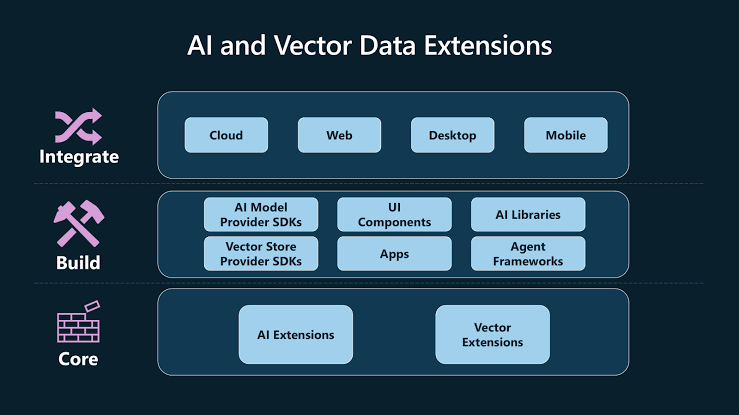
Architectural Comparison: Direct Database SDKs vs. Unified Abstractions
The Microsoft.Extensions.VectorData abstractions sit between your application's domain logic and the vendor-specific database connector libraries.
┌─────────────────────────────────────────────────────────────┐
│                 Enterprise .NET Core Application             │
└──────────────────────────────┬──────────────────────────────┘
                               │
                               ▼
┌─────────────────────────────────────────────────────────────┐
│             Microsoft.Extensions.VectorData                 │
│         (IVectorStore / IVectorStoreRecordCollection)        │
└──────────────┬──────────────────────────────┬───────────────┘
               │                              │
               ▼                              ▼
┌─────────────────────────────┐┌──────────────────────────────┐
│ Qdrant VectorStore Provider ││ Azure Search Store Provider  │
└──────────────┬──────────────┘└──────────────┬───────────────┘
               │                              │
               ▼                              ▼
┌─────────────────────────────┐┌──────────────────────────────┐
│    Qdrant Cluster Engine    ││   Azure AI Search Service    │
└─────────────────────────────┘└──────────────────────────────┘
The table below highlights the architectural differences between direct SDK usage and Microsoft.Extensions.VectorData:
| Engineering Dimension | Direct Vendor SDK Implementation | Microsoft.Extensions.VectorData Abstraction |
|---|
| Vendor Portability | Low; high code churn required to switch vector databases. | High; swap underlying provider using standard DI bindings. |
| Data Mapping | Vendor-specific mapping attributes across POCO models. | Unified schema attributes ([VectorStoreRecordKey], [VectorStoreRecordVector]). |
| Dependency Injection | Custom factory implementations per database type. | Native IServiceCollection extension methods. |
| Hybrid Search API | Inconsistent query paradigms across vector database engines. | Unified VectorSearchOptions supporting distance metrics and payload filters. |
| Testability | Difficult; requires running native database containers or complex mocks. | Simplified; mock IVectorStoreRecordCollection<TKey, TRecord> using standard unit testing mocks. |
Implementing a Vector Retrieval Pipeline in .NET
The following step-by-step walkthrough demonstrates how to annotate a vector domain model, register vector database collections, ingest document embeddings, and execute similarity searches using Microsoft.Extensions.VectorData.
Step 1: Install Package Dependencies
Add the core vector extensions package along with your target database connector (e.g., Qdrant or Azure AI Search):
Bash
dotnet add package Microsoft.Extensions.VectorData.Abstractions
dotnet add package Microsoft.SemanticKernel.Connectors.Qdrant
dotnet add package Microsoft.Extensions.AI
Step 2: Define the Vector Record Schema Model
Annotate your C# domain POCO using unified attribute metadata. This instructs the vector provider how to construct database indexes and primary key definitions.
C#
using Microsoft.Extensions.VectorData;

public class KnowledgeChunk
{
    [VectorStoreRecordKey]
    public required string DocumentId { get; set; }

    [VectorStoreRecordData(IsFilterable = true)]
    public required string Category { get; set; }

    [VectorStoreRecordData(IsFullTextSearchable = true)]
    public required string TextContent { get; set; }

    [VectorStoreRecordVector(Dimensions: 1536, DistanceFunction = DistanceFunction.CosineSimilarity)]
    public ReadOnlyMemory<float> VectorEmbedding { get; set; }
}
Step 3: Register and Ingest Vector Data
Set up standard .NET dependency injection and ingest document records into the target collection.
C#
using Microsoft.Extensions.DependencyInjection;
using Microsoft.Extensions.VectorData;
using Qdrant.Client;

public class KnowledgePipelineManager
{
    private readonly IVectorStoreRecordCollection<string, KnowledgeChunk> _collection;

    public KnowledgePipelineManager(IVectorStoreRecordCollection<string, KnowledgeChunk> collection)
    {
        _collection = collection;
    }

    public async Task InitializeAndIngestAsync(List<KnowledgeChunk> chunks)
    {
        // 1. Ensure collection and underlying indexes exist in the vector store
        await _collection.CreateCollectionIfNotExistsAsync();

        // 2. Perform bulk upsert of knowledge chunks containing dense embeddings
        await foreach (var recordKey in _collection.UpsertBatchAsync(chunks))
        {
            Console.WriteLine($"Ingested record with Key: {recordKey}");
        }
    }
}
Step 4: Execute Vector Similarity Search with Filtering
Perform semantic vector similarity queries while applying structured metadata filters.
C#
using Microsoft.Extensions.VectorData;

public class RetrievalEngine
{
    private readonly IVectorStoreRecordCollection<string, KnowledgeChunk> _collection;

    public RetrievalEngine(IVectorStoreRecordCollection<string, KnowledgeChunk> collection)
    {
        _collection = collection;
    }

    public async Task<List<KnowledgeChunk>> SearchRelevantContextAsync(
        ReadOnlyMemory<float> queryEmbedding,
        string targetCategory,
        int topK = 3)
    {
        // Configure search parameters including metadata filter conditions
        var searchOptions = new VectorSearchOptions
        {
            Top = topK,
            Skip = 0,
            Filter = new VectorSearchFilter()
                .EqualTo(nameof(KnowledgeChunk.Category), targetCategory)
        };

        // Execute vector search over the collection
        var searchResults = await _collection.VectorizedSearchAsync(queryEmbedding, searchOptions);

        var retrievedChunks = new List<KnowledgeChunk>();

        await foreach (var result in searchResults.Results)
        {
            Console.WriteLine($"Match: {result.Record.DocumentId} | Score: {result.Score:F4}");
            retrievedChunks.Add(result.Record);
        }

        return retrievedChunks;
    }
}
Architectural Advantages and Disadvantages
Advantages
Eliminates Vendor Lock-In: Application logic depends strictly on Microsoft.Extensions.VectorData interfaces, allowing database engine swaps with minimal configuration changes.
Declarative Index Schema Definition: Annotating models with attributes automates index generation, vector dimension allocation, and distance metric choices.
Native .NET Ecosystem Alignment: Integrates seamlessly with Microsoft.Extensions.AI embedding generators, Semantic Kernel plugins, and standard .NET logging.
Disadvantages
Lowest Common Denominator Limitations: Specialized vendor-specific features not yet captured by generic VectorSearchOptions may still require dropping down to native provider client instances.
Evolving SDK Surface: As vector extensions mature across versions, breaking changes in preview method signatures require dependency tracking.
Enterprise Best Practices
Explicitly Match Embedding Model Dimensions: Ensure the Dimensions parameter on [VectorStoreRecordVector] matches the output vector dimension generated by your embedding model (e.g., 1536 for OpenAI text-embedding-3-small).
Index Only Essential Metadata Fields: Mark only necessary properties with IsFilterable = true or IsFullTextSearchable = true to minimize index memory consumption in high-volume vector databases.
Use Batch Ingestion API Endpoints: Always prefer UpsertBatchAsync over sequential single-record upsert calls to optimize bulk data loading throughput over network boundaries.
Leverage Scoped Collection Registrations: Register IVectorStoreRecordCollection<TKey, TRecord> as scoped services to ensure clean connection lifecycle handling across web requests.
Common Mistakes to Avoid
Mismatching Distance Functions: Configuring CosineSimilarity in C# model annotations while the database defaults to EuclideanDistance produces inaccurate relevance scores.
Forgetting Collection Creation Checks: Querying or inserting records without first calling CreateCollectionIfNotExistsAsync() leads to runtime database missing index exceptions.
Treating Vectors as Primary Keys: Using floating-point vector arrays as document keys causes indexing errors. Always assign a discrete string or Guid property annotated with [VectorStoreRecordKey].
Troubleshooting Guide
Issue 1: Vector Dimension Mismatch Exception During Ingestion
Root Cause: The length of the ReadOnlyMemory<float> array passed during runtime upsert does not equal the Dimensions value specified on the model attribute.
Resolution: Verify that your text embedding generator and vector record schema share the same dimension configuration.
Issue 2: Metadata Filtering Returns Zero Results
Root Cause: The metadata property targeted in VectorSearchFilter was not marked with IsFilterable = true on the POCO model before collection creation.
Resolution: Add IsFilterable = true to [VectorStoreRecordData] on the filtered property, recreate the vector database collection index, and re-ingest data.
Issue 3: Collection Creation Fails on Multi-Node Clusters
Root Cause: Database connection timeouts occurred while creating vector HNSW or IVFFlat indexes across distributed nodes.
Resolution: Pass explicit timeout cancellation tokens to CreateCollectionIfNotExistsAsync() and verify cluster resource allocation.
Frequently Asked Questions (FAQs)
1. Does Microsoft.Extensions.VectorData replace Semantic Kernel Memory?
Microsoft.Extensions.VectorData acts as the foundational low-level abstraction layer for vector operations in .NET. Semantic Kernel builds its memory and vector connectors on top of these standard abstractions.
2. Which vector databases are supported by Microsoft.Extensions.VectorData?
Official and community providers support popular vector engines including Qdrant, Azure AI Search, Redis, Milvus, PostgreSQL (pgvector), Cosmos DB, and SQLite Vector extensions.
3. How do I switch vector database providers in my .NET application?
Change your package reference and update the service container registration in Program.cs (e.g., switching from .AddQdrantVectorStore() to .AddAzureAISearchVectorStore()). Your domain models and query pipeline code remain untouched.
Conclusion
The introduction of Microsoft.Extensions.VectorData brings standardized, vendor-agnostic vector database abstractions to the .NET ecosystem. By decoupling application code from specific vector database SDKs, enterprise developers can build maintainable, testable, and portable retrieval pipelines for RAG systems.


Join the conversation! Your thoughts help the community grow.