

Introduction
In today's enterprise landscape, building scalable AI services requires more than just wrapping an LLM in an API. Organizations need robust architectures that handle concurrent requests, maintain conversation state, manage memory efficiently, and provide reliable inference at scale. This article demonstrates how to design and implement a production-ready FastAPI service leveraging LangGraph for multi-agent orchestration, Retrieval-Augmented Generation (RAG) for knowledge grounding, and persistent memory for contextual conversations.
We'll build a complete proof-of-concept featuring a customer support system where multiple specialized agents collaborate to resolve queries using company documentation, maintaining conversation history and state across interactions. The solution addresses real-world challenges like latency optimization, error handling, scalability patterns, and state management—critical concerns when deploying AI services in enterprise environments.
Technology Stack
FastAPI, LangGraph, LangChain, ChromaDB, Pydantic, Python 3.11+, React, TypeScript, Axios, Docker, PostgreSQL, Redis
Architecture Overview
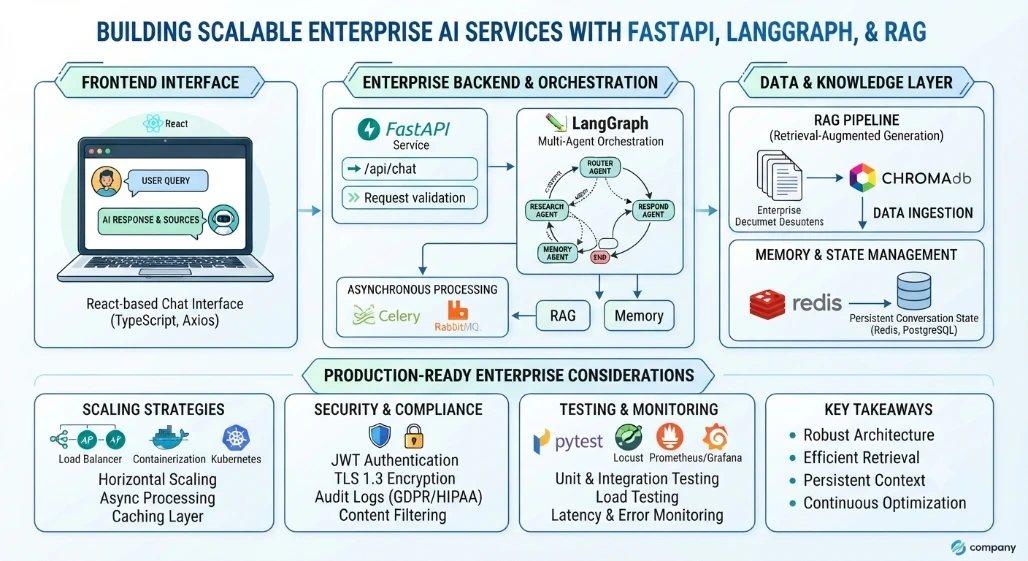
Our system employs a multi-agent architecture where specialized agents handle distinct responsibilities: a Router Agent directs queries to appropriate specialists, a Research Agent retrieves relevant documents via RAG, a Response Agent crafts answers, and a Memory Agent manages conversation context. LangGraph orchestrates these agents through a stateful graph, enabling conditional routing and iterative refinement.
The FastAPI layer exposes RESTful endpoints while managing request validation, authentication, and rate limiting. Behind the scenes, asynchronous processing ensures non-blocking operations, and connection pooling optimizes database interactions. This separation of concerns allows horizontal scaling of individual components based on demand patterns.
Backend Implementation
Let's build the core FastAPI application with LangGraph integration:
from fastapi import FastAPI, HTTPException
from pydantic import BaseModel, Field
from typing import List, Optional
from langgraph.graph import StateGraph, END
from langchain_core.messages import HumanMessage, AIMessage
import chromadb
from uuid import uuid4

app = FastAPI(title="Enterprise AI Service", version="1.0.0")

class ChatRequest(BaseModel):
    message: str = Field(..., description="User query", min_length=1)
    session_id: Optional[str] = Field(None, description="Conversation session ID")
    metadata: dict = Field(default_factory=dict, description="Additional context")

class ChatResponse(BaseModel):
    response: str
    session_id: str
    sources: List[str] = []
    confidence: float = 0.0

class ConversationState(BaseModel):
    messages: List[dict] = []
    context: dict = {}
    current_step: str = "router"
The state graph defines our agent workflow:
def create_agent_graph():
    workflow = StateGraph(ConversationState)

    workflow.add_node("router", router_agent)
    workflow.add_node("research", research_agent)
    workflow.add_node("respond", response_agent)
    workflow.add_node("memory", memory_agent)

    workflow.set_entry_point("router")
    workflow.add_edge("router", "research")
    workflow.add_edge("research", "respond")
    workflow.add_edge("respond", "memory")
    workflow.add_edge("memory", END)

    return workflow.compile()

agent_graph = create_agent_graph()
RAG Pipeline Implementation
The RAG component ingests enterprise documents and enables semantic search:
class RAGService:
    def __init__(self):
        self.client = chromadb.PersistentClient(path="./chroma_db")
        self.collection = self.client.get_or_create_collection("enterprise_docs")

    async def ingest_document(self, doc_text: str, metadata: dict):
        doc_id = str(uuid4())
        self.collection.add(
            documents=[doc_text],
            metadatas=[metadata],
            ids=[doc_id]
        )
        return doc_id

    async def retrieve_relevant(self, query: str, top_k: int = 3):
        results = self.collection.query(
            query_texts=[query],
            n_results=top_k
        )
        return results['documents'][0]
Memory and State Management
Persistent memory ensures conversation continuity:
class MemoryManager:
    def __init__(self):
        self.redis_client = redis.Redis(host='localhost', port=6379, db=0)

    async def save_session(self, session_id: str, state: dict):
        self.redis_client.setex(
            f"session:{session_id}",
            3600,
            json.dumps(state)
        )

    async def load_session(self, session_id: str) -> Optional[dict]:
        data = self.redis_client.get(f"session:{session_id}")
        return json.loads(data) if data else None
Frontend Integration
The React frontend provides a clean chat interface:
interface Message {
  role: 'user' | 'assistant';
  content: string;
  sources?: string[];
}

const ChatInterface: React.FC = () => {
  const [messages, setMessages] = useState<Message[]>([]);
  const [sessionId, setSessionId] = useState<string>('');

  const sendMessage = async (text: string) => {
    const response = await axios.post('/api/chat', {
      message: text,
      session_id: sessionId
    });

    setMessages([...messages,
      { role: 'user', content: text },
      { role: 'assistant', content: response.data.response,
        sources: response.data.sources }
    ]);
    setSessionId(response.data.session_id);
  };

  return (
    <div className="chat-container">
      {messages.map((msg, idx) => (
        <MessageBubble key={idx} message={msg} />
      ))}
      <ChatInput onSend={sendMessage} />
    </div>
  );
};
Scaling Strategies
For production deployment, consider these optimization techniques:
Horizontal Scaling: Deploy multiple FastAPI instances behind a load balancer
Async Processing: Use Celery or RabbitMQ for long-running inference tasks
Caching Layer: Implement Redis caching for frequent queries
Connection Pooling: Optimize database connections with SQLAlchemy async engine
Rate Limiting: Protect against abuse with token-based limits per user/session
Containerize the application using Docker for consistent deployments across environments. Implement health checks and readiness probes for Kubernetes orchestration.
Security and Compliance
Enterprise deployments require robust security measures:
Implement JWT-based authentication for API endpoints
Encrypt sensitive data at rest and in transit using TLS 1.3
Apply input validation and sanitization to prevent injection attacks
Maintain audit logs for all AI interactions complying with GDPR/HIPAA requirements
Implement content filtering to prevent harmful outputs
Testing and Monitoring
Establish comprehensive testing strategies:
Unit tests for individual agent functions using pytest
Integration tests validating end-to-end workflows
Load testing with Locust to identify bottlenecks
Monitor latency, error rates, and token usage with Prometheus and Grafana
Implement A/B testing for model performance comparison
Conclusion
Building scalable FastAPI services for LLM and ML inference requires careful architectural decisions balancing performance, reliability, and maintainability. By leveraging LangGraph for multi-agent orchestration, implementing efficient RAG pipelines, and managing state through persistent memory systems, enterprises can deploy robust AI services that handle real-world demands.
The proof-of-concept demonstrated here provides a foundation that can be extended with additional agents, enhanced retrieval strategies, and sophisticated memory mechanisms. Key success factors include thorough testing, comprehensive monitoring, and adherence to security best practices. As AI adoption accelerates, organizations investing in well-architected inference services will gain significant competitive advantages through faster iteration, improved reliability, and better user experiences. Remember that scalability isn't just about handling more requests it's about maintaining quality, consistency, and performance as your system grows. Start with solid foundations, iterate based on real usage patterns, and continuously optimize based on metrics and user feedback.
Join the conversation! Your thoughts help the community grow.