
Each developer has some "idle" period when one of her/his projects is already finished (may be that needed to be made it is one-two "clicks"), and the next one should be begun in a month. Well! Now you do have some time to share your idea with someone for whom it can be interesting at present, because tomorrow (in a week or in a month) you are going to "plunge into the battle" with your new project or/and tools.
OK! In this article (Part 1; Part 2; Part 3) I am going to share some ideas which do work in real projects. I will begin with the Address control (by the way, it can be some Family control, etc.; the core is the idea of such kind control), which is used as "independent unit" (dll) and allows in your .NET applications to avoid "tiresome" coding and designing. The examples are written using C#.
We will define our task as follows. On a form our control should look (see fig.1) as Label and TextBox with the text property like that: Street NumBuilding/NumApartment, NumEntrance, City, ZIP (for example:
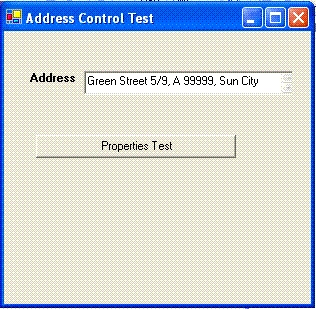
Figure 1.
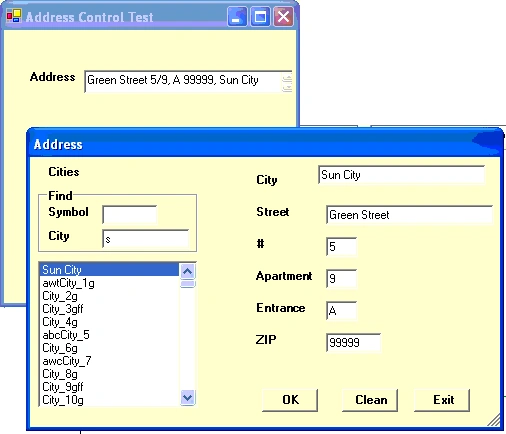
Figure 2.
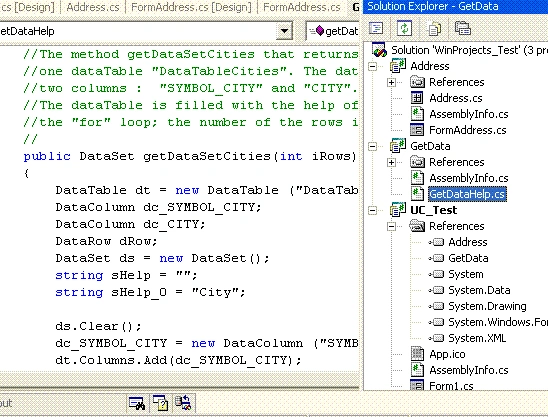
First of all we should create a solution for building our control. The solution consists of three projects: the first project ( Windows Control Library) named "Address" has Output Type of "Class Library"; the second one named "UC_Test" has Output Type of "Windows Application"; the third project named "GetData" has Output Type of "Class Library". The "Address" project includes such items as "User Control" named "Address" and "Windows Form" named "FormAddress". In fact this project will be our "independent unit" (dll). The project "UC_Test" includes only one Windows Form named "Form1". With its help we just test our "Address" control. The "GetData" project includes only one class (so far! In the next projects we can add some methods to this class and add some more classes) named "GetDataHelp". This project is "independent unit" (dll) and helps us to get needed data.The solution is shown on fig.3.
using System.Data;
using System.Data.SqlClient;
to the class itself :
//The method getDataSetCities that returns dataSet with
//one dataTable "DataTableCities". The dataTable consists of
//two columns : "SYMBOL_CITY" and "CITY".
//The dataTable is filled with the help of
//the "for" loop; the number of the rows is input parameter.
public DataSet getDataSetCities(int iRows)
{
DataTable dt = new DataTable ("DataTableCities");
DataColumn dc_SYMBOL_CITY;
DataColumn dc_CITY;
DataRow dRow;
DataSet ds = new DataSet();
manu narangPosted Jun 13, 2006, 8:12 AM
I like your article. Manu