
In Part 1 of this article (Part 1; Part 2; Part 3) we have defined our task and have prepared a basis for creation and testing the Address control. In this part we are going to build the control.
We have decided that our control should includes Label and textBox controls. In order to "force" all controls to behave as a whole unit at change of the sizes follow the following order at designing.
Inside of the Address project from "Windows Forms" tab drag and drop on the Address[Design] user control a panel named panelAddress (fig.4). Drag and drop on the
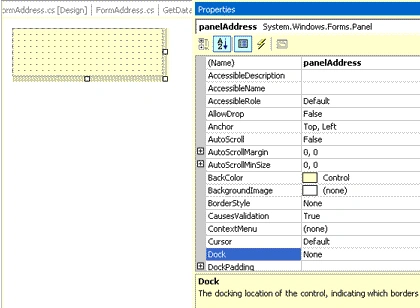
Figure 4.
panelAddress a label named labelAddress; set the Text property to "Address" and the Dock property to "Left" (fig.5). Drag and drop on the panelAddress a panel named
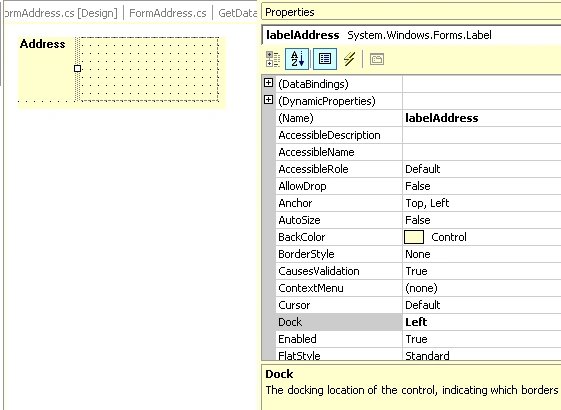
Figure 5.
panelTextBox; set the Dock property to "Left" (fig 6). Drag and drop on the
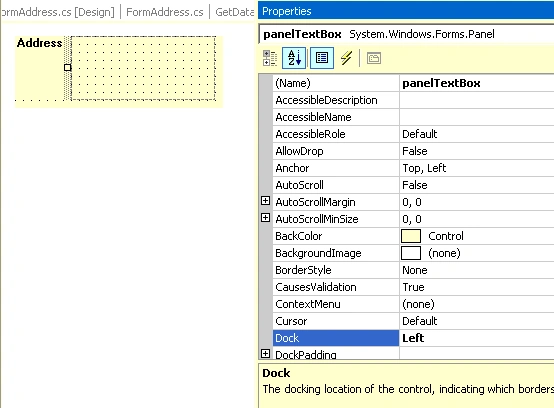
panelTextBox a textbox named textBoxAddress; set the Dock property to "Fill"(fig. 7).
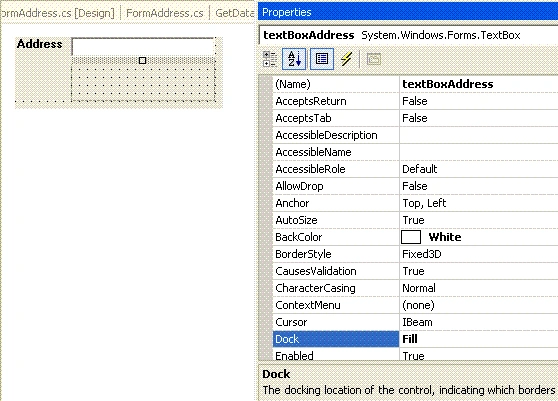
OK ! We have finished our design (see fig. 8).
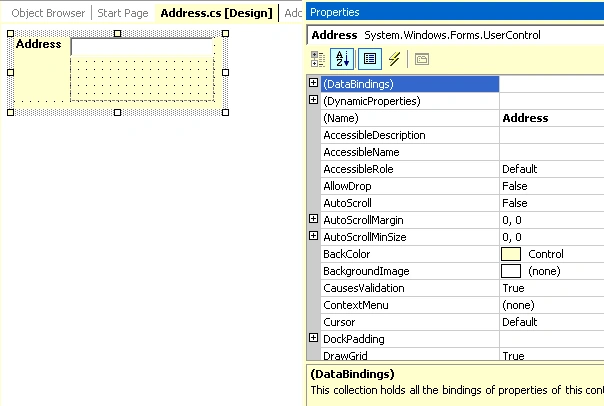
Table 1.
| Control | Name | Text |
| label | labelCityList | Cities |
| label | labelSymbolFind | Symbol |
| label | labelCityFind | City |
| label | labelCity | City |
| label | labelStreet | Street |
| label | labelBuilding | # |
| label | labelApartment | Apartment |
| label | labelEntrance | Entrance |
| label | labelZIP | ZIP |
| groupBox | groupBox1 | Find |
| textBox | textBoxCitySymbolFind | |
| textBox | textBoxCityFind | |
| textBox | textBoxCity | |
| textBox | textBoxStreet | |
| textBox | textBoxBuilding | |
| textBox | textBoxApartment | |
| textBox | textBoxEntrance | |
| textBox | textBoxZIP | |
| listBox | listBoxCity | |
| button | buttonOK | OK |
| button | buttonClean | Clean |
| button | buttonExit | Exit |
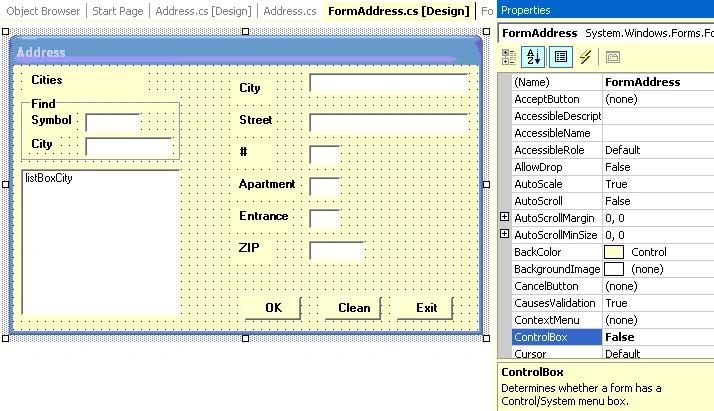
Figure 9.
The Address control and FormAddress code should includes properties ( such as Street, Apartment, City, DataTable of cities and so on) and methods , that allow to carry out our task.
Namespaces used in the Address control and FormAddress :
using System;
using System.Collections;
using System.ComponentModel;
using System.Drawing;
using System.Data;
using System.Windows.Forms;
Add to the Address.cs code page the following code:
#region "forClass"
//value of the width textBoxAddress property; default value = 100
int textBox_Width = 100;
//value of the textBoxAddress height property; default value = 26
int textBox_Height = 26;
//value of the labelAddress width property; default value = 40
int label_Width = 40;
//value of the textBoxAddress Multiline property; default value = "true"
bool textBox_Multiline = true;
string Symbol_City = "000000";
string Street = "
string Building = "5";
string Apartment = "9";
string Entrance = "A";
string ZIP = "99999";
string ADDRESS = "ADDRESS";
string City = "Sun City";
DataTable dt_Cities = new DataTable ();
string Value_Member ="";
string Display_Member = "";
//Length of the Symbol_City string that has to be used for "find" process
int Length_Symbol = 6;
#endregion
//-----------------------------------------------------------------
//The method that allows to adjust the control sizes
//according to the sizes of the textBox
private void init()
{
panelTextBox.Width = textBox_Width ;
panelAddress.Width = textBox_Width + label_Width + 8;
panelAddress.Height = C_TextBox_Height ;
this.Height = C_TextBox_Height + 2;
this.Width = panelAddress.Width + 2;
}
//----------------------------------------------------------------
//The method showAddress that shows the FormAddress form
//as a modal dialog if the adr_OK property of the FormAddress
//equals "true"
private void showAddress()
{
FormAddress fAddress = new FormAddress ();
fillProperties_Form(fAddress);
fAddress.ShowDialog ();
if (fAddress.adr_OK )
{
getFromProperties_Form (fAddress);
}
}
//----------------------------------------------------------------
//The method fillProperties_Form that sets
//the FormAddress properties
private void fillProperties_Form(FormAddress f)
{
ADDRESS = getAddress();
f.adr_APARTMENT = Apartment ;
f.adr_BUILDING = Building ;
f.adr_ENTRANCE = Entrance ;
f.adr_ZIP = ZIP;
f.adr_SYMBOL_CITY = Symbol_City ;
f.adr_STREET = Street;
f.adr_CITY = City;
f.adr_Address = ADDRESS;
f.adr_Display_Member = Display_Member ;
f.adr_Value_Member = Value_Member ;
f.adr_DataTableCities = dt_Cities ;
f.adr_lengthCode = Length_Symbol ;
}
//----------------------------------------------------------------
//The method getFromProperties_Form that sets
//the properties of the control
private void getFromProperties_Form(FormAddress f)
{
this.C_APARTMENT = f.adr_APARTMENT ;
this.C_BUILDING = f.adr_BUILDING ;
this.C_ENTRANCE = f.adr_ENTRANCE;
this.C_ZIP = f.adr_ZIP;
this.C_SYMBOL_CITY = f.adr_SYMBOL_CITY;
this.C_STREET = f.adr_STREET;
this.C_CITY = f.adr_CITY;
this.C_Address = f.adr_Address;
}
//-----------------------------------------------
//The method that returns "Address" as one string
private string getAddress()
{
string sResult="";
sResult= Street + " " + Building + "/" + Apartment +
", " + Entrance + " " + ZIP + ", " + City;
return (sResult);
}
//----------------------------------------------
//The method textBoxAddress_KeyUp that executes the showAddress
// method on the KeyUp event of the textBoxAddress
private void textBoxAddress_KeyUp
(object sender, System.Windows.Forms.KeyEventArgs e)
{
showAddress ();
}
//The method labelAddress_DoubleClick that executes
//the showAddress method on the DoubleClick event of the labelAddress
private void labelAddress_DoubleClick(object sender, System.EventArgs e)
{
showAddress ();
}
//One of opportunities to apply the init() method is
//to "call" it from the Address_Resize event
private void Address_Resize(object sender, System.EventArgs e)
{
// init();
}
//---------------------------------------------
#region "properties"
//The C_TextBox_Width property that allows to set:
//the panelTextBox width property,
//the panelAddress width property,
//the Address control width property
public int C_TextBox_Width
{
get
{
return textBox_Width;
}
set
{
textBox_Width =value ;
panelTextBox.Width =textBox_Width ;
panelAddress.Width =textBox_Width + label_Width + 8;
this.Width = panelAddress.Width + 2;
}
}
//-------------------------------------------------------------
public int C_TextBox_Height
{
get
{
return textBox_Height;
}
set
{
textBox_Height = value ;
panelAddress.Height = C_TextBox_Height ;
this.Height = C_TextBox_Height + 2;
}
}
//----------------------------------------------------
public bool C_TextBox_Multiline
{
get
{
return textBox_Multiline;
}
set
{
textBox_Multiline = value;
textBoxAddress.Multiline = textBox_Multiline;
}
}
//--------------------------------------------------
public string C_CITY
{
get
{
return City;
}
set
{
City = value;
}
}
//---------------------------------------------------------
public string C_SYMBOL_CITY
{
get
{
return Symbol_City;
}
set
{
Symbol_City = value;
}
}
//-------------------------------------------------
public string C_STREET
{
get
{
return Street;
}
set
{
Street = value;
}
}
//-------------------------------------------------
public string C_BUILDING
{
get
{
return Building;
}
set
{
Building = value;
}
}
Join the conversation! Your thoughts help the community grow.