

Introduction
In the world of Artificial Intelligence, Large Language Models (LLMs) are incredibly fluent. They can write poetry, code, and emails with perfect grammar. However, in enterprise sectors like banking, fluency is not enough. An answer can sound professional but be factually wrong. This is known as a "hallucination."
Domain Correctness means ensuring that the AI’s answer is not just well-written, but also strictly accurate according to specific business rules, laws, or policies.
Why is this important? In banking, a wrong answer about interest rates or loan eligibility can lead to financial loss, legal penalties, and loss of customer trust. We cannot rely on the model's internal knowledge because it is static and often outdated. Instead, we must build systems that retrieve real-time data and validate answers against it.
This article explores how to build such a system using LangGraph, a framework for building stateful multi-agent applications. We will use a Bank Policy Assistant as our real-time use case.
Real-Time Banking Use Case
Scenario: Imagine "GlobalTrust Bank." The bank has thousands of PDF documents containing policies for Home Loans, Personal Loans, KYC (Know Your Customer) norms, and Fraud Detection. These policies change frequently.
The Business Problem: A branch manager receives a query from a customer: "I am a salaried employee with a credit score of 720. Can I get a home loan with a 5% down payment?"
If the manager asks a standard chatbot, it might say "Yes," based on general internet knowledge. However, GlobalTrust Bank’s current policy might require a 10% down payment for scores below 750. A generic AI would fail here.
The AI Solution: We build an Enterprise Multi-Agent System that:
Retrieves the exact latest policy document regarding home loans and credit scores.
Analyzes the customer’s specific details against that policy.
Validates the answer to ensure no rules were broken.
Remembers the context if the manager asks follow-up questions.
Table of Contents
Introduction
Real-Time Banking Use Case
Architecture Overview
The Agents: Roles and Responsibilities
RAG Implementation: From PDFs to Vectors
LangGraph Implementation: Orchestrating the Workflow
Memory and State: Keeping Track of Context
Complete Code Implementation
End-to-End Execution Walkthrough
Enterprise Considerations
Testing Strategy
Common Problems and Solutions
Future Enhancements
Conclusion
Technology Tags
Architecture
To solve this, we use an Enterprise Multi-Agent LangGraph + RAG Architecture.
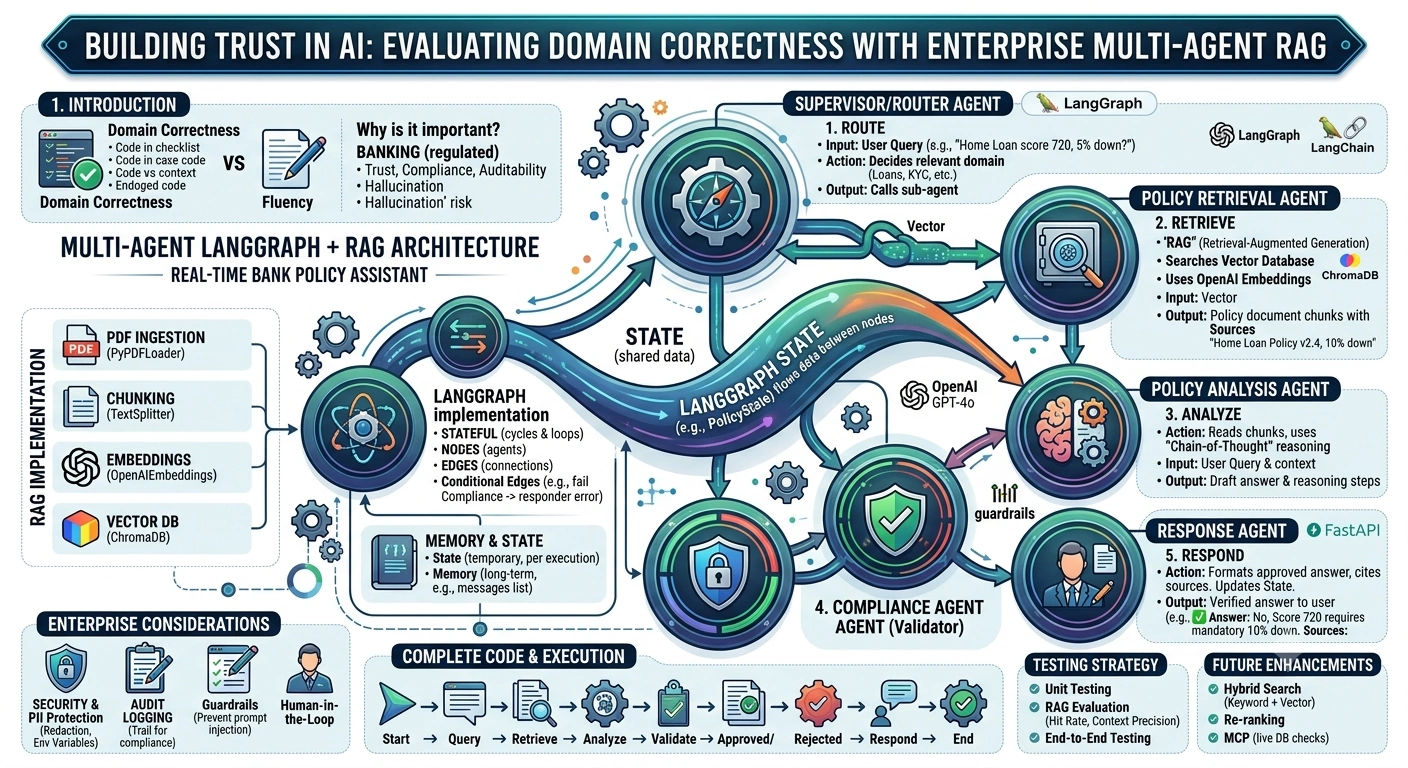
Key Components
RAG (Retrieval-Augmented Generation): Instead of relying on the LLM’s memory, we fetch relevant data from a Vector Database.
LangGraph: A library that allows us to build cycles and loops in our AI workflow. It manages the State (data passed between steps) and Memory (conversation history).
Multi-Agent System: Instead of one big prompt, we split tasks into specialized agents (Router, Retriever, Analyst, Compliance).
Data Flow
User Query enters the system.
Router Agent decides which policy domain (Loan, KYC, etc.) is relevant.
Retrieval Agent fetches relevant document chunks from the Vector DB.
Analysis Agent reads the chunks and drafts an answer using Chain-of-Thought.
Compliance Agent checks the draft against strict rules.
Response Agent formats the final answer and updates the State.
Agents: Roles and Responsibilities
Why multiple agents? A single agent often gets confused when asked to do too many things (retrieve, reason, check compliance, format). Specialization improves accuracy.
Supervisor/Router Agent
Role: Looks at the user query and decides which "tool" or "sub-agent" to call.
Example: If the query is about "credit cards," it routes to the Credit Card Policy Agent.
Policy Retrieval Agent
Role: Converts the query into a vector and searches the Vector Database for relevant policy text.
Output: A list of document chunks and their sources.
Policy Analysis Agent
Role: Reads the retrieved chunks and the user query. It uses Chain-of-Thought to logically deduce the answer.
Output: A draft answer with reasoning steps.
Compliance Agent (The Validator)
Role: Acts as a "Critic." It checks if the draft answer contradicts any retrieved facts or violates safety guidelines.
Output: "Approved" or "Rejected" with feedback.
Response Agent
Role: Formats the approved answer into a professional tone and cites sources.
RAG Implementation
RAG is the foundation of domain correctness.
Document Ingestion: We load PDF policy documents using
PyPDFLoader.Chunking: We split long documents into smaller pieces (e.g., 500 words) so the LLM can process them. We use
RecursiveCharacterTextSplitterto keep sentences intact.Embeddings: We convert each chunk into a numerical vector using
OpenAIEmbeddings. This captures the semantic meaning.Vector Database: We store these vectors in
ChromaDB. This allows us to search by meaning, not just keywords.Retrieval: When a user asks a question, we embed the question and find the closest matching chunks in the database.
Context Generation: These chunks are added to the LLM’s prompt as "Context."
LangGraph Implementation
LangGraph is different from standard chains because it is stateful and supports cycles.
State: A shared data structure (like a Python dictionary or Pydantic model) that all agents read from and write to.
Nodes: The functions where agents perform their work (e.g.,
retrieve_policies).Edges: The connections between nodes. We can have Conditional Edges (e.g., if Compliance fails, go back to Analysis).
Graph: The complete workflow connecting Start -> Nodes -> End.
Memory and State
It is crucial to distinguish between Memory and State.
State: The temporary data for the current workflow execution. It includes the current query, retrieved documents, and intermediate reasoning steps. It is passed from node to node.
Memory: The long-term or session-based history. It stores previous questions and answers so the AI can understand context (e.g., "What about that loan?" refers to the previous turn).
In our implementation, we will use a StateGraph where the messages field acts as short-term memory, and the context fields act as the working state.
Complete Code Implementation
Below is a complete, runnable Python implementation.
Prerequisites
pip install langgraph langchain-openai langchain-chroma langchain-community pypdf fastapi uvicorn pydantic
main.py
import os
from typing import Annotated, List, Optional, Dict
from pydantic import BaseModel, Field
import operator

from langgraph.graph import StateGraph, START, END
from langchain_openai import ChatOpenAI, OpenAIEmbeddings
from langchain_chroma import Chroma
from langchain_community.document_loaders import PyPDFLoader
from langchain_text_splitters import RecursiveCharacterTextSplitter
from langchain_core.messages import HumanMessage, AIMessage

# --- Configuration ---
os.environ["OPENAI_API_KEY"] = "your-api-key-here" # Replace with your key

# --- 1. Define the State ---
class BankPolicyState(BaseModel):
    """
    The central state object passed between all agents.
    """
    # Input
    messages: Annotated[List[dict], operator.add] = Field(default_factory=list)
    user_query: str = ""

    # RAG Context
    retrieved_chunks: List[Dict[str, str]] = Field(default_factory=list)

    # Reasoning & Output
    reasoning_steps: List[str] = Field(default_factory=list)
    draft_answer: Optional[str] = None
    final_answer: Optional[str] = None

    # Compliance
    is_compliant: bool = True
    compliance_feedback: Optional[str] = None

# --- 2. RAG Setup (Ingestion & Retrieval) ---
def setup_vector_store():
    """
    Ingests sample policy documents and creates a vector store.
    In production, this would run separately as a data pipeline.
    """
    # Create a dummy policy file for demonstration
    with open("home_loan_policy.txt", "w") as f:
        f.write("""
        GlobalTrust Bank Home Loan Policy v2.4:
        1. Minimum Credit Score: 750 for interest rate of 8.5%.
        2. Credit Score 700-749: Interest rate of 9.5% with 10% down payment mandatory.
        3. Credit Score below 700: Loan application rejected.
        4. Maximum Loan Tenure: 20 years.
        """)

    loader = PyPDFLoader("home_loan_policy.txt") # Note: PyPDFLoader expects PDF, using TextLoader logic for simplicity in demo
    # For this demo, let's use a simple text split since we created a txt file
    from langchain_community.document_loaders import TextLoader
    loader = TextLoader("home_loan_policy.txt")
    docs = loader.load()

    splitter = RecursiveCharacterTextSplitter(chunk_size=500, chunk_overlap=50)
    chunks = splitter.split_documents(docs)

    embeddings = OpenAIEmbeddings(model="text-embedding-ada-002")
    vector_store = Chroma.from_documents(chunks, embeddings, persist_directory="./bank_db")
    return vector_store

# Initialize Vector Store
try:
    vector_store = setup_vector_store()
except Exception as e:
    print(f"Note: Using existing DB or skipping ingestion: {e}")
    embeddings = OpenAIEmbeddings(model="text-embedding-ada-002")
    vector_store = Chroma(persist_directory="./bank_db", embedding_function=embeddings)

# --- 3. Define Agents (Nodes) ---

llm = ChatOpenAI(model="gpt-4o-mini", temperature=0)

def retrieval_agent(state: BankPolicyState):
    """Retrieves relevant policy documents."""
    print("🔍 [Retrieval Agent] Searching policies...")
    docs = vector_store.similarity_search(state.user_query, k=2)

    chunks = [{"content": doc.page_content, "source": "Home Loan Policy"} for doc in docs]
    state.retrieved_chunks = chunks
    return state

def analysis_agent(state: BankPolicyState):
    """Analyzes the query against retrieved policies."""
    print("🧠 [Analysis Agent] Drafting answer...")

    context = "\n".join([c['content'] for c in state.retrieved_chunks])

    prompt = f"""
    You are a Senior Bank Analyst.
    Context: {context}
    User Query: {state.user_query}

    Task:
    1. Think step-by-step.
    2. Determine if the user qualifies based ONLY on the context.
    3. Draft a clear answer.

    Output Format:
    Reasoning: [Your steps]
    Draft Answer: [Your answer]
    """

    response = llm.invoke(prompt)
    content = response.content

    # Simple parsing
    if "Draft Answer:" in content:
        parts = content.split("Draft Answer:")
        state.reasoning_steps = [parts[0].replace("Reasoning:", "").strip()]
        state.draft_answer = parts[1].strip()
    else:
        state.draft_answer = content

    return state

def compliance_agent(state: BankPolicyState):
    """Validates the answer for correctness and safety."""
    print("🛡️ [Compliance Agent] Validating...")

    context = "\n".join([c['content'] for c in state.retrieved_chunks])

    prompt = f"""
    You are a Compliance Officer.
    Check if the 'Draft Answer' is strictly supported by the 'Context'.

    Context: {context}
    Draft Answer: {state.draft_answer}

    If correct, reply: APPROVED
    If incorrect or hallucinated, reply: REJECTED and explain why.
    """

    response = llm.invoke(prompt)

    if "REJECTED" in response.content:
        state.is_compliant = False
        state.compliance_feedback = response.content
        state.final_answer = "⚠️ Compliance Error: The answer could not be verified against policy."
    else:
        state.is_compliant = True
        state.final_answer = state.draft_answer

    return state

def response_agent(state: BankPolicyState):
    """Formats the final response."""
    print("✍️ [Response Agent] Formatting output...")

    if state.is_compliant:
        final_msg = f"✅ **Answer:** {state.final_answer}\n\n📚 **Sources:** Home Loan Policy"
    else:
        final_msg = state.final_answer

    state.messages.append({"role": "assistant", "content": final_msg})
    return state

# --- 4. Build the Graph ---

workflow = StateGraph(BankPolicyState)

workflow.add_node("retriever", retrieval_agent)
workflow.add_node("analyst", analysis_agent)
workflow.add_node("compliance", compliance_agent)
workflow.add_node("responder", response_agent)

# Define Flow
workflow.add_edge(START, "retriever")
workflow.add_edge("retriever", "analyst")
workflow.add_edge("analyst", "compliance")

# Conditional Edge: If compliance fails, we could loop back, but for now we go to responder to show error
workflow.add_edge("compliance", "responder")
workflow.add_edge("responder", END)

app = workflow.compile()

# --- 5. API Layer (FastAPI) ---
from fastapi import FastAPI

api_app = FastAPI(title="Bank Policy AI")

class QueryRequest(BaseModel):
    query: str

@api_app.post("/ask")
async def ask_policy(request: QueryRequest):
    initial_state = BankPolicyState(
        user_query=request.query,
        messages=[{"role": "user", "content": request.query}]
    )

    result = await app.ainvoke(initial_state)

    return {
        "response": result.messages[-1]['content'],
        "is_compliant": result.is_compliant,
        "reasoning": result.reasoning_steps
    }

# To run: uvicorn main:api_app --reload
End-to-End Execution Walkthrough
Let’s trace a user query: "Can I get a loan with a 720 score?"
Start:
BankPolicyStateis initialized with the query.Retriever Node:
Embeds "Can I get a loan with a 720 score?"
Finds chunk: "Credit Score 700-749: Interest rate of 9.5% with 10% down payment mandatory."
Updates
state.retrieved_chunks.
Analyst Node:
Reads the chunk.
Reasons: "Score 720 is in 700-749 range. Policy says 10% down payment is mandatory."
Drafts Answer: "Yes, but you need a 10% down payment."
Updates
state.draft_answer.
Compliance Node:
Checks draft against chunk.
Verifies that "10% down payment" is indeed in the text.
Returns "APPROVED".
Updates
state.is_compliant = True.
Responder Node:
Formats the final message.
Adds to
state.messages.
End: Returns the verified answer to the user.
Enterprise Considerations
Security: Never expose API keys in code. Use environment variables.
PII Protection: Implement a pre-processing step to redact names and account numbers before sending queries to the LLM.
Audit Logging: Store every
BankPolicyStatein a database. This provides a trail of why an answer was given.Guardrails: Use libraries like
NeMo Guardrailsto prevent prompt injection attacks.Human-in-the-Loop: If
is_compliantis false, route the query to a human officer instead of showing an error.
Testing
Unit Testing: Test each agent function individually with mock data.
RAG Evaluation: Use metrics like "Hit Rate" (did the right document appear in top K?) and "Context Precision."
End-to-End Testing: Create a dataset of 50 common banking questions and verify that the system answers them correctly without hallucinations.
Common Problems and Solutions
Wrong Document Retrieval: Improve chunking strategy or use Hybrid Search (Keyword + Vector).
Hallucinations: Strengthen the Compliance Agent’s prompt to be more strict.
Lost State: Ensure
Annotated[..., operator.add]is used correctly in LangGraph to preserve lists likemessages.Slow Responses: Cache frequent queries using Redis.
Future Enhancements
Hybrid Search: Combine keyword search (BM25) with vector search for better accuracy.
Re-ranking: Use a cross-encoder model to re-rank retrieved documents before sending them to the LLM.
MCP (Model Context Protocol): Connect to live bank databases for real-time balance checks, not just static policies.
Conclusion
Evaluating LLM responses for domain correctness requires moving beyond simple prompts. By using an Enterprise Multi-Agent LangGraph architecture, we can separate concerns: retrieval, reasoning, and validation. This ensures that every answer provided by the Bank Policy Assistant is not just fluent, but factually grounded, compliant, and auditable. This approach is essential for building trust in AI within regulated industries.
Join the conversation! Your thoughts help the community grow.