

Introduction
The code here is written under the common creativity license you could download the project from the above. It has been enspired from Rodolfo Finochietti POP3 Project I have redesigned it and implement it and added to it SSL Support and optimized the design so that you could easily add other email clients below you will find a screen shot from the created demo application
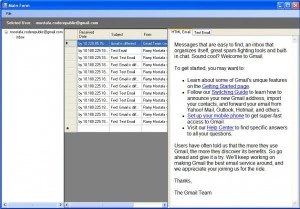
This post will go with you step by step towards building your own Mail Client using C#, First to start I'll start you need to first know the protocol you will be retrieving emails with I will discuss here the POP3 Protocol. The POP3 Protocols an application-layer Internet standard protocol along with IMAP4 they are the two most prevalent Internet standard protocols for e-mail retrieval. To understand how the protocol works lets examine a (Server - Client) communication example. First the server is waiting for connection from any client
S: <wait for connection on TCP port 110>
The Client opens a TCP Connection with the server
C: <open connection>
The Server then response with the +OK Ready State
S: +OK POP3 server ready <[email protected]>
Then we authenticate using the username and password
C: USER username_here
S: +OK send PASS
C: PASS password
S: +OK Welcome.
C: LIST
S: +OK 2 messages (320 octets)
S: 1 120
S: 2 200
S: .
C: RETR 1
S: +OK 120 octets
S: <the POP3 server sends message 1>
S: .
C: DELE 1
S: +OK message 1 deleted
C: RETR 2
S: +OK 200 octets
S: <the POP3 server sends message 2>
The QUIT command will remove retrieved messages from the server and sign off.
C: QUIT
S: +OK dewey POP3 server signing off (maildrop empty)
C: <close connection>
S: <wait for next connection>
Designing the Mail Client
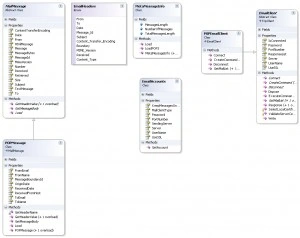
Now that we know how the POP3 protocol work we could start building our Mail Client. But before that let's discuss the structure of an e-mail message.
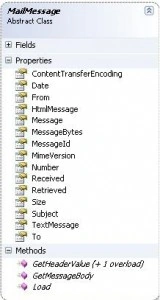 |
A mail message consists of
|
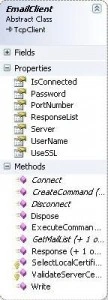


Implementing the Email Client
Connect the Client To The Server using the given username, password and server it takes as parameters the Mail Server Domain Reference, The Mail Account User Name and Password.
public override void Connect(string server, string UserName, string Password)
{
try
{
if (_isConnected)
{
return;
}
if (!UseSSL)
{
Connect(server, PortNumber);
string response = Response();
if (!response.Trim().StartsWith("+OK"))
{
//TODO: Raise Error Event
}
else
{
ExecuteCommand("USER", UserName);
ExecuteCommand("PASS", Password);
}
_isConnected = true;
}
else
{
byte[] bts;
int res;
string responseString = "";
ResponseList.Clear();
Connect(server, PortNumber);
inStream = new SslStream(this.GetStream(), false,
new RemoteCertificateValidationCallback(ValidateServerCertificate),
new LocalCertificateSelectionCallback(SelectLocalCertificate));
inStream.AuthenticateAsClient(server);
bts = new byte[1024];
res = inStream.Read(bts, 0, bts.Length);
ResponseList.Add(Encoding.ASCII.GetString(bts, 0, res));
responseString = ExecuteCommand("USER", UserName);
ResponseList.Add(responseString);
responseString = ExecuteCommand("PASS", Password);
ResponseList.Add(responseString);
if (!responseString.Trim().StartsWith("+OK"))
{
//TODO: Raise Error Event
}
else
_isConnected = true;
}
}
catch (Exception ex)
{
//TODO: Raise Error Event
}
}
The GetMailList Method first Execute the Command List then it Retrieves a MetaMessageInfo from the Response String here the response string is parsed to retrieve Meta Information of the emails on the server like Number of Messages, and Messages
List result = new List();
string responseString = ExecuteCommand("LIST");
MetaMessageInfo info = new MetaMessageInfo(MailClientType.POP3, responseString);
Here we make a loop to retrieve messages until we retrieve all messages using the number of messages in the POPMessage constructor it extracts all the message info from the string to fill its attributes
for (int i = 1; i <= info.NumberOfMessages; i++)
{
responseString = ExecuteCommand("RETR", i.ToString(), true);
POPMessage message = new POPMessage(responseString);
message.Number = i.ToString();
message.Retrieved = true;
if (message.MessageBoundaryId != null)
result.Add(message);
}
The Method that prase the response string to retrieve info from the Email is the LoadMethod
public override void Load(string messageString)
{
string message = messageString.Replace("+OK message follows", "");
Message = message;
string messageIdPure = MessageBoundaryId;
//the start of the message body starts from MessageBoundaryId ex --- ID --- Here I extract the Message body from the complete
//response string
int bodyIndex = message.IndexOf("--" + messageIdPure, StringComparison.CurrentCultureIgnoreCase);
int messageLength = message.Length - bodyIndex;
if (bodyIndex < 0)
return;
string bodyString = message.Substring(bodyIndex, messageLength);
string[] splitMessageOptions = new string[1];
splitMessageOptions[0] = "--" + messageIdPure;
//Here I Split with the message boundary Id to seperate the Text and HTML Messages
string[] messages = bodyString.Split(splitMessageOptions, StringSplitOptions.RemoveEmptyEntries);
//The Get Message Body Method retrieves the HTML, and Text Messages from the messages array
GetMessageBody(messages);
}
to extract a header property I use
_from = GetHeaderValue(EmailHeaders.From);
Where the EmailHeaders.From is an enumerator with the headers and the GetHeaderValue Method extracts the required header value from the complete message string.IMailPlusLibrary Usage
to use the library it's simple all you need to to do is to do the below code
POPEmailClient popClient = new POPEmailClient();
popClient.UseSSL = account.UseSSL;
popClient.PortNumber = Convert.ToInt32(account.PortNumber);
popClient.Connect(account.Server, account.UserName, account.Password);
account.CurrentAccountMails = popClient.GetMailList();
image mappingPosted Oct 26, 2017, 1:59 AM
My email id is [email protected] please provide a solution of taking inbox mail with attachments sir
image mappingPosted Oct 26, 2017, 1:57 AM
Sir can you please provide me a code to get inbox mail with attachments if possible thanks in advance
image mappingPosted Oct 26, 2017, 1:55 AM
Hi sir i get inbox messages in my window app by your c# code thanks
MB SPosted Jun 14, 2013, 10:04 AM
thanks ... what about SMTP? is it possible for smtp mail server?
David FlynnPosted Dec 21, 2010, 2:26 PM
I had an issue with the execute command during a retrieve. I would not retrieve a message until I put a sleep into the ExecuteCommand function. Write(request); if (isMessage) { System.Threading.Thread.Sleep(500); } responseString = Response(isMessage); Also, the text body control was not working on the main form. The body of the message is returned, but something might be wrong with how the control is rendered. Minor issues, again, thanks so much for the great code!
Shashi Kant YadaveditedPosted Aug 31, 2010, 5:35 AMEdited Aug 31, 2010, 5:39 AM
Yes I already have done this project with windows based project,i have provide to select the pop server like gmail,hotmail and etc.,we can fetch mails,delete mail,and retreive top mails and also read the unread mails, but sir i have one problem that is how am i access the mail folderwise like Inbox,SentItem,DeletedItems,Draft etc. seperately there is no any command in pop3 for that. if we execute "STAT" command it retreive all mails like sended and received both. Please help me its urgent and can be save my all mails on my local harddisk and for the nexr time login it will read all mails from localhardisk only unread mails get from the pop server. if there is any process then please help me.......... my mailis = [email protected]
Gyana RanjanPosted Sep 2, 2009, 4:12 AM
Hello Sir, I have connecting to the gmail pop like [email protected] port no-995 gmail [email protected] password=password But stilll unable to fetch mail from my gmail mail box
anandPosted May 14, 2009, 11:38 PM
Dear Mr.Ramy, thanks for the superb code, coming to the point i found only one bottleneck in this code if the message is not a multipart message then the boundary you are trying to find and extract message based on that will not work, it even not get displayed in the list, how to over come this here is a sample mail header To: [email protected] Content-Transfer-Encoding: 7bit Subject: test Date: Thu, 14 May 2009 05:10:26 -0400 X-MB-Message-Source: WebUI X-AOL-IP: 64.12.78.139 X-MB-Message-Type: User MIME-Version: 1.0 From: [email protected] Content-Type: text/plain; charset="us-ascii" X-Mailer: AOL Webmail 42949-STANDARD Received: from 59.96.134.162 by CEN1-L08.sis.aol.com (10.64.224.8) with HTTP (WebMailUI); Thu, 14 May 2009 05:10:26 -0400 Message-Id: <[email protected]> X-Spam-Flag:NO test ---------------------------------------- just thought you might want to know this. Any ideas best regards