

Introduction
Many times, while developing any software, our clients give us data into a bulk format or need a functionality of grid which contains many records. When the user edits multiple records from that grid, it needs to update all the records at a time into a database on the click of Submit button.
Many times, while developing any software, our clients give us data into a bulk format or need a functionality of grid which contains many records. When the user edits multiple records from that grid, it needs to update all the records at a time into a database on the click of Submit button.
In this article, we are going to learn -
- Insert single record using XML into a SQL Table
- Insert multiple records using XML into a SQL Table
- Insert / Update multiple records using XML into a SQL Table at the same time
In this article, I have created a sample XML format. Using nodes() method to shred XML into multiple rows, which propagates parts of XML documents into row sets. Here I am not going to use any stored procedure or any user interface from which user submits the data. I just demonstrated in a simple way using SQL. If you like to modify this code as per your requirement.
Working with the XML Data Type in SQL Server
The XML data type, introduced in SQL Server 2005, is a powerful construct. When used wisely, it can provide useful extensions to SQL Server. Robert Sheldon, in the first part of a series, describes how to create an index a typed XML column in a table, and discusses when you should consider using an XML Datatype
Part 1
Suppose the user is passing data from a function in XML format which contains some employee information having properties like TravelId, TravelCity etc. In below code, I am using temp table #Travel. XML contains a single record. Using SQL code insert this XML data into a temp table.
The XML data type, introduced in SQL Server 2005, is a powerful construct. When used wisely, it can provide useful extensions to SQL Server. Robert Sheldon, in the first part of a series, describes how to create an index a typed XML column in a table, and discusses when you should consider using an XML Datatype
Part 1
Suppose the user is passing data from a function in XML format which contains some employee information having properties like TravelId, TravelCity etc. In below code, I am using temp table #Travel. XML contains a single record. Using SQL code insert this XML data into a temp table.
- DECLARE @EmployeeXML XML;
- SET @EmployeeXML='<?xml version="1.0"?><EmpDetail>
- <TravelId>1</TravelId><TravelCity>Pune</TravelCity>
- </EmpDetail>';
- IF OBJECT_ID('tempdb..#Travel') is not null
- Begin
- Drop Table #Travel
- End
- CREATE TABLE #Travel(TravelId int, TravelCity varchar(100))
- INSERT INTO #Travel([TravelId],[TravelCity])
- SELECT COALESCE([Table].[Column].value('TravelId[1]', 'int'),0) as 'TravelId',
- [Table].[Column].value('TravelCity[1]', 'varchar(100)') as 'TravelCity'
- FROM @EmployeeXML.nodes('/EmpDetail') as [Table]([Column])
- SELECT * FROM #Travel
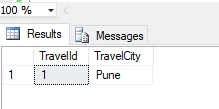
Output when we execute select command as,
Part 2
In below code XML contains two records. Using SQL code insert this XML data into a temp table.
- DECLARE @EmployeeXML XML;
- SET @EmployeeXML='<?xml version="1.0"?>
- <EmpDetails>
- <EmpDetail>
- <TravelId>1</TravelId><TravelCity>Pune</TravelCity>
- </EmpDetail>
- <EmpDetail>
- <TravelId>2</TravelId><TravelCity>Mumbai</TravelCity>
- </EmpDetail>
- </EmpDetails>';
- IF OBJECT_ID('tempdb..#Travel') is not null
- Begin
- Drop Table #Travel
- End
- CREATE TABLE #Travel(TravelId int, TravelCity varchar(100))
- INSERT INTO #Travel([TravelId],[TravelCity])
- SELECT COALESCE([Table].[Column].value('TravelId[1]', 'int'),0) as 'TravelId',
- [Table].[Column].value('TravelCity[1]', 'varchar(100)') as 'TravelCity'
- FROM @EmployeeXML.nodes('/EmpDetails/EmpDetail') as [Table]([Column])
- SELECT * FROM #Travel
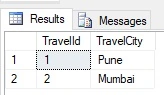
Part 3
Suppose the user is passing data from the function in XML which contains old data as well as some new record. Now user would like to update old data & if the record does not into a table then insert that record.
Suppose the user is passing data from the function in XML which contains old data as well as some new record. Now user would like to update old data & if the record does not into a table then insert that record.
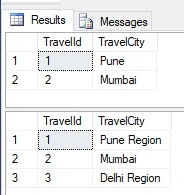
Here I am using @EmployeeXML_Old XML to insert data which contains some records and @EmployeeXML contains updated data as well as new data, I am using match condition to update the data as well as insert the data.
- IF OBJECT_ID('tempdb..#Travel') is not null
- Begin
- Drop Table #Travel
- End
- CREATE TABLE #Travel(TravelId int, TravelCity varchar(100))
- DECLARE @EmployeeXML_Old XML;
- SET @EmployeeXML_Old='<?xml version="1.0"?>
- <EmpDetails>
- <EmpDetail>
- <TravelId>1</TravelId><TravelCity>Pune</TravelCity>
- </EmpDetail>
- <EmpDetail>
- <TravelId>2</TravelId><TravelCity>Mumbai</TravelCity>
- </EmpDetail>
- </EmpDetails>';
- INSERT INTO #Travel([TravelId],[TravelCity])
- SELECT COALESCE([Table].[Column].value('TravelId[1]', 'int'),0) as 'TravelId',
- [Table].[Column].value('TravelCity[1]', 'varchar(100)') as 'TravelCity'
- FROM @EmployeeXML_Old.nodes('/EmpDetails/EmpDetail') as [Table]([Column])
- SELECT * FROM #Travel
- DECLARE @EmployeeXML XML;
- SET @EmployeeXML='<?xml version="1.0"?>
- <EmpDetails>
- <EmpDetail>
- <TravelId>1</TravelId><TravelCity>Pune Region</TravelCity>
- </EmpDetail>
- <EmpDetail>
- <TravelId>2</TravelId><TravelCity>Mumbai</TravelCity>
- </EmpDetail>
- <EmpDetail>
- <TravelId>3</TravelId><TravelCity>Delhi Region</TravelCity>
- </EmpDetail>
- </EmpDetails>';
- MERGE #Travel AS S
- USING (SELECT TravelId = [Table].[Column].value('TravelId[1]', 'int'),
- TravelCity = [Table].[Column].value('TravelCity[1]', 'varchar(100)')
- FROM @EmployeeXML.nodes('/EmpDetails/EmpDetail') AS [Table]([Column])) AS T(TravelId, TravelCity)
- ON T.TravelId = S.TravelId
- WHEN MATCHED THEN
- UPDATE SET S.TravelId = T.TravelId,
- S.TravelCity = T.TravelCity
- WHEN NOT MATCHED THEN
- INSERT (TravelId, TravelCity)
- VALUES (T.TravelId, T.TravelCity);
- SELECT * FROM #Travel
Summary
In this article, we learned Bulk Insert, Update XML data into SQL Table.
In this article, we learned Bulk Insert, Update XML data into SQL Table.
Join the conversation! Your thoughts help the community grow.