

While being very efficient, Entity Framework (EF) & Entity Framework Core (EF Core) do not allow you to natively perform bulk operations, Hopefully, there is an open-source library that solves the problem It is known as EF Core Bulk extensions. This article shows how to use EF Core Bulk Extensions on a .Net project that relies on EF Core.
Problem with EF, EFCore while dealing with huge data
We should not directly insert 100k data into the database by using Entity Framework. It may take a few minutes to perform the entire task. EntityFramework has been criticized when it comes to performance. The efficient way of dealing with such a large amount of data under such conditions, it is common to go back using ADO.Net to accomplish the task. However, if you have used the Entity Framework in your project, the combination of ADO.Net and SQLBulkCopy will break the benefits of the EntityFramework as an ORM (Object Relation Mapping)
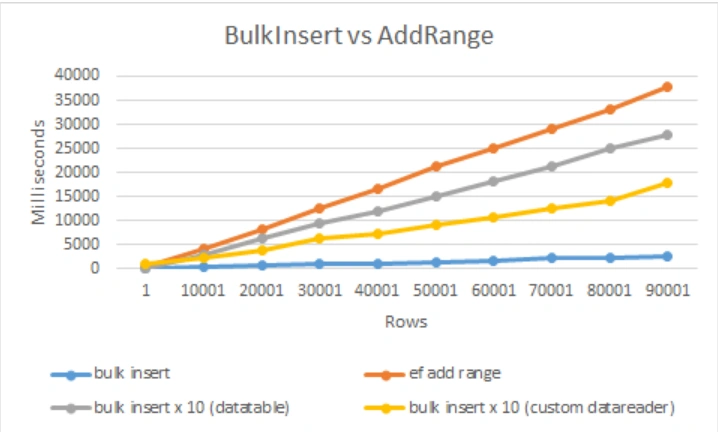
Compare Performance between Bulk Insert vs Add Range
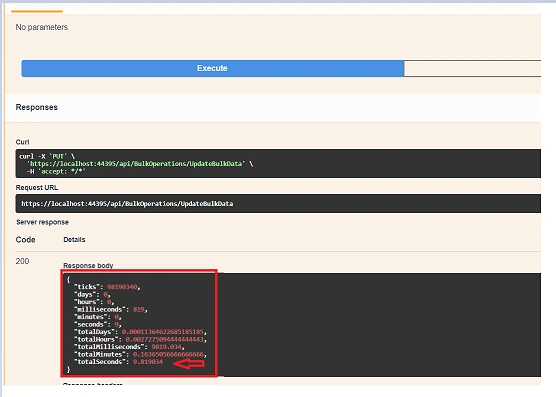
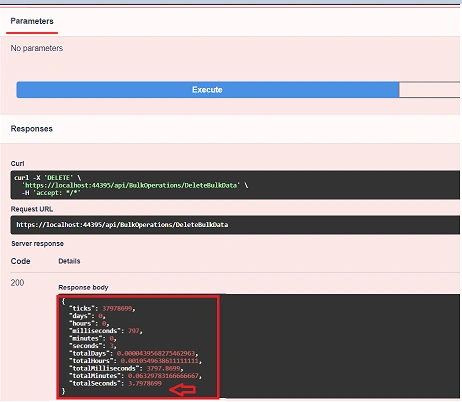
It is said that we can insert large data over 20 times faster than a regular insert. See the comparison below
Source Code - Git Hub Repo
Project Setup
- Create a Web API template with the latest .Net Core installed in your machine
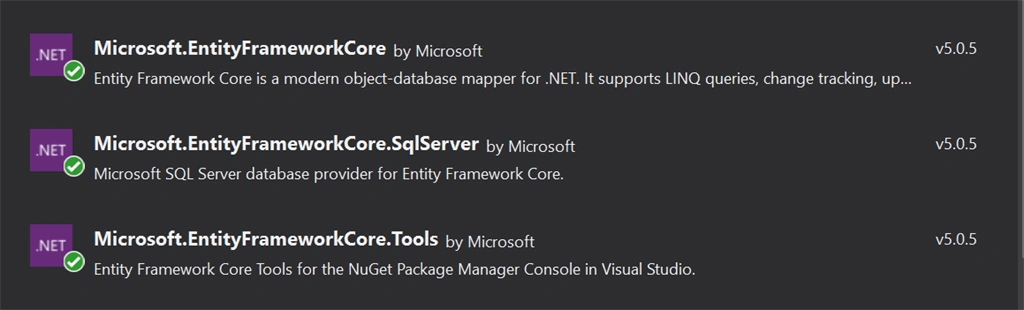
Package to Perform EF Core Bulk Operations

Create a model and DbContext where we can perform the table creation in the SQL Database with the configuration setup.
Employee.cs
- using System;
- using System.Collections.Generic;
- using System.ComponentModel.DataAnnotations;
- using System.Linq;
- using System.Threading.Tasks;
- namespace BulkOperations_EFCore.Models
- {
- public class Employee
- {
- [Key]
- public int Id{ get; set; }
- public string Name { get; set; }
- public string Designation { get; set; }
- public string City { get; set; }
- }
- }
AppDbContext.cs
- using Microsoft.EntityFrameworkCore;
- using System;
- using System.Collections.Generic;
- using System.Linq;
- using System.Threading.Tasks;
- namespace BulkOperations_EFCore.Models
- {
- public class AppDbContext : DbContext
- {
- public AppDbContext(DbContextOptions<AppDbContext> options) : base(options)
- {
- }
- public DbSet<Employee> Employees { get; set; }
- }
- }

Set up the connection string in the appsettings.json file
appsettings.json
- {
- "Logging": {
- "LogLevel": {
- "Default": "Information",
- "Microsoft": "Warning",
- "Microsoft.Hosting.Lifetime": "Information"
- }
- },
- "AllowedHosts": "*",
- "ConnectionStrings": {
- "myconn": "server=*Your Server Name*; database=bulkops;Trusted_Connection=True;"
- }
- }
- using BulkOperations_EFCore.BusinessLogic;
- using BulkOperations_EFCore.Models;
- using Microsoft.AspNetCore.Builder;
- using Microsoft.AspNetCore.Hosting;
- using Microsoft.AspNetCore.HttpsPolicy;
- using Microsoft.AspNetCore.Mvc;
- using Microsoft.EntityFrameworkCore;
- using Microsoft.Extensions.Configuration;
- using Microsoft.Extensions.DependencyInjection;
- using Microsoft.Extensions.Hosting;
- using Microsoft.Extensions.Logging;
- using Microsoft.OpenApi.Models;
- using System;
- using System.Collections.Generic;
- using System.Linq;
- using System.Threading.Tasks;
- namespace BulkOperations_EFCore
- {
- public class Startup
- {
- public Startup(IConfiguration configuration)
- {
- Configuration = configuration;
- }
- public IConfiguration Configuration { get; }
- // This method gets called by the runtime. Use this method to add services to the container.
- public void ConfigureServices(IServiceCollection services)
- {
- services.AddControllers();
- services.AddSwaggerGen(c =>
- {
- c.SwaggerDoc("v1", new OpenApiInfo { Title = "BulkOperations_EFCore", Version = "v1" });
- });
- #region Connection String
- services.AddDbContext<AppDbContext>(item => item.UseSqlServer(Configuration.GetConnectionString("myconn")));
- #endregion
- services.AddScoped<EmployeeService>();
- }
- // This method gets called by the runtime. Use this method to configure the HTTP request pipeline.
- public void Configure(IApplicationBuilder app, IWebHostEnvironment env)
- {
- if (env.IsDevelopment())
- {
- app.UseDeveloperExceptionPage();
- app.UseSwagger();
- app.UseSwaggerUI(c => c.SwaggerEndpoint("/swagger/v1/swagger.json", "BulkOperations_EFCore v1"));
- }
- app.UseHttpsRedirection();
- app.UseRouting();
- app.UseAuthorization();
- app.UseEndpoints(endpoints =>
- {
- endpoints.MapControllers();
- });
- }
- }
- }
David CorbinPosted Jan 15, 2024, 4:22 PM
This does not seem to BulkInsert the entire graph....
Mithun CPosted Jan 10, 2023, 6:09 AM
Thanks for the tutorial. I am getting 'cannot create table' while deleting on the server is there an alternative to that
Vnd PlPosted Aug 20, 2022, 5:02 PM
Is EFCore.BulkExtensions open source and can be used free of cost?
Hamid KhanPosted Jan 22, 2022, 7:22 AM
Nice example Thanks Jay Krishna Reddy for sharing
Talal AslamPosted Jul 5, 2021, 12:26 PM
Thanks Dear your Code is much better than other writers