

Introduction
A friend at C# Corner asked me about PIR Motion Sensors and how they work. Recently I got one for one of my projects. As soon as I got it the first thing I thought of was to write an article about it. Working with Sensors is always amazing. I am always excited when I run my first Sketch with a new type of Sensor and they never fail to impress me. This Sensor is one of them, it is so small yet powerful. When somebody walks into my room it notifies me, isn’t that cool? For a demonstration, I made a Burglar Alarm System with this. Its detecting range is up to 6 meters. It plays a buzzer and lights a LED when it detects an intrusion in my room. Let us understand PIR Motion Sensors and how they work and how to create some cool stuff like this. Here is a short demo video of a Burglar Alarm.
PIR Motion Sensor
“A passive infrared sensor (PIR sensor) is an electronic sensor that measures infrared (IR) light radiating from objects in its field of view.” It is also referred to as a PIR, "Passive Infrared", “PID”, "Pyroelectric", or "IR motion" sensors. These are small and inexpensive and operate on low power. PIR sensors are most commonly used to detect motion as if someone moves in or out within the Sensor’s range.
 How it Works
Everything emits some radiation whether human, animal or any object passing within the sensor’s range, the temperature at that point in the sensor's field of view will rise from room temperature to body temperature and then back again. The sensor will detect the change in Infrared Radiation. PIR Sensors are basically made of a “Pyroelectric sensor” that can detect levels of infrared radiation. “Pyroelectricity” means heat that generates electricity, hence these sensors convert changes in Infrared Radiation to a change in output voltage. These sensors usually have a small plastic covering that is actually the lens that increases its sensing range. The plastic lens has may multiple facets to focus the infrared energy onto the sensor. Each individual facet is a Fresnel lens. PIRs do not emit any Infrared and unlike other active sensors, they do not send anything out hence they are called Passive Sensors. This image will help you to understand how a PIR sensor works.
How it Works
Everything emits some radiation whether human, animal or any object passing within the sensor’s range, the temperature at that point in the sensor's field of view will rise from room temperature to body temperature and then back again. The sensor will detect the change in Infrared Radiation. PIR Sensors are basically made of a “Pyroelectric sensor” that can detect levels of infrared radiation. “Pyroelectricity” means heat that generates electricity, hence these sensors convert changes in Infrared Radiation to a change in output voltage. These sensors usually have a small plastic covering that is actually the lens that increases its sensing range. The plastic lens has may multiple facets to focus the infrared energy onto the sensor. Each individual facet is a Fresnel lens. PIRs do not emit any Infrared and unlike other active sensors, they do not send anything out hence they are called Passive Sensors. This image will help you to understand how a PIR sensor works.
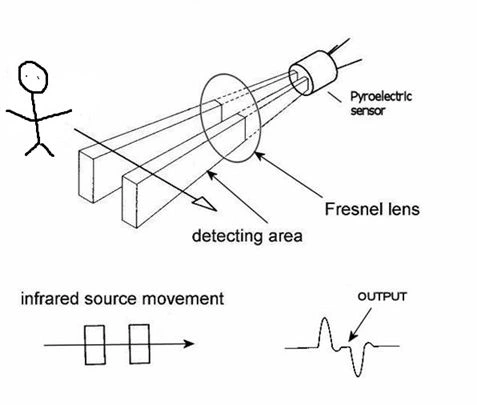
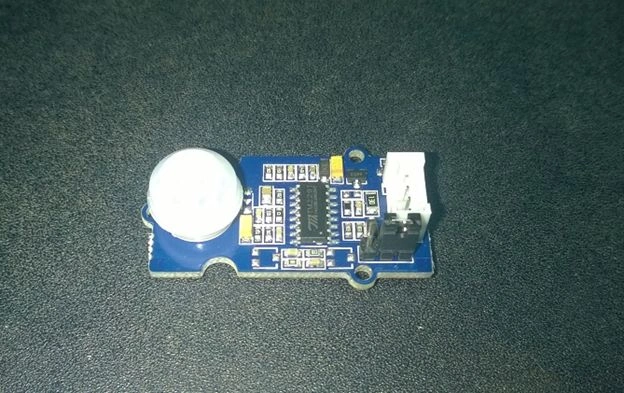
Figure 1: PIR sensor
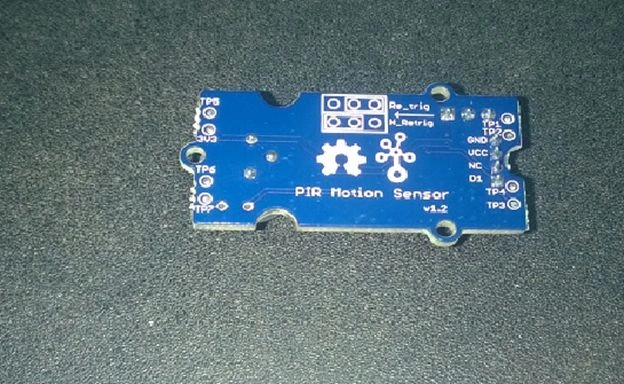
Figure 2: PIR Motion Sensor
Figure 3: Working of PIR Sensor
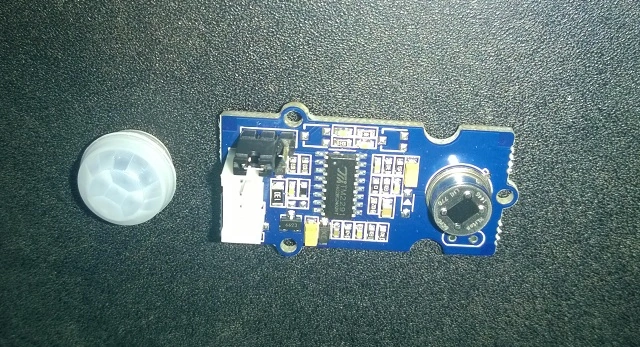
Figure 4: PIR Sensor without Cover lens
Prerequisite
Grove - PIR Motion Sensor
In this article, I will use Grove’s PIR Motion Sensor and will show how it works with Intel Galileo Gen1. You can reproduce the same example with Galileo gen2 or Arduino boards. This sensor has a Grove compatible interface, you need to just connect it through the Base Shield and start programming for it. If you are unfamiliar with Grove Sensors then please go through my article Grove Starter Kit With Intel Galileo Gen 2: Getting Started. This sensor has a detection range of a max of 6 meters but by default, it is 3 meters, you can increase or decrease it by attaching a Potentiometer to the circuit.
Other Specifications are:
- Grove compatible interface
- Voltage range: 3V–5V
- 2.0cm x 4.0cm twig module
- Detecting angle: 120 degree
- Detecting distance: max 6m (3m by default)
- Adjustable detecting distance and holding time
Connections
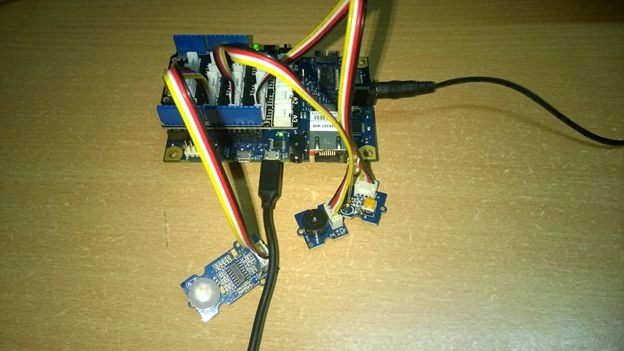
Since we are using Grove’s Sensors we don’t need to worry much about the connections or polarity. Here I have placed the Base Shield on my Galileo Gen 1 and connected the PIR Sensor to pin D2 and I also hooked up an LED to pin D4 and a Buzzer to pin D3 so when motion is detected it will alert us.
 Code
Code
Figure 5: Connections for the Burglar Alarm
- void loop()
- {
- if(isPeopleDetected()) //if it detects the moving people
- turnOnBuzzer();
- else
- turnOffBuzzer();
- }
- void turnOnBuzzer()
- {
- digitalWrite(LED,HIGH);
- for (int i = 0; i < length; i++)
- {
- if (notes[i] == ' ')
- {
- delay(beats[i] * tempo); // rest
- }
- else
- {
- playNote(notes[i], beats[i] * tempo);
- }
- // pause between notes
- delay(tempo / 2);
- }
- }
- void turnOffBuzzer()
- {
- digitalWrite(LED,LOW);
- digitalWrite(speakerPin,LOW);
- }

Figure 6: Code
Sr KarthigaPosted Jan 23, 2016, 5:38 AM
Good one
Pooja BaraskarPosted Sep 2, 2015, 4:15 PM
Avirup Basu Slide potentiometer is like other potentiometers but have a slider for variations, with Grove you can use it without going through soldering.
Santhakumar MunuswamyPosted Sep 2, 2015, 3:17 PM
Good article. Thanks for sharing
Pooja BaraskarPosted Sep 1, 2015, 1:06 PM
Avirup Basu Ok, adding potentiometer ain't that much difficult, If you don't want hard wiring you have other options like slide potentiometer, if you are familiar with electronics doesn't matter what brand or type you use. Electronics are compared on the basis of their specifications.
Pooja BaraskarPosted Sep 1, 2015, 8:57 AM
Avirup Basu I think you haven't gone through the Grove PIR Sensor I used here. We can also attach potentiometers as I already wrote in the article for the detecting range and response speed. I have seen the sensor you mentioned, It is good but do you really think it is better than the Grove one? It is nowhere compared to Grove PIR Sensor but if cost is a point you can go for that for simple projects. Please dont make any statements with out getting into things as it will be misleading to other readers.
Sibeesh VenuPosted Sep 1, 2015, 7:28 AM
Nice Share
Avirup BasuPosted Sep 1, 2015, 5:44 AM
Nice article Pooja Baraskar but I would suggest to use a HC-SR501 PIR sensor module as in it the potentiometers does the job of timer control and sensitivity control. Anyway, I had a view of the code you attached and if possible can you please tell what exactly are you playing in the buzzer? Is it the harmonic notes that you are playing when somebody is detected like c,d,.... or something else?
Vinodh NarayananPosted Sep 1, 2015, 5:00 AM
nice one thanks for sharing
Rajeesh MenothPosted Sep 1, 2015, 4:25 AM
Good Pooja Baraskar..
Pooja BaraskarPosted Sep 1, 2015, 1:31 AM
Rajeesh Menoth I also wanted to make something like this during my School days, but didn't got any resources or guidance. I hope this easy article will help Students and will further motivate them .
Karthikeyan KPosted Aug 31, 2015, 11:21 PM
Nice share...
Pankaj Kumar ChoudharyPosted Aug 31, 2015, 8:04 PM
Very useful gadget for household security purpose .........
Mohammed IbrahimPosted Aug 31, 2015, 6:49 PM
nice
Rajeesh MenothPosted Aug 31, 2015, 4:00 PM
Good One Pooja,In my 10th i done this type of device for practical section in electronics but i forgot that device name.it's working like this and produce some sounds..
Santhakumar MunuswamyPosted Aug 31, 2015, 3:53 PM
Good work.. Thanks for sharing