

Introduction
This article explains how to fetch data from the database by passing the parameter from a URL in the MVC4 Web API. Here we need to create a database in SQL and insert the value in the table. We can fetch the data by the Id and when we pass the Id in the URL as a parameter then it fetches the data from the table.
Use the following procedure to create the sample application.
Step 1
First we need to create a database with a table in SQL.
- create database Mudita
- use Mudita
- create table Employee(ID int IDENTITY,Name varchar(20), Address Varchar(40))
- Insert into Employee Values('Mudita','Kanpur')
- Insert into Employee Values('Tanya','Lucknow')
- Select * from Employee
- Drop table Employee
Now create a Web API Application:
- Start Visual Studio 2013.
- From the Start Window select "New Project".
- Select "Installed" -> "Templates" -> "Visual C#" -> "Web" -> "Visual Studio 2012" and select "ASP.NET MVC4 Web Application".
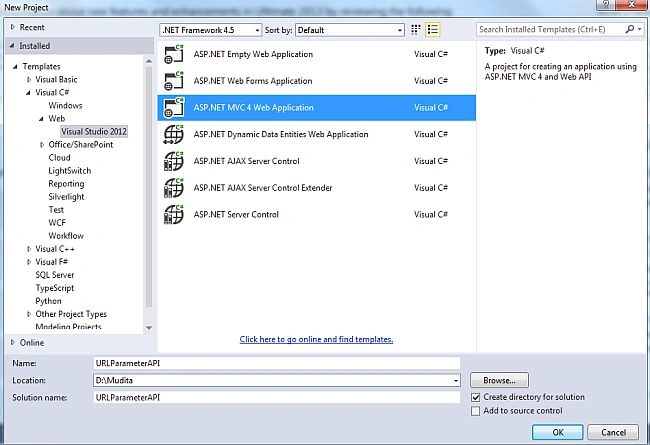
- Click on the "OK" button.
- From the MVC4 project window select "Web API".
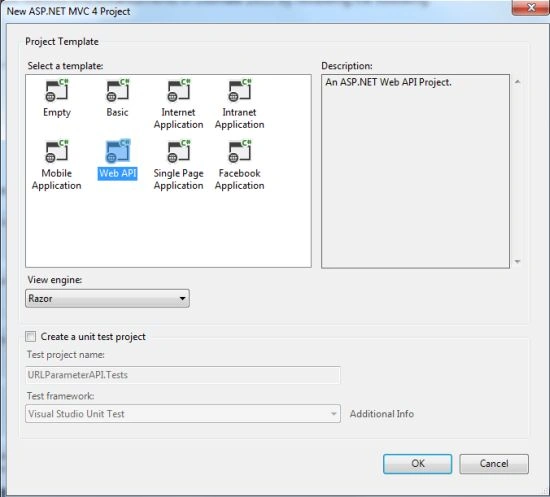
- Click on the "Create Project" button.
Step 3
Add a Model Class.
- In the "Solution Explorer".
- Right-click on the Model Folder.
- Select "Add" -> "Class".
- Select "Installed" -> "Visual C#" and select "Class".
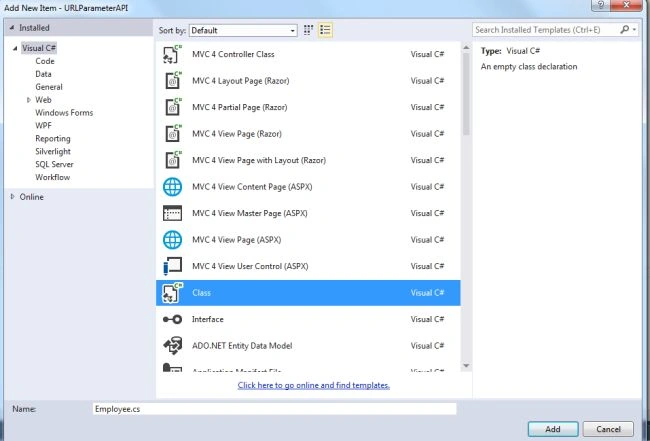
- Click on the "Ok" button.
Add the following code:
- using System;
- using System.Collections.Generic;
- using System.Linq;
- using System.Web;
- using System.Data;
- using System.Text;
- using System.Configuration;
- using System.Data.SqlClient;
- namespace URLParameterAPI.Models
- {
- public class Employee
- {
- public string Name { get; set; }
- public string Address { get; set; }
- SqlConnection con = new SqlConnection("Data Source=MCNDESKTOP44\\SQLSERVER;Initial Catalog=Mudita;User ID=sa;Password=password@123");
- public List<Employee>GetEmployee(int ID)
- {
- List<Employee> obj = new List<Employee>();
- con.Open();
- SqlCommand cmd = new SqlCommand("Select * from Employee where ID=" + ID, con);
- SqlDataReader rd = cmd.ExecuteReader();
- while (rd.Read())
- {
- Employee e = new Employee();
- e.Name = rd.GetString(1);
- e.Address = rd.GetString(2);
- obj.Add(e);
- }
- return obj;
- }
- }
- }
- }

Join the conversation! Your thoughts help the community grow.