

Introduction
Collections play a very important role in any programming language, so in this article, we are going to discuss the HashSet collection Introduced in .Net 3.5. This article can be used by beginners, intermediate, and professionals.
We are going to cover,
- What is HashSet?
- How to Create HashSet?
- How to Add a new element in HashSet?
- How to Handle duplicate Element in HashSet?
- How to Search element from HashSet?
- How to Remove element from HashSet?
- HashSet - Set Operational Methods
-
- IsProperSubsetOf
- UnionWith
- IntersectWith
- ExceptWith
What is HashSet?
Before we start with the definition, the first question that comes to mind is, where should we use or in which situation we should use HashSet Collection?
Suppose we have a requirement to store unique values and prevent duplicate insertion in the collection, then HashSet would be the right choice.
The next question would be, what is HashSet?
“HashSet is Unorder Collection which contains unique values to get High performance in C#.net.”
Below are a few important points of HashSet
- It can store only values not keys like other collections in C#.net.
- HashSet is unorder collection.
- Contain unique values.
- It can allow a single null value.
- It’s part of the System.Collections.Generic namespace.
- Give you high performance as it has unique values.
So we got the basic idea of HashSet. Now we will begin with creating of simple HashSet and adding a few values to it.
How to Create HashSet?
Here I am going to create a simple HashSet of string type which contains Cites.
Please see the below code,
using System;
using System.Collections.Generic;

namespace HashSetDemo
{
    class Program
    {
        static void Main(string[] args)
        {
            HashSet<string> cities = new HashSet<string>
            {
                "Mumbai",
                "Vadodra",
                "Surat",
                "Ahmedabad"
            };

            foreach (var city in cities)
            {
                Console.WriteLine(city);
            }
            Console.ReadLine();
        }
    }
}
In the above code,
- We have created a .Net Console application.
- Created Simple HashSet “Cities”.
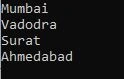
- Iterate Cities and Print City on the screen.
Output
How to Add new Elements in the HashSet?
We are going to add a few elements in HashSet using Add method.
Let's see the below code,
using System;
using System.Collections.Generic;

namespace HashSetDemo
{
    class Program
    {
        static void Main(string[] args)
        {
            HashSet<string> cities = new HashSet<string>
            {
                "Mumbai",
                "Vadodra",
                "Surat",
                "Ahmedabad"
            };

            cities.Add("Bharuch");

            foreach (var city in cities)
            {
                Console.WriteLine(city);
            }
            Console.ReadLine();
        }
    }
}
In the above code, we have used the “Add” method to insert a new element in HashSet Collection.
Output

How to Handle duplicate Element in HashSet?
A few more questions came to mind while I was adding elements in the HashSet in the previous section,
- What will happen if we try to add a duplicate element in HashSet?
- Will it throw a runtime exception?
- Will it ignore duplicate elements without throwing any exception?
Let’s see the below Code snippet to get answers to these questions. I am going to add a few duplicate cities and execute the program,
using System;
using System.Collections.Generic;

namespace HashSetDemo
{
    class Program
    {
        static void Main(string[] args)
        {
            HashSet<string> cities = new HashSet<string>
            {
                "Mumbai",
                "Vadodara",
                "Surat",
                "Ahmedabad",
                "Bharuch"
            };
            cities.Add("Mumbai");
            cities.Add("Vadodara");
            cities.Add("Surat");
            cities.Add("Ahmedabad");
            cities.Add("Bharuch");
            foreach (var city in cities)
            {
                Console.WriteLine(city);
            }
            Console.ReadLine();
        }
    }
}
In the above code,
- Added 5 cities in the HashSet
- Duplicate 5 cities added again in the HashSet with the Add method.
- Execute Program.
Output
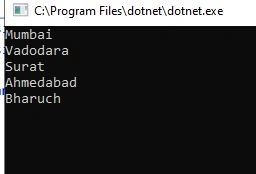
Based on the above output, we can conclude that duplicate records are ignored without throwing any error. In the above case, only 5 cities appeared as output and ignored duplicate 5 cities.
How to Search element from HashSet?
Contain method can use to search elements from HashSet. Let’s see the below code,
using System;
using System.Collections.Generic;

namespace HashSetDemo
{
    class Program
    {
        static void Main(string[] args)
        {
            HashSet<string> cities = new HashSet<string>
            {
                "Mumbai",
                "Vadodara",
                "Surat",
                "Ahmedabad",
                "Bharuch"
            };
            if(cities.Contains("Surat"))
            {
                Console.WriteLine("Surat found in the collection");
            }
            else
            {
                Console.WriteLine("Surat Not found in the collection");
            }
            Console.ReadLine();
        }
    }
}
We will get true as “surat” is present in the Cities Collection.
Output

How to Remove Element from HashSet?
To remove an element from HashSet, we should use the Remove method,
Syntax of the remove method would be,
public bool Remove (T item);
If an element is present in the collection, the Remove method will remove the element from collection and return true else false.
See below code snippet to get understand this concept,
using System;
using System.Collections.Generic;

namespace HashSetDemo
{
    class Program
    {
        static void Main(string[] args)
        {
            HashSet<string> cities = new HashSet<string>
            {
                "Mumbai",
                "Vadodara",
                "Surat",
                "Ahmedabad",
                "Bharuch"
            };
            foreach (var city in cities)
            {
                Console.WriteLine(city);
            }

            Console.WriteLine("******** Remove Surat From Collection ********");

            if (cities.Contains("Surat"))
            {
                cities.Remove("Surat");
            }
            foreach (var city in cities)
            {
                Console.WriteLine(city);
            }
            Console.ReadLine();
        }
    }
}
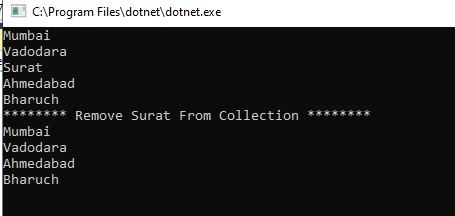
We have removed the “Surat” city from HashSet using the Remove method.
Output
HashSet – Set Operational Methods
HashSet has a few important inbuilt operational methods which will help us to write efficient code.
IsProperSubsetOf – This method is used to determine that the HashSet instance is a proper subset of the collection.
Please see the below code,
using System;
using System.Collections.Generic;

namespace HashSetDemo
{
    class Program
    {
        static void Main(string[] args)
        {
            HashSet<string> cities1 = new HashSet<string>
            {
                "Mumbai",
                "Vadodara",
                "Surat",
                "Ahmedabad",
                "Bharuch"
            };
            HashSet<string> cities2 = new HashSet<string>
            {
                "Mumbai",
                "Vadodara"
            };
            HashSet<string> cities3 = new HashSet<string>
            {
                "Mumbai",
                "Vadodara",
                "Surat",
                "Ahmedabad",
                "Bharuch",
                "Ankhleshwar"
            };
            if(!cities1.IsProperSubsetOf(cities2))
            {
                Console.WriteLine("Cities 2 is not subset of cities1");
            }

            if (cities1.IsProperSubsetOf(cities3))
            {
                Console.WriteLine("Cities 3 is  subset of cities1");
            }
            Console.ReadLine();
        }
    }
}
In the above code,
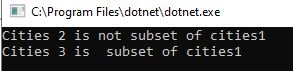
- Created three HashSet. Cities1, cities2, and cities 3.
- Cities1 and Cities2 are not subset
- Cities1 and cities3 are a subset.
- Execute and see the output.
Output
UnionWith
This method is used to combine both the collection. See below code snippet to get a better understanding,
using System;
using System.Collections.Generic;

namespace HashSetDemo
{
    class Program
    {
        static void Main(string[] args)
        {
            HashSet<string> cities1 = new HashSet<string>
            {
                "Mumbai",
                "Vadodara",
                "Surat",
                "Ahmedabad",
                "Bharuch"
            };
            HashSet<string> cities2 = new HashSet<string>
            {
                "Mumbai",
                "Vadodara",
                "Ankhleshwar"
            };
            cities1.UnionWith(cities2);
            foreach (var item in cities1)
            {
                Console.WriteLine(item);
            }
            Console.ReadLine();
        }
    }
}
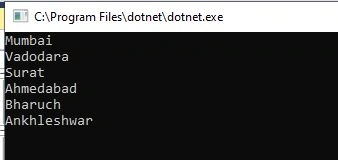
We have two collections Cities1 and Cities2. Cities 2 is copied into Cities1 when we execute the above code.
Output
IntersectWith
This Method returns common elements from both collections.
Let's see the below code,
using System;
using System.Collections.Generic;

namespace HashSetDemo
{
    class Program
    {
        static void Main(string[] args)
        {
            HashSet<string> cities1 = new HashSet<string>
            {
                "Mumbai",
                "Vadodara",
                "Surat",
                "Ahmedabad",
                "Bharuch"
            };
            HashSet<string> cities2 = new HashSet<string>
            {
                "Mumbai",
                "Vadodara",
                "Ankhleshwar"
            };
            cities1.IntersectWith(cities2);
            foreach (var item in cities1)
            {
                Console.WriteLine(item);
            }
            Console.ReadLine();
        }
    }
}
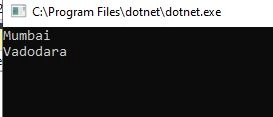
In the above code, “Mumbai ” and “Vadodara” are common in both the collection.
Output
ExceptWith
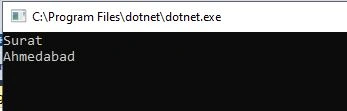
This method removes all elements from collection 1 that are matched with elements in collection 2.
Assume that you have two collection cities 1 and cities 2. Cities1 has 4 cities and Cities2 has 3 cities. Both collections have two same cities then the output would be the remaining 2 cities from cities1.
Let's see below example,
using System;
using System.Collections.Generic;

namespace HashSetDemo
{
    class Program
    {
        static void Main(string[] args)
        {
            HashSet<string> cities1 = new HashSet<string>
            {
                "Mumbai",
                "Vadodara",
                "Surat",
                "Ahmedabad"
            };
            HashSet<string> cities2 = new HashSet<string>
            {
                "Mumbai",
                "Vadodara",
                "Ankhleshwar"
            };
            cities1.ExceptWith(cities2);
            foreach (var item in cities1)
            {
                Console.WriteLine(item);
            }
            Console.ReadLine();
        }
    }
}
Output
Hope you enjoyed this article and found it useful. Thank you for reading this article.
Join the conversation! Your thoughts help the community grow.