

Article Overview
- Background
- How to compile/test with C# 8.0 in MS Visual Studio OR online
- Key features and enhancements to C# 8.0
- Switch Expression feature
- Pre-requisites
- How to compile/test with C# 8.0 in MS Visual Studio OR online
- MS Visual Studio
- Online tool
- Key features and enhancements to C# 8.0
- Switch Expressions
- Indices and Ranges
- Default Interface Members
- Static Local Functions
- Using Declarations
- Nullable Reference Types
- Readonly Struct Members
- Null-Coalescing Assignment
- Async Streams
- Property, Tuple, and Positional Patterns
- Switch Expression feature
- Points
- Example
- Summary
Background
There was a situation where I had to know all the key important features and enhancements in C# 8.0. There are a number of articles and blogs where you can find detailed explanations of new features of C# 8.0.
Hence, to understand each one in detail, I went through various sites instead of one single place. So, here I am putting all the key details along with key points as well as examples with code in one place. This way, you can get most of all information from a single place.
I have divided this whole article into 4 parts for making it easy to understand with step by step movement to go ahead.
This article mainly focuses on three key things.
- How to compile/test with C# 8.0 in MS Visual Studio OR online
- Key features and enhancements to C# 8.0
- Switch Expressions
Here, I have kept all the implementation details along with a complete example.
Prerequisites
You should have a basic knowledge of C#.
How to compile/test with C# 8.0 in MS Visual Studio OR online
First of all, before you start, you have to make the environment ready which can compile your C# 8.0 code.
There are two ways of doing this.
- MS Visual Studio
- Online tool
MS Visual Studio
Go to “Advanced Build Settings” and set “Language version” to “C# 8.0 (beta)”.
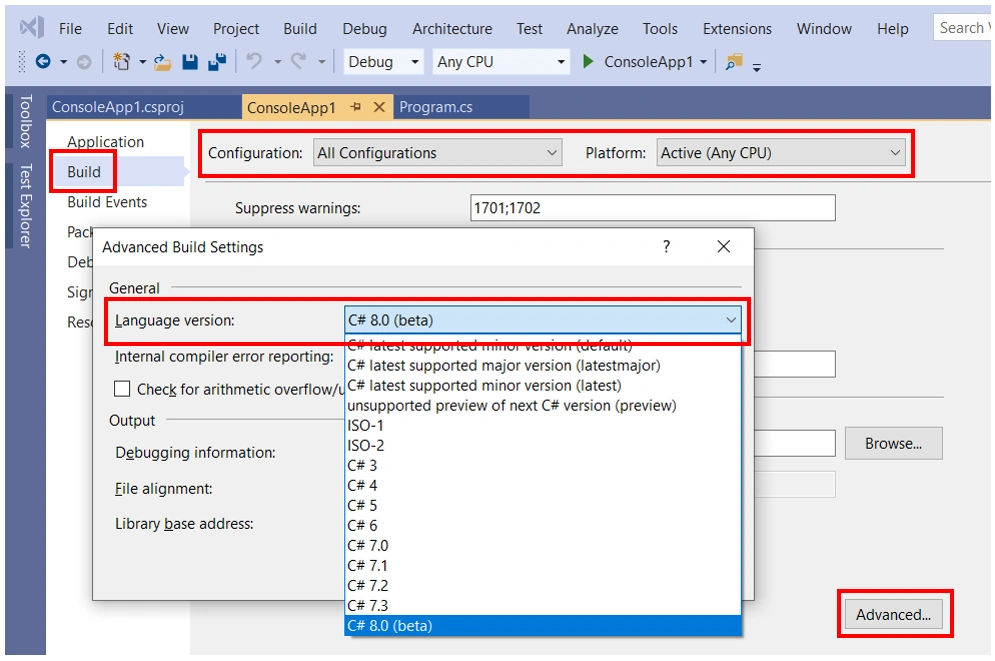
Online
There are various online tools where you can write, compile, and execute your code online. I am using “C# Online Compiler | .NET Fiddle” where you have to set “Compiler” to “.NET Core 3.0”.
Key features and enhancements to C# 8.0
C# 8.0 added the following key features and enhancements to the C# language.
- Switch Expressions
- Indices and Ranges
- Default Interface Members
- Static Local Functions
- Using Declarations
- Nullable Reference Types
- Readonly Struct Members
- Null-Coalescing Assignment
- Async Streams
- Property, Tuple, and Positional Patterns
Now, let us discuss each feature one by one in detail.
For your reference, I have kept all the examples in a single .cs file and uploaded them with this article.
Switch Expression feature
Below are the key syntax improvements:
- Bodies are expressions, not statements.
- Case and : elements are replaced with =>. It is more concise and intuitive.
- Variable comes before the switch keyword. It is visually easy to distinguish the switch expression from the switch statement.
- Default case is replaced with a _ discard.
Example-1
- var (a, b, option) = (10, 5, "+");
- var example1 = option switch
- {
- "+" => a + b,
- "-" => a - b,
- _ => a * b
- };
- Console.WriteLine(example1);
Example-2
- var value = 25;
- int example2 = value switch
- {
- _ when value > 10 => 0,
- _ when value <= 10 => 1
- };
- Console.WriteLine( example2);
- Calculation c1 = new Calculation(50, 10, "*");
- c1.print();
- Calculation c2 = new Calculation(50, 10, "+");
- c2.print();
- public class Calculation
- {
- public Calculation(int a, int b, string operation)
- {
- this.FirstNumber = a;
- this.SecondNumber = b;
- this.Operation = operation;
- this.ResultNumber = this.Operation switch
- {
- "+" => this.FirstNumber + this.SecondNumber,
- "-" => this.FirstNumber - this.SecondNumber,
- "/" => this.FirstNumber / this.SecondNumber,
- "*" => this.FirstNumber * this.SecondNumber,
- _ => -1
- };
- }
- public int FirstNumber { get; set; }
- public int SecondNumber { get; set; }
- public string Operation { get; set; }
- public int ResultNumber { get; set; }
- public void print()
- {
- Console.WriteLine($"{this.FirstNumber} {this.Operation} {this.SecondNumber} = {this.ResultNumber}");
- }
- }
Summary
Now, I believe you will be able to compile/test with C# 8.0 in MS Visual Studio OR online, you know the key new features and enhancements to C# 8.0, and you understand the Switch Expression feature.
In my next article, I will cover the next three features such as "Indices and Ranges", "Default Interface Members", and "Static Local Functions".
RyderPosted Feb 7, 2020, 5:47 AM
Nice one...
Shailesh PathakPosted Oct 18, 2019, 8:41 AM
Very nice..You are the inspiration of young people who has less experience in . Net...Well done ..Great job
Dhruvik SathvaraPosted Oct 10, 2019, 12:40 AM
Nice article...
Sourav Kumar DasPosted Oct 3, 2019, 11:47 PM
Nice Article.
Arvind KatariaPosted Oct 3, 2019, 12:11 PM
Nice article ...!!!
ShankarPosted Oct 3, 2019, 11:10 AM
Good one but what is advantage of this feature? Please add the same on your next feature explanations , what was not accomplished with out this feature or it is another way of doing same things?
Shrimant TelgavePosted Oct 3, 2019, 9:13 AM
Nice article..