

Overview
In this article, we will learn how we can calculate the cumulative total within Power BI. There are some practical scenarios where we need to find out running total with some predefined formula.
Cumulative Total Definition
The cumulative total is also known as Running total. It is the sum of a sequence of numbers, which is updated each time a new number is added to the sequence. In simple words, we can say it represents the current sequence + its previous rows sequence.
Scenario
I have the following table structure. I have 3 columns.
- Date
- Loan Increasing
- Loan decreasing
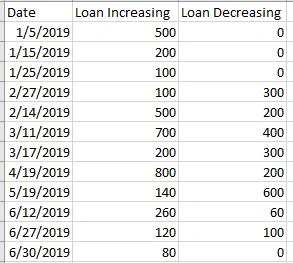
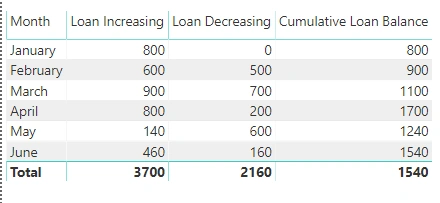
Now, in the end, I need a result for Cumulative Loan Balance something like the following screenshot.
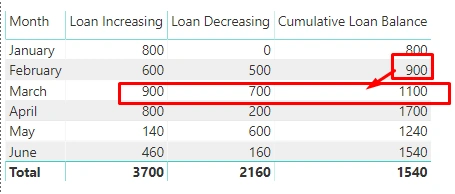
Example: For the month of March, the Cumulative Loan Balance should be like,
- Loan Increasing – Loan Decreasing + Previous month Loan Balance.
- So, it would be like = 900-700+900 = 1100
Download Sample Code Files from GitHub.
For your practice, I uploaded the sample Power Bi file and data file on GitHub. You can directly download the code files using the below URL.
Practical Solution with DAX
Here, we need to find out the Cumulative Total.
First, let’s find out the normal Loan Balance which is the difference between the Increasing Loan Balance and Decreasing Loan Balance.
Step 1
Create a new measure with following formula,

Below is an output for the Loan Balance.
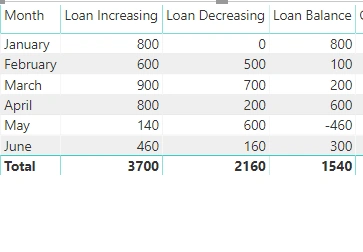
Step 2
Now, let’s calculate its Cumulative Total.
To find out the Cumulative Total, we will use the following DAX expressions.
- Calculate()
- Filter()
- ALL()
- MAX()
By combining all above DAX expression, create the following formula.
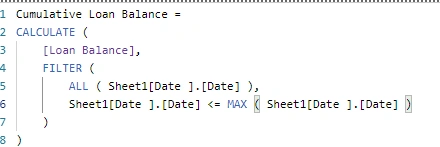
- Cumulative Loan Balance =
- CALCULATE (
- [Loan Balance],
- FILTER (
- ALL ( Sheet1[Date ].[Date] ),
- Sheet1[Date ].[Date] <= MAX ( Sheet1[Date ].[Date] )
- )
- )
Here, calculate function will calculate the cumulative Loan balance by applying the date filter by month. So, we can get the desire result set.
Please find below screenshot which represents the Cumulative Loan Balance.
Conclusion
This is how we can easily calculate Cumulative Total within Power BI. I hope you love this article! Stay connected with me for more amazing articles in the future.
alpesh rathodPosted Apr 14, 2021, 3:08 PM
The ALL function here resets the date to start , what if we want the user to select a starting point let say Mar , and hence the balance should start with 200
Geert GissingPosted Nov 8, 2020, 3:50 AM
Very generous!
Geert GissingPosted Nov 8, 2020, 3:48 AM
Thank you very much!
mikeyj777Posted Oct 29, 2019, 10:06 AM
Thank you for posting this. I have some time-independent data with a column that I'm looking to cumulatively sum. I tried to adjust your code a bit, but being a noob, not sure how the appropriate syntax. The column I'm looking to cumulatively sum is Sheet1[Content.F]. The records are currently sorted by it.