

In this article we will discuss how to calculate the number of working days between the two given days in C#.
Creating a Windows Form Application:
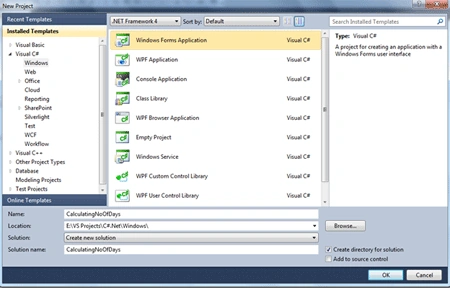
Start the Visual Studio 2010; create a Windows Form Application and name it as CalculatingNoOfDays.
Designing the Form:
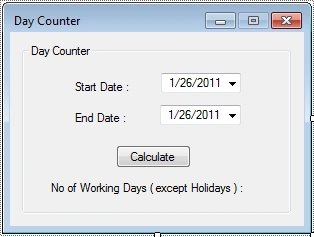
Place the following controls
- Three Labels
- Two DateTimePicker
- One Button
Give the proper names for controls and set the Text property of labels as shown below. After designing the form looks like the following.
Functionality Explanation:
The main aspect of this article is to calculate the number of working days between the given two days.
For example if one organization needs to take the list of employee's actual working days. In this situation they need to omit the weekend holidays as well as the organization's holidays. For that situation, this bit of code will be useful I guess. So for sample, here we are having an array of DateTime which will have the organizations holiday list.

In this example the listOfOrgHolidays array has two dates which are falling on the day Wednesday and Monday respectively. Even though these two days are falling on working days it is in the organization's holiday list so we need to omit from working days.
CalculateDays Method:
This is the method to calculate the number of working days for an organization. The screenshot below shows the code.
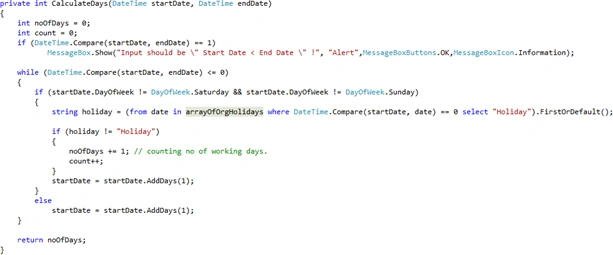
For this method we are passing the start and end days to calculate the number of working days.

The above bit of code is to check whether the end date is greater than the start date or not.
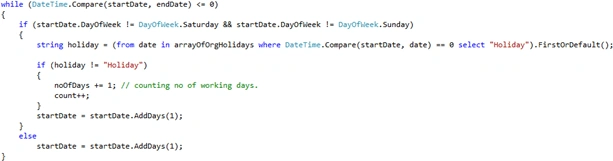
In this loop we are checking the holidays and counting the number of working days.

Here the LINQ has been used to check the holidays in the organization's holidays list. If the organization's holiday date is between the start and end date then the LINQ will return the string holidays.
One of the major methods here is DateTime.Compare(). This method is used to compare the two given dates.
Finally in the Button event we are calling the CalculateDays() method to calculate the number of working days.
If you run this project the final windows form will be like this as our given sample input.
Dinesh KumarPosted Feb 13, 2020, 11:24 PM
I need mvvm structure for this code
sukh warringPosted Mar 29, 2019, 2:31 AM
2 can we display result without clicking even ,when i fill two value automatically result will display
sukh warringPosted Mar 29, 2019, 2:30 AM
Hey I have few problem with this sample can u help to findout possible solution ?can we replace DateTimePicker with normal date
Max HannaPosted Dec 10, 2018, 10:57 AM
What kind of noob posts screenshots of code. thanks im going to the next tutorial.
Erickson LestinoPosted Aug 20, 2017, 9:04 AM
THANKS!!!!!! Work Perfect!
Richmond BaldozPosted Sep 21, 2015, 12:31 AM
It says No overload for method "CalculateDays" takes 0 arguments
Richmond BaldozPosted Sep 21, 2015, 12:30 AM
I cant call the method., What to do?
Faruk YildizPosted Jul 10, 2015, 9:33 AM
Thanks good working.
Jaganathan BantheswaranPosted Mar 14, 2014, 2:12 AM
@p k, sure you can use..
p kPosted Mar 14, 2014, 12:55 AM
can we use this type of code without LINQ
israel condePosted Jun 20, 2013, 2:54 AM
thanks
Jaganathan BantheswaranPosted Jun 17, 2013, 6:57 AM
if you get the dates, then you can get day names from that like dateTime.DayOfWeek.ToString()
israel condePosted Jun 9, 2013, 2:21 PM
Hello Jaganathan, I have a question. How can I get the names of the days instead the numbers of the days worked? And not counting Saturdays and Sundays? Thanks for your attention.
prasad nvmPosted Sep 14, 2011, 12:17 AM
Hi Jagan, This is Prasad , Recently seen your calculation working days between 2 selected days. That was really good but I have small doubt on followed line. string holiday = (from date in arrayOfOrgHolidays where DateTime.Compare(startDate, date) == 0 select "Holiday").FirstOrDefault(); About why using this line.. Thaks, Prasad.