

Birthdays, anniversaries, appointments, holidays, bill payments, and project deadlines. All these have one thing in common. Can you guess? It's a date. It is difficult to remember dates. That is where the calendar comes to rescue.
ASP.NET provides a Calendar control that is used to display a calendar on a Web page. ASP.NET Calendar control displays a month calendar that allows user to select dates and move to the next and previous months.
By default, this control displays the name of the current month, day headings for the days of the weeks, days of the month and arrow characters for navigation to the previous or next month.
The class hierarchy for this control is as follows:
Object -> Control -> WebControl -> Calendar
The Calendar is complex, powerful Web server control that you can use to add a calendar feature to your web page. We can use Calendar control to display any date between 0 A.D. and 9999 A.D.
The Calendar control is represented as:
<asp:Calendar ID="Calendar1" runat="server" </asp:Calendar>
element in Source view.
When rendered to a user's browser, the calendar control generates an HTML <table> element and a set of associated JavaScript.
The Calendar control can be used to select a single date or multiple dates. The SelectionMode property is used for this.
The SelectionMode properties are:
| Property | Description |
| Day | Allow selection of a single date. |
| DayWeek | Allows the selection of a single date or a complete week. |
| DayWeekMonth | Allow selection of single date, complete week or complete month. |
| None | Doesn't allow you to select any date. |
You can also set the properties for the calendar either by selecting the Auto Format property by right clicking on the Calendar control or by manually setting them one by one.
Calendar Properties
There are many properties of Calendar control to customize the functionality and appearance. These can be read at msdn.
Let us start with a basic example that will help you in making a small application showing a list of Indian holidays.
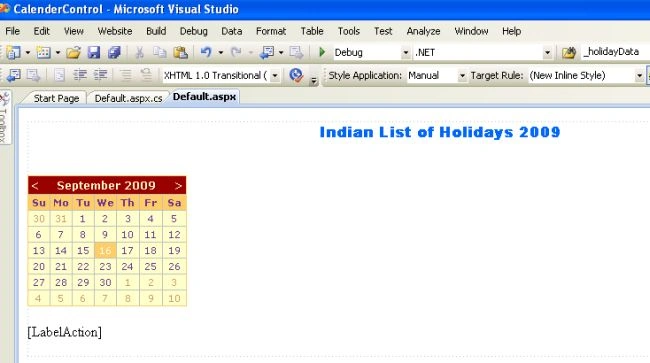
Default.aspx code
<%@ Page Language="C#" AutoEventWireup="true" CodeFile="Default.aspx.cs" Inherits="_Default" %>
<!DOCTYPE html PUBLIC "-//W3C//DTD XHTML 1.0 Transitional//EN" "http://www.w3.org/TR/xhtml1/DTD/xhtml1-transitional.dtd">
<html xmlns="http://www.w3.org/1999/xhtml">
<head runat="server">
    <title>Untitled Page</title>
</head>
<body>
    <form id="form1" runat="server">
    <div>
        <p style="text-align: center">
        <b></b>
        <asp:Label ID="Label1" runat="server" Font-Bold="True" Font-Names="Arial Black" Font-Size="Medium"
            ForeColor="#0066FF">Indian List of Holidays 2009</asp:Label><br /></b>
        </p>
        <asp:Calendar ID="Calendar1" runat="server" BackColor="#FFFFCC" BorderColor="#FFCC66"
            BorderWidth="1px" DayNameFormat="Shortest" Font-Names="Verdana" Font-Size="8pt"
            ForeColor="#663399" ShowGridLines="True" OnDayRender="Calendar1_DayRender" OnSelectionChanged="Calendar1_SelectionChanged"
            OnVisibleMonthChanged="Calendar1_VisibleMonthChanged">
            <SelectedDayStyle BackColor="#CCCCFF" Font-Bold="True" />
            <SelectorStyle BackColor="#FFCC66" />
            <TodayDayStyle BackColor="#FFCC66" ForeColor="White" />
            <OtherMonthDayStyle ForeColor="#CC9966" />
            <NextPrevStyle Font-Size="9pt" ForeColor="#FFFFCC" />
            <DayHeaderStyle BackColor="#FFCC66" Font-Bold="True" Height="1px" />
            <TitleStyle BackColor="#990000" Font-Bold="True" Font-Size="9pt" ForeColor="#FFFFCC" />
        </asp:Calendar>
        <br />
        <b></b>
        <asp:Label ID="LabelAction" runat="server"></asp:Label><br />
        </b>
    </div>
    </form>
</body>
</html>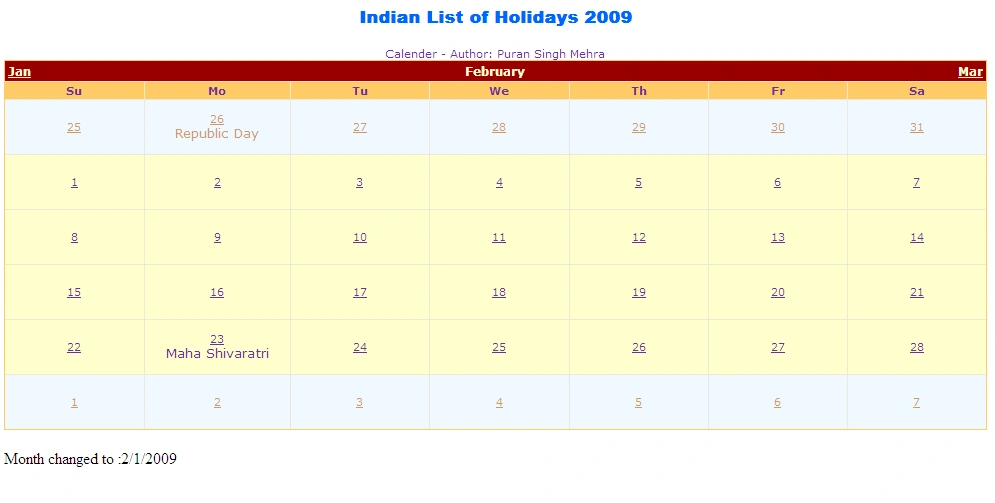
Rajasekaran SPosted Aug 16, 2019, 5:16 AM
How to set the text
onais ahmerPosted Aug 30, 2018, 1:33 AM
Best Article..
Suresh MolabantiPosted Jun 13, 2016, 8:46 AM
how to change the complete webpage one language to another language plz help me ....
Suresh MolabantiPosted Jun 13, 2016, 8:45 AM
thanks nice shanring this blog
Santhakumar MunuswamyPosted Jun 9, 2016, 12:35 AM
Thank you for nice share
Kuppurasu NagarajPosted Jun 6, 2016, 12:13 PM
Nice Sharing..