

Silverlight Calendar Control
A Calendar control is used to create a visual calendar that let users pick a date and fire an event on the selection of the date. This article demonstrates how to create and use a Calendar control in Silverlight using XAML and C#.
Creating a Calendar
The Calendar element represents a Silverlight calendar control in XAML.
<Calendar/>
The Calendar control is defined in the System.Windows.Controls namespace. When you drag and drop a Calendar control from Toolbox to the page, you will notice the following namespace is added to the top of the page.
xmlns:basics="clr-namespace:System.Windows.Controls;assembly=System.Windows.Controls"
And following code is added for the Calendar control.
<basics:Calendar></basics:Calendar>
The default view of the Calendar control looks like Figure 1.
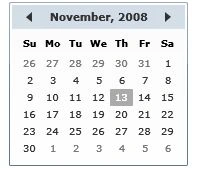
Figure 1
The Width and Height attributes of the Calendar element represent the width and the height of a Calendar. The Content attribute represents the text of a Calendar. The x:Name attribute represents the name of the control, which is a unique identifier of a control.
The code snippet in Listing 1 creates a Calendar control and sets the name, height, and width properties of a Calendar control.
<Calendar x:Name="DrawCircleCalendar" Height="30" Width="100" >
</Calendar>
Listing 1
Display Modes
The DisplayMode property of the Calendar class represents the format of display of a Calendar, which can be a month, year, or decade. Month is the default mode. By setting the DisplayMode to Year and Decade generates Figure 2 and Figure 3 respectively.
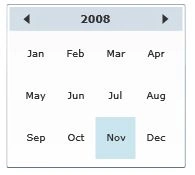
Figure 2
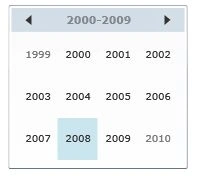
Figure 3
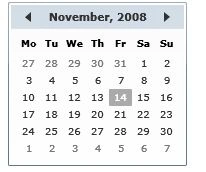
The Month view that is also the default view looks like Figure 4.
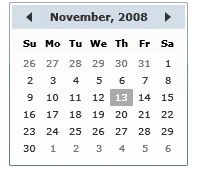
Figure 4
If you take an example of the Decade, and click on year 2008 in Figure 3, you will get another Calendar format with all months in year 2008 and if you click on any month, you will eventually get the month view of the Calendar.
The following code snippet sets the DisplayMode property to Decade.
<basics:Calendar DisplayMode="Decade">
</basics:Calendar>
Selection Modes and Selection Dates
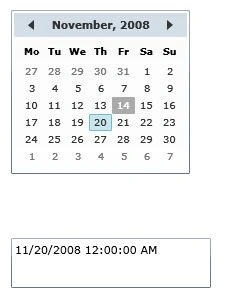
The SelectedDate property represents the currently selected date. If multiple dates selection is true, the SelectedDates property represents a collection of currently selected dates.
The SelectionMode of type CalendarSelectionMode enumeration represents the selection mode of calendar. Table 1 describes the CalendarSelectionMode enumeration and its members.
|
CalendarSelectionMode |
Description |
|
None |
No selections are allowed. |
|
SingleDate |
Only a single date can be selected, either by setting SelectedDate or the first value in SelectedDates. AddRange cannot be used. |
|
SingleRange |
A single range of dates can be selected. Setting SelectedDate, adding a date individually to SelectedDates, or using AddRange will clear all previous values from SelectedDates. |
|
MultipleRange |
Multiple non-contiguous ranges of dates can be selected. Adding a date individually to SelectedDates or using AddRange will not clear SelectedDates. Setting SelectedDate will still clear SelectedDates, but additional dates or range can then be added. Adding a range that includes some dates that are already selected or overlaps with another range results in the union of the ranges and does not cause an exception. |
The following code snippet sets the SelectionMode property to single range.
<basics:Calendar SelectionMode="SingleRange">
</basics:Calendar>
BlackoutDates
The BlackoutDates property of the Calendar class represents a collection of dates that are not available for selection. All non selection dates are marked by a cross. For example, say in Jan month of year 2009, we would like to block dates from Jan 1st to Jan 4th and then all Saturdays and Sundays and the final calendar should look like Figure 5.
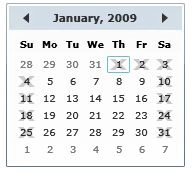
Figure 5
We can achieve this by adding code listed in Listing 2. As you can see from Listing 3, the BlackoutDates.Add method takes a CalendarDateRange object, which is a collection of two DateTime objects. The first date is the start date of the range and second date is the end date of the date range.
private void SetBlackOutDates()
{
MonthlyCalendar.BlackoutDates.Add(new CalendarDateRange(
new DateTime(2009, 1, 1),
new DateTime(2009, 1, 4)
));
MonthlyCalendar.BlackoutDates.Add(new CalendarDateRange(
new DateTime(2009, 1, 10),
new DateTime(2009, 1, 11)
));
MonthlyCalendar.BlackoutDates.Add(new CalendarDateRange(
new DateTime(2009, 1, 17),
new DateTime(2009, 1, 18)
));
MonthlyCalendar.BlackoutDates.Add(new CalendarDateRange(
new DateTime(2009, 1, 24),
new DateTime(2009, 1, 25)
));
MonthlyCalendar.BlackoutDates.Add(new CalendarDateRange(
new DateTime(2009, 1, 31),
new DateTime(2009, 1, 31)
));
}
Listing 2
DisplayDateStart and DisplayDateEnd
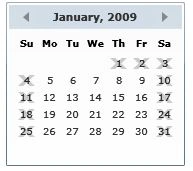
The Calendar control allows you to set the start and end display dates by using the DisplayDateStart and DisplayDateEnd properties. If you see Figure 5 in the previous section, you may notice the Jan 2009 month calendar display start with Dec 28, 2008 date. But now what if you want to display dates for Jan 2009 month only? We can use the DisplayStartDate and DisplayEndDate properties to control the start and end dates of a month. The code listed in Listing 3 makes sure the start date is Jan 01, 2009 and end date is Jan 31, 2009. The current selected date is Jan 05.
private void SetDisplayDates()
{
MonthlyCalendar.DisplayDate = new DateTime(2009, 5, 1);
MonthlyCalendar.DisplayDateStart = new DateTime(2009, 1, 1);
Manoj Singh PanwarPosted Nov 23, 2011, 12:21 PM
Gotta know more about calender. Nice one sir.
Mahesh ChandPosted Nov 23, 2011, 2:01 AM
Thanks Jean
Jean PaulPosted Nov 3, 2010, 11:12 AM
That was a cool one. Super!
narcisse balabanPosted Dec 3, 2009, 12:43 PM
Calendar SelectionDatesChanged causes a problem.As the mouse is on the control, this event is triggered by the first date the mouse is over. User cannot go to select a specific date !!
danny drorPosted Oct 28, 2009, 6:05 PM
It works great, thanks! ------------------------------ Danny, Fire Sprinkler
marko bozaneditedPosted Apr 9, 2009, 6:58 PMEdited Apr 9, 2009, 7:01 PM
how to bind column dates from database to calendar blackoutdates property????