

Here I have used ui-calendar directives to create a simple scheduling application for displaying events in a calendar.
Description
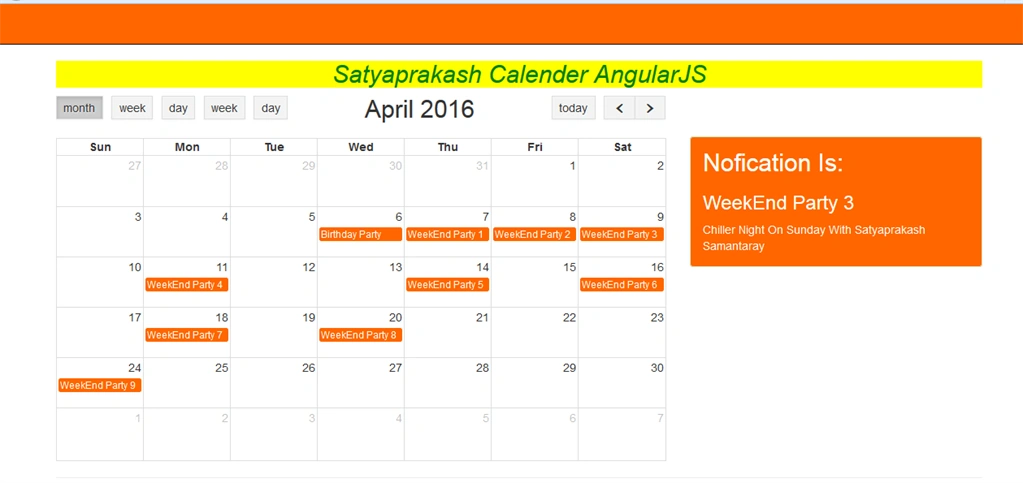
I have fetched some calendar events using a back-end and shown them on the calendar. The event description will be shown when the end user clicks on the event link in a calendar.
I have fetched some calendar events using a back-end and shown them on the calendar. The event description will be shown when the end user clicks on the event link in a calendar.
Project Link
Steps to be followed
Step 1
Create an MVC application named SatyaEventCalendarInAngularJS.
Step 2
Create a database named "Calender" in the App_Data folder. Inside this database, create a new table named "Demo_Events".
Step 1
Create an MVC application named SatyaEventCalendarInAngularJS.
Step 2
Create a database named "Calender" in the App_Data folder. Inside this database, create a new table named "Demo_Events".
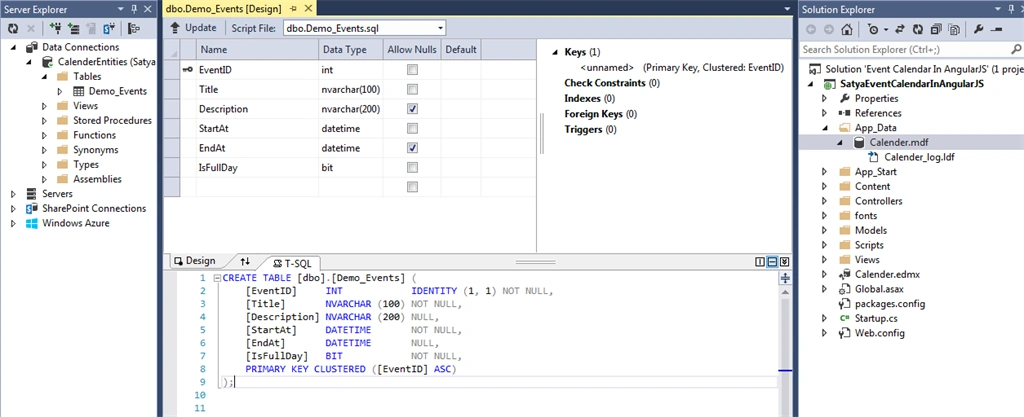
Then, add some demo records in this table.
Script
Script
- SET IDENTITY_INSERT [dbo].[Demo_Events] ON
- INSERT INTO [dbo].[Demo_Events] ([EventID], [Title], [Description], [StartAt], [EndAt], [IsFullDay])
- VALUES (1, N'Birthday Party', N'Satyaprakash Birthday party at 9:00', N'2016-04-06 21:30:00', N'2016-
- 04-06 21:30:00', 1)
- INSERT INTO [dbo].[Demo_Events] ([EventID], [Title], [Description], [StartAt], [EndAt], [IsFullDay])
- VALUES (2, N'WeekEnd Party 1', N'Chiller Night On Sunday With Satyaprakash Samantaray', N'2016-04-07
- 00:00:00', N'2016-04-07 00:00:00', 1)
- INSERT INTO [dbo].[Demo_Events] ([EventID], [Title], [Description], [StartAt], [EndAt], [IsFullDay])
- VALUES (3, N'WeekEnd Party 2', N'Chiller Night On Sunday With Satyaprakash Samantaray', N'2016-04-08
- 00:00:00', N'2016-04-08 00:00:00', 1)
- INSERT INTO [dbo].[Demo_Events] ([EventID], [Title], [Description], [StartAt], [EndAt], [IsFullDay])
- VALUES (4, N'WeekEnd Party 3', N'Chiller Night On Sunday With Satyaprakash Samantaray', N'2016-04-09
- 00:00:00', N'2016-04-09 00:00:00', 1)
- INSERT INTO [dbo].[Demo_Events] ([EventID], [Title], [Description], [StartAt], [EndAt], [IsFullDay])
- VALUES (5, N'WeekEnd Party 4', N'Chiller Night On Sunday With Satyaprakash Samantaray', N'2016-04-11
- 00:00:00', N'2016-04-11 00:00:00', 1)
- INSERT INTO [dbo].[Demo_Events] ([EventID], [Title], [Description], [StartAt], [EndAt], [IsFullDay])
- VALUES (6, N'WeekEnd Party 5', N'Chiller Night On Sunday With Satyaprakash Samantaray', N'2016-04-14
- 00:00:00', N'2016-04-14 00:00:00', 1)
- INSERT INTO [dbo].[Demo_Events] ([EventID], [Title], [Description], [StartAt], [EndAt], [IsFullDay])
- VALUES (7, N'WeekEnd Party 6', N'Chiller Night On Sunday With Satyaprakash Samantaray', N'2016-04-16
- 00:00:00', N'2016-04-16 00:00:00', 1)
- INSERT INTO [dbo].[Demo_Events] ([EventID], [Title], [Description], [StartAt], [EndAt], [IsFullDay])
- VALUES (8, N'WeekEnd Party 7', N'Chiller Night On Sunday With Satyaprakash Samantaray', N'2016-04-18
- 00:00:00', N'2016-04-18 00:00:00', 1)
- INSERT INTO [dbo].[Demo_Events] ([EventID], [Title], [Description], [StartAt], [EndAt], [IsFullDay])
- VALUES (9, N'WeekEnd Party 8', N'Chiller Night On Sunday With Satyaprakash Samantaray', N'2016-04-20
- 00:00:00', N'2016-04-20 00:00:00', 1)
- INSERT INTO [dbo].[Demo_Events] ([EventID], [Title], [Description], [StartAt], [EndAt], [IsFullDay])
- VALUES (10, N'WeekEnd Party 9', N'Chiller Night On Sunday With Satyaprakash Samantaray', N'2016-04-24
- 00:00:00', N'2016-04-24 00:00:00', 1)
- SET IDENTITY_INSERT [dbo].[Demo_Events] OFF
Step 3
Now, add the Entity Data Model.
Now, add the Entity Data Model.
Go to Solution Explorer, right click on Project name from Solution Explorer.
Go to Add > New item > select ADO.NET Entity Data Model under Data.
Enter the Model name > Add.
A popup window will appear (Entity Data Model Wizard). Here, select Generate from the database.
Next, choose your data connection > select your database > Next.
Select tables > enter Model Namespace > Finish.
Step 4
Then, add the fullcalendar.css file into your application. This file can be found in the attached project.
Step 5
Add a JavaScript file related to ui-calendar dependencies into your application.
Step 6
Make a JS file named "MyApp.js" for Angular components.
Code Ref
Step 4
Then, add the fullcalendar.css file into your application. This file can be found in the attached project.
Step 5
Add a JavaScript file related to ui-calendar dependencies into your application.
Step 6
Make a JS file named "MyApp.js" for Angular components.
Code Ref
- var app = angular.module('myApp', ['ui.calendar']);
- app.controller('myNgController', ['$scope', '$http', 'uiCalendarConfig', function ($scope, $http, uiCalendarConfig) {
- $scope.SelectedEvent = null;
- var isFirstTime = true;
- $scope.events = [];
- $scope.eventSources = [$scope.events];
- $http.get('/home/getevents', {
- cache: true,
- params: {}
- }).then(function (data) {
- $scope.events.slice(0, $scope.events.length);
- angular.forEach(data.data, function (value) {
- $scope.events.push({
- title: value.Title,
- description: value.Description,
- start: new Date(parseInt(value.StartAt.substr(6))),
- end: new Date(parseInt(value.EndAt.substr(6))),
- allDay: value.IsFullDay,
- stick: true
- });
- });
- });
- $scope.uiConfig = {
- calendar: {
- height: 450,
- editable: true,
- displayEventTime: false,
- header: {
- left: 'month basicWeek basicDay agendaWeek agendaDay',
- center: 'title',
- right:'today prev,next'
- },
- eventClick: function (event) {
- $scope.SelectedEvent = event;
- },
- eventAfterAllRender: function () {
- if ($scope.events.length > 0 && isFirstTime) {
- uiCalendarConfig.calendars.myCalendar.fullCalendar('gotoDate', $scope.events[0].start);
- isFirstTime = false;
- }
- }
- }
- };
- }])
I have included the ui.calendar module in our module (here referred to as "myApp") for implementing the ui-calender (fullcalendar) in our AngularJS application as well as uiCalendarConfig into our Controller for getting the ui-calender object into our Controller.
- var app = angular.module('myApp', ['ui.calendar']);
- app.controller('myNgController', ['$scope', '$http', 'uiCalendarConfig', function ($scope, $http, uiCalendarConfig) {
- $scope.SelectedEvent = null;
- var isFirstTime = true;
- $scope.events = [];
- $scope.eventSources = [$scope.events];
- $http.get('/home/getevents', {
- cache: true,
- params: {}
- }).then(function (data) {
- $scope.events.slice(0, $scope.events.length);
- angular.forEach(data.data, function (value) {
- $scope.events.push({
- title: value.Title,
- description: value.Description,
- start: new Date(parseInt(value.StartAt.substr(6))),
- end: new Date(parseInt(value.EndAt.substr(6))),
- allDay: value.IsFullDay,
- stick: true
- });
- });
- });
- $scope.uiConfig = {
- calendar: {
- height: 450,
- editable: true,
- displayEventTime: false,
- header: {
- left: 'month basicWeek basicDay agendaWeek agendaDay',
- center: 'title',
- right:'today prev,next'
- },
- eventClick: function (event) {
- $scope.SelectedEvent = event;
- },
Focus first event
- uiCalendarConfig.calendars.myCalendar.fullCalendar('gotoDate', $scope.events[0].start);
- isFirstTime = false;
Create an MVC Controller. I have added an "Index" action into the "Home" Controller.
Step 8
Added View for your action and design.
Code Ref
- @{
- ViewBag.Title = "Satyaprakash";
- }
- <h2 style="background-color: Yellow;color: green; text-align: center; font-style: oblique">Satyaprakash Calender AngularJS</h2>
- <div ng-app="myApp" ng-controller="myNgController">
- <div class="row">
- <div class="col-md-8">
- <div id="calendar" ui-calendar="uiConfig.calendar" ng-model="eventSources" calendar="myCalendar"></div>
- </div>
- <div class="col-md-4">
- <div ng-show="SelectedEvent" class="alert alert-success" style="margin-top:50px">
- <h2 style="margin-top:0px"> Nofication Is:</h2>
- <h3 style="color:white">{{SelectedEvent.title}}</h3>
- <p>{{SelectedEvent.description}}</p>
- </div>
- </div>
- </div>
- </div>
- <link href="~/Content/fullcalendar.css" rel="stylesheet" />
- <link href="~/Content/bootstrap.css" rel="stylesheet" />
- <script src="~/Scripts/moment.js"></script>
- <script src="~/Scripts/jquery-1.11.3.js"></script>
- <script src="~/Scripts/angular.js"></script>
- <script src="~/Scripts/calendar.js"></script>
- <script src="~/Scripts/fullcalendar.js"></script>
- <script src="~/Scripts/gcal.js"></script>
- <script src="~/Scripts/MyApp.js"></script>
Here, I have added the code using the AngularJS Controller and related AangularJS config file and model to retrieve events. After clicking on the event link, the description notification will appear from SQL server.
- <div ng-app="myApp" ng-controller="myNgController">
- <div class="row">
- <div class="col-md-8">
- <div id="calendar" ui-calendar="uiConfig.calendar" ng-model="eventSources" calendar="myCalendar"></div>
- </div>
- <div class="col-md-4">
- <div ng-show="SelectedEvent" class="alert alert-success" style="margin-top:50px">
- <h2 style="margin-top:0px"> Nofication Is:</h2>
- <h3 style="color:white">{{SelectedEvent.title}}</h3>
- <p>{{SelectedEvent.description}}</p>
- </div>
- </div>
- </div>
- </div>
- <div class="col-md-8">
- <div id="calendar" ui-calendar="uiConfig.calendar" ng-model="eventSources" calendar="myCalendar"></div>
- </div>
- <div class="col-md-4">
- <div ng-show="SelectedEvent" class="alert alert-success" style="margin-top:50px">
- <h2 style="margin-top:0px"> Nofication Is:</h2>
- <h3 style="color:white">{{SelectedEvent.title}}</h3>
- <p>{{SelectedEvent.description}}</p>
- </div>
- </div>
- <link href="~/Content/fullcalendar.css" rel="stylesheet" />
- <link href="~/Content/bootstrap.css" rel="stylesheet" />
- <script src="~/Scripts/moment.js"></script>
- <script src="~/Scripts/jquery-1.11.3.js"></script>
- <script src="~/Scripts/angular.js"></script>
- <script src="~/Scripts/calendar.js"></script>
- <script src="~/Scripts/fullcalendar.js"></script>
- <script src="~/Scripts/gcal.js"></script>
- <script src="~/Scripts/MyApp.js"></script>
Add another action named "GetEvents()" in your MVC controller for fetching the data (here, Events data) from the database.
Code Ref
- public JsonResult GetEvents()
- {
- using (CalenderEntities dc = new CalenderEntities())
- {
- var v = dc.Demo_Events.OrderBy(a => a.StartAt).ToList();
- return new JsonResult { Data = v, JsonRequestBehavior = JsonRequestBehavior.AllowGet };
- }
- }
Code Description
Here, CalenderEntities is the name of the model entity. Using this object, we can retrieve the data using order by StartAt datetime column data.
OUTPUT
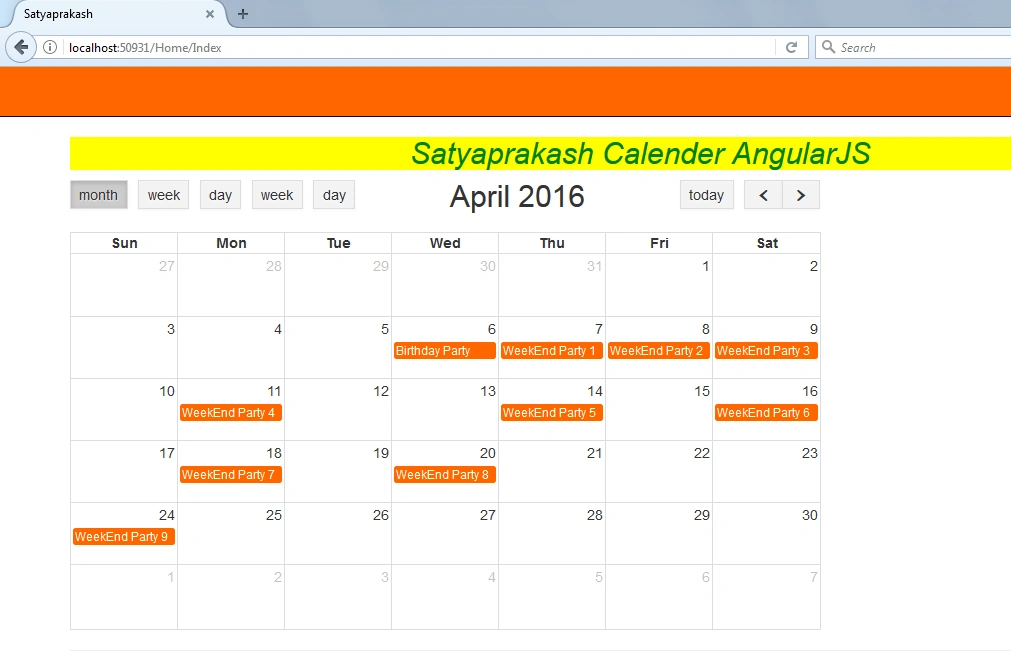
List of events on this date.
The Event description will be shown as below.
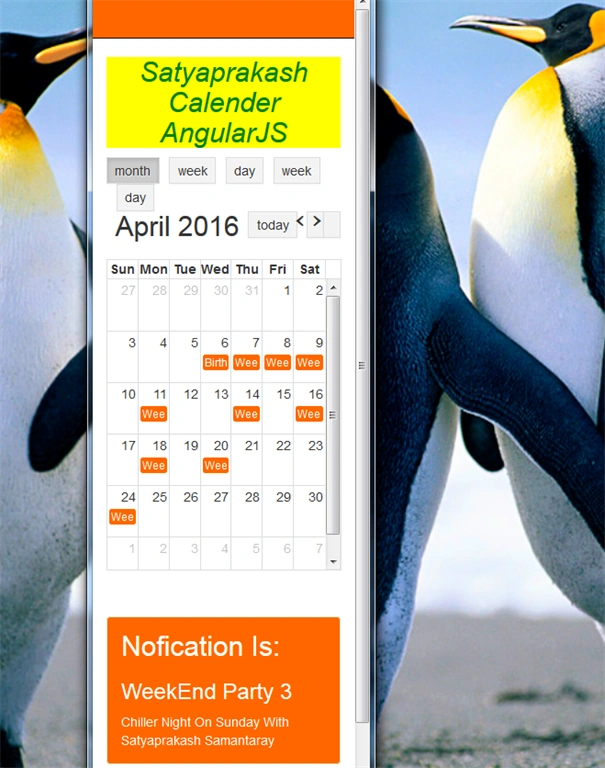
Mobile View
SUMMARY
Here, CalenderEntities is the name of the model entity. Using this object, we can retrieve the data using order by StartAt datetime column data.
OUTPUT
List of events on this date.
The Event description will be shown as below.
Mobile View
SUMMARY
In this article, we learned the following -
- What are Calendar Events In AngularJS.
- How to use Entity Framework to retrieve calendar events from back-end in AngularJS.
- List of ui-calendar dependancies.
- Mobile View support.
Nur ZalfarinaPosted Dec 9, 2018, 9:03 PM
Hi, can you explain and show using angular 4 because currently I'm using angular 4 to fetch and display event from database to full calendar. Thank you.
JuanPosted Aug 21, 2017, 10:57 AM
Great article, but code download is essential.