

Background
There are many services available today such as WCF, REST, Web API etc., but still Web Service plays an important role in cross platform application communication such using SAP web service to provide data for other platform applications.
Previously, I had written many articles on web services, from creating to consuming web services, and it got a huge response. Now in this article we will learn how to consume or call web services using SOAP request with the help of HttpWebRequest class. In this approach sometimes we need to consume the third party web services where we don't know much about the endpoints and configuration of web services. In this article we will not create any web service because we have already created it. So, if we want to learn the basics of the web services please refer to my previous articles.
- Introduction to Web Service with Example in ASP.NET
- Consuming Web Service In an ASP.NET Web Application
I hope you read the above articles. Now let's learn how to call Web Service using SOAP request in console application step by step, so that beginners can also understand it easily.
Step 1: Find the Web Service SOAP Request Body.
In this article, we are not going to create web service because we have already created it and if you want to create web service and learn about it then please refer my preceding articles.
So let's find out the SOAP request body which is used to pass input parameters and invoke the web service. I have one web service which is hosted in my local IIS. So paste your web service url into the browser and wait till the following response comes which is shown in the following image.
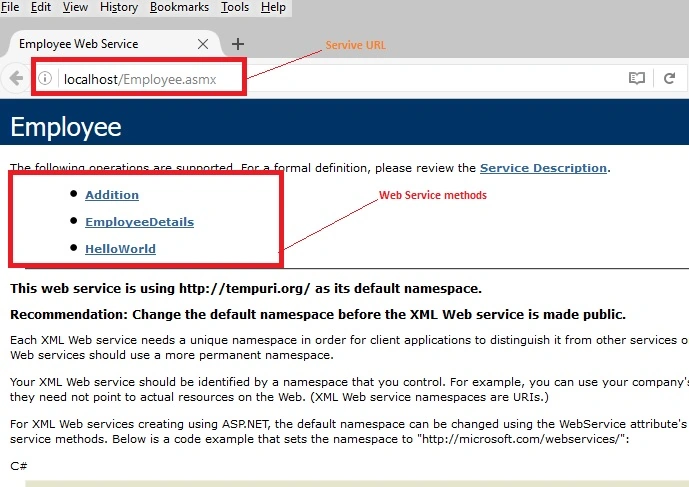
In the above screenshot, you might have noticed that there are three web methods in the web service named Addition, EmployeeDetails and HelloWorld. Now click on one of the methods which you want to invoke. After clicking on web method it shows SOAP request and SOAP Response body, find out the SOAP request body which is shown in the following image.
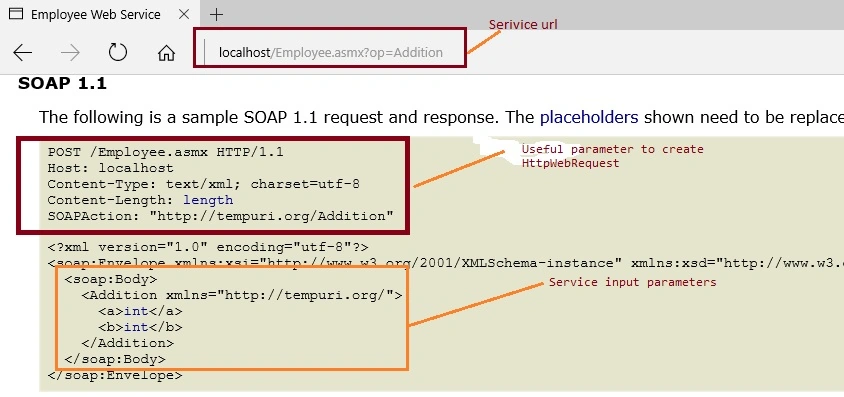
In the above image, we are clearly observing that it shows all details how to make SOAP request and is also showing parameter values which are required to invoke service using HttpWebRequest. So, lets learn in brief about those parameters .
- HTTP Method: It's nothing but the what type of HTTP request you wants to make to the service such as GET , POST ,PUT or delete.
- Host: It defines the url where the service is hosted , in our scenario our host is localhost , i.e http://localhost/Employee.asmx.
- Content-Type: It defines what type of content type request you are making such as XML or json now in our scenario its text/xml.
- Content-Length: It defines the content length of request body.
- SOAPAction: This is very important attribute to identify specific web method and call it from multiple web methods .
- SOAP Body: It contains the request and response body.
I hope you learned about SOAP request parameter, Now copy the soap envelope part to use it as SOAP request which we will use in our console application.
Step 2: Create the Console application to call Web Service
- Go to "Start", "All Programs", then click "Microsoft Visual Studio 2015".
- Click "File", "New", then "Project...", and in the New Project window, click console "C#" - ".
- Give the project a name, such as "UsingSOAPRequest" or another as you wish and specify the location.
Now open Program.cs file and write the following method to create HttpWebRequest as:
public HttpWebRequest CreateSOAPWebRequest()
{
    //Making Web Request
    HttpWebRequest Req = (HttpWebRequest)WebRequest.Create(@"http://localhost/Employee.asmx");
    //SOAPAction
    Req.Headers.Add(@"SOAPAction:http://tempuri.org/Addition");
    //Content_type
    Req.ContentType = "text/xml;charset=\"utf-8\"";
    Req.Accept = "text/xml";
    //HTTP method
    Req.Method = "POST";
    //return HttpWebRequest
    return Req;
}
Now let's create the method to invoke the web service using SOAP request body
public void InvokeService(int a, int b) {
  //Calling CreateSOAPWebRequest method
  HttpWebRequest request = CreateSOAPWebRequest();

  XmlDocument SOAPReqBody = new XmlDocument();
  //SOAP Body Request
  SOAPReqBody.LoadXml(@ "<?xml version="
   "1.0"
   " encoding="
   "utf-8"
   "?>   < soap: Envelope xmlns: soap = ""
   http: //schemas.xmlsoap.org/soap/envelope/"" xmlns:xsi=""http://www.w3.org/2001/XMLSchema-instance"" xmlns:xsd=""http://www.w3.org/2001/XMLSchema"">
   < soap: Body >
   < Addition xmlns = ""
   http: //tempuri.org/"">
   < a > " + a + @" < /a>   < b > " + b + @" < /b>   < /Addition>   < /soap:Body>   < /soap:Envelope>");


   using(Stream stream = request.GetRequestStream()) {
    SOAPReqBody.Save(stream);
   }
   //Geting response from request
   using(WebResponse Serviceres = request.GetResponse()) {
       using(StreamReader rd = new StreamReader(Serviceres.GetResponseStream())) {
           //reading stream
           var ServiceResult = rd.ReadToEnd();
           //writting stream result on console
           Console.WriteLine(ServiceResult);
           Console.ReadLine();
       }
   }
}
Now call the above method from main method by writing the following code as:
static void Main(string[] args)
{
    //creating object of program class to access methods
    Program obj = new Program();
    Console.WriteLine("Please Enter Input values..");
    //Reading input values from console
    int a = Convert.ToInt32(Console.ReadLine());
    int b = Convert.ToInt32(Console.ReadLine());
    //Calling InvokeService method
    obj.InvokeService(a, b);
}
Now whole code in Program.cs file will look like the following:
using System;
using System.IO;
using System.Net;
using System.Xml;

namespace UsingSOAPRequest
{
    public class Program
    {
        static void Main(string[] args)
        {
            //creating object of program class to access methods
            Program obj = new Program();
            Console.WriteLine("Please Enter Input values..");
            //Reading input values from console
            int a = Convert.ToInt32(Console.ReadLine());
            int b = Convert.ToInt32(Console.ReadLine());
            //Calling InvokeService method
            obj.InvokeService(a, b);
        }
        public void InvokeService(int a, int b)
        {
            //Calling CreateSOAPWebRequest method
            HttpWebRequest request = CreateSOAPWebRequest();

            XmlDocument SOAPReqBody = new XmlDocument();
            //SOAP Body Request
            SOAPReqBody.LoadXml(@"<?xml version=""1.0"" encoding=""utf-8""?>
            <soap:Envelope xmlns:soap=""http://schemas.xmlsoap.org/soap/envelope/"" xmlns:xsi=""http://www.w3.org/2001/XMLSchema-   instance"" xmlns:xsd=""http://www.w3.org/2001/XMLSchema"">
             <soap:Body>
                <Addition xmlns=""http://tempuri.org/"">
                  <a>" + a + @"</a>
                  <b>" + b + @"</b>
                </Addition>
              </soap:Body>
            </soap:Envelope>");


            using (Stream stream = request.GetRequestStream())
            {
                SOAPReqBody.Save(stream);
            }
            //Geting response from request
            using (WebResponse Serviceres = request.GetResponse())
            {
                using (StreamReader rd = new StreamReader(Serviceres.GetResponseStream()))
                {
                    //reading stream
                    var ServiceResult = rd.ReadToEnd();
                    //writting stream result on console
                    Console.WriteLine(ServiceResult);
                    Console.ReadLine();
                }
            }
        }

        public HttpWebRequest CreateSOAPWebRequest()
        {
            //Making Web Request
            HttpWebRequest Req = (HttpWebRequest)WebRequest.Create(@"http://localhost/Employee.asmx");
            //SOAPAction
            Req.Headers.Add(@"SOAPAction:http://tempuri.org/Addition");
            //Content_type
            Req.ContentType = "text/xml;charset=\"utf-8\"";
            Req.Accept = "text/xml";
            //HTTP method
            Req.Method = "POST";
            //return HttpWebRequest
            return Req;
        }
    }
}
Now run the console application, then the console window will look like as follows and enter the input values as:
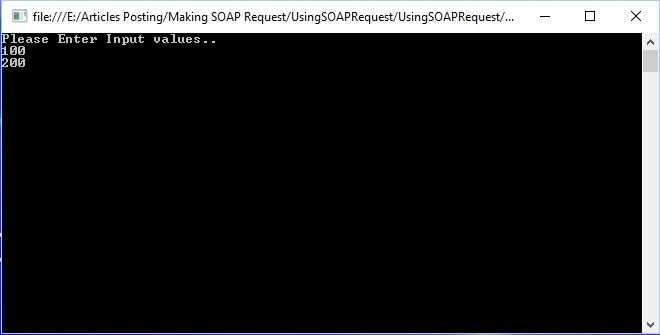
Now press enter button, it will give the response in XML format as follows:
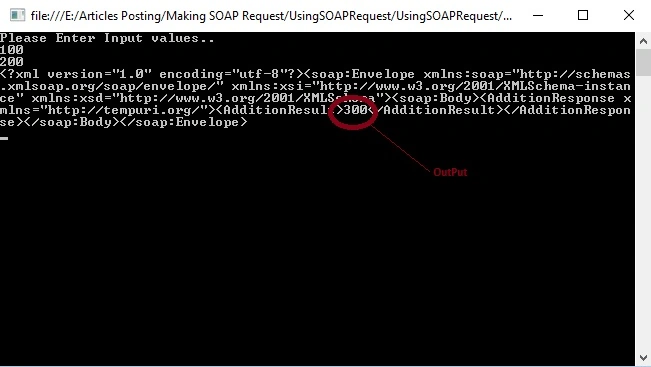
In preceding console window you have seen web service response in the form of XML format which contains the output as 300. I hope from all above examples you have learned how to call web service using SOAP request in console application.
Notes
- Download the Zip file of the sample application for a better understanding.
- Apply proper validation as per your need.
Summary
I hope this article is useful for all readers, if you have any suggestions related to this article then please contact me.
Read more articles on ASP.NET Web Services
Ameer ShaikPosted Nov 5, 2020, 3:42 AM
Why are send soap request then return same request response
Manoj RawatPosted Sep 27, 2020, 1:06 AM
Very nice and helpful article. Appreciate your technical skill. Keep posting such depth and helpful article. Kudos to you..
Vandit GajeraPosted Sep 4, 2020, 5:42 AM
What is pass in Req.Headers.Add("SOAPAction") what url i pass ?
John DoePosted Dec 17, 2019, 5:33 AM
Hi, is there any way to figure out the output of web service without calling it?
Bhushan GuptaPosted Jul 3, 2019, 7:41 AM
Good but it is not running
Amit MohantyPosted Jun 28, 2019, 2:20 AM
Good description !!!
Umashankar RajpootPosted Mar 2, 2019, 12:33 AM
Service URL - http://35.154.31.90/CHECKIN/dservice.asmxService Name - Pushdata Soap Header Values - pid – 131(Constant) fid – 3591(Constant) cid – 93(Constant) TokenKey - d06325d6-a9db-4a65-bedc-3f68fa64d5b2 (Constant) uid – DRIT (Constant) roleid – 1126 (Constant) Services Parameter – Name: xmlString Type: String Format - <?xml version="1.0"?><PARAMETERS><SID VALUE="61"/><ADDRESS VALUE=""/><AREA VALUE=""/><CIRCLE VALUE=""/><COMPLAINT_NO VALUE=""/><COMPLAINT_SUB_TYPE VALUE=""/><COMPLAINT_TYPE VALUE=""/><CONSUMER_NAME VALUE=""/><DISCOM VALUE=""/><DIVISION VALUE=""/><FRT_MOBILE VALUE=""/><JE_MOBILE VALUE=""/><LANDMARK VALUE=""/><MOBILE_NO VALUE=""/><MODE_OF_REGISTRATION VALUE=""/><PIN_NO VALUE=""/><REF_COMPLAINT_SUB_TYPE_CODE VALUE=""/><REF_COMPLAINT_TYPE_CODE VALUE=""/><REMARKS VALUE=""/><SUB_DIVISION VALUE=""/><ZONE VALUE=""/></PARAMETERS> how to code for this service. please help me
edusiePosted Feb 6, 2019, 6:48 AM
Great code. Save me a lot. I need to use SOAPUI to get the right SOAP Action.
Hadshana KamalanathanPosted Jul 22, 2018, 1:37 AM
Good one..
dhanu shreePosted Jul 2, 2018, 3:43 AM
We have done the same task, but in web application. Could you please let me know how to grab the XML format of the response in this?
mohit bohraPosted Jan 30, 2018, 3:12 AM
I am getting the following error...error : Value cannot be null.Parameter name: url while loading the project
Cihan AŞANPosted May 26, 2017, 7:38 AM
Thanks ...........
Vithal WadjePosted Jun 21, 2016, 2:44 AM
check my other articles
PAtrick NiehotPosted Jun 14, 2016, 7:22 AM
you also have example somewhere how to make the employee web service you use in this article?
Rahul Kumar SaxenaPosted Apr 4, 2016, 7:46 AM
Good Show
Vithal WadjePosted Mar 29, 2016, 10:31 AM
Thanks sir
Debasis SahaPosted Mar 29, 2016, 12:18 AM
Good One..
Humayun Kabir MamunPosted Mar 29, 2016, 12:15 AM
Nice...
Vithal WadjePosted Mar 28, 2016, 1:31 PM
Thanks
Saillesh PawarPosted Mar 28, 2016, 11:06 AM
Nice share
Vignesh ManiPosted Mar 28, 2016, 10:47 AM
nice
Ammar ShaukatPosted Mar 28, 2016, 5:54 AM
what is the basic difference between Windows Service and Web Service
Vithal WadjePosted Mar 28, 2016, 5:54 AM
Thanks Sagar sir , Noted your suggestion which you have sent through message .
Sagar PardeshiPosted Mar 28, 2016, 5:46 AM
Nice Article Share....